
*Solved* The Disappearing Font - Apple Only
- Stan Bush
-
 Topic Author
- Offline
- Senior Member
-

Less
More
9 years 4 weeks ago - 9 years 3 weeks ago #95092
by Stan Bush
I'm the guy to hire when everything's on fire.
*Solved* The Disappearing Font - Apple Only was created by Stan Bush
Whenever someone goes to register at this page :
Northside Alumni on a PC, they font color is fine.
However, when they register on an Apple product...they can't see what they are typing. It does accept the text, but you can't see it. In other words they can enter in '3' attendees, hit next...and it show the fields to accept the three attendees information.
BUT... when even though the text is accepted... again, it isn't visible.
On PC's it's fine.
What do I need to do?
Northside Alumni on a PC, they font color is fine.
However, when they register on an Apple product...they can't see what they are typing. It does accept the text, but you can't see it. In other words they can enter in '3' attendees, hit next...and it show the fields to accept the three attendees information.
BUT... when even though the text is accepted... again, it isn't visible.
On PC's it's fine.
What do I need to do?
I'm the guy to hire when everything's on fire.
Last edit: 9 years 3 weeks ago by Stan Bush.
Please Log in or Create an account to join the conversation.
- James Riley
-

- Offline
- Platinum Member
-

9 years 4 weeks ago #95094
by James Riley
James Riley .: EventBooking user since 2014 ::: JoomDonation user since 2016 :.
.: grfx & web design / IT / AV @ St. Therese Institute of Faith and Mission, Bruno, SK, Canada :.
Replied by James Riley on topic The Disappearing Font - Apple Only
This is an ongoing issue in some browsers with templates that set input fields to "box-sizing: border-box" via CSS.
Tuan was made aware of the issue and was having his template dev look into it.
Anyways, I think your problem will be solved by adding the following CSS via the Custom CSS tab:
Tuan was made aware of the issue and was having his template dev look into it.
Anyways, I think your problem will be solved by adding the following CSS via the Custom CSS tab:
Code:
textarea, input[type="text"], input[type="password"], input[type="datetime"], input[type="datetime-local"], input[type="date"], input[type="month"], input[type="time"], input[type="week"], input[type="number"], input[type="email"], input[type="url"], input[type="search"], input[type="tel"], input[type="color"], .uneditable-input {
box-sizing: content-box !important;
}
James Riley .: EventBooking user since 2014 ::: JoomDonation user since 2016 :.
.: grfx & web design / IT / AV @ St. Therese Institute of Faith and Mission, Bruno, SK, Canada :.
Please Log in or Create an account to join the conversation.
- James Riley
-
- Offline
- Platinum Member
-
9 years 4 weeks ago - 9 years 4 weeks ago #95099
by James Riley
James Riley .: EventBooking user since 2014 ::: JoomDonation user since 2016 :.
.: grfx & web design / IT / AV @ St. Therese Institute of Faith and Mission, Bruno, SK, Canada :.
Replied by James Riley on topic The Disappearing Font - Apple Only
Oh -- I realized after posting that, despite EB's custom.css loading only when EB is onscreen, the above CSS will apply to any other textarea / input elements that appear at the same time (eg. sidebars, etc).
This might be a better/safer CSS ruleset:
Also, I copied the selector block from your site's CSS verbatim and kept ALL the input "types" that your site's CSS defines. Many of the "types" are not necessary for EB and can be removed.
This might be a better/safer CSS ruleset:
Code:
.eb-form-content textarea, .eb-form-content input[type="text"], .eb-form-content input[type="datetime"], .eb-form-content input[type="datetime-local"], .eb-form-content input[type="date"], .eb-form-content input[type="month"], .eb-form-content input[type="time"], .eb-form-content input[type="week"], .eb-form-content input[type="number"], .eb-form-content input[type="email"], .eb-form-content input[type="url"], .eb-form-content input[type="search"], .eb-form-content input[type="tel"], .eb-form-content input[type="color"], .eb-form-content .uneditable-input {
box-sizing: content-box !important;
}
Also, I copied the selector block from your site's CSS verbatim and kept ALL the input "types" that your site's CSS defines. Many of the "types" are not necessary for EB and can be removed.
James Riley .: EventBooking user since 2014 ::: JoomDonation user since 2016 :.
.: grfx & web design / IT / AV @ St. Therese Institute of Faith and Mission, Bruno, SK, Canada :.
Last edit: 9 years 4 weeks ago by James Riley.
The following user(s) said Thank You: Tuan Pham Ngoc, Stan Bush
Please Log in or Create an account to join the conversation.
- Stan Bush
-
Topic Author
- Offline
- Senior Member
-
9 years 4 weeks ago #95144
by Stan Bush
I'm the guy to hire when everything's on fire.
Replied by Stan Bush on topic The Disappearing Font - Apple Only
Thanks James... it worked... and I appreciate your help.
I'm the guy to hire when everything's on fire.
Please Log in or Create an account to join the conversation.
- Stan Bush
-
Topic Author
- Offline
- Senior Member
-
9 years 3 weeks ago #95431
by Stan Bush
I'm the guy to hire when everything's on fire.
Replied by Stan Bush on topic The Disappearing Font - Apple Only
This has reared it's head again and the text in the fields is no longer visible. It's strange because it's random. For example, the price does NOT display on the individual login, but it does display on the couples.
I'm the guy to hire when everything's on fire.
Please Log in or Create an account to join the conversation.
- James Riley
-
- Offline
- Platinum Member
-
9 years 3 weeks ago - 9 years 3 weeks ago #95432
by James Riley
James Riley .: EventBooking user since 2014 ::: JoomDonation user since 2016 :.
.: grfx & web design / IT / AV @ St. Therese Institute of Faith and Mission, Bruno, SK, Canada :.
Replied by James Riley on topic The Disappearing Font - Apple Only
Ahh... the .eb-form.content class does not appear on the individual reg form!
Let's try this variation instead. It looks like it should be a catch-all (fingers crossed!).
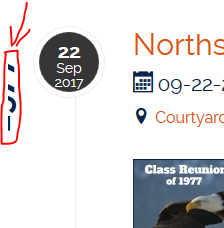
I also noticed that the rotated 1977 heading text appears fine on mobile, but not on desktop. Maybe try this CSS instead.
Let's try this variation instead. It looks like it should be a catch-all (fingers crossed!).
Code:
/* changed .eb-form-content --> .eb-container */
.eb-container textarea, .eb-container input[type="text"], .eb-container input[type="datetime"], .eb-container input[type="datetime-local"], .eb-container input[type="date"], .eb-container input[type="month"], .eb-container input[type="time"], .eb-container input[type="week"], .eb-container input[type="number"], .eb-container input[type="email"], .eb-container input[type="url"], .eb-container input[type="search"], .eb-container input[type="tel"], .eb-container input[type="color"], .eb-container .uneditable-input {
box-sizing: content-box !important;
}
I also noticed that the rotated 1977 heading text appears fine on mobile, but not on desktop. Maybe try this CSS instead.
Code:
#eb-category-page-timeline h1.eb-page-heading {
transform: rotate(270deg);
transform-origin: right bottom 0; /* changed this */
position: relative;
float: left;
top: 40px; /* changed this */
left: -20px; /* changed this */
}
James Riley .: EventBooking user since 2014 ::: JoomDonation user since 2016 :.
.: grfx & web design / IT / AV @ St. Therese Institute of Faith and Mission, Bruno, SK, Canada :.
Last edit: 9 years 3 weeks ago by James Riley.
Please Log in or Create an account to join the conversation.
- Stan Bush
-
Topic Author
- Offline
- Senior Member
-
9 years 3 weeks ago #95433
by Stan Bush
I'm the guy to hire when everything's on fire.
Replied by Stan Bush on topic The Disappearing Font - Apple Only
It didn't work for me... I'm presuming this is how it should look now?
Code:
#eb-category-page-timeline h1.eb-page-heading {
transform: rotate(270deg);
transform-origin: right bottom 0; /* changed this */
position: relative;
float: left;
top: 40px; /* changed this */
left: -20px; /* changed this */
}
#eb-category-page-timeline #eb-category .eb-description {display: none;}
#eb-category-page-timeline #adminForm > div.clearfix {display:none;}
/* changed .eb-form-content --> .eb-container */
.eb-container textarea, .eb-container input[type="text"], .eb-container input[type="datetime"], .eb-container input[type="datetime-local"], .eb-container input[type="date"], .eb-container input[type="month"], .eb-container input[type="time"], .eb-container input[type="week"], .eb-container input[type="number"], .eb-container input[type="email"], .eb-container input[type="url"], .eb-container input[type="search"], .eb-container input[type="tel"], .eb-container input[type="color"], .eb-container .uneditable-input {
box-sizing: content-box !important;
}
I'm the guy to hire when everything's on fire.
Please Log in or Create an account to join the conversation.
- James Riley
-
- Offline
- Platinum Member
-
9 years 3 weeks ago #95435
by James Riley
James Riley .: EventBooking user since 2014 ::: JoomDonation user since 2016 :.
.: grfx & web design / IT / AV @ St. Therese Institute of Faith and Mission, Bruno, SK, Canada :.
Replied by James Riley on topic The Disappearing Font - Apple Only
Windows Firefox looks fine now (it didn't before).
Windows Chrome looks good.
Windows 10 Edge looks good.
iOS Safari looks good.
Not sure what is not working??
Windows Chrome looks good.
Windows 10 Edge looks good.
iOS Safari looks good.
Not sure what is not working??
James Riley .: EventBooking user since 2014 ::: JoomDonation user since 2016 :.
.: grfx & web design / IT / AV @ St. Therese Institute of Faith and Mission, Bruno, SK, Canada :.
Please Log in or Create an account to join the conversation.
- Stan Bush
-
Topic Author
- Offline
- Senior Member
-
9 years 3 weeks ago #95503
by Stan Bush
I'm the guy to hire when everything's on fire.
Replied by Stan Bush on topic The Disappearing Font - Apple Only
Thanks James. Yes that worked. I thought I replied to this yesterday to tell you that it did. But, nope!
Anway... I appreciate your help.
as always it was outstanding.
Anway... I appreciate your help.
as always it was outstanding.
I'm the guy to hire when everything's on fire.
Please Log in or Create an account to join the conversation.
Moderators: Tuan Pham Ngoc
Support
Documentation
Information
Copyright © 2026 Joomla Extensions by Joomdonation. All Rights Reserved.
joomdonation.com is not affiliated with or endorsed by the Joomla! Project or Open Source Matters.
The Joomla! name and logo is used under a limited license granted by Open Source Matters the trademark holder in the United States and other countries.
The Joomla! name and logo is used under a limited license granted by Open Source Matters the trademark holder in the United States and other countries.