
*Solved* Remove the 'Category" And Description
- Stan Bush
-
 Topic Author
- Offline
- Senior Member
-

Less
More
9 years 1 month ago - 9 years 4 weeks ago #94908
by Stan Bush
I'm the guy to hire when everything's on fire.
*Solved* Remove the 'Category" And Description was created by Stan Bush
I need a menu that displays the events in a category, but doesn't show the category Field in the display.
Is this possible?
Is this possible?
I'm the guy to hire when everything's on fire.
Last edit: 9 years 4 weeks ago by Stan Bush. Reason: mark as solved
Please Log in or Create an account to join the conversation.
- Tuan Pham Ngoc
- Away
- Administrator
-

9 years 1 month ago #94916
by Tuan Pham Ngoc
Replied by Tuan Pham Ngoc on topic Remove the 'Category" And Description
We don't have an option for that, unfortunately. If you need it, you would need to customize the code abit. You can send me the link to the page, and tell me what menu option you are using (category option or upcoming events option), I will tell you exact file you need to modify to remove it
Tuan
Tuan
Please Log in or Create an account to join the conversation.
- Stan Bush
-
Topic Author
- Offline
- Senior Member
-
9 years 1 month ago #94928
by Stan Bush
I'm the guy to hire when everything's on fire.
Replied by Stan Bush on topic Remove the 'Category" And Description
northsidealumni.com/events/1977
... however there are 60+ other 'classes' that will be added and I'm not going to want to have to change the code for each one individually..let me think on this for a day or two.
I'm the guy to hire when everything's on fire.
Please Log in or Create an account to join the conversation.
- Tuan Pham Ngoc
- Away
- Administrator
-
9 years 1 month ago #94939
by Tuan Pham Ngoc
Replied by Tuan Pham Ngoc on topic Remove the 'Category" And Description
Hello Stan
Look at the file components/com_eventbooking/view/category/tmpl/timeline.php, you will see this line of code
Remove it and the category will be hided
Tuan
Look at the file components/com_eventbooking/view/category/tmpl/timeline.php, you will see this line of code
Code:
<h1 class="eb-page-heading"><?php echo $pageHeading;?></h1>
Remove it and the category will be hided
Tuan
The following user(s) said Thank You: Stan Bush
Please Log in or Create an account to join the conversation.
- James Riley
-

- Offline
- Platinum Member
-

9 years 1 month ago - 9 years 1 month ago #94946
by James Riley
James Riley .: EventBooking user since 2014 ::: JoomDonation user since 2016 :.
.: grfx & web design / IT / AV @ St. Therese Institute of Faith and Mission, Bruno, SK, Canada :.
Replied by James Riley on topic Remove the 'Category" And Description
I was thinking one line in [Event Booking -> Configuration -> Custom CSS tab] -> Custom CSS box would do it too...
... this however may not be the best for SEO (having a <h1> tag hidden).
You could also get rid of the 1977 Northside Eagles description text at the same time with this CSS instead:
... or look for the corresponding PHP code for the line beginning with <div class="eb-description"... just below the code Tuan mentioned, or the entire <div id="eb-category"> ... </div> block (11 lines of code).
Or... BEST YET! :woohoo:
You could use CSS to rotate the <h1> 90-degrees and drop it down the left hand side Then you maintain the SEO benefit of having the <h1> on the page.
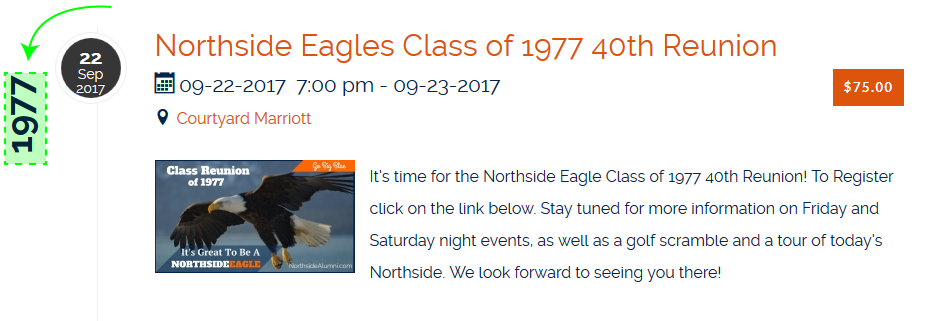 NOTE: This CSS would only work for a short 4-character title (eg. 1977, 2014, etc.). In order to get it to work with longer titles, you'll have to rotate the text the other way (reading top to bottom instead of bottom to top) by using transform: rotate(90deg); transform-origin: left bottom 0; instead, plus remove the top:50px line.
I think I need to get some CSS out of my system this morning or something... I've been doing graphic design and running sound / video / lights for the past couple weeks and haven't touched enough web coding
Code:
#eb-category-page-timeline .eb-page-heading {display: none;}
You could also get rid of the 1977 Northside Eagles description text at the same time with this CSS instead:
Code:
#eb-category-page-timeline #eb-category {display: none;}
Or... BEST YET!
:woohoo:You could use CSS to rotate the <h1> 90-degrees and drop it down the left hand side
Then you maintain the SEO benefit of having the <h1> on the page.
Code:
#eb-category-page-timeline h1.eb-page-heading {
transform: rotate(270deg);
transform-origin: left bottom 0;
position: relative;
float: left;
top: 50px;
}
#eb-category-page-timeline #eb-category .eb-description {display: none;}
#eb-category-page-timeline #adminForm > div.clearfix {display:none;}
I think I need to get some CSS out of my system this morning or something... I've been doing graphic design and running sound / video / lights for the past couple weeks and haven't touched enough web coding
James Riley .: EventBooking user since 2014 ::: JoomDonation user since 2016 :.
.: grfx & web design / IT / AV @ St. Therese Institute of Faith and Mission, Bruno, SK, Canada :.
Last edit: 9 years 1 month ago by James Riley.
The following user(s) said Thank You: Tuan Pham Ngoc, Stan Bush
Please Log in or Create an account to join the conversation.
- Stan Bush
-
Topic Author
- Offline
- Senior Member
-
9 years 1 month ago #94949
by Stan Bush
I'm the guy to hire when everything's on fire.
Replied by Stan Bush on topic Remove the 'Category" And Description
Hey James.. thanks. Cut.. paste.. boom.
Thanks much...
Thanks much...
I'm the guy to hire when everything's on fire.
Please Log in or Create an account to join the conversation.
- James Riley
-
- Offline
- Platinum Member
-
9 years 1 month ago #94951
by James Riley
James Riley .: EventBooking user since 2014 ::: JoomDonation user since 2016 :.
.: grfx & web design / IT / AV @ St. Therese Institute of Faith and Mission, Bruno, SK, Canada :.
Replied by James Riley on topic Remove the 'Category" And Description
Sorry for the overwhelming, rambling post! Glad that something I mentioned was useful for you
James Riley .: EventBooking user since 2014 ::: JoomDonation user since 2016 :.
.: grfx & web design / IT / AV @ St. Therese Institute of Faith and Mission, Bruno, SK, Canada :.
Please Log in or Create an account to join the conversation.
Moderators: Tuan Pham Ngoc
Support
Documentation
Information
Copyright © 2026 Joomla Extensions by Joomdonation. All Rights Reserved.
joomdonation.com is not affiliated with or endorsed by the Joomla! Project or Open Source Matters.
The Joomla! name and logo is used under a limited license granted by Open Source Matters the trademark holder in the United States and other countries.
The Joomla! name and logo is used under a limited license granted by Open Source Matters the trademark holder in the United States and other countries.