- Posts: 4
- Thank you received: 0

How to change module display
- taro
- Topic Author
- Offline
- New Member
-

Less
More
9 years 1 month ago #93848
by taro
How to change module display was created by taro
Hello.
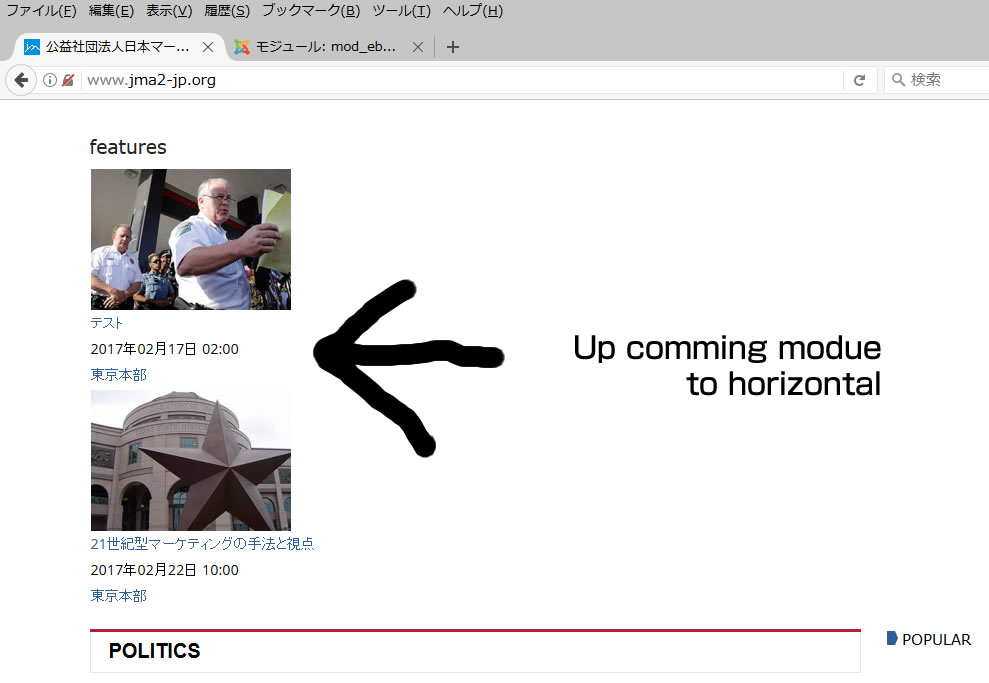
I wan to change display up comming module Virtical to Horizontal.
How to do it ?
please help.
I wan to change display up comming module Virtical to Horizontal.
How to do it ?
please help.
Please Log in or Create an account to join the conversation.
- James Riley
-

- Offline
- Platinum Member
-

9 years 1 month ago - 9 years 1 month ago #93849
by James Riley
James Riley .: EventBooking user since 2014 ::: JoomDonation user since 2016 :.
.: grfx & web design / IT / AV @ St. Therese Institute of Faith and Mission, Bruno, SK, Canada :.
Replied by James Riley on topic How to change module display
It might take more CSS coding than just the following, but start by adding this CSS in to [EventBooking -> Configuration -> Custom CSS tab -> custom CSS box].
Note: I'm writing this based on the "improved" layout for the Upcoming Events module...The "default" layout uses table cells instead of the "improved" layout's usage of an unordered list <ul><li>.
Change the values of width and EDIT: [strike]margin-left[/strike] margin-right to whatever looks / fits / works best.
As I said, you might need more CSS than just this, but this code should make the event-blocks sit side-by-side and then wrap to a new line if there are more events than can fit across horizontally,
Note: I'm writing this based on the "improved" layout for the Upcoming Events module...The "default" layout uses table cells instead of the "improved" layout's usage of an unordered list <ul><li>.
Code:
ul.eventsmall li {
float: left;
width: 200px;
margin-right:20px;
}
Change the values of width and EDIT: [strike]margin-left[/strike] margin-right to whatever looks / fits / works best.
As I said, you might need more CSS than just this, but this code should make the event-blocks sit side-by-side and then wrap to a new line if there are more events than can fit across horizontally,
James Riley .: EventBooking user since 2014 ::: JoomDonation user since 2016 :.
.: grfx & web design / IT / AV @ St. Therese Institute of Faith and Mission, Bruno, SK, Canada :.
Last edit: 9 years 1 month ago by James Riley. Reason: margin-left -> margin-right
The following user(s) said Thank You: taro
Please Log in or Create an account to join the conversation.
- taro
- Topic Author
- Offline
- New Member
-
Less
More
- Posts: 4
- Thank you received: 0
9 years 1 month ago #93872
by taro
Replied by taro on topic How to change module display
I could do it! I sincerely thank you.
Please Log in or Create an account to join the conversation.
Moderators: Tuan Pham Ngoc
Support
Documentation
Information
Copyright © 2026 Joomla Extensions by Joomdonation. All Rights Reserved.
joomdonation.com is not affiliated with or endorsed by the Joomla! Project or Open Source Matters.
The Joomla! name and logo is used under a limited license granted by Open Source Matters the trademark holder in the United States and other countries.
The Joomla! name and logo is used under a limited license granted by Open Source Matters the trademark holder in the United States and other countries.