- Posts: 31
- Thank you received: 0

Categoris in Events in Category Timeline Layout
- wisma
- Topic Author
- Offline
- Junior Member
-

Less
More
9 years 2 months ago #93432
by wisma
Categoris in Events in Category Timeline Layout was created by wisma
How can display categories in Events in Category Timeline Layout?
www.katapultfestival.ch/programm.html
Thx 4 help
regards marc
www.katapultfestival.ch/programm.html
Thx 4 help
regards marc
Please Log in or Create an account to join the conversation.
- Tuan Pham Ngoc
- Offline
- Administrator
-

9 years 2 months ago #93532
by Tuan Pham Ngoc
Replied by Tuan Pham Ngoc on topic Categoris in Events in Category Timeline Layout
You will have to edit code if you want to display category. The file you need to modify is components/com_eventbooking/view/common/tmpl/events_timeline.php, you can use the code
echo $event->category_name; in that file to display name of category of the event in that file
Regards,
Tuan
echo $event->category_name; in that file to display name of category of the event in that file
Regards,
Tuan
Please Log in or Create an account to join the conversation.
- wisma
- Topic Author
- Offline
- Junior Member
-
Less
More
- Posts: 31
- Thank you received: 0
9 years 2 months ago #93616
by wisma
Replied by wisma on topic Categoris in Events in Category Timeline Layout
Thanks a lot, It works.
I have 2 additional questions.
1. How can i allign the h2.eb-event-title-container with the eb-event-date-container?
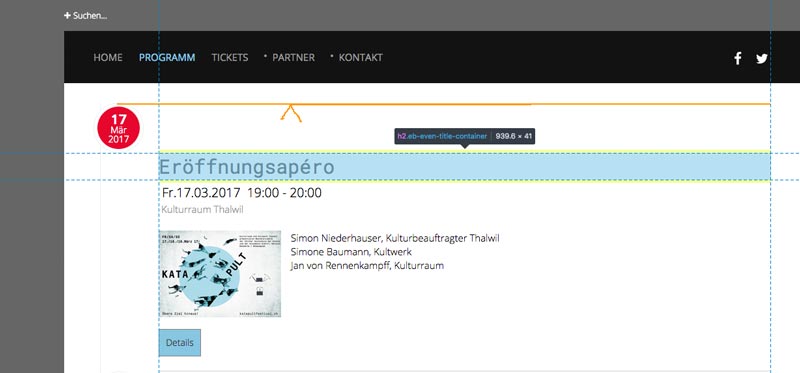
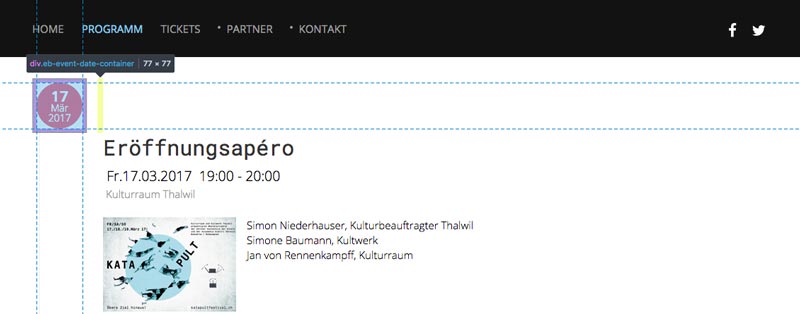
www.katapultfestival.ch/programm.html
2. How can i link the image in the timeline view direct to the detail page instead of a shadowbox.
thx 4 help
I have 2 additional questions.
1. How can i allign the h2.eb-event-title-container with the eb-event-date-container?
www.katapultfestival.ch/programm.html
2. How can i link the image in the timeline view direct to the detail page instead of a shadowbox.
thx 4 help
Please Log in or Create an account to join the conversation.
- James Riley
-

- Offline
- Platinum Member
-

9 years 2 months ago #93633
by James Riley
James Riley .: EventBooking user since 2014 ::: JoomDonation user since 2016 :.
.: grfx & web design / IT / AV @ St. Therese Institute of Faith and Mission, Bruno, SK, Canada :.
Replied by James Riley on topic Categoris in Events in Category Timeline Layout
#1: add this to your custom CSS (to override the default "position: relative"):
#2: code edit required to file components/com_eventbooking/view/common.events_timeline.php
Look for the code:
...and edit the href, and remove the class="eb-modal". I think something like this should work:
Code:
.eb-event-date-container { position:absolute; }
#2: code edit required to file components/com_eventbooking/view/common.events_timeline.php
Look for the code:
Code:
<a href="<?php echo $baseUri . '/media/com_eventbooking/images/' . $event->thumb; ?>" class="eb-modal"><img src="<?php echo $baseUri . '/media/com_eventbooking/images/thumbs/' . $event->thumb; ?>" class="eb-thumb-left"/></a>
...and edit the href, and remove the class="eb-modal". I think something like this should work:
Code:
<a href="<?php echo $detailUrl; ?>"><img src="<?php echo $baseUri . '/media/com_eventbooking/images/thumbs/' . $event->thumb; ?>" class="eb-thumb-left"/></a>
James Riley .: EventBooking user since 2014 ::: JoomDonation user since 2016 :.
.: grfx & web design / IT / AV @ St. Therese Institute of Faith and Mission, Bruno, SK, Canada :.
The following user(s) said Thank You: Tuan Pham Ngoc, wisma
Please Log in or Create an account to join the conversation.
- wisma
- Topic Author
- Offline
- Junior Member
-
Less
More
- Posts: 31
- Thank you received: 0
9 years 2 months ago #93646
by wisma
Replied by wisma on topic Categoris in Events in Category Timeline Layout
works perfectly.
Thanks a lot for help
regards
Thanks a lot for help
regards
Please Log in or Create an account to join the conversation.
Moderators: Tuan Pham Ngoc
Support
Documentation
Information
Copyright © 2026 Joomla Extensions by Joomdonation. All Rights Reserved.
joomdonation.com is not affiliated with or endorsed by the Joomla! Project or Open Source Matters.
The Joomla! name and logo is used under a limited license granted by Open Source Matters the trademark holder in the United States and other countries.
The Joomla! name and logo is used under a limited license granted by Open Source Matters the trademark holder in the United States and other countries.