- Posts: 29
- Thank you received: 4

Adding a Comment for Coupons
- Cory S
- Topic Author
- Offline
- Junior Member
-

Less
More
9 years 2 months ago #92883
by Cory S
Adding a Comment for Coupons was created by Cory S
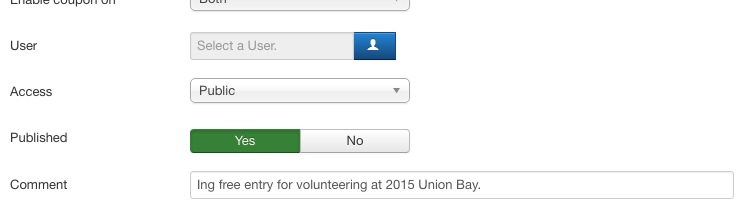
I found that I wanted the ability to add a Comment to a Coupon, so that at a later date, I could remember what the coupon was created for. I typically create specific Coupons for individuals, so it's nice to know the history.
I manually implemented this, but would love it to be integrated into the main product. As it currently is, everytime I updated Events Booking, I have to make this change again.
I'm sharing the code here, so anyone else can also implement on their system, and so Tuan can easily integrate into future versions.
My EB Version: 2.10.2
This change requires editing 3 files and adding a new column to your database.
The Comment field will appear when creating and viewing the Coupon details.
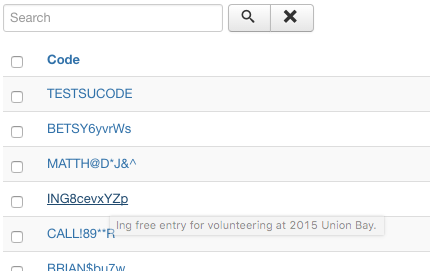
A tooltip of the Comment will also appear when hovering over the Coupon Code in the list of Coupons.
FILE: administrator/components/com_eventbooking/views/coupon/tmpl/default.php
Add this div as the last item in the section of control-group fields, after the Published field.
FILE: administrator/components/com_eventbooking/views/coupons/tmpl/default.php
Add the 'title' element to this row code.
FILE /Volumes/snowdogevents.com/administrator/language/en-GB/en-GB.com_eventbooking.ini
Add this strings value in the translation file for your language.
Database
Table: jml_eb_coupons
Add new column coupon_comment,
coupon_comment varchar(100) utf8_general_ci Yes NULL
Obviously, use at your own risk. I take no responsibility if this messes something up with your system, or if you incorrectly make the changes. You may have to tweak this slightly if your version of EB is different than mine, or if future versions of EB change this area of code.
-Cory
I manually implemented this, but would love it to be integrated into the main product. As it currently is, everytime I updated Events Booking, I have to make this change again.
I'm sharing the code here, so anyone else can also implement on their system, and so Tuan can easily integrate into future versions.
My EB Version: 2.10.2
This change requires editing 3 files and adding a new column to your database.
The Comment field will appear when creating and viewing the Coupon details.
A tooltip of the Comment will also appear when hovering over the Coupon Code in the list of Coupons.
FILE: administrator/components/com_eventbooking/views/coupon/tmpl/default.php
Add this div as the last item in the section of control-group fields, after the Published field.
Code:
<div class="control-group">
<label class="control-label">
<?php echo JText::_('EB_COUPON_COMMENT'); ?>
</label>
<div class="controls">
<input class="input-xxlarge" type="text" name="coupon_comment" id="coupon_comment" size="100" maxlength="99"
value="<?php echo $this->item->coupon_comment; ?>"/>
</div>
</div>
FILE: administrator/components/com_eventbooking/views/coupons/tmpl/default.php
Add the 'title' element to this row code.
Code:
<a title = "<?php echo $row->coupon_comment; ?>" href="<?php echo $link; ?>">
<?php echo $row->code; ?>
</a>
Add this strings value in the translation file for your language.
Code:
EB_COMMENT="Comment"
Database
Table: jml_eb_coupons
Add new column coupon_comment,
coupon_comment varchar(100) utf8_general_ci Yes NULL
Obviously, use at your own risk. I take no responsibility if this messes something up with your system, or if you incorrectly make the changes. You may have to tweak this slightly if your version of EB is different than mine, or if future versions of EB change this area of code.
-Cory
Please Log in or Create an account to join the conversation.
Moderators: Tuan Pham Ngoc
Support
Documentation
Information
Copyright © 2026 Joomla Extensions by Joomdonation. All Rights Reserved.
joomdonation.com is not affiliated with or endorsed by the Joomla! Project or Open Source Matters.
The Joomla! name and logo is used under a limited license granted by Open Source Matters the trademark holder in the United States and other countries.
The Joomla! name and logo is used under a limited license granted by Open Source Matters the trademark holder in the United States and other countries.