- Posts: 6
- Thank you received: 0

Add More Butto
- Stef van Roon
- Topic Author
- Offline
- New Member
-

Less
More
9 years 2 months ago - 9 years 2 months ago #92675
by Stef van Roon
Add More Butto was created by Stef van Roon
Hello,
Can you tell me where i can change the background from the add more butto (add_more_item)
Thanks,
Stef.
# fix it with Google chrome
Can you tell me where i can change the background from the add more butto (add_more_item)
Thanks,
Stef.
# fix it with Google chrome
Last edit: 9 years 2 months ago by Stef van Roon. Reason: Fixed the problem
Please Log in or Create an account to join the conversation.
- James Riley
-

- Offline
- Platinum Member
-

9 years 2 months ago - 9 years 2 months ago #92690
by James Riley
James Riley .: EventBooking user since 2014 ::: JoomDonation user since 2016 :.
.: grfx & web design / IT / AV @ St. Therese Institute of Faith and Mission, Bruno, SK, Canada :.
Replied by James Riley on topic Add More Butto
EVENTBOOKING FRONT-END:You can change it by adding a new CSS rule-set to /media/com_eventbooking/assets/css/custom.css .
See www.joomdonation.com/forum/events-bookin...nt-module.html#88145 for a video example of how I determine the right CSS selector and declarations to add to the custom.css file.
EVENTBOOKING BACKEND: there is no EB custom.css for the backend admin interface (well, there is on mine, but that's because I re-add the code to load the file every time I upgrade EB). You will have to add it to your admin template's custom/override CSS (if your template has one).
See www.joomdonation.com/forum/events-bookin...nt-module.html#88145 for a video example of how I determine the right CSS selector and declarations to add to the custom.css file.
EVENTBOOKING BACKEND: there is no EB custom.css for the backend admin interface (well, there is on mine, but that's because I re-add the code to load the file every time I upgrade EB). You will have to add it to your admin template's custom/override CSS (if your template has one).
James Riley .: EventBooking user since 2014 ::: JoomDonation user since 2016 :.
.: grfx & web design / IT / AV @ St. Therese Institute of Faith and Mission, Bruno, SK, Canada :.
Last edit: 9 years 2 months ago by James Riley.
Please Log in or Create an account to join the conversation.
- Tuan Pham Ngoc
- Offline
- Administrator
-

9 years 2 months ago #92733
by Tuan Pham Ngoc
Replied by Tuan Pham Ngoc on topic Add More Butto
Actually, you can add custom css by accessing to Events Booking -> Configuration, look at Custom CSS tab and put the custom css you want there
@Stef : If you don't know how to change it, submit a support ticket explain exactly what you want to change and send us super admin account of the site. I will have my template developer to do the modification for you
Regards,
Tuan
@Stef : If you don't know how to change it, submit a support ticket explain exactly what you want to change and send us super admin account of the site. I will have my template developer to do the modification for you
Regards,
Tuan
Please Log in or Create an account to join the conversation.
- James Riley
-
- Offline
- Platinum Member
-
9 years 2 months ago #92753
by James Riley
James Riley .: EventBooking user since 2014 ::: JoomDonation user since 2016 :.
.: grfx & web design / IT / AV @ St. Therese Institute of Faith and Mission, Bruno, SK, Canada :.
Replied by James Riley on topic Add More Butto
Why don't I see the magic CSS tab in my installation? I'm still running 2.12.2 and not 2.13 yet, but I didn't see CSS tab is not listed in the release notes for 2.13... ??? Is there an option or plugin that I didn't enable?

James Riley .: EventBooking user since 2014 ::: JoomDonation user since 2016 :.
.: grfx & web design / IT / AV @ St. Therese Institute of Faith and Mission, Bruno, SK, Canada :.
Please Log in or Create an account to join the conversation.
- Tuan Pham Ngoc
- Offline
- Administrator
-
9 years 2 months ago #92765
by Tuan Pham Ngoc
Replied by Tuan Pham Ngoc on topic Add More Butto
Hi James
Go to Extensions -> Plugins, find the plugin Editor - CodeMirror , publish it
Then the tab should be available. (It is published by default, and using in Joomla core for editing code + css in template managers, so I don't know why it is not available on your site)
Or maybe you override configuration view, too?
See the screenshot from my local compute
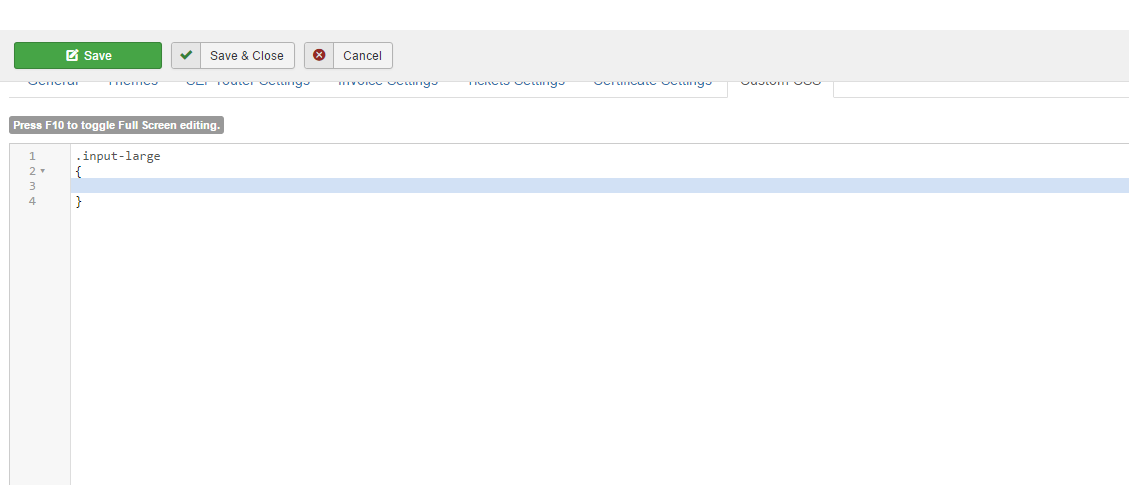
Tuan
Go to Extensions -> Plugins, find the plugin Editor - CodeMirror , publish it
Then the tab should be available. (It is published by default, and using in Joomla core for editing code + css in template managers, so I don't know why it is not available on your site)
Or maybe you override configuration view, too?
See the screenshot from my local compute
Tuan
The following user(s) said Thank You: James Riley
Please Log in or Create an account to join the conversation.
- James Riley
-
- Offline
- Platinum Member
-
9 years 2 months ago #92813
by James Riley
James Riley .: EventBooking user since 2014 ::: JoomDonation user since 2016 :.
.: grfx & web design / IT / AV @ St. Therese Institute of Faith and Mission, Bruno, SK, Canada :.
Replied by James Riley on topic Add More Butto
As you suggested, Editor -> Code Mirror was not published on my site. The CSS tab now appears 
James Riley .: EventBooking user since 2014 ::: JoomDonation user since 2016 :.
.: grfx & web design / IT / AV @ St. Therese Institute of Faith and Mission, Bruno, SK, Canada :.
Please Log in or Create an account to join the conversation.
- Tuan Pham Ngoc
- Offline
- Administrator
-
9 years 2 months ago #92825
by Tuan Pham Ngoc
Replied by Tuan Pham Ngoc on topic Add More Butto
Great. Now you can guide other customers using that custom css tab editing instead of modifying the css file using Files Manager
Tuan
Tuan
Please Log in or Create an account to join the conversation.
- James Riley
-
- Offline
- Platinum Member
-
9 years 2 months ago #92854
by James Riley
James Riley .: EventBooking user since 2014 ::: JoomDonation user since 2016 :.
.: grfx & web design / IT / AV @ St. Therese Institute of Faith and Mission, Bruno, SK, Canada :.
Replied by James Riley on topic Add More Butto
Exactly my thought. It's far less daunting to click a tab then edit a file, and typing out "/media/com_eventbooking/assets/css/custom.css" all the time gets tedious I wish that I had found that tab earlier!
I wish that I had found that tab earlier! James Riley .: EventBooking user since 2014 ::: JoomDonation user since 2016 :.
.: grfx & web design / IT / AV @ St. Therese Institute of Faith and Mission, Bruno, SK, Canada :.
Please Log in or Create an account to join the conversation.
- Tuan Pham Ngoc
- Offline
- Administrator
-
9 years 2 months ago #92880
by Tuan Pham Ngoc
Replied by Tuan Pham Ngoc on topic Add More Butto
Hehe, I remember that I mentioned about that tab on some other topics which you answered, too. Anyway, the most important things is you have it now
I think for end-users, putting css code into a tab in Configuration is much easier than editing a file (using FTP program or a files manager extension), so glad we have it supported with little code
Tuan
I think for end-users, putting css code into a tab in Configuration is much easier than editing a file (using FTP program or a files manager extension), so glad we have it supported with little code
Tuan
Please Log in or Create an account to join the conversation.
Moderators: Tuan Pham Ngoc
Support
Documentation
Information
Copyright © 2026 Joomla Extensions by Joomdonation. All Rights Reserved.
joomdonation.com is not affiliated with or endorsed by the Joomla! Project or Open Source Matters.
The Joomla! name and logo is used under a limited license granted by Open Source Matters the trademark holder in the United States and other countries.
The Joomla! name and logo is used under a limited license granted by Open Source Matters the trademark holder in the United States and other countries.