- Posts: 3
- Thank you received: 0

Compare values in text field
- Khairool Adzelan Aman
- Topic Author
- Offline
- New Member
-

Less
More
9 years 2 months ago #92566
by Khairool Adzelan Aman
Compare values in text field was created by Khairool Adzelan Aman
Hi,
I have several tiers of tickets that needs to be applied a discount on. Here's the situation:
Adult 1 day pass - $ 25 per pax
Adult 2-days pass - $45 per pax
Child 1-day pass - $10 per pax
Child 2-days pass - $19 per pax
Coupon code : CODE2017
I've created all the necessary custom fields and calculations. The issue is that in the Coupon Code field, I need to compare the value entered by the user to the coupon code (CODE2017) so that they can only proceed when the exact code is entered.
How do I do that?
Best regards,
Khairool
I have several tiers of tickets that needs to be applied a discount on. Here's the situation:
Adult 1 day pass - $ 25 per pax
Adult 2-days pass - $45 per pax
Child 1-day pass - $10 per pax
Child 2-days pass - $19 per pax
Coupon code : CODE2017
I've created all the necessary custom fields and calculations. The issue is that in the Coupon Code field, I need to compare the value entered by the user to the coupon code (CODE2017) so that they can only proceed when the exact code is entered.
How do I do that?
Best regards,
Khairool
Please Log in or Create an account to join the conversation.
- Tuan Pham Ngoc
- Away
- Administrator
-

9 years 2 months ago #92575
by Tuan Pham Ngoc
Replied by Tuan Pham Ngoc on topic Compare values in text field
Hello Khairool
I think making the coupon code as a require field will help in this case. You can submit a support ticket so that we can try to help editing the code to see whether it solves your requirement or not
Please also including PayPal Transaction ID of the purchase or the email you used to purchase the product so that we can validate order before providing support (just checked but could not find an order in your account)
Regards,
Tuan
I think making the coupon code as a require field will help in this case. You can submit a support ticket so that we can try to help editing the code to see whether it solves your requirement or not
Please also including PayPal Transaction ID of the purchase or the email you used to purchase the product so that we can validate order before providing support (just checked but could not find an order in your account)
Regards,
Tuan
Please Log in or Create an account to join the conversation.
- Khairool Adzelan Aman
- Topic Author
- Offline
- New Member
-
Less
More
- Posts: 3
- Thank you received: 0
9 years 2 months ago #92654
by Khairool Adzelan Aman
Replied by Khairool Adzelan Aman on topic Compare values in text field
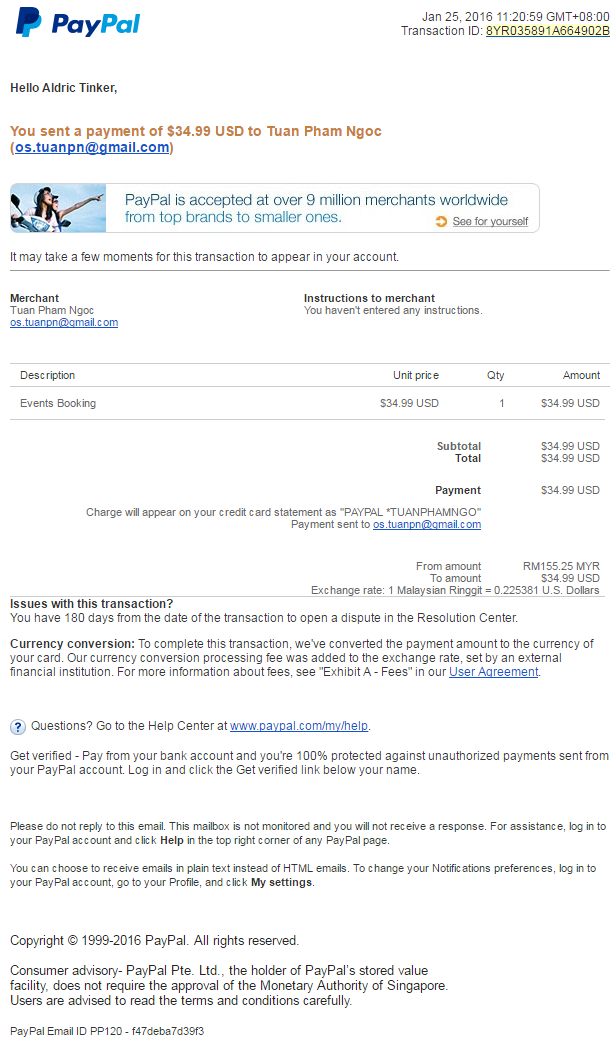
Thanks for getting back to me. The transaction ID for my purchase was 8YR035891A664902B made on January 25, 2016 under the name of Aldric Tinker. He was my partner.
I've already made the coupon code required. It is as a custom field, not using the Discounts tab under events or Coupons option. The concern is now a visitor can enter any value into it and the transaction can still proceed; while what is required is that only specific code (in this example CODE2017) can proceed with the purchase. Anything else will result in an error.
You can try it out at this link: miricountrymusic.com/index.php/tickets/m...ividual-registration
Please do not proceed any further than the PayPal login page.
Best regards,
Khairool
I've already made the coupon code required. It is as a custom field, not using the Discounts tab under events or Coupons option. The concern is now a visitor can enter any value into it and the transaction can still proceed; while what is required is that only specific code (in this example CODE2017) can proceed with the purchase. Anything else will result in an error.
You can try it out at this link: miricountrymusic.com/index.php/tickets/m...ividual-registration
Please do not proceed any further than the PayPal login page.
Best regards,
Khairool
Please Log in or Create an account to join the conversation.
- Tuan Pham Ngoc
- Away
- Administrator
-
9 years 2 months ago #92669
by Tuan Pham Ngoc
Replied by Tuan Pham Ngoc on topic Compare values in text field
Hello Khairool
I could not find any order from the name you provided. However, you cannot use custom field for that purpose. You will have to use coupon code if you want to valid the code with a list of pre-defined value
There is no way to validate value entered in a custom field with a specific value
I could not find any order from the name you provided. However, you cannot use custom field for that purpose. You will have to use coupon code if you want to valid the code with a list of pre-defined value
There is no way to validate value entered in a custom field with a specific value
Please Log in or Create an account to join the conversation.
- Khairool Adzelan Aman
- Topic Author
- Offline
- New Member
-
Less
More
- Posts: 3
- Thank you received: 0
9 years 2 months ago #92677
by Khairool Adzelan Aman
Replied by Khairool Adzelan Aman on topic Compare values in text field
My bad, the coupon interacts and calculates the price correctly when I enabled it in the Events settings. It should work as it should now.
Thanks, and sorry for the trouble.
Regards,
Khairool
p/s: I'm attaching the paypal receipt for the transaction. Could you please double-check your records again? Thanks
Thanks, and sorry for the trouble.
Regards,
Khairool
p/s: I'm attaching the paypal receipt for the transaction. Could you please double-check your records again? Thanks
Please Log in or Create an account to join the conversation.
Moderators: Tuan Pham Ngoc
Support
Documentation
Information
Copyright © 2026 Joomla Extensions by Joomdonation. All Rights Reserved.
joomdonation.com is not affiliated with or endorsed by the Joomla! Project or Open Source Matters.
The Joomla! name and logo is used under a limited license granted by Open Source Matters the trademark holder in the United States and other countries.
The Joomla! name and logo is used under a limited license granted by Open Source Matters the trademark holder in the United States and other countries.