- Posts: 31
- Thank you received: 0

multiple columns in Category Columns Layout
- wisma
- Topic Author
- Offline
- Junior Member
-

Less
More
9 years 3 months ago #92275
by wisma
multiple columns in Category Columns Layout was created by wisma
Hi
How can i add multiple columns in EB Category Columns Layout.
I set different values under options with no effect. it shows only one column.
www.katapultfestival.ch/programm.html
thx 4 help
How can i add multiple columns in EB Category Columns Layout.
I set different values under options with no effect. it shows only one column.
www.katapultfestival.ch/programm.html
thx 4 help
Please Log in or Create an account to join the conversation.
- James Riley
-

- Offline
- Platinum Member
-

9 years 3 months ago #92296
by James Riley
James Riley .: EventBooking user since 2014 ::: JoomDonation user since 2016 :.
.: grfx & web design / IT / AV @ St. Therese Institute of Faith and Mission, Bruno, SK, Canada :.
Replied by James Riley on topic multiple columns in Category Columns Layout
It should be possible with a bit of CSS. Try adding the following to your /media/com_eventbooking/assets/css/custom.css file.
Resulting layout:
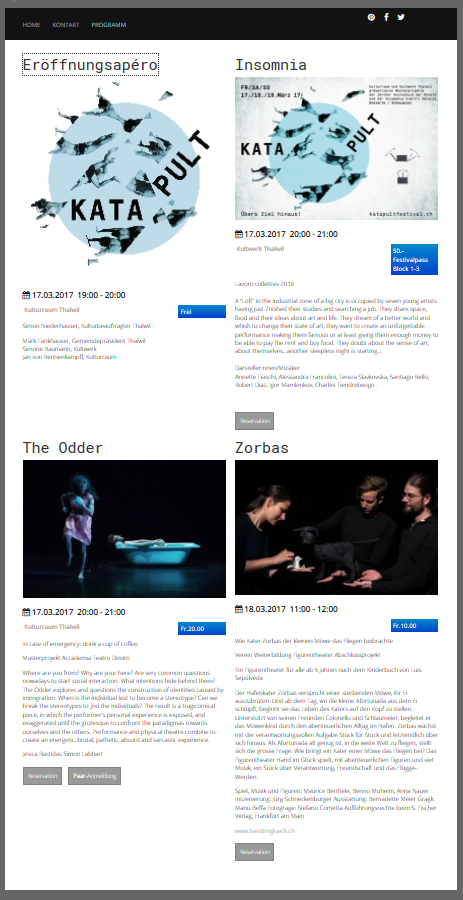
Code:
#eb-category-page-columns .eb-event-box {clear:none;}
#eb-category-page-columns .row-fluid.clearfix {clear:none;}
Resulting layout:
James Riley .: EventBooking user since 2014 ::: JoomDonation user since 2016 :.
.: grfx & web design / IT / AV @ St. Therese Institute of Faith and Mission, Bruno, SK, Canada :.
The following user(s) said Thank You: wisma
Please Log in or Create an account to join the conversation.
- wisma
- Topic Author
- Offline
- Junior Member
-
Less
More
- Posts: 31
- Thank you received: 0
9 years 3 months ago - 9 years 3 months ago #92318
by wisma
Replied by wisma on topic multiple columns in Category Columns Layout
Thx a lot for help it works. but where can i set the thumb width ? general settings Thumbnail width don't take effect
and
.eb-event-box img.eb-event-thumb {
width: 50%;
}
display the image with 50% width but its still crispy because the width is 200px.
thx for help
redards
marc
and
.eb-event-box img.eb-event-thumb {
width: 50%;
}
display the image with 50% width but its still crispy because the width is 200px.
thx for help
redards
marc
Last edit: 9 years 3 months ago by wisma.
Please Log in or Create an account to join the conversation.
- James Riley
-
- Offline
- Platinum Member
-
9 years 3 months ago #92360
by James Riley
James Riley .: EventBooking user since 2014 ::: JoomDonation user since 2016 :.
.: grfx & web design / IT / AV @ St. Therese Institute of Faith and Mission, Bruno, SK, Canada :.
Replied by James Riley on topic multiple columns in Category Columns Layout
Are you wanting a higher-resolution thumbnail so that the images don't look pixelated when enlarged to full column width?
Here are a couple settings to try, although I think you tried setting the first one already.
[Events Booking -> Configuration -> General tab -> Other Settings], and set a value in [Thumbnail width] in pixels.
[Events Booking -> Configuration -> Themes tab] turn on the config option [Display Event Large Image]
You might have to RE-UPLOAD your original full-resolution image in the [Event Manager] as I think thumbs are created upon image upload and not every time the event is viewed.
If these setting don't work, you can always manually overwrite the thumbnails in the /media/com_eventbooking/images/thumbs/ folder (but hopefully we can find a way that will work automatically).
Here are a couple settings to try, although I think you tried setting the first one already.
[Events Booking -> Configuration -> General tab -> Other Settings], and set a value in [Thumbnail width] in pixels.
[Events Booking -> Configuration -> Themes tab] turn on the config option [Display Event Large Image]
You might have to RE-UPLOAD your original full-resolution image in the [Event Manager] as I think thumbs are created upon image upload and not every time the event is viewed.
If these setting don't work, you can always manually overwrite the thumbnails in the /media/com_eventbooking/images/thumbs/ folder (but hopefully we can find a way that will work automatically).
James Riley .: EventBooking user since 2014 ::: JoomDonation user since 2016 :.
.: grfx & web design / IT / AV @ St. Therese Institute of Faith and Mission, Bruno, SK, Canada :.
Please Log in or Create an account to join the conversation.
- wisma
- Topic Author
- Offline
- Junior Member
-
Less
More
- Posts: 31
- Thank you received: 0
9 years 2 months ago #92526
by wisma
Replied by wisma on topic multiple columns in Category Columns Layout
Thanks for help - delete and rewrite the thumbs works. They are now 400*x px as set in General tab.
just a last question:
how and where can i add more than 2 columns.
regards marc
just a last question:
how and where can i add more than 2 columns.
regards marc
Please Log in or Create an account to join the conversation.
- James Riley
-
- Offline
- Platinum Member
-
9 years 2 months ago #92543
by James Riley
James Riley .: EventBooking user since 2014 ::: JoomDonation user since 2016 :.
.: grfx & web design / IT / AV @ St. Therese Institute of Faith and Mission, Bruno, SK, Canada :.
Replied by James Riley on topic multiple columns in Category Columns Layout
Combined with the CSS I posted earlier, try setting [Menus -> your site's main menu -> your PROGRAMM menu item-> Options tab -> Number of Columns] to 3 instead of 2.
James Riley .: EventBooking user since 2014 ::: JoomDonation user since 2016 :.
.: grfx & web design / IT / AV @ St. Therese Institute of Faith and Mission, Bruno, SK, Canada :.
Please Log in or Create an account to join the conversation.
- wisma
- Topic Author
- Offline
- Junior Member
-
Less
More
- Posts: 31
- Thank you received: 0
9 years 2 months ago #92565
by wisma
Replied by wisma on topic multiple columns in Category Columns Layout
Yes, but i have already set 3 columns there, with no effect.
regards marc
regards marc
Please Log in or Create an account to join the conversation.
- wisma
- Topic Author
- Offline
- Junior Member
-
Less
More
- Posts: 31
- Thank you received: 0
9 years 2 months ago #92574
by wisma
Replied by wisma on topic multiple columns in Category Columns Layout
Hello James
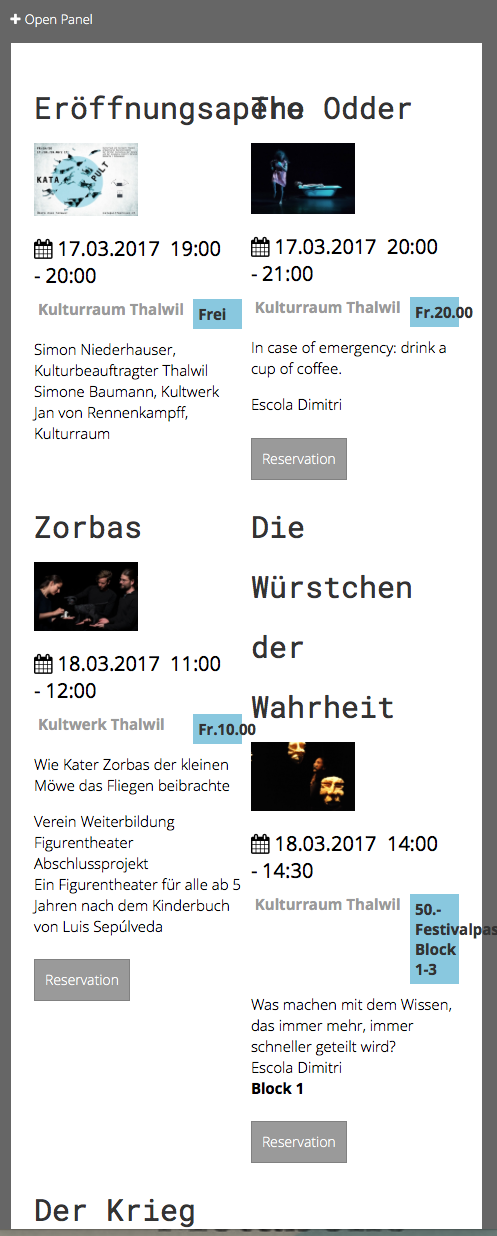
other question , how can i format the eb-event-title that it breaks with the columns on small screens/mobiles
thx
other question , how can i format the eb-event-title that it breaks with the columns on small screens/mobiles
thx
Please Log in or Create an account to join the conversation.
- James Riley
-
- Offline
- Platinum Member
-
9 years 2 months ago #92594
by James Riley
James Riley .: EventBooking user since 2014 ::: JoomDonation user since 2016 :.
.: grfx & web design / IT / AV @ St. Therese Institute of Faith and Mission, Bruno, SK, Canada :.
Replied by James Riley on topic multiple columns in Category Columns Layout
I'm not sure why the 3-column layout is not working (your live site seems to still be the same 1-col layout that I first looked at anyways).
As for a better mobile-friendly 2-col layout, I would implement the following code CSS if it were my site that I was tweaking This overrides some of the <h2> heading styles set by your template, but only for this page and layout.
Which *should* (if I did everything right... I wasn't able to test everything live) result in a layout like this for smaller screen sizes:
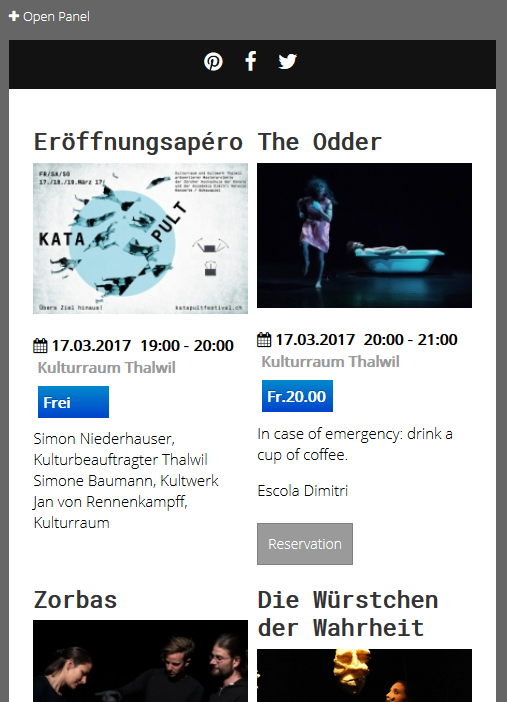
As for a better mobile-friendly 2-col layout, I would implement the following code CSS if it were my site that I was tweaking
This overrides some of the <h2> heading styles set by your template, but only for this page and layout.Code:
@media (min-width:1px) and (max-width: 531px) {
.eb-container h2 {
line-height: 60%;
margin-bottom: 10px !important;
}
.eb-event-box .eb-event-title {
font-size:70%;
font-weight:800;
}
.eb-event-box .eb-event-date-time {
font-size:100%
}
.eb-event-box .eb-event-location-price {
padding-top:0px;
}
.eb-event-box .eb-event-price {
float: none;
clear: both;
width: 100%;
}
}
@media (max-width: 331px) {
h2 .eb-event-title {
font-size:60%;
font-weight:800;
}
}
Which *should* (if I did everything right... I wasn't able to test everything live) result in a layout like this for smaller screen sizes:
James Riley .: EventBooking user since 2014 ::: JoomDonation user since 2016 :.
.: grfx & web design / IT / AV @ St. Therese Institute of Faith and Mission, Bruno, SK, Canada :.
Please Log in or Create an account to join the conversation.
- James Riley
-
- Offline
- Platinum Member
-
9 years 2 months ago #92595
by James Riley
James Riley .: EventBooking user since 2014 ::: JoomDonation user since 2016 :.
.: grfx & web design / IT / AV @ St. Therese Institute of Faith and Mission, Bruno, SK, Canada :.
Replied by James Riley on topic multiple columns in Category Columns Layout
Searching Google for the CSS to force long words to wrap, I came up with the following that you can try:
Code:
.eb-container h2 {
/* from https://css-tricks.com/snippets/css/prevent-long-urls-from-breaking-out-of-container/ */
overflow-wrap: break-word;
word-wrap: break-word;
-ms-word-break: break-all;
word-break: break-word;
-ms-hyphens: auto;
-moz-hyphens: auto;
-webkit-hyphens: auto;
hyphens: auto;
}
James Riley .: EventBooking user since 2014 ::: JoomDonation user since 2016 :.
.: grfx & web design / IT / AV @ St. Therese Institute of Faith and Mission, Bruno, SK, Canada :.
Please Log in or Create an account to join the conversation.
Moderators: Tuan Pham Ngoc
Support
Documentation
Information
Copyright © 2026 Joomla Extensions by Joomdonation. All Rights Reserved.
joomdonation.com is not affiliated with or endorsed by the Joomla! Project or Open Source Matters.
The Joomla! name and logo is used under a limited license granted by Open Source Matters the trademark holder in the United States and other countries.
The Joomla! name and logo is used under a limited license granted by Open Source Matters the trademark holder in the United States and other countries.