
How to select deposit icon in 2.12.0
- Andrea
-
 Topic Author
- Offline
- Elite Member
-

Less
More
9 years 4 months ago #90982
by Andrea
Visit my page! www.elementotango.it
How to select deposit icon in 2.12.0 was created by Andrea
Hi there, I wanted to ask how I could select an icon for the "deposit" payment. I see that for all of the payment methods there is an option to specify the icon to be used, but this is not possible apparently for the deposit one. Thanks!
Regards Andrea.
Regards Andrea.
Visit my page! www.elementotango.it
Please Log in or Create an account to join the conversation.
- Tuan Pham Ngoc
- Offline
- Administrator
-

9 years 4 months ago #90998
by Tuan Pham Ngoc
Replied by Tuan Pham Ngoc on topic How to select deposit icon in 2.12.0
Hi Andrea
Unfortunately, it is not possible. We only have icon for payment methods, we don't have icons support for payment type (Deposit Payment / Full Payment)
Regards,
Tuan
Unfortunately, it is not possible. We only have icon for payment methods, we don't have icons support for payment type (Deposit Payment / Full Payment)
Regards,
Tuan
Please Log in or Create an account to join the conversation.
- Andrea
-
Topic Author
- Offline
- Elite Member
-
9 years 3 months ago - 9 years 3 months ago #91011
by Andrea
Visit my page! www.elementotango.it
Replied by Andrea on topic How to select deposit icon in 2.12.0
Hi Tuan, sorry I explained myself wrongly. I wanted to ask if we have the possibility to use an icon for the payment method = Offline deposit. I don't intend full or partial, but the payment method. I see that in the folder: media/com_eventbooking/assets/images/paymentmethods there is an image named "os_offline.png" but I can't use it. It does not appear next to the selection.
Here is the page with an example of the issue: www.elementotango.it/tangoinlove/prenota...al-registration.html
Thanks!
Regards Andrea.
Here is the page with an example of the issue: www.elementotango.it/tangoinlove/prenota...al-registration.html
Thanks!
Regards Andrea.
Visit my page! www.elementotango.it
Last edit: 9 years 3 months ago by Andrea.
Please Log in or Create an account to join the conversation.
- Leon Treff
- Offline
- Premium Member
-

Less
More
- Posts: 137
- Thank you received: 30
9 years 3 months ago #91024
by Leon Treff
Replied by Leon Treff on topic How to select deposit icon in 2.12.0
Hello,
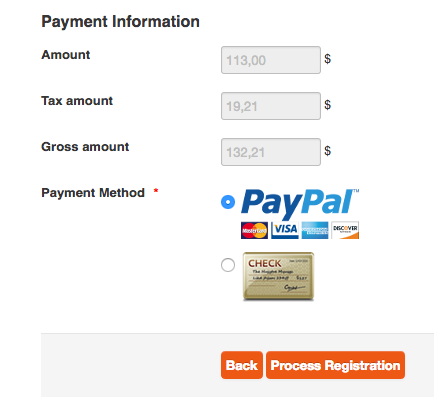
it should work, as you can see from my attachment, the "Check" icon is for offline payment.
In the os_offline plugin, just put os_offline.png into the icon field.
Sincerely,
Léon
it should work, as you can see from my attachment, the "Check" icon is for offline payment.
In the os_offline plugin, just put os_offline.png into the icon field.
Sincerely,
Léon
Please Log in or Create an account to join the conversation.
- Andrea
-
Topic Author
- Offline
- Elite Member
-
9 years 3 months ago #91029
by Andrea
Hi Leon, this is really strange, as I don't have an "icon" field into the offline payment plugin. Do you have one ? I do have such a field for the other payment plugins, but I don't have it for the offline payment!
Visit my page! www.elementotango.it
Replied by Andrea on topic How to select deposit icon in 2.12.0
Leon Treff wrote: Hello,
it should work, as you can see from my attachment, the "Check" icon is for offline payment.
In the os_offline plugin, just put os_offline.png into the icon field.
Sincerely,
Léon
Hi Leon, this is really strange, as I don't have an "icon" field into the offline payment plugin. Do you have one ? I do have such a field for the other payment plugins, but I don't have it for the offline payment!
Visit my page! www.elementotango.it
Please Log in or Create an account to join the conversation.
- Tuan Pham Ngoc
- Offline
- Administrator
-
9 years 3 months ago #91033
by Tuan Pham Ngoc
Replied by Tuan Pham Ngoc on topic How to select deposit icon in 2.12.0
Hi Andrea
Maybe you are using extra offline payment plugins? For payment plugins which don't have Icon parameter, you can add it yourself:
1. Open the xml file of the payment plugin (for example components/com_eventbooking/payments/os_offline.xml
2. Add this line to that file
<field name="icon" type="text" size="40" label="Icon"></field>
(see the other files such as os_paypal.xml to see where that line should be added)
After that, the parameter will be available for you to use
Tuan
Maybe you are using extra offline payment plugins? For payment plugins which don't have Icon parameter, you can add it yourself:
1. Open the xml file of the payment plugin (for example components/com_eventbooking/payments/os_offline.xml
2. Add this line to that file
<field name="icon" type="text" size="40" label="Icon"></field>
(see the other files such as os_paypal.xml to see where that line should be added)
After that, the parameter will be available for you to use
Tuan
Please Log in or Create an account to join the conversation.
Moderators: Tuan Pham Ngoc
Support
Documentation
Information
Copyright © 2026 Joomla Extensions by Joomdonation. All Rights Reserved.
joomdonation.com is not affiliated with or endorsed by the Joomla! Project or Open Source Matters.
The Joomla! name and logo is used under a limited license granted by Open Source Matters the trademark holder in the United States and other countries.
The Joomla! name and logo is used under a limited license granted by Open Source Matters the trademark holder in the United States and other countries.