- Posts: 157
- Thank you received: 4

[Solved] date format and custom fields
- Baptiste
- Topic Author
- Offline
- Premium Member
-

Less
More
9 years 4 months ago - 9 years 3 months ago #90731
by Baptiste
[Solved] date format and custom fields was created by Baptiste
Hi!
I'm using some custom fields as date.
I want to use this format : %d-%m-%Y
i correctly add this format to custom field, for example : <field name="field_j2" type="calendar" class="input-small hasTooltip" format="%d-%m-%Y" label="Deuxième jour" size="50" description=""></field>
I also configure the date format correcty in configuration : d-m-Y.
In frontend, all is ok, all dates (custom or not) appear like that : d-m-Y
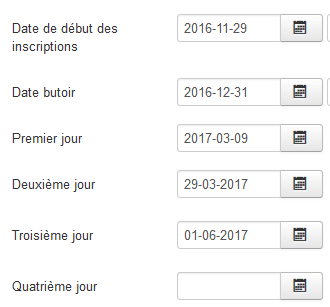
However, in backend, the display is different between "core" date (beginning, end...) end custom fields, as you can see here:
I know this is just a visual pr in backend, however people who use it can be afraid of that, and use the copy/paste function...
Is there a solution (i tried to modify the administrator/components/com_eventbooking/view/event/tmpl/default.php file, changing :
%Y-%m-%d with '%d-%m-%Y
and $format = 'Y-m-d'; with $format = 'd-m-Y';
But after saving event, the date goes wrong (01-01-0001)
Can you advice me something?
Thank you!
I'm using some custom fields as date.
I want to use this format : %d-%m-%Y
i correctly add this format to custom field, for example : <field name="field_j2" type="calendar" class="input-small hasTooltip" format="%d-%m-%Y" label="Deuxième jour" size="50" description=""></field>
I also configure the date format correcty in configuration : d-m-Y.
In frontend, all is ok, all dates (custom or not) appear like that : d-m-Y
However, in backend, the display is different between "core" date (beginning, end...) end custom fields, as you can see here:
I know this is just a visual pr in backend, however people who use it can be afraid of that, and use the copy/paste function...
Is there a solution (i tried to modify the administrator/components/com_eventbooking/view/event/tmpl/default.php file, changing :
%Y-%m-%d with '%d-%m-%Y
and $format = 'Y-m-d'; with $format = 'd-m-Y';
But after saving event, the date goes wrong (01-01-0001)
Can you advice me something?
Thank you!
Last edit: 9 years 3 months ago by Baptiste. Reason: Solved
Please Log in or Create an account to join the conversation.
- Baptiste
- Topic Author
- Offline
- Premium Member
-
Less
More
- Posts: 157
- Thank you received: 4
9 years 4 months ago #90881
by Baptiste
Replied by Baptiste on topic date format and custom fields
Hi!
Did someone have seen this post?
Thank you for your help
Did someone have seen this post?
Thank you for your help
Please Log in or Create an account to join the conversation.
- Baptiste
- Topic Author
- Offline
- Premium Member
-
Less
More
- Posts: 157
- Thank you received: 4
9 years 3 months ago #91136
by Baptiste
Replied by Baptiste on topic date format and custom fields
Hi!
Should i explain better my problem?
Should i explain better my problem?
Please Log in or Create an account to join the conversation.
- Tuan Pham Ngoc
- Offline
- Administrator
-

9 years 3 months ago #91159
by Tuan Pham Ngoc
Replied by Tuan Pham Ngoc on topic date format and custom fields
Hi Baptiste
I still don't really understand the problem here. Not sure what is the custom fields you are talking about ? The event custom fields or registration form custom fields?
Tuan
I still don't really understand the problem here. Not sure what is the custom fields you are talking about ? The event custom fields or registration form custom fields?
Tuan
Please Log in or Create an account to join the conversation.
- Baptiste
- Topic Author
- Offline
- Premium Member
-
Less
More
- Posts: 157
- Thank you received: 4
9 years 3 months ago #91164
by Baptiste
Replied by Baptiste on topic date format and custom fields
Hi Tuan,
I try to explain better :
In backend, the core date field (Start Date, End date) of event are displayed like that : Y/m/d
In frontend, they are correctly displayed, as mentionned in configuration : d/m/Y
However, i created custom fields (fields.xml) for days 2, 3, 4... : here is my code :
They are displayed like that in backend, event: d/m/Y
And also in frontend : d/m/Y
My problem is that in backend, i have then 2 kind of displays, depending if it is core field or custom field (Y/m/d and d/m/Y). As you can see in capture of my first post)
That is a bit tricky for users of the backend (they are disturbed, and can't use copy/past function then).
As explained before, i tried to change the date format in administrator/components/com_eventbooking/view/event/tmpl/default.php, but none of my changes work...
I try to explain better :
In backend, the core date field (Start Date, End date) of event are displayed like that : Y/m/d
In frontend, they are correctly displayed, as mentionned in configuration : d/m/Y
However, i created custom fields (fields.xml) for days 2, 3, 4... : here is my code :
Code:
<field name="field_j2" type="calendar" class="input-small hasTooltip" format="%d-%m-%Y" label="Deuxième jour" size="50" description=""></field>
<field name="field_j3" type="calendar" class="input-small hasTooltip" format="%d-%m-%Y" label="Troisième jour" size="50" description=""></field>
<field name="field_j4" type="calendar" class="input-small hasTooltip" format="%d-%m-%Y" label="Quatrième jour" size="50" description=""></field>
<field name="field_j5" type="calendar" class="input-small hasTooltip" format="%d-%m-%Y" label="Cinquième jour" size="50" description=""></field>
They are displayed like that in backend, event: d/m/Y
And also in frontend : d/m/Y
My problem is that in backend, i have then 2 kind of displays, depending if it is core field or custom field (Y/m/d and d/m/Y). As you can see in capture of my first post)
That is a bit tricky for users of the backend (they are disturbed, and can't use copy/past function then).
As explained before, i tried to change the date format in administrator/components/com_eventbooking/view/event/tmpl/default.php, but none of my changes work...
Please Log in or Create an account to join the conversation.
- Tuan Pham Ngoc
- Offline
- Administrator
-
9 years 3 months ago #91223
by Tuan Pham Ngoc
Replied by Tuan Pham Ngoc on topic date format and custom fields
Hi Baptiste
Unfortunately, at this time, Events Booking is not ready for custom format for event date fields such as Event Date, Event End Date, Registration Start Date...
For date inputs for each event. we will have to use the format Y-m-d for now. I will try to improve it, but it will take more time to implement and make it ready for using
Tuan
Unfortunately, at this time, Events Booking is not ready for custom format for event date fields such as Event Date, Event End Date, Registration Start Date...
For date inputs for each event. we will have to use the format Y-m-d for now. I will try to improve it, but it will take more time to implement and make it ready for using
Tuan
Please Log in or Create an account to join the conversation.
- Baptiste
- Topic Author
- Offline
- Premium Member
-
Less
More
- Posts: 157
- Thank you received: 4
9 years 3 months ago #91252
by Baptiste
Replied by Baptiste on topic [Solved] date format and custom fields
Hi Tuan and thank you for your answer,
Well, i found a kinf of solution for my specific need :
i use Ymd format in fields.xml, and in backend :
And i modified event_properties.php in frontend :
i replaced
with
Not very nice (i'm not programmer!) but that works : Same format in backend (Ymd) and same format in frontend (dmY)
I have one last topic without answer, here it is , can you answer it? that's the last need for my need, i think!
Thank you and have a nice day!
Well, i found a kinf of solution for my specific need :
i use Ymd format in fields.xml, and in backend :
Code:
<field name="field_j2" type="calendar" class="input-small hasTooltip" format="%Y-%m-%d" label="Deuxième jour" size="50" description=""></field>
<field name="field_j3" type="calendar" class="input-small hasTooltip" format="%Y-%m-%d" label="Troisième jour" size="50" description=""></field>
i replaced
Code:
<?php echo $paramValue; ?>
Code:
<?php
$dateFormat = $config->event_date_format;
if ($param['title'] == 'Deuxième jour'||$param['title'] == 'Troisième jour'||$param['title'] == 'Quatrième jour'||$param['title'] == 'Cinquième jour')
{
echo JHtml::_('date', $paramValue, $dateFormat, null);
}
else {
echo $paramValue;
}
?>
Not very nice (i'm not programmer!) but that works : Same format in backend (Ymd) and same format in frontend (dmY)
I have one last topic without answer, here it is , can you answer it? that's the last need for my need, i think!
Thank you and have a nice day!
Please Log in or Create an account to join the conversation.
Moderators: Tuan Pham Ngoc
Support
Documentation
Information
Copyright © 2026 Joomla Extensions by Joomdonation. All Rights Reserved.
joomdonation.com is not affiliated with or endorsed by the Joomla! Project or Open Source Matters.
The Joomla! name and logo is used under a limited license granted by Open Source Matters the trademark holder in the United States and other countries.
The Joomla! name and logo is used under a limited license granted by Open Source Matters the trademark holder in the United States and other countries.