- Posts: 5
- Thank you received: 0

Generate Printable Event Ticket
- steve martin
- Topic Author
- Offline
- New Member
-

Less
More
9 years 4 months ago #90664
by steve martin
Generate Printable Event Ticket was created by steve martin
I have been trying to come up with a way for the registration confirmation page to display a printable (designed) ticket.
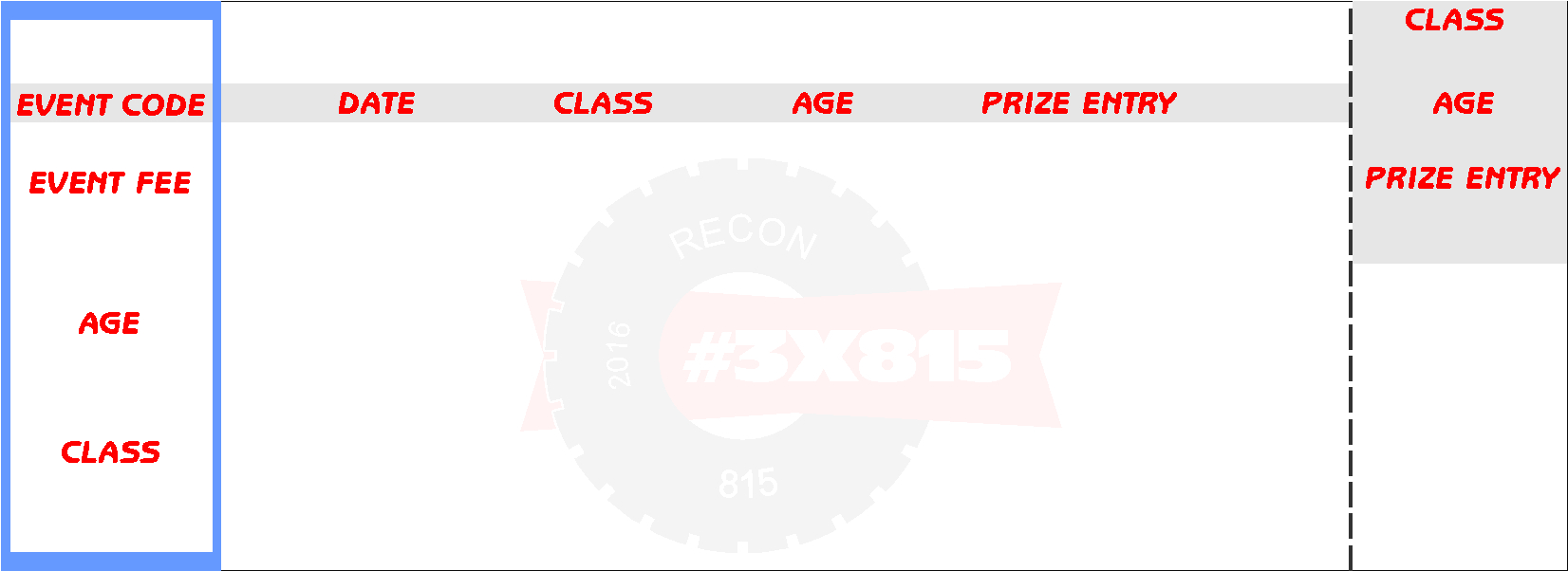
I have created a table and embedded a background image of a ticket I have designed. I have tried many times to parse the data using the same format as I would Custom Fields [THE_NAME] however some work and some do not. The Custom ones work 99% of the time. The standard fields like Event Name, Event Date do not work. I have attached an image of the background
My other issue/need would be the "Certificates" which only come as a PDF and I have only found ways to add a background image to an entire page, not just a section. My other issue would be you can never have more than 1 event that is active since they would all share the same TCPDF config file so the image I would embed into the config file would be on every single Certificate.
Invoices also use a shared design so there is no (that I have seen) way to create a dynamic viewable HTML page based upon the event they are registered for.
I have spent 2 months trying to get this to work they way I thought it would, however I am nearly at my "Do or Die" point as my events must be ready and live in the next 30 days.
I am willing to pay for some custom work, however the work will need to be done quickly or I will be forced to request my money back for this product as well as the other 2 I have purchased which have their own issues as well.
I have created a table and embedded a background image of a ticket I have designed. I have tried many times to parse the data using the same format as I would Custom Fields [THE_NAME] however some work and some do not. The Custom ones work 99% of the time. The standard fields like Event Name, Event Date do not work. I have attached an image of the background
My other issue/need would be the "Certificates" which only come as a PDF and I have only found ways to add a background image to an entire page, not just a section. My other issue would be you can never have more than 1 event that is active since they would all share the same TCPDF config file so the image I would embed into the config file would be on every single Certificate.
Invoices also use a shared design so there is no (that I have seen) way to create a dynamic viewable HTML page based upon the event they are registered for.
I have spent 2 months trying to get this to work they way I thought it would, however I am nearly at my "Do or Die" point as my events must be ready and live in the next 30 days.
I am willing to pay for some custom work, however the work will need to be done quickly or I will be forced to request my money back for this product as well as the other 2 I have purchased which have their own issues as well.
Please Log in or Create an account to join the conversation.
- Tuan Pham Ngoc
- Offline
- Administrator
-

9 years 4 months ago #90666
by Tuan Pham Ngoc
Replied by Tuan Pham Ngoc on topic Generate Printable Event Ticket
Hi Steve
1. About the problem with tags, I am sure that it happens because you are using a wrong tag. For example, for event title, event date, please use [EVENT_TITLE] , [EVENT_DATE] tags and it will be displayed properly. You know in case some tags doesn't work, you can submit a support ticket and we will help checking and correct it for you
2. About the background image, this is something which I cannot help for now. As you know, we use TCPDF library for generating invoice, certificates (and I am also working on Tickets PDF right at the moment, planning to release by the end of next week). I haven't had a chance to look at how they handle background image yet, maybe I will have time next week. The first thing I will look at is how to have backgorund image for the whole page. For having background image in a specific position, I am afraid of you will have to find out and customize the code yourself. Each customer would need background image in a different position, so I am not sure If we can make it works for everyone. I also could not spend time to look at every customer ticket design, modify code so that background image looks perfect for a specific website. Sometime, you will need to do the customization yourself to make it works in the way you want
3. For the invoice layout, I can implement it so that each event can have it own invoice layout. However, this is something I am afraid of we can only get it implemented in about 2 weeks from now
4. Finally, there is no perfect software which can make everyone happy. In case Events Booking could not be used for handling your requirement, you can request for refund and I will be happy to refund your money.
Regards,
Tuan
1. About the problem with tags, I am sure that it happens because you are using a wrong tag. For example, for event title, event date, please use [EVENT_TITLE] , [EVENT_DATE] tags and it will be displayed properly. You know in case some tags doesn't work, you can submit a support ticket and we will help checking and correct it for you
2. About the background image, this is something which I cannot help for now. As you know, we use TCPDF library for generating invoice, certificates (and I am also working on Tickets PDF right at the moment, planning to release by the end of next week). I haven't had a chance to look at how they handle background image yet, maybe I will have time next week. The first thing I will look at is how to have backgorund image for the whole page. For having background image in a specific position, I am afraid of you will have to find out and customize the code yourself. Each customer would need background image in a different position, so I am not sure If we can make it works for everyone. I also could not spend time to look at every customer ticket design, modify code so that background image looks perfect for a specific website. Sometime, you will need to do the customization yourself to make it works in the way you want
3. For the invoice layout, I can implement it so that each event can have it own invoice layout. However, this is something I am afraid of we can only get it implemented in about 2 weeks from now
4. Finally, there is no perfect software which can make everyone happy. In case Events Booking could not be used for handling your requirement, you can request for refund and I will be happy to refund your money.
Regards,
Tuan
Please Log in or Create an account to join the conversation.
- Tuan Pham Ngoc
- Offline
- Administrator
-
9 years 4 months ago #90667
by Tuan Pham Ngoc
Replied by Tuan Pham Ngoc on topic Generate Printable Event Ticket
PS: Instead of modify registration complete page, maybe you should spend time to learn how to design your ticket in PDF format supported by TCPDF and wait for Tickets PDF feature which will be released next week
Tuan
Tuan
Please Log in or Create an account to join the conversation.
- steve martin
- Topic Author
- Offline
- New Member
-
Less
More
- Posts: 5
- Thank you received: 0
9 years 4 months ago #90669
by steve martin
Replied by steve martin on topic Generate Printable Event Ticket
To add an image into the TCPDF it is hard coded into the file itself, along with paper size, portrait or landscape. I have looked into it but stopped when it will be the same image on all of the PDF's created.
Now I wrote my original message in hopes that a 3rd party programmer MAY come across and offer their services for hire. I understand I would need to edit files, which I have done for many of the items I use on my website. I am just up against a wall right now with time as I have to have at least 8 events up and running by January 1st and we both have spent the last month or so working on things. If you took my post as a slam, that is not how I intended it. It was more of a "cry for help" to any programmers who may have already done this thet is out there.
Now I wrote my original message in hopes that a 3rd party programmer MAY come across and offer their services for hire. I understand I would need to edit files, which I have done for many of the items I use on my website. I am just up against a wall right now with time as I have to have at least 8 events up and running by January 1st and we both have spent the last month or so working on things. If you took my post as a slam, that is not how I intended it. It was more of a "cry for help" to any programmers who may have already done this thet is out there.
Please Log in or Create an account to join the conversation.
- Tuan Pham Ngoc
- Offline
- Administrator
-
9 years 4 months ago #90670
by Tuan Pham Ngoc
Replied by Tuan Pham Ngoc on topic Generate Printable Event Ticket
Hi Steve
Honestly, there would not be any developers on this forum could help. If you can post the code you were trying to do here, that would be great
I could not look at it right now as I am focus working on Tickets PDF feature at the moment, but next week, maybe by the end, I will have time to look at TCPDF document and the code you found would be helpful to me
If it could be implemented, we can customize code to allow select background image for each event and use that image....
Tuan
Honestly, there would not be any developers on this forum could help. If you can post the code you were trying to do here, that would be great
I could not look at it right now as I am focus working on Tickets PDF feature at the moment, but next week, maybe by the end, I will have time to look at TCPDF document and the code you found would be helpful to me
If it could be implemented, we can customize code to allow select background image for each event and use that image....
Tuan
Please Log in or Create an account to join the conversation.
- Tuan Pham Ngoc
- Offline
- Administrator
-
9 years 4 months ago #90671
by Tuan Pham Ngoc
=> I don't really understand this but no, It was not my intention to say something bad, too. I just tried to explain what I could do for this case
Replied by Tuan Pham Ngoc on topic Generate Printable Event Ticket
If you took my post as a slam, that is not how I intended it
=> I don't really understand this but no, It was not my intention to say something bad, too. I just tried to explain what I could do for this case
Please Log in or Create an account to join the conversation.
- Tuan Pham Ngoc
- Offline
- Administrator
-
9 years 4 months ago #90675
by Tuan Pham Ngoc
Replied by Tuan Pham Ngoc on topic Generate Printable Event Ticket
Today, I were able to implement ticket PDF with following settings;
1. Page orientation: Portrait or Landscape
2. Page Size: A4, A5, A6, A7
3. Background image
4. Background image position (LEFT x TOP)
With these settings, I hope it would solve your issue. Need more works before can release it but we should have it ready next week.
Regards,
Tuan
1. Page orientation: Portrait or Landscape
2. Page Size: A4, A5, A6, A7
3. Background image
4. Background image position (LEFT x TOP)
With these settings, I hope it would solve your issue. Need more works before can release it but we should have it ready next week.
Regards,
Tuan
Please Log in or Create an account to join the conversation.
- steve martin
- Topic Author
- Offline
- New Member
-
Less
More
- Posts: 5
- Thank you received: 0
9 years 4 months ago - 9 years 4 months ago #90678
by steve martin
Replied by steve martin on topic Generate Printable Event Ticket
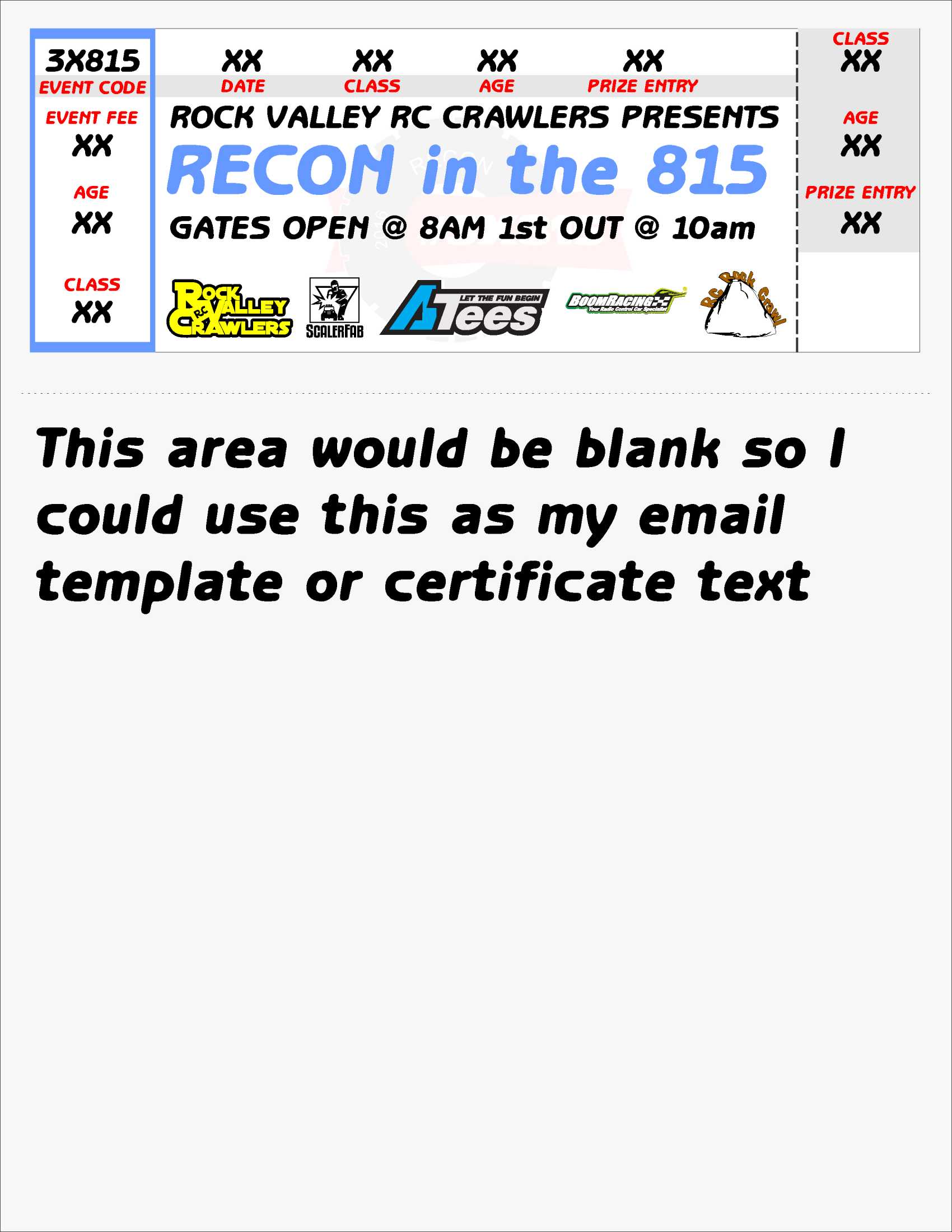
I wonder if I was to create a white background image that would fill the entire page (8.5"x11") and design it so the "ticket" Here is an example of a full page image.
Last edit: 9 years 4 months ago by steve martin. Reason: add image
Please Log in or Create an account to join the conversation.
- Tuan Pham Ngoc
- Offline
- Administrator
-
9 years 4 months ago #90697
by Tuan Pham Ngoc
Replied by Tuan Pham Ngoc on topic Generate Printable Event Ticket
Honestly, I haven't tried to use background image in the email, so I am not sure if it is possible
I have the code for the ticket pdf completed (need more iteration to make sure it works smooth). However, I think you can try the new version to see whether it could be used for your requirement instead of modifying email layout
Basically:
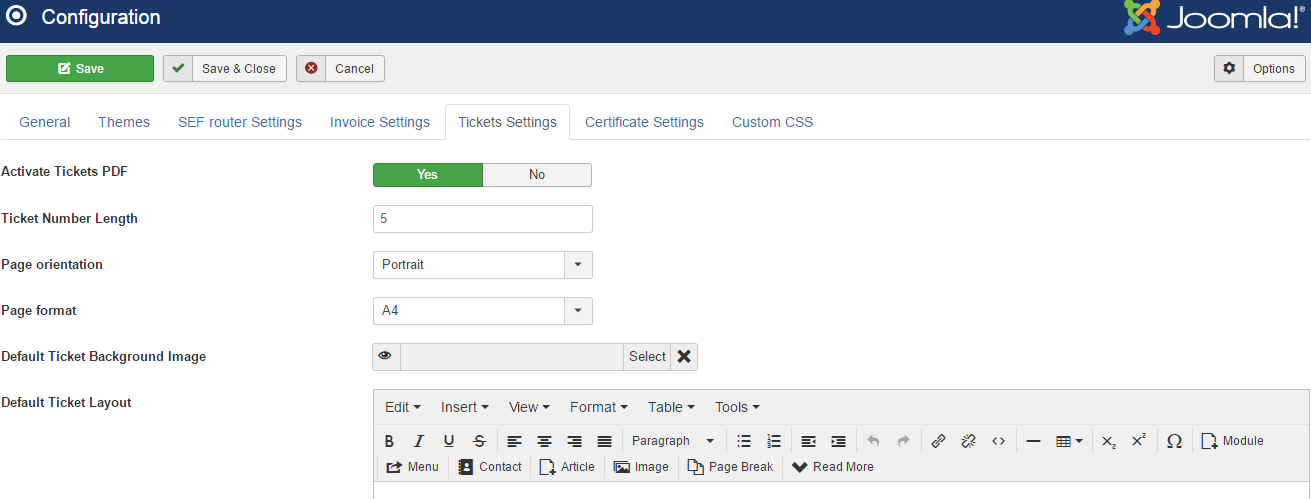
1. In Configuration, you can select Page orientation, Page Orientation ... of the ticket (see this image)
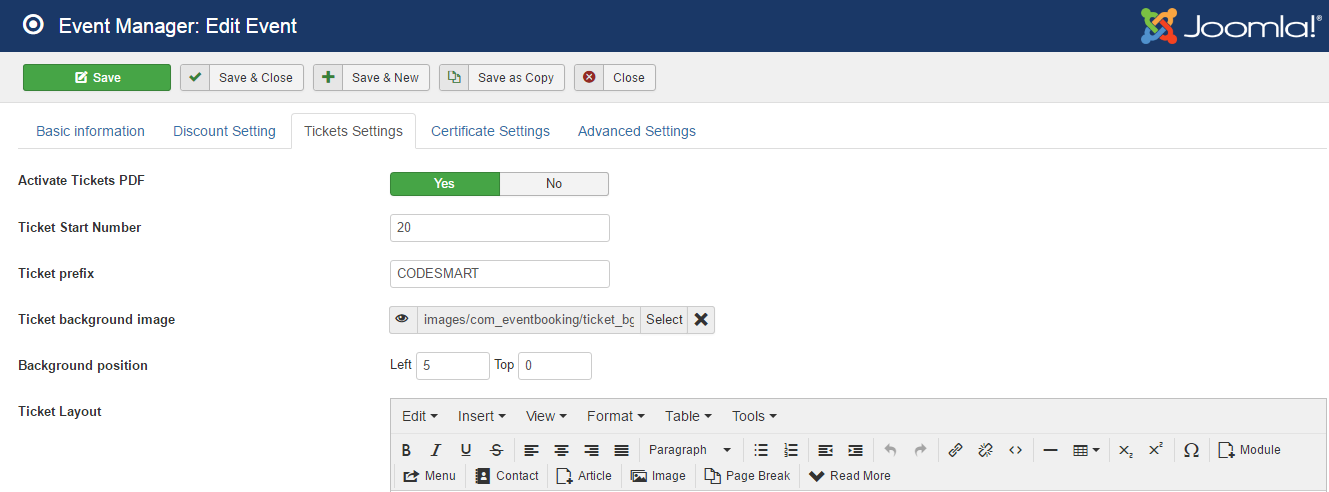
2. In Event, you can select ticket layout, background image, backgorund position....(see the next image)
If you want to try this new version (try on a test site, please), send an email to tuanpn@joomdonation.com and I will send the version to you for try
Regards,
Tuan
I have the code for the ticket pdf completed (need more iteration to make sure it works smooth). However, I think you can try the new version to see whether it could be used for your requirement instead of modifying email layout
Basically:
1. In Configuration, you can select Page orientation, Page Orientation ... of the ticket (see this image)
2. In Event, you can select ticket layout, background image, backgorund position....(see the next image)
If you want to try this new version (try on a test site, please), send an email to tuanpn@joomdonation.com and I will send the version to you for try
Regards,
Tuan
Please Log in or Create an account to join the conversation.
Moderators: Tuan Pham Ngoc
Support
Documentation
Information
Copyright © 2026 Joomla Extensions by Joomdonation. All Rights Reserved.
joomdonation.com is not affiliated with or endorsed by the Joomla! Project or Open Source Matters.
The Joomla! name and logo is used under a limited license granted by Open Source Matters the trademark holder in the United States and other countries.
The Joomla! name and logo is used under a limited license granted by Open Source Matters the trademark holder in the United States and other countries.