- Posts: 29
- Thank you received: 0

Thai Language Questions
- Somkiat Foongkiat
- Topic Author
- Offline
- Junior Member
-

Less
More
9 years 5 months ago #89076
by Somkiat Foongkiat
Thai Language Questions was created by Somkiat Foongkiat
Hi,
My website is in Thai language at www.ExcelExpertTraining.com .
1. When upgrading EB, do I need to translate again from English to Thai? I wish the system will keep my translation without change when upgrading.
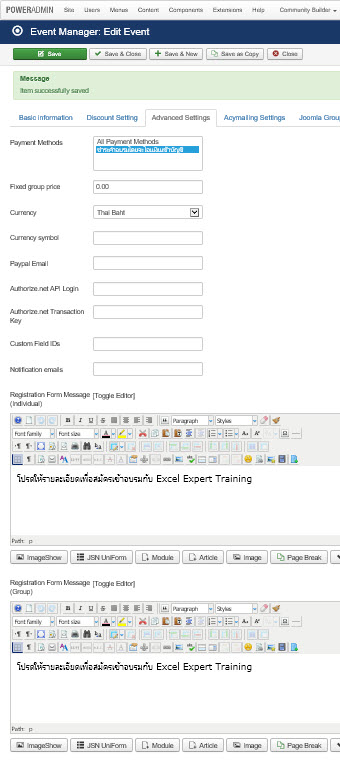
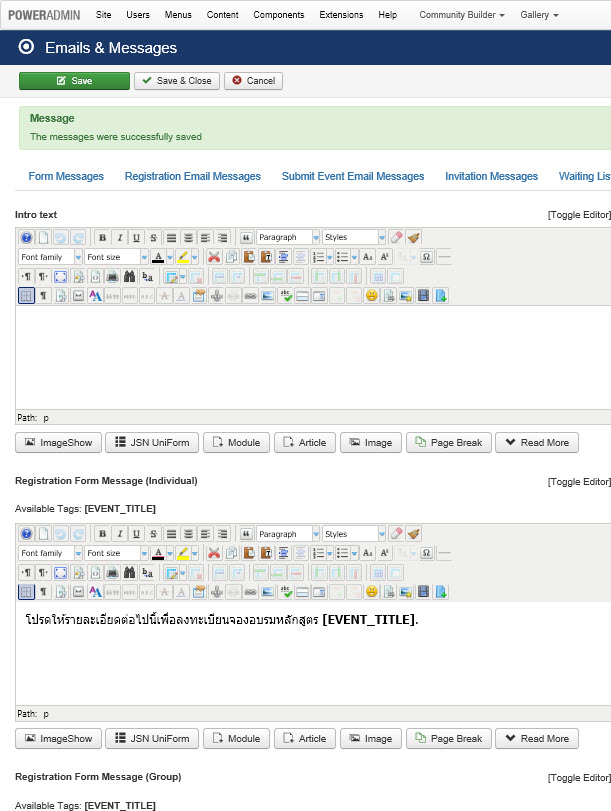
2. What is the different between forms in Emails & Messages section vs Event Manager > Advanced Settings Forms? Which forms will send to registrants?
3. When upgrading EB, do I have to write Thai messages in Emails & Messages section and in Event Manager > Advanced Settings Forms again?
4. Invoice does not show Thai in PDF file. How to set That font in PDF?
5. Are there any files that I have to backup before upgrading in order to keep Thai language?
Thanks,
Somkiat
My website is in Thai language at www.ExcelExpertTraining.com .
1. When upgrading EB, do I need to translate again from English to Thai? I wish the system will keep my translation without change when upgrading.
2. What is the different between forms in Emails & Messages section vs Event Manager > Advanced Settings Forms? Which forms will send to registrants?
3. When upgrading EB, do I have to write Thai messages in Emails & Messages section and in Event Manager > Advanced Settings Forms again?
4. Invoice does not show Thai in PDF file. How to set That font in PDF?
5. Are there any files that I have to backup before upgrading in order to keep Thai language?
Thanks,
Somkiat
Please Log in or Create an account to join the conversation.
- Tuan Pham Ngoc
- Offline
- Administrator
-

9 years 5 months ago #89087
by Tuan Pham Ngoc
Replied by Tuan Pham Ngoc on topic Thai Language Questions
Hi Somkiat
1=> No, you don't have to do that. The system keep the translation you made
2=> The difference is that the Event Manager > Advanced Settings Forms allows you to enter different messages for the event you are editing. If you don't enter any messages on Advanced Settings, the messages in Emails & Messages will be used
So in most case, just leave the messages in Advanced Settings empty
3=> No, you don't have to do that. As I said, it will be kept
4=> Submit a support ticket sending us super admin account of your site. We are going to check and setup correct font for you
5=> No, you don't have to backup anything
Tuan
1=> No, you don't have to do that. The system keep the translation you made
2=> The difference is that the Event Manager > Advanced Settings Forms allows you to enter different messages for the event you are editing. If you don't enter any messages on Advanced Settings, the messages in Emails & Messages will be used
So in most case, just leave the messages in Advanced Settings empty
3=> No, you don't have to do that. As I said, it will be kept
4=> Submit a support ticket sending us super admin account of your site. We are going to check and setup correct font for you
5=> No, you don't have to backup anything
Tuan
The following user(s) said Thank You: Somkiat Foongkiat
Please Log in or Create an account to join the conversation.
Moderators: Tuan Pham Ngoc
Support
Documentation
Information
Copyright © 2026 Joomla Extensions by Joomdonation. All Rights Reserved.
joomdonation.com is not affiliated with or endorsed by the Joomla! Project or Open Source Matters.
The Joomla! name and logo is used under a limited license granted by Open Source Matters the trademark holder in the United States and other countries.
The Joomla! name and logo is used under a limited license granted by Open Source Matters the trademark holder in the United States and other countries.