- Posts: 26
- Thank you received: 0

Suppress title on Individual Registration form?
- Paul Seyler
- Topic Author
- Offline
- Junior Member
-

Less
More
9 years 7 months ago #85525
by Paul Seyler
Suppress title on Individual Registration form? was created by Paul Seyler
Is there any way to suppress the title on the Individual or Group Registration forms? It shows 'Individual Registration' or 'Group Registration' at the top of the form in a way that doesn't fit with our site.
Please Log in or Create an account to join the conversation.
- James Riley
-

- Offline
- Platinum Member
-

9 years 7 months ago - 9 years 7 months ago #85529
by James Riley
James Riley .: EventBooking user since 2014 ::: JoomDonation user since 2016 :.
.: grfx & web design / IT / AV @ St. Therese Institute of Faith and Mission, Bruno, SK, Canada :.
Replied by James Riley on topic Suppress title on Individual Registration form?
Method 1:
You will have to edit PHP files to achieve this... Both files you need to edit are located in /components/com_eventbooking/view/register/tmpl/
For the individual registration form, search for and remove the following line from default.php :
For the group registration, search for and remove this line from group.php :
.
For both edited files, SAVE-AS to /templates/YOUR-TEMPLATE/html/com_eventbooking/register/ to save it as a template override (create the folders are required).
Method 2
You *COULD* also hide these 2 page headings using CSS instead of editing PHP code (not as professional as removing the unwanted code, but it works!)
To do this using CSS *INSTEAD* of editing the PHP files, open /media/com_eventbooking/assets/css/custom.css and add the following line to the end of the file:
Both options (PHP saved as a template override, or CSS) will be upgrade-safe.
You will have to edit PHP files to achieve this... Both files you need to edit are located in /components/com_eventbooking/view/register/tmpl/
For the individual registration form, search for and remove the following line from default.php :
Code:
<h1 class="eb-page-heading"><?php echo $headerText; ?></h1>
For the group registration, search for and remove this line from group.php :
Code:
<h1 class="eb-page-title"><?php echo $headerText; ?></h1>
For both edited files, SAVE-AS to /templates/YOUR-TEMPLATE/html/com_eventbooking/register/ to save it as a template override (create the folders are required).
Method 2
You *COULD* also hide these 2 page headings using CSS instead of editing PHP code (not as professional as removing the unwanted code, but it works!)
To do this using CSS *INSTEAD* of editing the PHP files, open /media/com_eventbooking/assets/css/custom.css and add the following line to the end of the file:
Code:
#eb-group-registration-form h1.eb-page-title, #eb-individual-registration-page h1.eb-page-heading {display:none;}
Both options (PHP saved as a template override, or CSS) will be upgrade-safe.
James Riley .: EventBooking user since 2014 ::: JoomDonation user since 2016 :.
.: grfx & web design / IT / AV @ St. Therese Institute of Faith and Mission, Bruno, SK, Canada :.
Last edit: 9 years 7 months ago by James Riley. Reason: correction to the override path
The following user(s) said Thank You: Paul Seyler
Please Log in or Create an account to join the conversation.
- Paul Seyler
- Topic Author
- Offline
- Junior Member
-
Less
More
- Posts: 26
- Thank you received: 0
9 years 7 months ago #85532
by Paul Seyler
Replied by Paul Seyler on topic Suppress title on Individual Registration form?
Brilliant, James. Modified CSS and it worked perfectly. Because it still left the vertical space that the title would have taken, when I have more time I'll try the PHP method instead, to see if it will eliminate that empty line. Thanks very much!
Paul
Paul
Please Log in or Create an account to join the conversation.
- James Riley
-
- Offline
- Platinum Member
-
9 years 7 months ago #85538
by James Riley
James Riley .: EventBooking user since 2014 ::: JoomDonation user since 2016 :.
.: grfx & web design / IT / AV @ St. Therese Institute of Faith and Mission, Bruno, SK, Canada :.
Replied by James Riley on topic Suppress title on Individual Registration form?
That space can probably be removed by CSS as well. If you would like to just do it all with CSS, post a link to an active event with both individual and group registration, and I can take a look at what code you'll still need to add. My guess is that your template's CSS is doing something that is preventing the space from collapsing, but EB's custom.css file should be able to override it.
James Riley .: EventBooking user since 2014 ::: JoomDonation user since 2016 :.
.: grfx & web design / IT / AV @ St. Therese Institute of Faith and Mission, Bruno, SK, Canada :.
Please Log in or Create an account to join the conversation.
- Paul Seyler
- Topic Author
- Offline
- Junior Member
-
Less
More
- Posts: 26
- Thank you received: 0
9 years 7 months ago #85539
by Paul Seyler
Replied by Paul Seyler on topic Suppress title on Individual Registration form?
Thanks, James. Here's the link. Ignore the slightly depressing subject matter J
matthewsenvironmentalsolutions.com/us/cl...ividual-registration
Suppressing the title allowed me to move it below the logo. You can see the extra white space above the logo where the old title *would* have been. My next challenge is to pretty up the form below from the default single-column layout, but I'm afraid it's beyond my very limited CSS skills. Want to put some related fields beside each other (First Name/Last Name, City/State/Country, etc.) It may be beyond what I can get from this forum.
Thanks again for your help.
Paul
matthewsenvironmentalsolutions.com/us/cl...ividual-registration
Suppressing the title allowed me to move it below the logo. You can see the extra white space above the logo where the old title *would* have been. My next challenge is to pretty up the form below from the default single-column layout, but I'm afraid it's beyond my very limited CSS skills. Want to put some related fields beside each other (First Name/Last Name, City/State/Country, etc.) It may be beyond what I can get from this forum.
Thanks again for your help.
Paul
Please Log in or Create an account to join the conversation.
- Donal
- Offline
- Elite Member
-

Less
More
- Posts: 240
- Thank you received: 17
9 years 7 months ago #85566
by Donal
Hi James,
thanks for the useful info above. I have used it to override the shopping cart registration page layout.
1 thing I noted, which I thought should be mentioned, is that the override path I needed to use was /templates/YOUR-TEMPLATE/html/com_eventbooking/register/
Replied by Donal on topic Suppress title on Individual Registration form?
James Riley wrote: Method 1:
For the group registration, search for and remove this line from group.php :.Code:<h1 class="eb-page-title"><?php echo $headerText; ?></h1>
For both edited files, SAVE-AS to /templates/YOUR-TEMPLATE/html/com_eventbooking/register/tmpl/ to save it as a template override (create the folders are required).
Hi James,
thanks for the useful info above. I have used it to override the shopping cart registration page layout.
1 thing I noted, which I thought should be mentioned, is that the override path I needed to use was /templates/YOUR-TEMPLATE/html/com_eventbooking/register/
Please Log in or Create an account to join the conversation.
- Tuan Pham Ngoc
- Offline
- Administrator
-

9 years 7 months ago #85567
by Tuan Pham Ngoc
Replied by Tuan Pham Ngoc on topic Suppress title on Individual Registration form?
Just want to mention that you can create template override using Joomla template manager
docs.joomla.org/J3.x:How_to_use_the_Temp...r#Creating_Overrides
Tuan
Tuan
Please Log in or Create an account to join the conversation.
- James Riley
-
- Offline
- Platinum Member
-
9 years 7 months ago - 9 years 7 months ago #85573
by James Riley
The one reason that I often go the CSS route myself is that it is a bit more version-proof. With template overrides and an extension that is updated regularly, you run the risk of new features not working or occasionally the extension breaking because the new code that the developer has added is being overridden by the old template override. Most the time, however, there is no problem with overriding. CSS can also be a bit less intimidating for the non-coding user. The downfall is that PHP is still processing the content, the content is still appearing in the HTML code anyways, if the user's browser doesn't support CSS (boy would our modern websites all be in big trouble!) then they see the content even though it is supposed to be hidden, and that you are likely having to make another file call for the CSS file.
James Riley .: EventBooking user since 2014 ::: JoomDonation user since 2016 :.
.: grfx & web design / IT / AV @ St. Therese Institute of Faith and Mission, Bruno, SK, Canada :.
Replied by James Riley on topic Suppress title on Individual Registration form?
Thanks for the note on the template manager, Tuan!Just want to mention that you can create template override using Joomla template manager docs.joomla.org/J3.x:How_to_use_the_Temp...r#Creating_Overrides
The one reason that I often go the CSS route myself is that it is a bit more version-proof. With template overrides and an extension that is updated regularly, you run the risk of new features not working or occasionally the extension breaking because the new code that the developer has added is being overridden by the old template override. Most the time, however, there is no problem with overriding. CSS can also be a bit less intimidating for the non-coding user. The downfall is that PHP is still processing the content, the content is still appearing in the HTML code anyways, if the user's browser doesn't support CSS (boy would our modern websites all be in big trouble!) then they see the content even though it is supposed to be hidden, and that you are likely having to make another file call for the CSS file.
James Riley .: EventBooking user since 2014 ::: JoomDonation user since 2016 :.
.: grfx & web design / IT / AV @ St. Therese Institute of Faith and Mission, Bruno, SK, Canada :.
Last edit: 9 years 7 months ago by James Riley. Reason: corrections :)
Please Log in or Create an account to join the conversation.
- James Riley
-
- Offline
- Platinum Member
-
9 years 7 months ago - 9 years 7 months ago #85575
by James Riley
Oops! Thanks for pointing that out Donal. I will modify the original post so that I don't accidentally lead others astray!
James Riley .: EventBooking user since 2014 ::: JoomDonation user since 2016 :.
.: grfx & web design / IT / AV @ St. Therese Institute of Faith and Mission, Bruno, SK, Canada :.
Replied by James Riley on topic Suppress title on Individual Registration form?
Donal Lyne wrote: 1 thing I noted, which I thought should be mentioned, is that the override path I needed to use was /templates/YOUR-TEMPLATE/html/com_eventbooking/register/
Oops! Thanks for pointing that out Donal. I will modify the original post so that I don't accidentally lead others astray!
James Riley .: EventBooking user since 2014 ::: JoomDonation user since 2016 :.
.: grfx & web design / IT / AV @ St. Therese Institute of Faith and Mission, Bruno, SK, Canada :.
Last edit: 9 years 7 months ago by James Riley. Reason: spelling correction
Please Log in or Create an account to join the conversation.
- James Riley
-
- Offline
- Platinum Member
-
9 years 7 months ago #85576
by James Riley
The spacing is actually part of your template and is present site-wide.
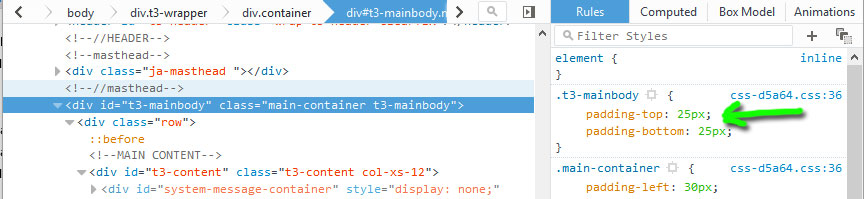
I did some checking on other pages, and I think that your site might actually look better throughout if you eliminate the padding-top site-wide. If your template provides a CSS override or customization, add:
to the end of the existing code. If not, modify the CSS file when the t3-mainbody selector appears, and either add the above code to that file somewhere after the existing selector, or change the existing 25px to 0px.
James Riley .: EventBooking user since 2014 ::: JoomDonation user since 2016 :.
.: grfx & web design / IT / AV @ St. Therese Institute of Faith and Mission, Bruno, SK, Canada :.
Replied by James Riley on topic Suppress title on Individual Registration form?
Paul Seyler wrote: Suppressing the title allowed me to move it below the logo. You can see the extra white space above the logo where the old title *would* have been. My next challenge is to pretty up the form below from the default single-column layout, but I'm afraid it's beyond my very limited CSS skills. Want to put some related fields beside each other (First Name/Last Name, City/State/Country, etc.) It may be beyond what I can get from this forum.
The spacing is actually part of your template and is present site-wide.
I did some checking on other pages, and I think that your site might actually look better throughout if you eliminate the padding-top site-wide. If your template provides a CSS override or customization, add:
Code:
.t3-mainbody {padding-top:0;}
James Riley .: EventBooking user since 2014 ::: JoomDonation user since 2016 :.
.: grfx & web design / IT / AV @ St. Therese Institute of Faith and Mission, Bruno, SK, Canada :.
Please Log in or Create an account to join the conversation.
Moderators: Tuan Pham Ngoc
Support
Documentation
Information
Copyright © 2026 Joomla Extensions by Joomdonation. All Rights Reserved.
joomdonation.com is not affiliated with or endorsed by the Joomla! Project or Open Source Matters.
The Joomla! name and logo is used under a limited license granted by Open Source Matters the trademark holder in the United States and other countries.
The Joomla! name and logo is used under a limited license granted by Open Source Matters the trademark holder in the United States and other countries.