- Posts: 5
- Thank you received: 0

Login module fields not aligned
- Sarmed
-
 Topic Author
- Offline
- New Member
-

Less
More
9 years 8 months ago #83855
by Sarmed
Best regards,
Sarmed
Login module fields not aligned was created by Sarmed
Hello, I've tried and have not been able to figure out how to fix misalignment of login form fields. If I go to my home page, formatting of Login module looks fine. But as soon as I open one of the Event Booking page, it changes format and fields become out of align. Please see attached screenshot.
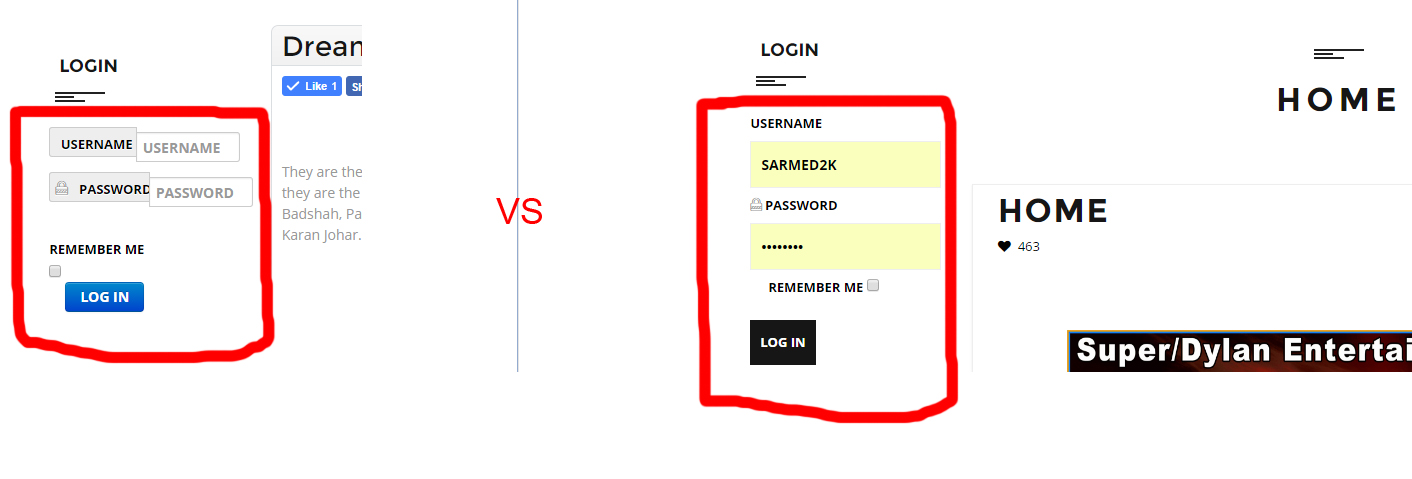
Is there a specific file I can modify to correct alignment? Is it possible for me to keep the original format/style of login form as it matches with theme of my website?
Is there a specific file I can modify to correct alignment? Is it possible for me to keep the original format/style of login form as it matches with theme of my website?
Best regards,
Sarmed
Please Log in or Create an account to join the conversation.
- Tuan Pham Ngoc
- Offline
- Administrator
-

9 years 8 months ago #83856
by Tuan Pham Ngoc
Replied by Tuan Pham Ngoc on topic Login module fields not aligned
Hi Sarmed
Seems there are some css conflict causing the issue. Please submit a support ticket sending us super admin account of the site and the link to the page
My developer will look at it and get it sorted for you
Regards,
Tuan
Seems there are some css conflict causing the issue. Please submit a support ticket sending us super admin account of the site and the link to the page
My developer will look at it and get it sorted for you
Regards,
Tuan
The following user(s) said Thank You: Sarmed
Please Log in or Create an account to join the conversation.
- Sarmed
-
Topic Author
- Offline
- New Member
-
Less
More
- Posts: 5
- Thank you received: 0
9 years 8 months ago #83862
by Sarmed
Best regards,
Sarmed
Replied by Sarmed on topic Login module fields not aligned
Solution found! Modify the configuration setting as follows:
1. Go to Components > Event Booking > Configuration
2. Under "General" tab, look for "Load bootstrap CSS in the front-end" and change this option to "No"
3. Under "Twitter bootstrap version", choose version 2.
4. Hit "Save" button.
Best regards,
Sarmed
1. Go to Components > Event Booking > Configuration
2. Under "General" tab, look for "Load bootstrap CSS in the front-end" and change this option to "No"
3. Under "Twitter bootstrap version", choose version 2.
4. Hit "Save" button.
Best regards,
Sarmed
Best regards,
Sarmed
Please Log in or Create an account to join the conversation.
Moderators: Tuan Pham Ngoc
Support
Documentation
Information
Copyright © 2026 Joomla Extensions by Joomdonation. All Rights Reserved.
joomdonation.com is not affiliated with or endorsed by the Joomla! Project or Open Source Matters.
The Joomla! name and logo is used under a limited license granted by Open Source Matters the trademark holder in the United States and other countries.
The Joomla! name and logo is used under a limited license granted by Open Source Matters the trademark holder in the United States and other countries.