- Posts: 62
- Thank you received: 0

Dates box Issues
- okkhalid
- Topic Author
- Offline
- Senior Member
-

Less
More
9 years 9 months ago #83459
by okkhalid
Dates box Issues was created by okkhalid
Hello,
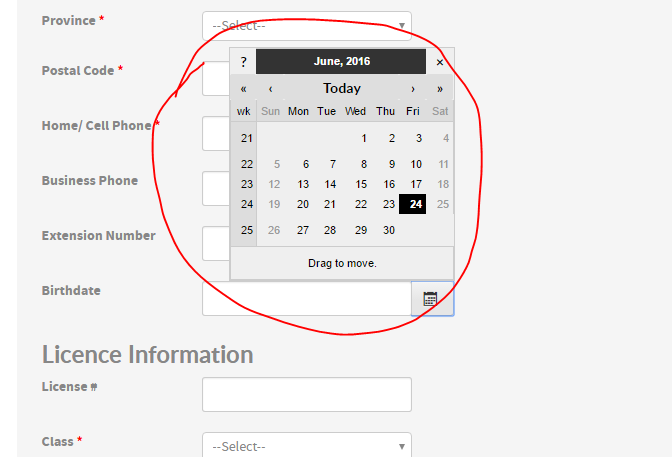
The date pop up is difficult for people to navigate, especially when someone birthday is:
05-05-1945
So if he open the date pop up he will take 5 minuets of his time to go till he reach to the date and then select.
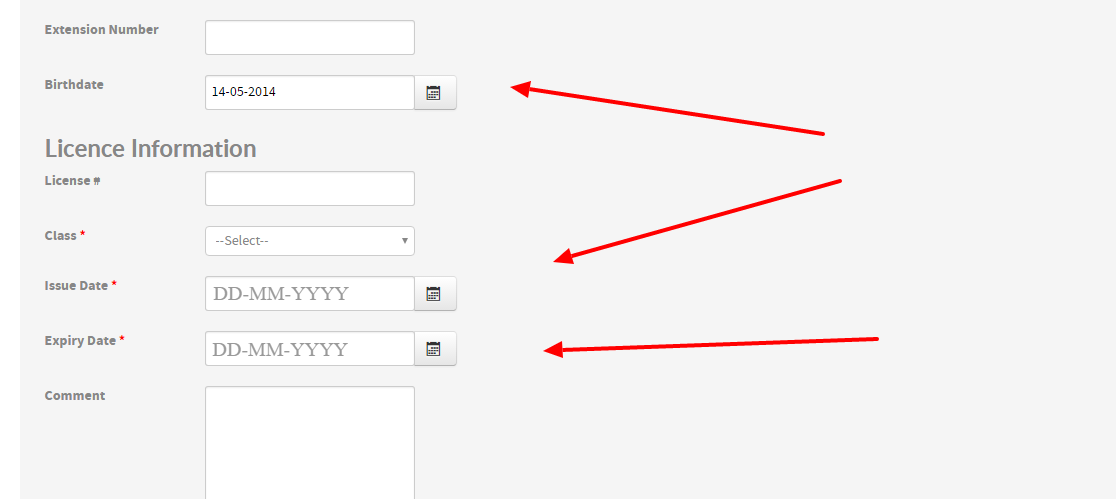
So I'm thinking to have have this format to people to follow our date format:
DD-MM-YYYY
to be inside the box so people need to fill it.
so now they have 2 options:
1- Pop up Calendar
2- type in directly.
Please help, as I got some complaints about this.
Thank you for the great help and support.
The date pop up is difficult for people to navigate, especially when someone birthday is:
05-05-1945
So if he open the date pop up he will take 5 minuets of his time to go till he reach to the date and then select.
So I'm thinking to have have this format to people to follow our date format:
DD-MM-YYYY
to be inside the box so people need to fill it.
so now they have 2 options:
1- Pop up Calendar
2- type in directly.
Please help, as I got some complaints about this.
Thank you for the great help and support.
Please Log in or Create an account to join the conversation.
- Tuan Pham Ngoc
- Away
- Administrator
-

9 years 9 months ago #83474
by Tuan Pham Ngoc
Replied by Tuan Pham Ngoc on topic Dates box Issues
Right now, I think users still type the data directly in the box if they want. It doesn't work like that on your site? Or you want to show the DD-MM-YYYY (date format in the box) so that users can type it in correct format?
Tuan
Tuan
Please Log in or Create an account to join the conversation.
- okkhalid
- Topic Author
- Offline
- Senior Member
-
Less
More
- Posts: 62
- Thank you received: 0
9 years 9 months ago #83479
by okkhalid
Replied by okkhalid on topic Dates box Issues
Yes, how I can show the format: DD-MM-YYYY (date format in the box)
as I do not want the user enter different format than I have.
as I do not want the user enter different format than I have.
Please Log in or Create an account to join the conversation.
- Tuan Pham Ngoc
- Away
- Administrator
-
9 years 9 months ago #83514
by Tuan Pham Ngoc
Replied by Tuan Pham Ngoc on topic Dates box Issues
Hi
Please get this file, unzip it, upload to administrator/components/com_eventbooking/libraries/rad/form/field folder of your site.
Then the placeholder DD-MM-YYYY will be displayed inside the inputbox.
To force users to enter date in that format, go to Events Booking -> Configuration, find the config option "Date Custom Field Format", set it to "d-m-Y"
Regards,
Tuan
Please get this file, unzip it, upload to administrator/components/com_eventbooking/libraries/rad/form/field folder of your site.
Then the placeholder DD-MM-YYYY will be displayed inside the inputbox.
To force users to enter date in that format, go to Events Booking -> Configuration, find the config option "Date Custom Field Format", set it to "d-m-Y"
Regards,
Tuan
Please Log in or Create an account to join the conversation.
- okkhalid
- Topic Author
- Offline
- Senior Member
-
Less
More
- Posts: 62
- Thank you received: 0
9 years 9 months ago #83516
by okkhalid
Replied by okkhalid on topic Dates box Issues
Perfect, thank you so much for doing this, you are a start 
Please Log in or Create an account to join the conversation.
Moderators: Tuan Pham Ngoc
Support
Documentation
Information
Copyright © 2026 Joomla Extensions by Joomdonation. All Rights Reserved.
joomdonation.com is not affiliated with or endorsed by the Joomla! Project or Open Source Matters.
The Joomla! name and logo is used under a limited license granted by Open Source Matters the trademark holder in the United States and other countries.
The Joomla! name and logo is used under a limited license granted by Open Source Matters the trademark holder in the United States and other countries.