- Posts: 5
- Thank you received: 0

Hide price on Timeline view
- Tito
- Topic Author
- Offline
- New Member
-

Less
More
9 years 9 months ago #82746
by Tito
Hide price on Timeline view was created by Tito
Hi,
just installed EB and having a very good impression!
I need to hide the price btn in the timeline event list (i.e: Upcoming events), so users will find the price once they see the details page.
Haven't found such option at the component's admin interface, so I guess a layout customization is needed.
Looks like changing the eb-event-price-container at the events_timeline.php template would do the job, but before proceeding I would appreciate any comments about doing this.
Also, hiding it just when is not a free event, would be a plus!
Thanks in advance!!
just installed EB and having a very good impression!
I need to hide the price btn in the timeline event list (i.e: Upcoming events), so users will find the price once they see the details page.
Haven't found such option at the component's admin interface, so I guess a layout customization is needed.
Looks like changing the eb-event-price-container at the events_timeline.php template would do the job, but before proceeding I would appreciate any comments about doing this.
Also, hiding it just when is not a free event, would be a plus!
Thanks in advance!!
Please Log in or Create an account to join the conversation.
- James Riley
-

- Offline
- Platinum Member
-

9 years 9 months ago - 9 years 9 months ago #82750
by James Riley
James Riley .: EventBooking user since 2014 ::: JoomDonation user since 2016 :.
.: grfx & web design / IT / AV @ St. Therese Institute of Faith and Mission, Bruno, SK, Canada :.
Replied by James Riley on topic Hide price on Timeline view
You could remove it from the PHP code, or you should be able to override it with a few lines of CSS.
You mentioned the timeline view, so I will post an example for that in just a minute....
Here's what the HTML looks like (I've marked a couple items of interest that we will use to target the element you're after).
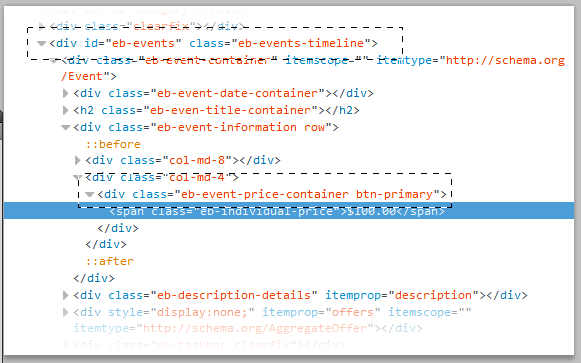
So, the CSS that you'll want to add to /media/com_eventbooking/assets/css/custom.css is:
You mentioned the timeline view, so I will post an example for that in just a minute....
Here's what the HTML looks like (I've marked a couple items of interest that we will use to target the element you're after).
So, the CSS that you'll want to add to /media/com_eventbooking/assets/css/custom.css is:
Code:
#eb-events.eb-events-timeline .eb-event-price-container {display:none;}
James Riley .: EventBooking user since 2014 ::: JoomDonation user since 2016 :.
.: grfx & web design / IT / AV @ St. Therese Institute of Faith and Mission, Bruno, SK, Canada :.
Last edit: 9 years 9 months ago by James Riley. Reason: Added CSS
The following user(s) said Thank You: Tito
Please Log in or Create an account to join the conversation.
- Tito
- Topic Author
- Offline
- New Member
-
Less
More
- Posts: 5
- Thank you received: 0
9 years 9 months ago #82753
by Tito
Replied by Tito on topic Hide price on Timeline view
Done and worked as expected!
Many thanks!!
Many thanks!!
Please Log in or Create an account to join the conversation.
- James Riley
-
- Offline
- Platinum Member
-
9 years 9 months ago #82756
by James Riley
James Riley .: EventBooking user since 2014 ::: JoomDonation user since 2016 :.
.: grfx & web design / IT / AV @ St. Therese Institute of Faith and Mission, Bruno, SK, Canada :.
Replied by James Riley on topic Hide price on Timeline view
You're welcome!
The advantage making changes via the custom.css is that your changes won't lost when you update/upgrade to later versions of Event Booking (if you made the change at the core PHP level, then you have to manually maintain the change forever).
The advantage making changes via the custom.css is that your changes won't lost when you update/upgrade to later versions of Event Booking (if you made the change at the core PHP level, then you have to manually maintain the change forever).
James Riley .: EventBooking user since 2014 ::: JoomDonation user since 2016 :.
.: grfx & web design / IT / AV @ St. Therese Institute of Faith and Mission, Bruno, SK, Canada :.
The following user(s) said Thank You: Tito
Please Log in or Create an account to join the conversation.
- Tito
- Topic Author
- Offline
- New Member
-
Less
More
- Posts: 5
- Thank you received: 0
9 years 9 months ago #82759
by Tito
Replied by Tito on topic Hide price on Timeline view
Thanks for the tip!
I've also got the taskbar hidden at the timeline events list view. We don't want users to be able to register or saving the event, etc... before reading the details. Didn't find any option on the interface to configure this, so following your method, I added this line to custom.css:
It worked as expected, but (of course) the 'Details' button was also hidden. Then I have added a button linking to each event page on every event's Short description box . Not nice.
Know a better way?
Thanks again for your help!
I've also got the taskbar hidden at the timeline events list view. We don't want users to be able to register or saving the event, etc... before reading the details. Didn't find any option on the interface to configure this, so following your method, I added this line to custom.css:
Code:
#eb-events.eb-events-timeline .eb-taskbar {display:none;}
It worked as expected, but (of course) the 'Details' button was also hidden. Then I have added a button linking to each event page on every event's Short description box . Not nice.
Know a better way?
Thanks again for your help!
Please Log in or Create an account to join the conversation.
- Tuan Pham Ngoc
- Offline
- Administrator
-

9 years 9 months ago #82782
by Tuan Pham Ngoc
Replied by Tuan Pham Ngoc on topic Hide price on Timeline view
Actually, you can modify the PHP code to hide the information you don't want. I think it is simpler to do that. You can use template override so that the change won't be lost when you update to future releases of the extension.
Read docs.joomla.org/J3.x:How_to_use_the_Temp...r#Creating_Overrides to understand how to create template override using Joomla template manager, you should be able to edit it easily
Regards,
Tuan
Read docs.joomla.org/J3.x:How_to_use_the_Temp...r#Creating_Overrides to understand how to create template override using Joomla template manager, you should be able to edit it easily
Regards,
Tuan
Please Log in or Create an account to join the conversation.
- Tito
- Topic Author
- Offline
- New Member
-
Less
More
- Posts: 5
- Thank you received: 0
9 years 9 months ago #82797
by Tito
Replied by Tito on topic Hide price on Timeline view
Wil try that. Many thanks.
Please Log in or Create an account to join the conversation.
- James Riley
-
- Offline
- Platinum Member
-
9 years 9 months ago #82864
by James Riley
James Riley .: EventBooking user since 2014 ::: JoomDonation user since 2016 :.
.: grfx & web design / IT / AV @ St. Therese Institute of Faith and Mission, Bruno, SK, Canada :.
Replied by James Riley on topic Hide price on Timeline view
Overrides are great. I had thought of mentioning it myself, but a CSS approach in this case seemed easier to implement, especially if you're not overly familiar with PHP and Joomla. Tuan knows I love going for the CSS approach on things  I usually try to go CSS first because can be less work involved in maintaining the edit.
One think to keep in mind with the "display: none;" CSS: The content is still generated by your website and delivered to the user's browser, but is just flagged as hidden. If there is a problem with the user's browser (or if they edit code), they can still see the content. Not a big issue in this case, but ultimately it *is* better to not give the user something at all if you don't want them to have it. This is where re-writing and overriding the code comes in.
A couple things to keep in mind with Overrides:
1) When you update to a later version of a component, you might want to check your override file(s) against the new version of the file(s) to ensure that no major changes have been to the new version of the file. If you upgrade and don't see a new feature or something stops working, rename your override files to disable them (eg: add a ".bak" or ".offline" etc. before the ".php") and see if that fixes the issue, and then re-introduce your changes into the new file, and save that back to your override directory.
2) You can only override files in a view/someview/tmpl/ folder. If you want to make changes to any files previous to that folder, (eg view/event/html.php), then you cannot use the override approach and need to make the changes to the extension's core file directly.
I usually try to go CSS first because can be less work involved in maintaining the edit.One think to keep in mind with the "display: none;" CSS: The content is still generated by your website and delivered to the user's browser, but is just flagged as hidden. If there is a problem with the user's browser (or if they edit code), they can still see the content. Not a big issue in this case, but ultimately it *is* better to not give the user something at all if you don't want them to have it. This is where re-writing and overriding the code comes in.
A couple things to keep in mind with Overrides:
1) When you update to a later version of a component, you might want to check your override file(s) against the new version of the file(s) to ensure that no major changes have been to the new version of the file. If you upgrade and don't see a new feature or something stops working, rename your override files to disable them (eg: add a ".bak" or ".offline" etc. before the ".php") and see if that fixes the issue, and then re-introduce your changes into the new file, and save that back to your override directory.
2) You can only override files in a view/someview/tmpl/ folder. If you want to make changes to any files previous to that folder, (eg view/event/html.php), then you cannot use the override approach and need to make the changes to the extension's core file directly.
James Riley .: EventBooking user since 2014 ::: JoomDonation user since 2016 :.
.: grfx & web design / IT / AV @ St. Therese Institute of Faith and Mission, Bruno, SK, Canada :.
The following user(s) said Thank You: Tuan Pham Ngoc
Please Log in or Create an account to join the conversation.
Moderators: Tuan Pham Ngoc
Support
Documentation
Information
Copyright © 2026 Joomla Extensions by Joomdonation. All Rights Reserved.
joomdonation.com is not affiliated with or endorsed by the Joomla! Project or Open Source Matters.
The Joomla! name and logo is used under a limited license granted by Open Source Matters the trademark holder in the United States and other countries.
The Joomla! name and logo is used under a limited license granted by Open Source Matters the trademark holder in the United States and other countries.