- Posts: 99
- Thank you received: 1

Need help with Joomla? We are available for hire to help with Joomla customization, upgrades, maintenance, and custom development.
Explore our services Discounted prices
- Andrew Hicks
- Topic Author
- Offline
- Premium Member
-

Less
More
10 years 4 months ago #82640
by Andrew Hicks
Discounted prices was created by Andrew Hicks
We would like more categories of discounted prices for users to select when doing group bookings:
eg 1. child price, 2. Price without meal, 3. Price with accomodation, Price with transport, etc.
I followed your instuction for custom event field - which worked - to create a child price. It appears in the details box for the event but is not linked to payment or invoice and there seems no way for the user to select this price for whichever of their guests.
eg 1. child price, 2. Price without meal, 3. Price with accomodation, Price with transport, etc.
I followed your instuction for custom event field - which worked - to create a child price. It appears in the details box for the event but is not linked to payment or invoice and there seems no way for the user to select this price for whichever of their guests.
Please Log in or Create an account to join the conversation.
- Calum
- Offline
- Elite Member
-

Less
More
- Posts: 257
- Thank you received: 34
10 years 4 months ago #82647
by Calum
Replied by Calum on topic Discounted prices
Have you got the custom field set to the right setting to get it to show on each group booking not just the first/billing?
Please Log in or Create an account to join the conversation.
- Andrew Hicks
- Topic Author
- Offline
- Premium Member
-
Less
More
- Posts: 99
- Thank you received: 1
10 years 4 months ago #82651
by Andrew Hicks
Replied by Andrew Hicks on topic Discounted prices
Thanks for responding Calum.
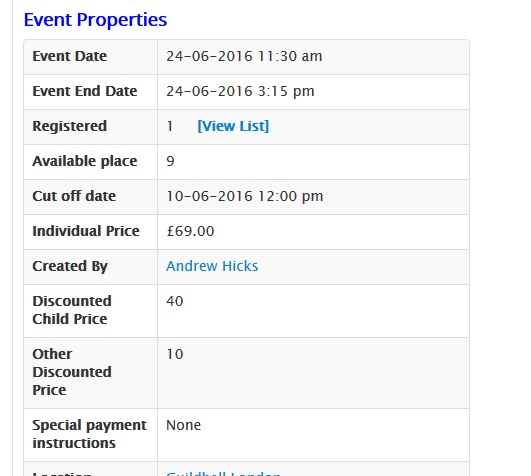
This is how it appears on the event display - basically just as a random item of data.
I also attach my fields.xml file (renamed as .txt).
So how do I redefine the child price so as to appear as a price field? And how do we get registrants in group bookings to associate with one price or the other?
Advice on this topic is very much appreciated.
This is how it appears on the event display - basically just as a random item of data.
I also attach my fields.xml file (renamed as .txt).
So how do I redefine the child price so as to appear as a price field? And how do we get registrants in group bookings to associate with one price or the other?
Advice on this topic is very much appreciated.
Please Log in or Create an account to join the conversation.
- Calum
- Offline
- Elite Member
-
Less
More
- Posts: 257
- Thank you received: 34
10 years 4 months ago #82653
by Calum
Replied by Calum on topic Discounted prices
I'd probably not have used the XML stuff!
I'd have used the Custom Fee Fields: eventbookingdoc.joomservices.com/basic-s...ds/custom-fee-fields
And used that to add / subtract the fees from the basic fee.
I'd have used the Custom Fee Fields: eventbookingdoc.joomservices.com/basic-s...ds/custom-fee-fields
And used that to add / subtract the fees from the basic fee.
Please Log in or Create an account to join the conversation.
- Andrew Hicks
- Topic Author
- Offline
- Premium Member
-
Less
More
- Posts: 99
- Thank you received: 1
10 years 4 months ago #82665
by Andrew Hicks
Replied by Andrew Hicks on topic Discounted prices
Yes Calum I have tried that. I created a radio button set for adult / child.
That option specifies a universal price supplement / discount. So with fixed values of 0 and -40 it works (the child price is reduced by £40).
What we want is to be able to sppecify different child discount rates per event. So I created an event custom field called 'child_discount'. In this event I have filled that field as '40'.
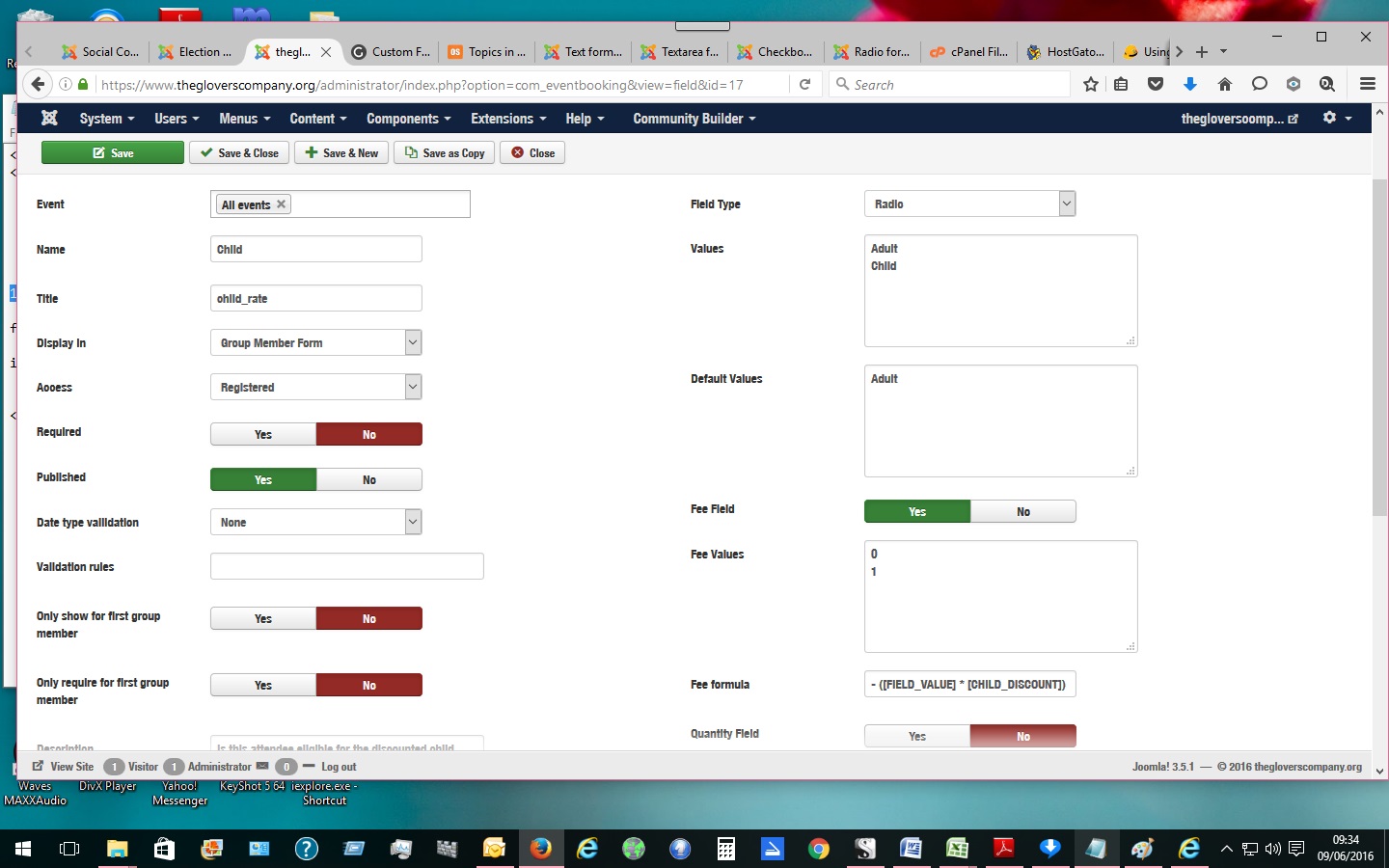
Now I am trying to use the 'fee formula' option to calculate the deduction. I change the adult and child values to "0" and "1", then used the formula: " - ( [FIELD_VALUE] * [CHILD_DISCOUNT] ) ".
Only it has no effect. Children are charged full price same as adults. Even the value (1) is not added to the price. See attachment.
That option specifies a universal price supplement / discount. So with fixed values of 0 and -40 it works (the child price is reduced by £40).
What we want is to be able to sppecify different child discount rates per event. So I created an event custom field called 'child_discount'. In this event I have filled that field as '40'.
Now I am trying to use the 'fee formula' option to calculate the deduction. I change the adult and child values to "0" and "1", then used the formula: " - ( [FIELD_VALUE] * [CHILD_DISCOUNT] ) ".
Only it has no effect. Children are charged full price same as adults. Even the value (1) is not added to the price. See attachment.
Please Log in or Create an account to join the conversation.
- Tuan Pham Ngoc
- Away
- Administrator
-

10 years 4 months ago #82668
by Tuan Pham Ngoc
Replied by Tuan Pham Ngoc on topic Discounted prices
Unfortunately, at the moment, event custom fields could not be used for fee formula yet (and it could not be used in the email, thank you messages)
I can add support for it. However, it would take few days to have it implemented (as I am working on other things, too)
Would it be OK for you to wait me for one week for this feature?
Tuan
I can add support for it. However, it would take few days to have it implemented (as I am working on other things, too)
Would it be OK for you to wait me for one week for this feature?
Tuan
The following user(s) said Thank You: Andrew Hicks
Please Log in or Create an account to join the conversation.
- Andrew Hicks
- Topic Author
- Offline
- Premium Member
-
Less
More
- Posts: 99
- Thank you received: 1
10 years 4 months ago #82670
by Andrew Hicks
Replied by Andrew Hicks on topic Discounted prices
One week to implement this fix would be great. Thank you Tuan. You are amazing.
Please Log in or Create an account to join the conversation.
- Tuan Pham Ngoc
- Away
- Administrator
-
10 years 4 months ago #82671
by Tuan Pham Ngoc
Replied by Tuan Pham Ngoc on topic Discounted prices
I consider this is an "improvement", not a "fix" since it was not the way the extension was designed to work (and If I am correct, no one needed this feature before)
Tuan
Tuan
The following user(s) said Thank You: Andrew Hicks
Please Log in or Create an account to join the conversation.
- Andrew Hicks
- Topic Author
- Offline
- Premium Member
-
Less
More
- Posts: 99
- Thank you received: 1
10 years 4 months ago #82690
by Andrew Hicks
Replied by Andrew Hicks on topic Discounted prices
Thank you very much indeed.
Please Log in or Create an account to join the conversation.
- Andrew Hicks
- Topic Author
- Offline
- Premium Member
-
Less
More
- Posts: 99
- Thank you received: 1
10 years 1 month ago #87833
by Andrew Hicks
Replied by Andrew Hicks on topic Discounted prices
Hi Tuan,
Have you managed to implement this feature yet? It would be really useful.
Regards,
Andrew
Have you managed to implement this feature yet? It would be really useful.
Regards,
Andrew
Please Log in or Create an account to join the conversation.
Moderators: Tuan Pham Ngoc
Support
Documentation
Information
Copyright © 2026 Joomla Extensions by Joomdonation. All Rights Reserved.
joomdonation.com is not affiliated with or endorsed by the Joomla! Project or Open Source Matters.
The Joomla! name and logo is used under a limited license granted by Open Source Matters the trademark holder in the United States and other countries.
The Joomla! name and logo is used under a limited license granted by Open Source Matters the trademark holder in the United States and other countries.