
Ordering of Events in Admin area
- intouchweb
- Topic Author
- Offline
- Elite Member
-

Less
More
9 years 10 months ago #81587
by intouchweb
Ordering of Events in Admin area was created by intouchweb
Each time I go to the Events page in the backend the order of upcoming events are in reverse order to the upcoming events, ie the closest events are listed last rather then first. How do I change the ordering so that the closest upcoming events are always listed first in the backend? Thanks
Please Log in or Create an account to join the conversation.
- Dang Dam
-

- Offline
- Premium Member
-

Less
More
- Posts: 119
- Thank you received: 21
9 years 10 months ago #81590
by Dang Dam
Replied by Dang Dam on topic Ordering of Events in Admin area
Hello.
You can manage ordering in Eventbooking Config => Themes tab => Order Events By: Event Date, and Order direction: set to DESC, to show latest event first.
Thanks.
You can manage ordering in Eventbooking Config => Themes tab => Order Events By: Event Date, and Order direction: set to DESC, to show latest event first.
Thanks.
Please Log in or Create an account to join the conversation.
- intouchweb
- Topic Author
- Offline
- Elite Member
-
9 years 10 months ago #81598
by intouchweb
Replied by intouchweb on topic Ordering of Events in Admin area
Hi Dung, are you sure this changes the order displayed in the BACK end?
I believe your suggestion changes the FRONT end ordering...?
It is the backend ordering that is causing a problem.
Please confirm
I believe your suggestion changes the FRONT end ordering...?
It is the backend ordering that is causing a problem.
Please confirm
Please Log in or Create an account to join the conversation.
- Dang Dam
-
- Offline
- Premium Member
-
Less
More
- Posts: 119
- Thank you received: 21
9 years 10 months ago #81599
by Dang Dam
Replied by Dang Dam on topic Ordering of Events in Admin area
Hello.
Sorry about the wrong guide. Last guide is how to order event at the frontend.
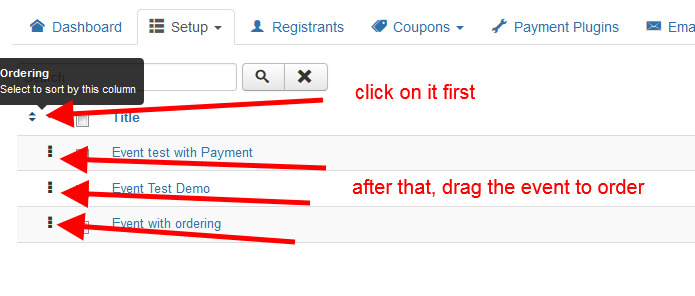
Please check the attachment to see how to order events in backend.
Thanks.
Sorry about the wrong guide. Last guide is how to order event at the frontend.
Please check the attachment to see how to order events in backend.
Thanks.
Please Log in or Create an account to join the conversation.
- Tuan Pham Ngoc
- Offline
- Administrator
-

9 years 10 months ago #81600
by Tuan Pham Ngoc
Replied by Tuan Pham Ngoc on topic Ordering of Events in Admin area
Hi
Sorry for the wrong answer from my dev. He didn't understand your question. By default, events in the backend is ordered by ordering in DESC order. It seems you want to order events by date, so you will need to edit the code abit. Please follow this instructions:
1. Open the file administrator/components/com_eventbooking/model/events.php
2. Find these lines of code:
3. Change it to:
After that, logout, then login again. It should solve your issue
Tuan
Sorry for the wrong answer from my dev. He didn't understand your question. By default, events in the backend is ordered by ordering in DESC order. It seems you want to order events by date, so you will need to edit the code abit. Please follow this instructions:
1. Open the file administrator/components/com_eventbooking/model/events.php
2. Find these lines of code:
Code:
$this->state->insert('filter_category_id', 'int', 0)
->insert('filter_location_id', 'int', 0)
->insert('filter_past_events', 'int', 0)
->insert('filter_order_Dir', 'word', 'DESC');
3. Change it to:
Code:
$this->state->insert('filter_category_id', 'int', 0)
->insert('filter_location_id', 'int', 0)
->insert('filter_past_events', 'int', 0)
->setDefault('filter_order', 'tbl.event_date');
After that, logout, then login again. It should solve your issue
Tuan
Please Log in or Create an account to join the conversation.
Moderators: Tuan Pham Ngoc
Support
Documentation
Information
Copyright © 2026 Joomla Extensions by Joomdonation. All Rights Reserved.
joomdonation.com is not affiliated with or endorsed by the Joomla! Project or Open Source Matters.
The Joomla! name and logo is used under a limited license granted by Open Source Matters the trademark holder in the United States and other countries.
The Joomla! name and logo is used under a limited license granted by Open Source Matters the trademark holder in the United States and other countries.