- Posts: 3
- Thank you received: 0

Changing the name and font size on headers
- Mike Smock
- Topic Author
- Offline
- New Member
-

Less
More
9 years 11 months ago #80154
by Mike Smock
Changing the name and font size on headers was created by Mike Smock
Hi,
I would like to change at the font size for the event title and for the "Event Properties". How do I do this?
I would also like to change some of the phases such as "Event Properties" to Event Details. I looked at the "Translations" tab and it doesn't appear that you can change fields. How do I do this?
I would like to change at the font size for the event title and for the "Event Properties". How do I do this?
I would also like to change some of the phases such as "Event Properties" to Event Details. I looked at the "Translations" tab and it doesn't appear that you can change fields. How do I do this?
Please Log in or Create an account to join the conversation.
- James Riley
-

- Offline
- Platinum Member
-

9 years 11 months ago - 9 years 11 months ago #80159
by James Riley
James Riley .: EventBooking user since 2014 ::: JoomDonation user since 2016 :.
.: grfx & web design / IT / AV @ St. Therese Institute of Faith and Mission, Bruno, SK, Canada :.
Replied by James Riley on topic Changing the name and font size on headers
Because there are pages and pages of items in the translation manager, the key to finding ANYTHING is to search for the appropriate Key name. Sometime, you can just take a guess at a key word that the key name might contain and find it quickly, other times you need at ask @Tuan or wade through a sea of code...
Here, I guessed that the item you wanted would have the word "properties" as part of the key name... Yup!
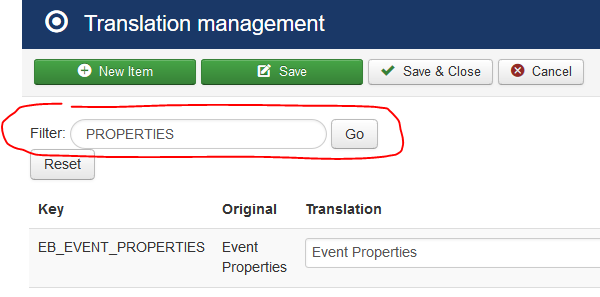
[hr]As for changing the font size, you'll need to add a line of CSS code to the /media/com_eventbooking/assets/css/custom.css file. Lets first find something that we can use to target the element. Right-clicking on the Event Properties text and selecting "inspect element" from the menu, we see:

The text is wrapped with a <h3> tag, with it's own unique id. Perfect! In the custom.css file, we just need to add the following line:
... and change YOUR-SIZE to whatever you want... 3em, 150%, 20px, etc.
Here, I guessed that the item you wanted would have the word "properties" as part of the key name... Yup!
[hr]As for changing the font size, you'll need to add a line of CSS code to the /media/com_eventbooking/assets/css/custom.css file. Lets first find something that we can use to target the element. Right-clicking on the Event Properties text and selecting "inspect element" from the menu, we see:
The text is wrapped with a <h3> tag, with it's own unique id. Perfect! In the custom.css file, we just need to add the following line:
Code:
#eb-event-properties-heading {font-size:YOUR-SIZE; }
James Riley .: EventBooking user since 2014 ::: JoomDonation user since 2016 :.
.: grfx & web design / IT / AV @ St. Therese Institute of Faith and Mission, Bruno, SK, Canada :.
Last edit: 9 years 11 months ago by James Riley.
The following user(s) said Thank You: Tuan Pham Ngoc
Please Log in or Create an account to join the conversation.
- Mike Smock
- Topic Author
- Offline
- New Member
-
Less
More
- Posts: 3
- Thank you received: 0
9 years 11 months ago #80161
by Mike Smock
Replied by Mike Smock on topic Changing the name and font size on headers
Thanks James!
Changed the name. That worked.
Found the custom css file but now FileZilla decided it couldn't download the file for me to add the css code. So I'll need to figure that out.
I do appreciate the support!
Thanks
Changed the name. That worked.
Found the custom css file but now FileZilla decided it couldn't download the file for me to add the css code. So I'll need to figure that out.
I do appreciate the support!
Thanks
Please Log in or Create an account to join the conversation.
- James Riley
-
- Offline
- Platinum Member
-
9 years 11 months ago - 9 years 11 months ago #80164
by James Riley
James Riley .: EventBooking user since 2014 ::: JoomDonation user since 2016 :.
.: grfx & web design / IT / AV @ St. Therese Institute of Faith and Mission, Bruno, SK, Canada :.
Replied by James Riley on topic Changing the name and font size on headers
Oh, another way to find what you're looking for is to look at the /language/en-GB/en-GB.com_eventbooking.ini file.
I just realized that the Translation Manager is actually just a back-end editor for updating this file
I just realized that the Translation Manager is actually just a back-end editor for updating this file
James Riley .: EventBooking user since 2014 ::: JoomDonation user since 2016 :.
.: grfx & web design / IT / AV @ St. Therese Institute of Faith and Mission, Bruno, SK, Canada :.
Last edit: 9 years 11 months ago by James Riley.
Please Log in or Create an account to join the conversation.
Moderators: Tuan Pham Ngoc
Support
Documentation
Information
Copyright © 2026 Joomla Extensions by Joomdonation. All Rights Reserved.
joomdonation.com is not affiliated with or endorsed by the Joomla! Project or Open Source Matters.
The Joomla! name and logo is used under a limited license granted by Open Source Matters the trademark holder in the United States and other countries.
The Joomla! name and logo is used under a limited license granted by Open Source Matters the trademark holder in the United States and other countries.