- Posts: 62
- Thank you received: 0

remove registered row
- okkhalid
- Topic Author
- Offline
- Senior Member
-

Less
More
9 years 11 months ago #79108
by okkhalid
remove registered row was created by okkhalid
Hello,
I'm looking to remove the Registered item and numbers from the core file, by removing the code:
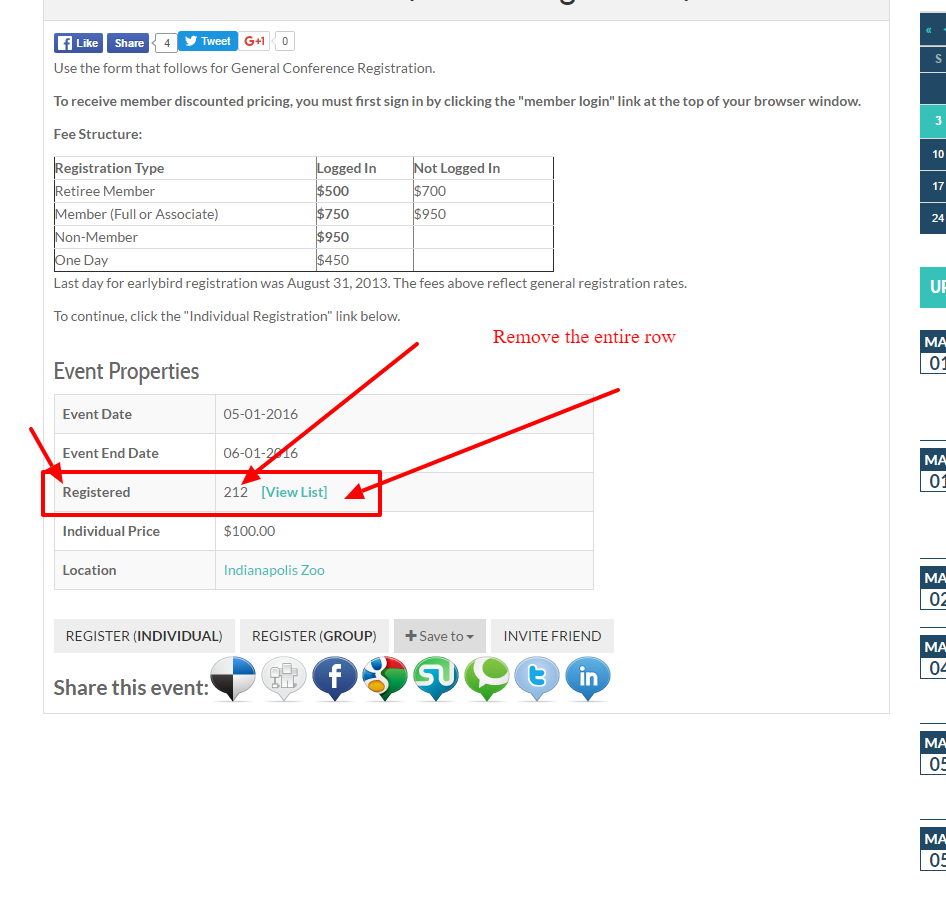
joomdonationdemo.com/eventbooking/other-features/content-plugin
I know how to do that in the backed:
To hide this information, please go to Events Booking -> Configuration, look at Themes tab, find the config option "Show number registered users", set it to No
But I'm really looking to remove the code from the file but not sure which file and line?
Please help.
I'm looking to remove the Registered item and numbers from the core file, by removing the code:
joomdonationdemo.com/eventbooking/other-features/content-plugin
I know how to do that in the backed:
To hide this information, please go to Events Booking -> Configuration, look at Themes tab, find the config option "Show number registered users", set it to No
But I'm really looking to remove the code from the file but not sure which file and line?
Please help.
Please Log in or Create an account to join the conversation.
- okkhalid
- Topic Author
- Offline
- Senior Member
-
Less
More
- Posts: 62
- Thank you received: 0
9 years 11 months ago #79115
by okkhalid
Replied by okkhalid on topic remove registered row
Any hint, I tried to edit lots of files but still not able to remove the row,
Thanks,
Thanks,
Please Log in or Create an account to join the conversation.
- Brian F
- Offline
- Premium Member
-

Less
More
- Posts: 101
- Thank you received: 17
9 years 11 months ago #79116
by Brian F
Replied by Brian F on topic remove registered row
For the event details page, in the file "/components/com_eventbooking/view/event/tmpl/default.php" that block of code starts around Line 216 with "if ($this->config->show_registered && $item->registration_type != 3)".
For the events listings, in "/components/com_eventbooking/view/events/tmpl/default.php" you'll see around Line 46 "<?php echo JText::_('EB_NUMBER_REGISTRANTS'); ?>" for the label, and around Line 102 "<?php echo (int) $row->total_registrants ; ?>" for the query.
For the events listings, in "/components/com_eventbooking/view/events/tmpl/default.php" you'll see around Line 46 "<?php echo JText::_('EB_NUMBER_REGISTRANTS'); ?>" for the label, and around Line 102 "<?php echo (int) $row->total_registrants ; ?>" for the query.
Please Log in or Create an account to join the conversation.
- okkhalid
- Topic Author
- Offline
- Senior Member
-
Less
More
- Posts: 62
- Thank you received: 0
9 years 11 months ago #79124
by okkhalid
Replied by okkhalid on topic remove registered row
Hi, Thank you, I have tried this before but it did not work,
I have removed the complete code and still shows.
I'm really not sure why still shows.
I have removed the complete code and still shows.
I'm really not sure why still shows.
Please Log in or Create an account to join the conversation.
- Tuan Pham Ngoc
- Away
- Administrator
-

9 years 11 months ago #79130
by Tuan Pham Ngoc
Replied by Tuan Pham Ngoc on topic remove registered row
Hi
You can go to Events Booking -> Configuration, look at Themes tab, find the config option "Show number registered users", set it to No
After that, it should be hided automatically
Regards,
Tuan
You can go to Events Booking -> Configuration, look at Themes tab, find the config option "Show number registered users", set it to No
After that, it should be hided automatically
Regards,
Tuan
Please Log in or Create an account to join the conversation.
- Brian F
- Offline
- Premium Member
-
Less
More
- Posts: 101
- Thank you received: 17
9 years 11 months ago #79197
by Brian F
Replied by Brian F on topic remove registered row
Hi Tuan, they were hoping to remove that row from within the code instead of using the config setting.
okkhalid, sorry, for the event listings, please try the "/components/com_eventbooking/view/common/tmpl/events_table.php" file; code blocks around Line 68 and Line 260; both starting with "if ($config->show_registered)".
okkhalid, sorry, for the event listings, please try the "/components/com_eventbooking/view/common/tmpl/events_table.php" file; code blocks around Line 68 and Line 260; both starting with "if ($config->show_registered)".
Please Log in or Create an account to join the conversation.
- okkhalid
- Topic Author
- Offline
- Senior Member
-
Less
More
- Posts: 62
- Thank you received: 0
9 years 11 months ago #79198
by okkhalid
Replied by okkhalid on topic remove registered row
Hi Brian,
Thank you but that will effect the table layout.
I'm looking to deleted the row in the event details page:
for example:
in this page:
joomdonationdemo.com/eventbooking/events...student-registration
So when anyone click on the page to view the details for the event, the view the above link.
So not able to located the code that is hide in this page.
Please help.
Thank you but that will effect the table layout.
I'm looking to deleted the row in the event details page:
for example:
in this page:
joomdonationdemo.com/eventbooking/events...student-registration
So when anyone click on the page to view the details for the event, the view the above link.
So not able to located the code that is hide in this page.
Please help.
Please Log in or Create an account to join the conversation.
- Brian F
- Offline
- Premium Member
-
Less
More
- Posts: 101
- Thank you received: 17
9 years 11 months ago #79201
by Brian F
Replied by Brian F on topic remove registered row
Hi, editing the event details file at "/components/com_eventbooking/view/event/tmpl/default.php" where the block of code starts around Line 216 with "if ($this->config->show_registered && $item->registration_type != 3)" doesn't remove that for you? Deleting, or commenting out:
Code:
<?php
}
if ($this->config->show_registered && $item->registration_type != 3)
{
?>
<tr>
<td>
<strong><?php echo JText::_('EB_REGISTERED'); ?></strong>
</td>
<td>
<?php echo $item->total_registrants ; ?>
<?php
if ($this->config->show_list_of_registrants && ($item->total_registrants > 0) && EventbookingHelper::canViewRegistrantList())
{
?>
<a href="index.php?option=com_eventbooking&view=registrantlist&id=<?php echo $item->id ?>&tmpl=component" class="eb-colorbox-register-lists"><span class="view_list"><?php echo JText::_("EB_VIEW_LIST"); ?></span></a>
<?php
}
?>
</td>
</tr>
Please Log in or Create an account to join the conversation.
- okkhalid
- Topic Author
- Offline
- Senior Member
-
Less
More
- Posts: 62
- Thank you received: 0
9 years 11 months ago #79205
by okkhalid
Replied by okkhalid on topic remove registered row
Hello,
I have removed the entire codes, still showing
|
I have removed the entire codes, still showing
|
Please Log in or Create an account to join the conversation.
- Brian F
- Offline
- Premium Member
-
Less
More
- Posts: 101
- Thank you received: 17
9 years 11 months ago #79207
by Brian F
Replied by Brian F on topic remove registered row
Hmm, that's the correct file and code to remove for the event details page, I've tested it and it doesn't show on my end. Sorry, I would have to look at your site. I don't guess clearing your site's and brower's caches would help?
Please Log in or Create an account to join the conversation.
Moderators: Tuan Pham Ngoc
Support
Documentation
Information
Copyright © 2026 Joomla Extensions by Joomdonation. All Rights Reserved.
joomdonation.com is not affiliated with or endorsed by the Joomla! Project or Open Source Matters.
The Joomla! name and logo is used under a limited license granted by Open Source Matters the trademark holder in the United States and other countries.
The Joomla! name and logo is used under a limited license granted by Open Source Matters the trademark holder in the United States and other countries.