- Posts: 11
- Thank you received: 1

Terms and Conditions
- Steve Barratt
- Topic Author
- Offline
- New Member
-

Less
More
10 years 2 weeks ago #78302
by Steve Barratt
Terms and Conditions was created by Steve Barratt
I have a requirement for terms and conditions for 3 of the 4 events I am currently managing, how can I not have terms and conditions on that 1 event that doesn't require it? or if it is on it will always appear for all events?
Please Log in or Create an account to join the conversation.
- James Riley
-

- Offline
- Platinum Member
-

10 years 2 weeks ago #78317
by James Riley
James Riley .: EventBooking user since 2014 ::: JoomDonation user since 2016 :.
.: grfx & web design / IT / AV @ St. Therese Institute of Faith and Mission, Bruno, SK, Canada :.
Replied by James Riley on topic Terms and Conditions
From what I've seen, T&C is a global setting with no event-level override (though I don't think it would be hard to code in an override at event level). You can set an override T&C article, but you can't turn off T&C.
James Riley .: EventBooking user since 2014 ::: JoomDonation user since 2016 :.
.: grfx & web design / IT / AV @ St. Therese Institute of Faith and Mission, Bruno, SK, Canada :.
Please Log in or Create an account to join the conversation.
- James Riley
-
- Offline
- Platinum Member
-
10 years 2 weeks ago - 10 years 2 weeks ago #78325
by James Riley
James Riley .: EventBooking user since 2014 ::: JoomDonation user since 2016 :.
.: grfx & web design / IT / AV @ St. Therese Institute of Faith and Mission, Bruno, SK, Canada :.
Replied by James Riley on topic Terms and Conditions
I think I got it figured out (I needed it for an event last month, but didn't have the time to do it then... but I will need it again  ).
).
1. Database change: Add a new column to the __eb_events table, named disable_term_condition

I did most my code-level changes, as template overrides. There is one core file (html.php) that you'll have to overwrite however (can't template override it ). All my changes are flagged within the files with a "JAMES ADDED 3/15/2016"). This works for back-end event creation -- I don't use front-end creation, so I don't know if it would work there or not.
2. From the attached EB-Admin.zip, put
Hopefully I got all the file paths right
On my event edit window, I now have the following option on the right-hand column, and no T&C on the events that I set to disable=yes
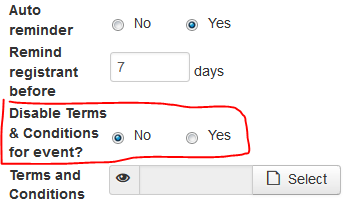
).1. Database change: Add a new column to the __eb_events table, named disable_term_condition
I did most my code-level changes, as template overrides. There is one core file (html.php) that you'll have to overwrite however (can't template override it
). All my changes are flagged within the files with a "JAMES ADDED 3/15/2016"). This works for back-end event creation -- I don't use front-end creation, so I don't know if it would work there or not.2. From the attached EB-Admin.zip, put
- html.php --> /administrator/components/com_eventbooking/view/event/ (this is the one core-file overwrite)
- default.php -> /administrator/templates/YOUR-ADMIN-TEMPLATE/html/com_eventbooking/event/ (I hard-coded english text into this file -- if you need a different language, you can change it within the file. If you need multilingual, you'll have to create the appropriate translation table entries and rewrite the code to pull from the table instead.)
- both default.php and group_billing.php --> /templates/YOUR-SITE-TEMPLATE/html/com_eventbooking/register/
Hopefully I got all the file paths right
On my event edit window, I now have the following option on the right-hand column, and no T&C on the events that I set to disable=yes
James Riley .: EventBooking user since 2014 ::: JoomDonation user since 2016 :.
.: grfx & web design / IT / AV @ St. Therese Institute of Faith and Mission, Bruno, SK, Canada :.
Last edit: 10 years 2 weeks ago by James Riley.
The following user(s) said Thank You: Tuan Pham Ngoc, Steve Barratt
Please Log in or Create an account to join the conversation.
- James Riley
-
- Offline
- Platinum Member
-
10 years 2 weeks ago - 10 years 2 weeks ago #78326
by James Riley
James Riley .: EventBooking user since 2014 ::: JoomDonation user since 2016 :.
.: grfx & web design / IT / AV @ St. Therese Institute of Faith and Mission, Bruno, SK, Canada :.
Replied by James Riley on topic Terms and Conditions
@Tuan -- There would be only a little bit more work required to add this to core: translation-enabled text (instead of hard-coded), and auto DB column creation. ... And anything else I'm missing :whistle: . Would you consider patching core to include this option?
As mentioned, my code-changes are all tagged with "JAMES ADD 3/15/2016".
As mentioned, my code-changes are all tagged with "JAMES ADD 3/15/2016".
James Riley .: EventBooking user since 2014 ::: JoomDonation user since 2016 :.
.: grfx & web design / IT / AV @ St. Therese Institute of Faith and Mission, Bruno, SK, Canada :.
Last edit: 10 years 2 weeks ago by James Riley.
Please Log in or Create an account to join the conversation.
- Steve Barratt
- Topic Author
- Offline
- New Member
-
Less
More
- Posts: 11
- Thank you received: 1
10 years 2 weeks ago #78341
by Steve Barratt
Replied by Steve Barratt on topic Terms and Conditions
@James, I have done as you posted and it works like a charm, thank you so much for the fix. To me it makes sense to be able to turn on or off the Terms & Conditions for each event. But I can understand that it is global as well.
I hope that Tuan is happy to include your "fix" in a future build.
As always the community, and especially you James, are so helpful
I hope that Tuan is happy to include your "fix" in a future build.
As always the community, and especially you James, are so helpful
The following user(s) said Thank You: James Riley
Please Log in or Create an account to join the conversation.
- Tuan Pham Ngoc
- Offline
- Administrator
-

10 years 2 weeks ago #78347
by Tuan Pham Ngoc
Replied by Tuan Pham Ngoc on topic Terms and Conditions
Thanks James. Yes, If I remember correctly, there was another customer asked for this feature. So I am thinking about it and will add it to version 2.4.1
Regards,
Tuan
Regards,
Tuan
The following user(s) said Thank You: James Riley
Please Log in or Create an account to join the conversation.
Moderators: Tuan Pham Ngoc
Support
Documentation
Information
Copyright © 2026 Joomla Extensions by Joomdonation. All Rights Reserved.
joomdonation.com is not affiliated with or endorsed by the Joomla! Project or Open Source Matters.
The Joomla! name and logo is used under a limited license granted by Open Source Matters the trademark holder in the United States and other countries.
The Joomla! name and logo is used under a limited license granted by Open Source Matters the trademark holder in the United States and other countries.