
Email to Admin when created a new Event
- Adi Heutschi
-
 Topic Author
- Offline
- Junior Member
-

adi
Please Log in or Create an account to join the conversation.
- Tuan Pham Ngoc
- Offline
- Administrator
-

This feature was implemented from version 2.6.0. You can update to latest version, then go to Events Booking -> Emails & Messages, look at Events Submission Messages tab, enter necessary email subject and email message and everything will work as expected
Tuan
Please Log in or Create an account to join the conversation.
- Adi Heutschi
-
Topic Author
- Offline
- Junior Member
-
Thanks. Now i have updatet to 2.7.0
if I add an event I got the following error:
"Error while saving event:Invalid address"
I am not receiving E-Mail.
What is the Problem?
Please Log in or Create an account to join the conversation.
- Guenter
- Offline
- New Member
-

regards
Günter
Please Log in or Create an account to join the conversation.
- Tuan Pham Ngoc
- Offline
- Administrator
-
Adi Heutschi wrote: Hello Tuan
Thanks. Now i have updatet to 2.7.0
if I add an event I got the following error:
"Error while saving event:Invalid address"
I am not receiving E-Mail.
What is the Problem?
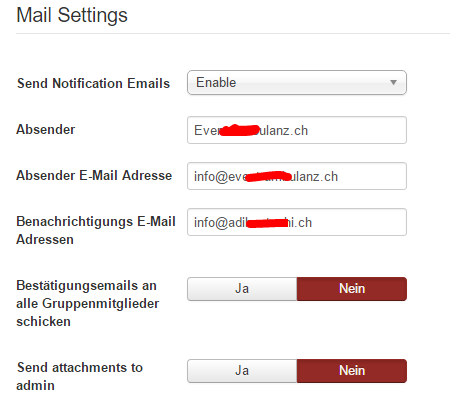
I think there might be a problem with your mail settings. Could you go to Events Booking -> Configuration, look at Mail Settings section, check and make sure you entered valid email into the Notification Emails config option ?
Tuan
Please Log in or Create an account to join the conversation.
- Adi Heutschi
-
Topic Author
- Offline
- Junior Member
-
I think i have the correct E-mail settings configurated.
I also receive course registration.
Please Log in or Create an account to join the conversation.
- Tuan Pham Ngoc
- Offline
- Administrator
-
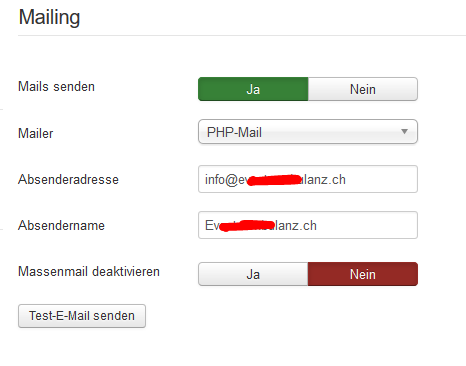
Could you please also go to System -> Global Configuration, look at Server tab, mail settings section and make sure it is valid, too? I have seen few customers left that settings empty and it causes the issue, too
Tuan
Please Log in or Create an account to join the conversation.
- Adi Heutschi
-
Topic Author
- Offline
- Junior Member
-
The Global Server E-mail Settings are correct. I can send and receive Testmails.
best regards
Please Log in or Create an account to join the conversation.
- Tuan Pham Ngoc
- Offline
- Administrator
-
In this case, please submit a support ticket so that we could check to see why it doesn't work and get it sorted for you
Regards,
Tuan
Please Log in or Create an account to join the conversation.
Support
Documentation
Information
The Joomla! name and logo is used under a limited license granted by Open Source Matters the trademark holder in the United States and other countries.