- Posts: 115
- Thank you received: 0

Customize [Registration_Detail]
- toad78
- Topic Author
- Offline
- Premium Member
-

Less
More
10 years 6 months ago #69697
by toad78
Customize [Registration_Detail] was created by toad78
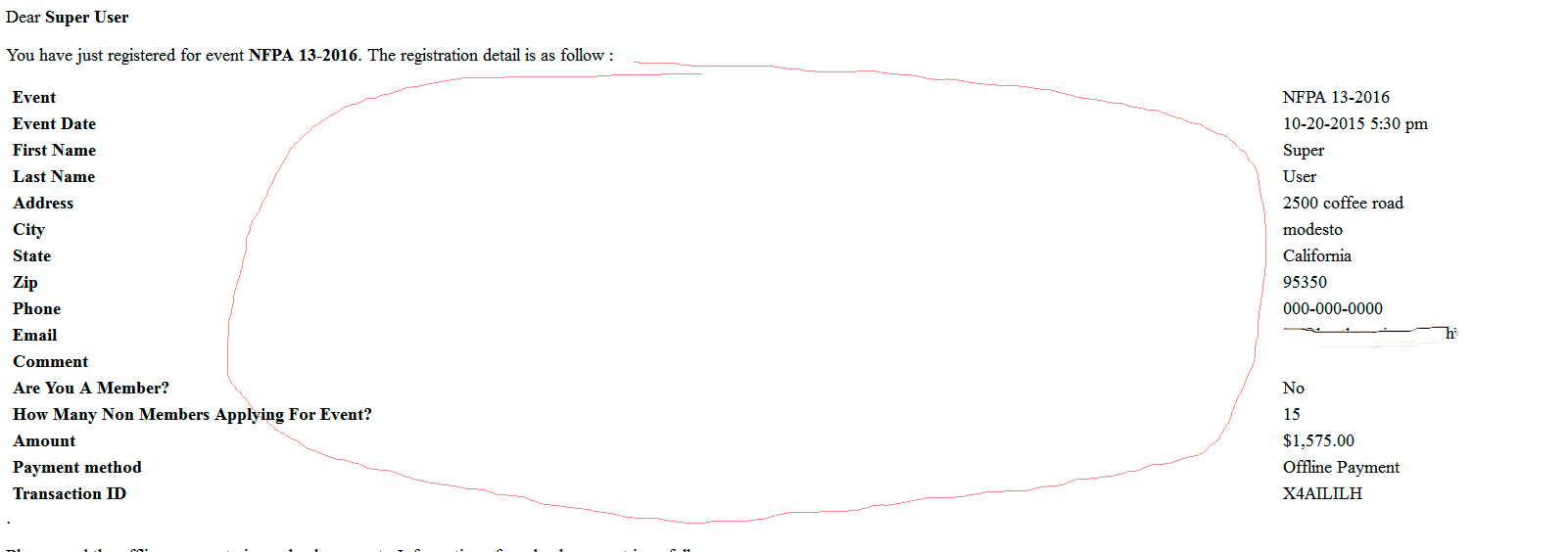
Is there a way to customize the [Registration_Detail] in the email (not the PDF)? Why I'm asking is that the formatting is off.
Please Log in or Create an account to join the conversation.
- Tuan Pham Ngoc
- Away
- Administrator
-

10 years 6 months ago #69701
by Tuan Pham Ngoc
Replied by Tuan Pham Ngoc on topic Customize [Registration_Detail]
Hmm
That format looks strange to me. Could you please try to look at the file components/com_eventbooking/emailtemplates/email_individual_detail.php and try to customize it?
Tuan
That format looks strange to me. Could you please try to look at the file components/com_eventbooking/emailtemplates/email_individual_detail.php and try to customize it?
Tuan
Please Log in or Create an account to join the conversation.
- toad78
- Topic Author
- Offline
- Premium Member
-
Less
More
- Posts: 115
- Thank you received: 0
10 years 6 months ago #69707
by toad78
Replied by toad78 on topic Customize [Registration_Detail]
It's all table-based at 100% width, which makes sense why the email looks so spacious. Is there a way, without further Event Booking updates overwriting it, that I can format this template to create a fixed-width table layout?
Please Log in or Create an account to join the conversation.
- Tuan Pham Ngoc
- Away
- Administrator
-
10 years 6 months ago #69729
by Tuan Pham Ngoc
Replied by Tuan Pham Ngoc on topic Customize [Registration_Detail]
For now, please create that fixed layout and used it. In the future release (not 2.0.5 but 2.0.6), I will make it possible to use template override for the email message as well.
If you can share the layout file back, I am happy to review it and if it is good, I can include it in future releases of the extension
Regards,
Tuan
If you can share the layout file back, I am happy to review it and if it is good, I can include it in future releases of the extension
Regards,
Tuan
Please Log in or Create an account to join the conversation.
- Diane Cleaver
- Offline
- Senior Member
-

Less
More
- Posts: 65
- Thank you received: 0
9 years 6 months ago #87261
by Diane Cleaver
Replied by Diane Cleaver on topic Customize [Registration_Detail]
Has the overrides for email templates been implemented yet? I created an override for email_individual_detail.php so that I could apply font styling, but it is not working.
Please Log in or Create an account to join the conversation.
- Tuan Pham Ngoc
- Away
- Administrator
-
9 years 6 months ago #87281
by Tuan Pham Ngoc
Replied by Tuan Pham Ngoc on topic Customize [Registration_Detail]
Hi Diane
Yes. It was implemented. If you are using latest version of Events Booking, you can copy the above file to PATH_TO_HTML_FOLDER_OF_YOUR_TEMPLATE/emailtemplates/, then change it from there and it should work as expected
Tuan
Yes. It was implemented. If you are using latest version of Events Booking, you can copy the above file to PATH_TO_HTML_FOLDER_OF_YOUR_TEMPLATE/emailtemplates/, then change it from there and it should work as expected
Tuan
Please Log in or Create an account to join the conversation.
- Diane Cleaver
- Offline
- Senior Member
-
Less
More
- Posts: 65
- Thank you received: 0
9 years 6 months ago #87313
by Diane Cleaver
Replied by Diane Cleaver on topic Customize [Registration_Detail]
Thank you, the issue was my fault. I did not have the folder structure correct in the html folder (was missing the com_eventbooking) folder.
In these overrides, I have specified the font size and style for the table items in the emails. However, only the Event and Event Date fields are being changed. The First Name, Last Name, and Email are not being affected. Looking at the email_individual_detail.php file (and all the others in the emailtemplates folder), I don't see the name or email referenced. Can you tell me what file contains this information?
Thank you.
In these overrides, I have specified the font size and style for the table items in the emails. However, only the Event and Event Date fields are being changed. The First Name, Last Name, and Email are not being affected. Looking at the email_individual_detail.php file (and all the others in the emailtemplates folder), I don't see the name or email referenced. Can you tell me what file contains this information?
Thank you.
Please Log in or Create an account to join the conversation.
- Tuan Pham Ngoc
- Away
- Administrator
-
9 years 6 months ago #87324
by Tuan Pham Ngoc
Replied by Tuan Pham Ngoc on topic Customize [Registration_Detail]
Hi Diane
It is rendered using custom field class and it could not be overrided. If you want to change something, please try to:
1. Find this block of code:
2. Change it to:
As you can see, now these fields will be rendered insde that tr , td block and then you can add the inline css code to style it in the way you want
Regards,
Tuan
It is rendered using custom field class and it could not be overrided. If you want to change something, please try to:
1. Find this block of code:
Code:
foreach ($fields as $field)
{
if ($field->hideOnDisplay || $field->row->hide_on_email)
{
continue;
}
echo $field->getOutput(false);
}
2. Change it to:
Code:
foreach ($fields as $field)
{
if ($field->hideOnDisplay || $field->row->hide_on_email)
{
continue;
}
?>
<tr>
<td class="title_cell">
<?php echo $field->title; ?>
</td>
<td class="field_cell">
<?php echo $field->value; ?>
</td>
</tr>
<?php
}
As you can see, now these fields will be rendered insde that tr , td block and then you can add the inline css code to style it in the way you want
Regards,
Tuan
Please Log in or Create an account to join the conversation.
- Gianluca
-

- Offline
- Junior Member
-

9 years 4 months ago #90017
by Gianluca
Replied by Gianluca on topic Customize [Registration_Detail]
Hi, in the news release 2.11.2, I saw the position of the file "email_individual_detail.php" is components/com_eventbooking/view/emailtemplates/tmpl/
For the overrides I insert "email_individual_detail.php" into: /templates/MY_TEMPLATES/html/emailtemplates/tmpl/email_individual_detail.php
But doesn't work. Which is the right position?
For the overrides I insert "email_individual_detail.php" into: /templates/MY_TEMPLATES/html/emailtemplates/tmpl/email_individual_detail.php
But doesn't work. Which is the right position?
Please Log in or Create an account to join the conversation.
- Tuan Pham Ngoc
- Away
- Administrator
-
9 years 4 months ago #90027
by Tuan Pham Ngoc
Replied by Tuan Pham Ngoc on topic Customize [Registration_Detail]
/templates/MY_TEMPLATES/html/emailtemplates/email_individual_detail.php should be correct path
Please note that when you create template override, never put tmpl into the path
Tuan
Please note that when you create template override, never put tmpl into the path
Tuan
Please Log in or Create an account to join the conversation.
Moderators: Tuan Pham Ngoc
Support
Documentation
Information
Copyright © 2026 Joomla Extensions by Joomdonation. All Rights Reserved.
joomdonation.com is not affiliated with or endorsed by the Joomla! Project or Open Source Matters.
The Joomla! name and logo is used under a limited license granted by Open Source Matters the trademark holder in the United States and other countries.
The Joomla! name and logo is used under a limited license granted by Open Source Matters the trademark holder in the United States and other countries.