- Posts: 37
- Thank you received: 0

Money figures too big for boxes. (font size)
- Brian
- Topic Author
- Offline
- Junior Member
-

Less
More
10 years 6 months ago #69042
by Brian
Money figures too big for boxes. (font size) was created by Brian
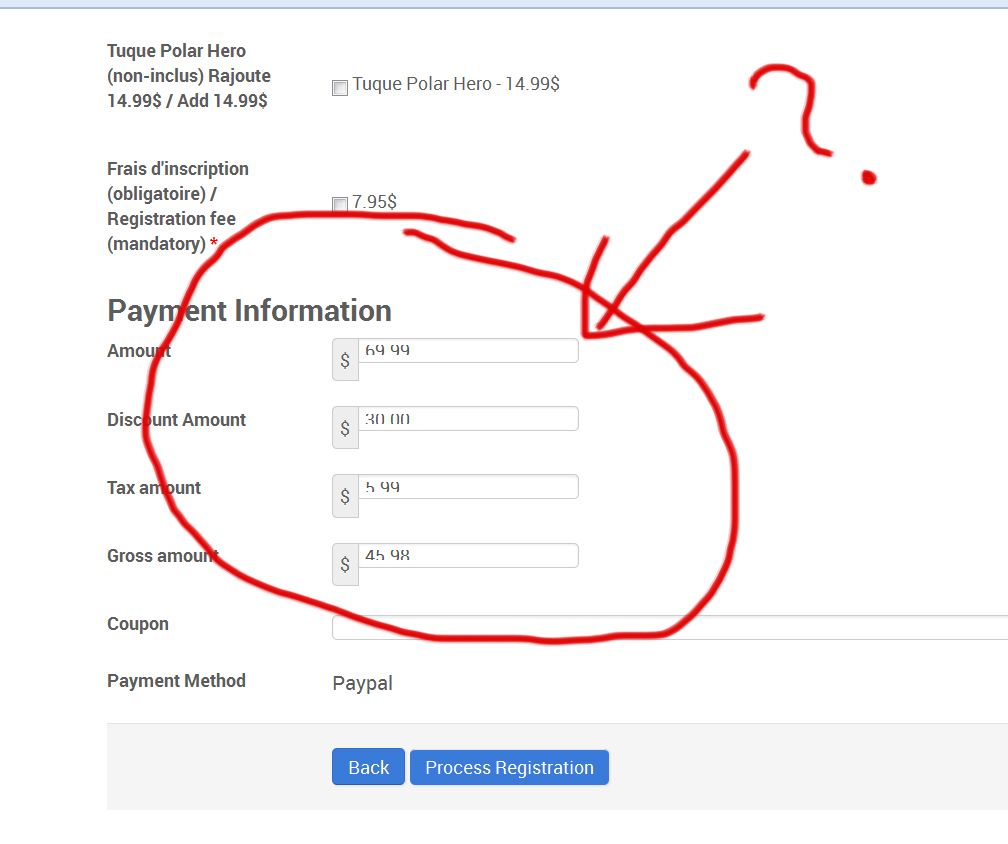
I am setting up a new page with this extension and my numbers are not fitting into the boxes. What can I do?
sportera-adrenaline.com/index.php/compon...istration?Itemid=182
sportera-adrenaline.com/index.php/compon...istration?Itemid=182
Please Log in or Create an account to join the conversation.
- James Riley
-

- Offline
- Platinum Member
-

10 years 6 months ago - 10 years 6 months ago #69046
by James Riley
James Riley .: EventBooking user since 2014 ::: JoomDonation user since 2016 :.
.: grfx & web design / IT / AV @ St. Therese Institute of Faith and Mission, Bruno, SK, Canada :.
Replied by James Riley on topic Money figures too big for boxes. (font size)
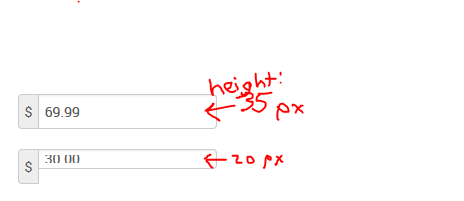
Looks like the problem is occurring because of a height:20px that is being set in /media/com_eventbooking/assets/bootstrap/css/bootstrap.css
Open /media/com_eventbooking/assets/custom.css and add the following. Hopefully it'll fix the problem.
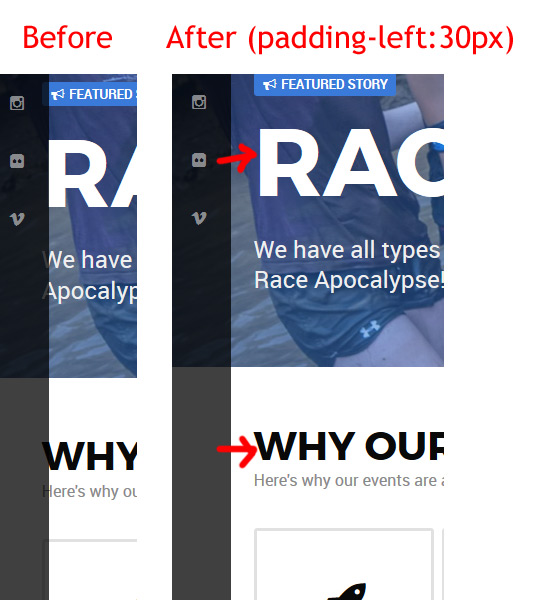
Also... Looks like your site is having some problems with the content appearing under the sidebar that runs down the left of your page too. You might want that look on your header images, but then text also ends up underneath the sidebar.
I would suggest maybe trying out the following css in your template's custom/override css file/additional-css-box to fix the site-wide problem you are having:
-- James
Open /media/com_eventbooking/assets/custom.css and add the following. Hopefully it'll fix the problem.
Code:
input[type="text"] {height:35px;}
Also... Looks like your site is having some problems with the content appearing under the sidebar that runs down the left of your page too. You might want that look on your header images, but then text also ends up underneath the sidebar.
I would suggest maybe trying out the following css in your template's custom/override css file/additional-css-box to fix the site-wide problem you are having:
Code:
.g-container {padding-left:30px;}
-- James
James Riley .: EventBooking user since 2014 ::: JoomDonation user since 2016 :.
.: grfx & web design / IT / AV @ St. Therese Institute of Faith and Mission, Bruno, SK, Canada :.
Last edit: 10 years 6 months ago by James Riley.
The following user(s) said Thank You: Tuan Pham Ngoc, Brian
Please Log in or Create an account to join the conversation.
Moderators: Tuan Pham Ngoc
Support
Documentation
Information
Copyright © 2026 Joomla Extensions by Joomdonation. All Rights Reserved.
joomdonation.com is not affiliated with or endorsed by the Joomla! Project or Open Source Matters.
The Joomla! name and logo is used under a limited license granted by Open Source Matters the trademark holder in the United States and other countries.
The Joomla! name and logo is used under a limited license granted by Open Source Matters the trademark holder in the United States and other countries.