- Posts: 159
- Thank you received: 2

Changing the column width of registration page
- Roger
- Topic Author
- Offline
- Premium Member
-

Less
More
10 years 6 months ago #68972
by Roger
Changing the column width of registration page was created by Roger
Hello
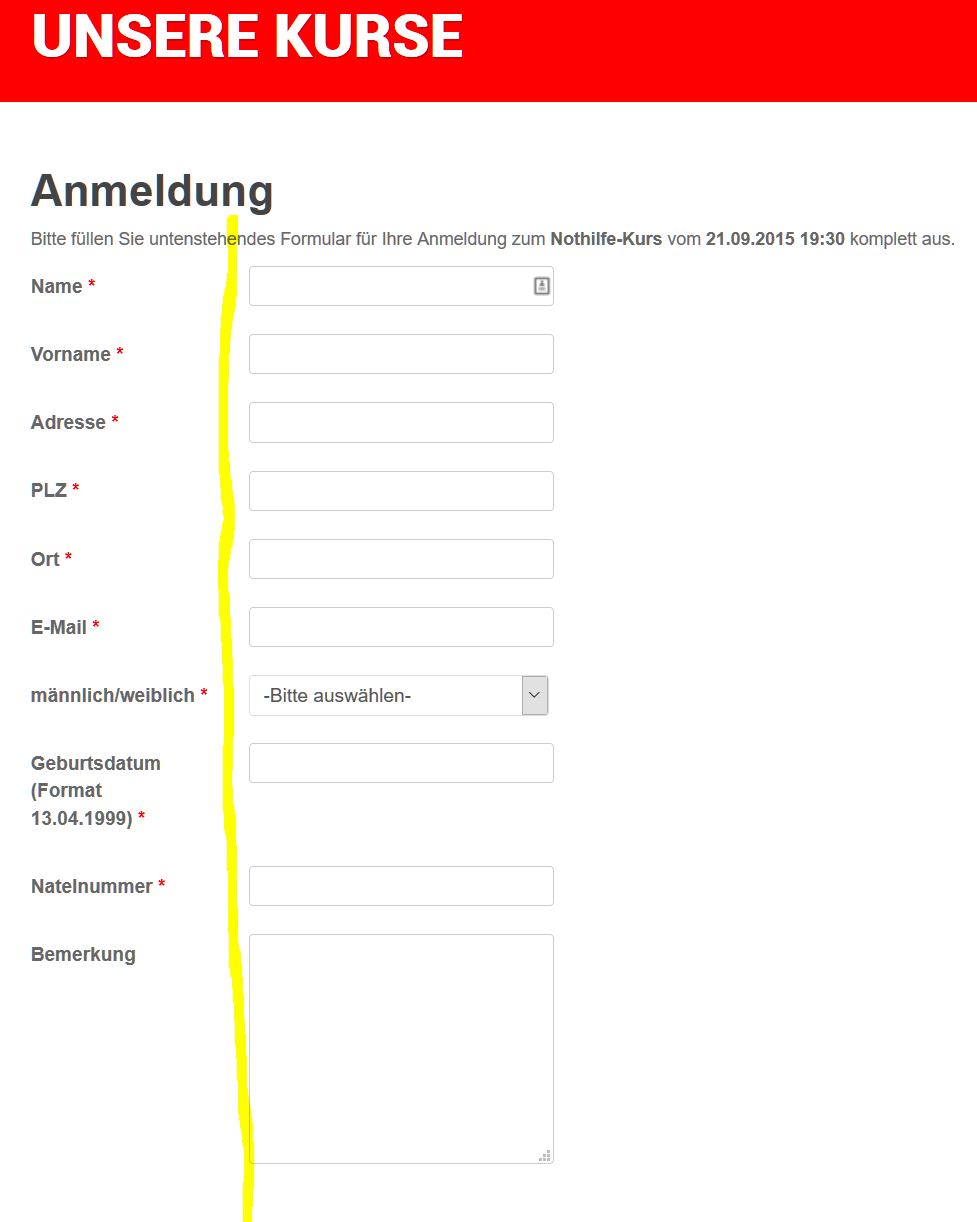
The column with the labels of the different fields is too narrow. Is there a custom.css file where I can change the width, so that it won't be overwritten by the next Event Booking release?
If I set the width for example to 200 pixels, what will happen with the responsive design? How can I prevent that on small screens?
Thanks
Roger
The column with the labels of the different fields is too narrow. Is there a custom.css file where I can change the width, so that it won't be overwritten by the next Event Booking release?
If I set the width for example to 200 pixels, what will happen with the responsive design? How can I prevent that on small screens?
Thanks
Roger
Please Log in or Create an account to join the conversation.
- Tuan Pham Ngoc
- Offline
- Administrator
-

10 years 6 months ago #68987
by Tuan Pham Ngoc
Replied by Tuan Pham Ngoc on topic Changing the column width of registration page
Please send us the link to your registration page. I will ask my template developer to look at it and give you a proper solution
Tuan
Tuan
Please Log in or Create an account to join the conversation.
- Roger
- Topic Author
- Offline
- Premium Member
-
Less
More
- Posts: 159
- Thank you received: 2
10 years 6 months ago #69002
by Roger
Replied by Roger on topic Changing the column width of registration page
Hi Tuan
Here an publicly accessible link. It is still running on 1.7.4. Will probably upgrade today
www.samariter-brig-glis.ch/kurse/bevoelk...ividual-registration
Thanks
Roger
Here an publicly accessible link. It is still running on 1.7.4. Will probably upgrade today
www.samariter-brig-glis.ch/kurse/bevoelk...ividual-registration
Thanks
Roger
Please Log in or Create an account to join the conversation.
- James Riley
-

- Offline
- Platinum Member
-

10 years 6 months ago - 10 years 6 months ago #69038
by James Riley
James Riley .: EventBooking user since 2014 ::: JoomDonation user since 2016 :.
.: grfx & web design / IT / AV @ St. Therese Institute of Faith and Mission, Bruno, SK, Canada :.
Replied by James Riley on topic Changing the column width of registration page
On my site, I custom-styled the class:
..,. to adjust the column width.
I have set width:350px for normal viewing (seems to be a good value for my template).
To make it responsive, when the screen size decreases, I have the width go to width:100% in order to take up a whole line with the entry boxes appearing underneath.
Code:
.eb-container .form-horizontal .control-label {css code here}
I have set width:350px for normal viewing (seems to be a good value for my template).
To make it responsive, when the screen size decreases, I have the width go to width:100% in order to take up a whole line with the entry boxes appearing underneath.
James Riley .: EventBooking user since 2014 ::: JoomDonation user since 2016 :.
.: grfx & web design / IT / AV @ St. Therese Institute of Faith and Mission, Bruno, SK, Canada :.
Last edit: 10 years 6 months ago by James Riley.
Please Log in or Create an account to join the conversation.
- Roger
- Topic Author
- Offline
- Premium Member
-
Less
More
- Posts: 159
- Thank you received: 2
10 years 6 months ago #69039
by Roger
Replied by Roger on topic Changing the column width of registration page
Hello James
Thanks for your answer. Did you change the css file from event booking or are you using some kind of a custom.css file? I don't want to adjust this after every new release of Event Booking.
Roger
Thanks for your answer. Did you change the css file from event booking or are you using some kind of a custom.css file? I don't want to adjust this after every new release of Event Booking.
Roger
Please Log in or Create an account to join the conversation.
- Dang Dam
-

- Offline
- Premium Member
-
Less
More
- Posts: 119
- Thank you received: 21
10 years 6 months ago #69056
by Dang Dam
Replied by Dang Dam on topic Changing the column width of registration page
Hello.
Yes, we used custom.css file, and add css style to this file.
This is link to custom.css file: media/com_eventbooking/assets/css/custom.css
Thanks.
Yes, we used custom.css file, and add css style to this file.
This is link to custom.css file: media/com_eventbooking/assets/css/custom.css
Thanks.
Please Log in or Create an account to join the conversation.
- Roger
- Topic Author
- Offline
- Premium Member
-
Less
More
- Posts: 159
- Thank you received: 2
10 years 6 months ago #69102
by Roger
Replied by Roger on topic Changing the column width of registration page
Thanks a lot will try it tomorrow. Might get back to you because of responsive design.
Cheers
Roger
Cheers
Roger
Please Log in or Create an account to join the conversation.
- James Riley
-
- Offline
- Platinum Member
-
10 years 6 months ago #69103
by James Riley
James Riley .: EventBooking user since 2014 ::: JoomDonation user since 2016 :.
.: grfx & web design / IT / AV @ St. Therese Institute of Faith and Mission, Bruno, SK, Canada :.
Replied by James Riley on topic Changing the column width of registration page
Hmmm... Realized that my template was doing the responsive part for me exactly the way I wanted it to work (and that my custom responsive code for this wasn't even loading :whistle: ).
Setting .form-horizontal .control-label{ width:350px;} is all I needed to do for my site.
I have being using my template's custom css file, but using EB's custom.css file is a better way to go as it only loads when the user is viewing an EB page (you don't have to define the style really narrow and specific to EB this way, and performance wise it means that you're not loading extra css every time your site loads a non-EB page). EB doesn't overwrite the file when upgrading and your custom css tweaks are retained.
Setting .form-horizontal .control-label{ width:350px;} is all I needed to do for my site.
I have being using my template's custom css file, but using EB's custom.css file is a better way to go as it only loads when the user is viewing an EB page (you don't have to define the style really narrow and specific to EB this way, and performance wise it means that you're not loading extra css every time your site loads a non-EB page). EB doesn't overwrite the file when upgrading and your custom css tweaks are retained.
James Riley .: EventBooking user since 2014 ::: JoomDonation user since 2016 :.
.: grfx & web design / IT / AV @ St. Therese Institute of Faith and Mission, Bruno, SK, Canada :.
Please Log in or Create an account to join the conversation.
Moderators: Tuan Pham Ngoc
Support
Documentation
Information
Copyright © 2026 Joomla Extensions by Joomdonation. All Rights Reserved.
joomdonation.com is not affiliated with or endorsed by the Joomla! Project or Open Source Matters.
The Joomla! name and logo is used under a limited license granted by Open Source Matters the trademark holder in the United States and other countries.
The Joomla! name and logo is used under a limited license granted by Open Source Matters the trademark holder in the United States and other countries.