- Posts: 17
- Thank you received: 0

Alignment of fields on registration completed page
- Paul Bull
- Topic Author
- Offline
- New Member
-

Less
More
10 years 9 months ago #64700
by Paul Bull
Alignment of fields on registration completed page was created by Paul Bull
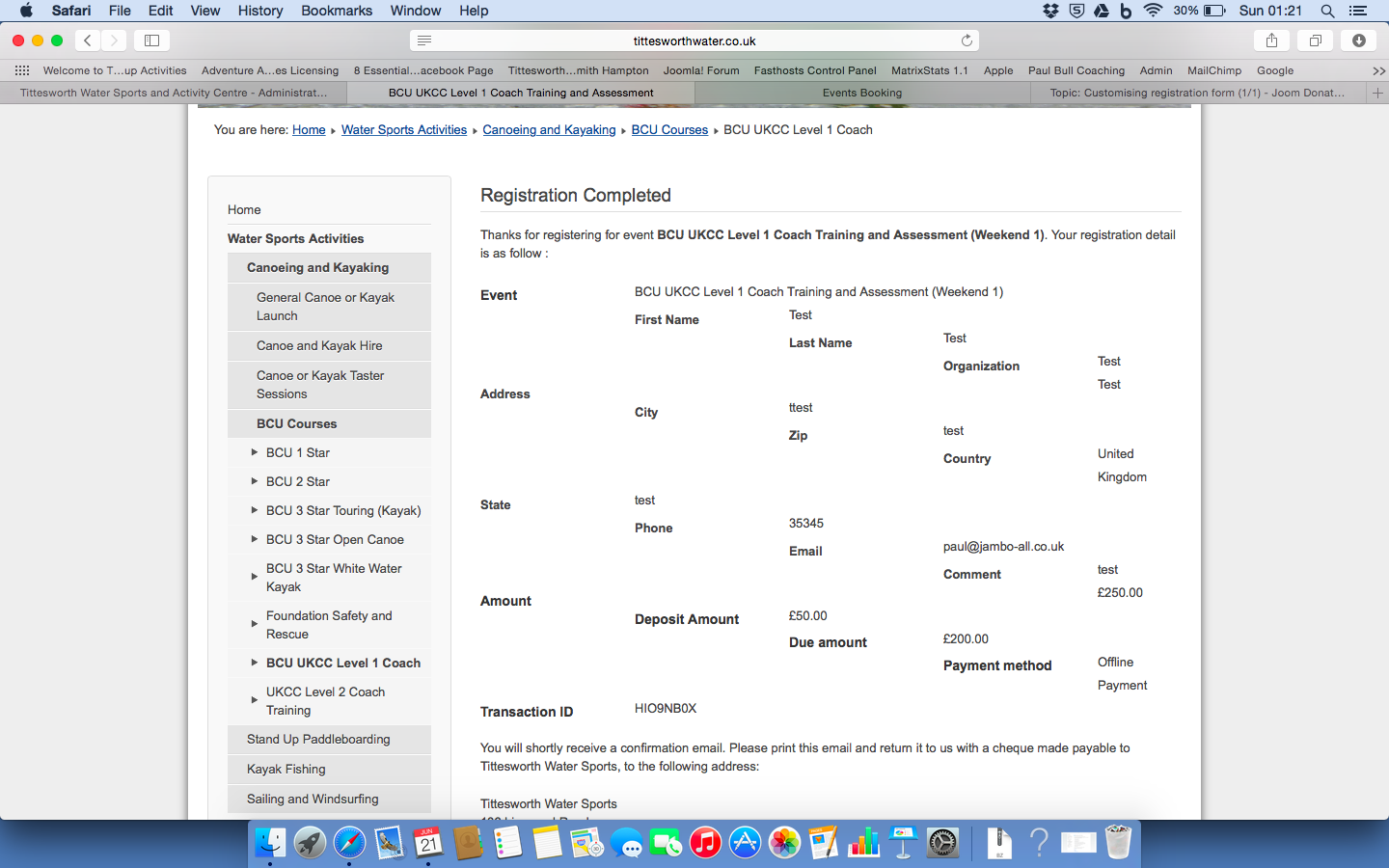
How do you get the text to align to the left of the page rather than stepped as in the example below?
Thanks
Paul
Thanks
Paul
Please Log in or Create an account to join the conversation.
- Tuan Pham Ngoc
- Offline
- Administrator
-

10 years 9 months ago #64703
by Tuan Pham Ngoc
Replied by Tuan Pham Ngoc on topic Alignment of fields on registration completed page
I think this happens because you config Events Booking to use twitter bootstrap 3 instead of twitter bootstrap 2 (default) but your site template only have twitter bootstrap 2 loaded
So go to Events Booking -> Configuration, find the config option "Twitter bootstrap version", set it to "Twitter Bootstrap version 2". After that, the issue should be sorted
Tuan
So go to Events Booking -> Configuration, find the config option "Twitter bootstrap version", set it to "Twitter Bootstrap version 2". After that, the issue should be sorted
Tuan
Please Log in or Create an account to join the conversation.
- Paul Bull
- Topic Author
- Offline
- New Member
-
Less
More
- Posts: 17
- Thank you received: 0
10 years 9 months ago #64760
by Paul Bull
Replied by Paul Bull on topic Alignment of fields on registration completed page
Thanks Tuan,
I've done that and it's fixed the issue. However it's turned the timeline view from the nice blue to a black timeline. Is it possible to change the timeline date bubbles to blue again?
Thanks
Paul
I've done that and it's fixed the issue. However it's turned the timeline view from the nice blue to a black timeline. Is it possible to change the timeline date bubbles to blue again?
Thanks
Paul
Please Log in or Create an account to join the conversation.
- Tuan Pham Ngoc
- Offline
- Administrator
-
10 years 9 months ago #64798
by Tuan Pham Ngoc
Replied by Tuan Pham Ngoc on topic Alignment of fields on registration completed page
Could you send us the link to that page? I will ask my template developer to look at it and guide you to change it. It should be easy.
Regards,
Tuan
Regards,
Tuan
Please Log in or Create an account to join the conversation.
- Paul Bull
- Topic Author
- Offline
- New Member
-
Less
More
- Posts: 17
- Thank you received: 0
10 years 9 months ago #64823
by Paul Bull
Replied by Paul Bull on topic Alignment of fields on registration completed page
Thanks Tuan, the site is
www.tittesworthwater.co.uk
If you could let me know what needs to be changed to change the circle holding the date to a nice blue that would be great.
All the best,
Paul
If you could let me know what needs to be changed to change the circle holding the date to a nice blue that would be great.
All the best,
Paul
Please Log in or Create an account to join the conversation.
- Andrew Shaw
- Offline
- Junior Member
-

Less
More
- Posts: 29
- Thank you received: 4
10 years 9 months ago #64834
by Andrew Shaw
Replied by Andrew Shaw on topic Alignment of fields on registration completed page
go to file - /components/com_eventbooking/assets/bootstrap/css/bootstrap.css
Go to line 1419 / .btn-inverse
change background-color to say "#0044cc" or which ever colour you want.
Regards
Go to line 1419 / .btn-inverse
change background-color to say "#0044cc" or which ever colour you want.
Regards
The following user(s) said Thank You: Tuan Pham Ngoc
Please Log in or Create an account to join the conversation.
- Paul Bull
- Topic Author
- Offline
- New Member
-
Less
More
- Posts: 17
- Thank you received: 0
10 years 9 months ago #64835
by Paul Bull
Replied by Paul Bull on topic Alignment of fields on registration completed page
Brilliant - thanks for the solution Andrew!
Please Log in or Create an account to join the conversation.
- wirex
- Offline
- Senior Member
-

Less
More
- Posts: 54
- Thank you received: 4
10 years 9 months ago #65351
by wirex
Replied by wirex on topic Alignment of fields on registration completed page
Hi Tuan,
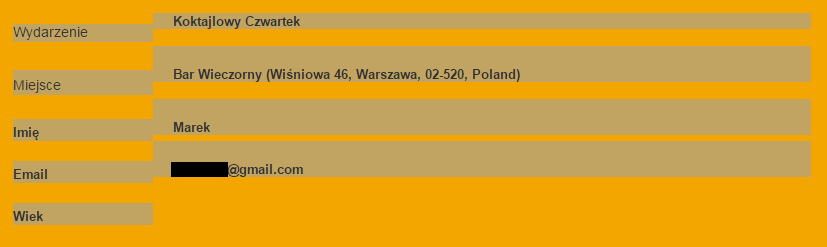
After update to 1.7.3 I notice that format of [REGISTRATION_DETAIL] tag has changed. Columns names do registration values do not do not set in one line. Please find attached screenshot.
The dark area is just a selection which I've made to highlight lines layout.
I've checked twitter bootstrap version and it's set to 2
Any idea how to fix it ?
Thanks,
Wirex
After update to 1.7.3 I notice that format of [REGISTRATION_DETAIL] tag has changed. Columns names do registration values do not do not set in one line. Please find attached screenshot.
The dark area is just a selection which I've made to highlight lines layout.
I've checked twitter bootstrap version and it's set to 2
Any idea how to fix it ?
Thanks,
Wirex
Please Log in or Create an account to join the conversation.
- Tuan Pham Ngoc
- Offline
- Administrator
-
10 years 9 months ago #65368
by Tuan Pham Ngoc
Replied by Tuan Pham Ngoc on topic Alignment of fields on registration completed page
I think there must be some css conflict on your site causing the issue. Please submit a support ticket sending us super admin account of your site so that I can check and correct it for you
Regards,
Tuan
Regards,
Tuan
Please Log in or Create an account to join the conversation.
- Paul Bull
- Topic Author
- Offline
- New Member
-
Less
More
- Posts: 17
- Thank you received: 0
10 years 6 months ago #69330
by Paul Bull
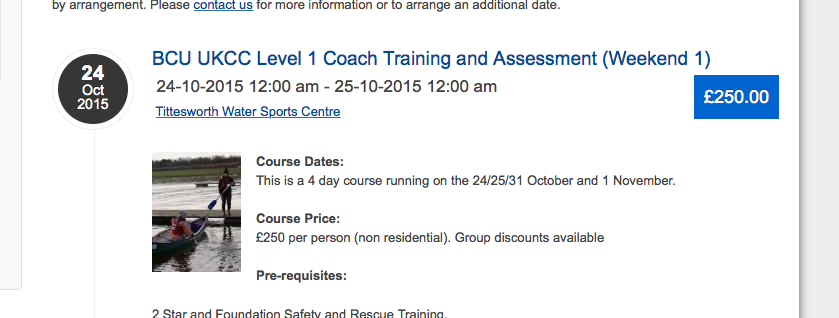
Just updated to 2.0.4 of the events component and can't find these files now - can anyone help me to customise the colour of the circle that holds the date of the event. Screen shot attached... I want to change the black circle to a blue circle...
Thanks
Paul
Replied by Paul Bull on topic Alignment of fields on registration completed page
Andrew Shaw wrote: go to file - /components/com_eventbooking/assets/bootstrap/css/bootstrap.css
Go to line 1419 / .btn-inverse
change background-color to say "#0044cc" or which ever colour you want.
Regards
Just updated to 2.0.4 of the events component and can't find these files now - can anyone help me to customise the colour of the circle that holds the date of the event. Screen shot attached... I want to change the black circle to a blue circle...
Thanks
Paul
Please Log in or Create an account to join the conversation.
Moderators: Tuan Pham Ngoc
Support
Documentation
Information
Copyright © 2026 Joomla Extensions by Joomdonation. All Rights Reserved.
joomdonation.com is not affiliated with or endorsed by the Joomla! Project or Open Source Matters.
The Joomla! name and logo is used under a limited license granted by Open Source Matters the trademark holder in the United States and other countries.
The Joomla! name and logo is used under a limited license granted by Open Source Matters the trademark holder in the United States and other countries.