- Posts: 13
- Thank you received: 0

Need help with Joomla? We are available for hire to help with Joomla customization, upgrades, maintenance, and custom development.
Explore our services Events Booking 1.6.9: CSS bug with location links
- Trev Roberts
- Topic Author
- Offline
- New Member
-

Less
More
11 years 8 months ago #55164
by Trev Roberts
Events Booking 1.6.9: CSS bug with location links was created by Trev Roberts
Hi Tuan,
Following on from Stephan
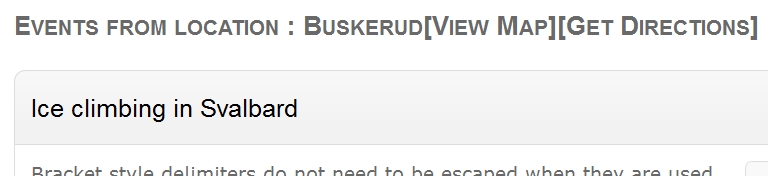
There is a problem with css on my location links in that they are displayed with square brackets and no spacing. (See attached)
I think the links would be better displayed in a different font colour, correctly spaced.
It looks a bit unprofessional to be honest.
Trev
Following on from Stephan
Stephan Hodges wrote: Just a gentle reminder about the "Get Directions" box CSS.
There is a problem with css on my location links in that they are displayed with square brackets and no spacing. (See attached)
I think the links would be better displayed in a different font colour, correctly spaced.
It looks a bit unprofessional to be honest.
Trev
Please Log in or Create an account to join the conversation.
- Tuan Pham Ngoc
- Offline
- Administrator
-

11 years 8 months ago #55172
by Tuan Pham Ngoc
Replied by Tuan Pham Ngoc on topic Events Booking 1.6.9: CSS bug with location links
Hi Trev
The issue with Stephan is different. it is affected by the template she is using. For the issue with the display, I will try to find a different display for it. If you have idea to improve it, feel free to give me your suggestion
Tuan
The issue with Stephan is different. it is affected by the template she is using. For the issue with the display, I will try to find a different display for it. If you have idea to improve it, feel free to give me your suggestion
Tuan
Please Log in or Create an account to join the conversation.
- Trev Roberts
- Topic Author
- Offline
- New Member
-
Less
More
- Posts: 13
- Thank you received: 0
11 years 8 months ago #55174
by Trev Roberts
Replied by Trev Roberts on topic Events Booking 1.6.9: CSS bug with location links
Sure thing T
I'll have a look at it at the weekend
I'll have a look at it at the weekend
Please Log in or Create an account to join the conversation.
- Trev Roberts
- Topic Author
- Offline
- New Member
-
Less
More
- Posts: 13
- Thank you received: 0
11 years 8 months ago #55182
by Trev Roberts
Replied by Trev Roberts on topic Events Booking 1.6.9: CSS bug with location links
Just had a quick look
Changing the font color and spacing is easy. Just edit the file template.css located in your current template directory, e.g,
yoursite.com/templates/css/template.css
This was the original at around line 40 of my template.css
h1 a, h2 a {
color:#0000ff;
Back-up your template.css file before you change the above to this -
h1 a, h2 a {
color:#0000ff;
text-decoration: none;
margin: 0 0 8px 0;
padding:4px 8px;
and change the color to suit your own needs
As far as I can see the script for loading the [Location] and [View Map] boxes refers to three files and one folder that don't exist, i,e,
1) AJS.js
2) AJS_fx.js
3) gb_scripts.js
src=" your-site.com/components/com_eventbookin...ts/js/greybox/AJS.js
Changing the font color and spacing is easy. Just edit the file template.css located in your current template directory, e.g,
yoursite.com/templates/css/template.css
This was the original at around line 40 of my template.css
h1 a, h2 a {
color:#0000ff;
Back-up your template.css file before you change the above to this -
h1 a, h2 a {
color:#0000ff;
text-decoration: none;
margin: 0 0 8px 0;
padding:4px 8px;
and change the color to suit your own needs
As far as I can see the script for loading the [Location] and [View Map] boxes refers to three files and one folder that don't exist, i,e,
1) AJS.js
2) AJS_fx.js
3) gb_scripts.js
src=" your-site.com/components/com_eventbookin...ts/js/greybox/AJS.js
Please Log in or Create an account to join the conversation.
Moderators: Tuan Pham Ngoc
Support
Documentation
Information
Copyright © 2026 Joomla Extensions by Joomdonation. All Rights Reserved.
joomdonation.com is not affiliated with or endorsed by the Joomla! Project or Open Source Matters.
The Joomla! name and logo is used under a limited license granted by Open Source Matters the trademark holder in the United States and other countries.
The Joomla! name and logo is used under a limited license granted by Open Source Matters the trademark holder in the United States and other countries.