- Posts: 339
- Thank you received: 5
EB Registration not Showing CB field
- OTWD
-
Topic Author
- Offline
- Platinum Member
-
Less
More
11 years 6 months ago - 11 years 6 months ago #50230
by OTWD
Success consists of going from failure to failure without loss of enthusiasm.
EB Registration not Showing CB field was created by OTWD
UPDATE: ON A BACKUP SITE, IF I DELETE THE FIELD cb_teachernumber FROM CB AND RECREATE IT WITH THE CONDITIONAL FIELDS AND REMAP IT THE the eb_TeacherNumber textfield DOES show.
SO IT MUST BE A DATABASE ISSUE. HOW CAN I FIX THIS?
Hi Tuan
I have EB 1.6.2 with CB 1.9.1
The user will register using CB registration.
One of the Reg fields is a CB conditional field dropdown with the following options
Teacher | Principal | NQT | Parent
If they select either "cb_type" Teacher | Principal | NQT they also have to enter a ID number - "cb_teachernumber" if they select "Parent" no ID number is required and this field is hidden in the CB registration - so far so good.
The cb_type and cb_teachernumber fields are mapped to the EB custom fields and are required fields = eb_RegistrationType and eb_TeacherNumber
To book an event the user logs in and the Event is activated for booking.
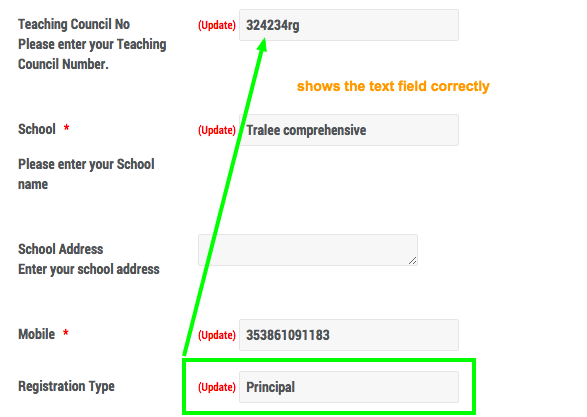
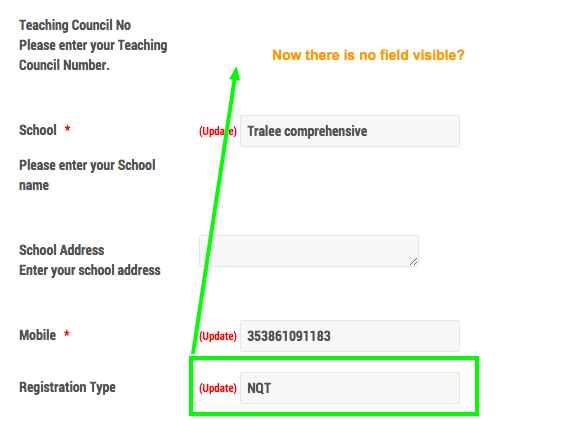
Everything works except on the EB Registration page if a user has selected NQT as an option the eb_TeacherNumber textfield DOES NOT show - only the title. If they select Teacher or Principal the the eb_TeacherNumber textfield DOES show
I have tried the following
Checked in Databases
Cleared all caches
Used Tools in CB to synchronize users / databases etc.
Ensured the CB conditional field cb_type includes NQT as an option to show the cb_teachernumber field
The option NQT was added at a later date and I am wondering if the database table needs to be manually updated to allow the
eb_TeacherNumber to show up.
Really appreciate any help on this issue.
Thanks
SO IT MUST BE A DATABASE ISSUE. HOW CAN I FIX THIS?
Hi Tuan
I have EB 1.6.2 with CB 1.9.1
The user will register using CB registration.
One of the Reg fields is a CB conditional field dropdown with the following options
Teacher | Principal | NQT | Parent
If they select either "cb_type" Teacher | Principal | NQT they also have to enter a ID number - "cb_teachernumber" if they select "Parent" no ID number is required and this field is hidden in the CB registration - so far so good.
The cb_type and cb_teachernumber fields are mapped to the EB custom fields and are required fields = eb_RegistrationType and eb_TeacherNumber
To book an event the user logs in and the Event is activated for booking.
Everything works except on the EB Registration page if a user has selected NQT as an option the eb_TeacherNumber textfield DOES NOT show - only the title. If they select Teacher or Principal the the eb_TeacherNumber textfield DOES show
I have tried the following
Checked in Databases
Cleared all caches
Used Tools in CB to synchronize users / databases etc.
Ensured the CB conditional field cb_type includes NQT as an option to show the cb_teachernumber field
The option NQT was added at a later date and I am wondering if the database table needs to be manually updated to allow the
eb_TeacherNumber to show up.
Really appreciate any help on this issue.
Thanks
Success consists of going from failure to failure without loss of enthusiasm.

Last edit: 11 years 6 months ago by OTWD.
Please Log in or Create an account to join the conversation.
Moderators: Tuan Pham Ngoc
Support
Documentation
Information
Copyright © 2026 Joomla Extensions by Joomdonation. All Rights Reserved.
joomdonation.com is not affiliated with or endorsed by the Joomla! Project or Open Source Matters.
The Joomla! name and logo is used under a limited license granted by Open Source Matters the trademark holder in the United States and other countries.