- Posts: 37
- Thank you received: 0

Need help with Joomla? We are available for hire to help with Joomla customization, upgrades, maintenance, and custom development.
Explore our services Editing layout of checkbox list options
- penguinhead
- Topic Author
- Offline
- Junior Member
-

Less
More
12 years 3 weeks ago #49225
by penguinhead
Editing layout of checkbox list options was created by penguinhead
Is it possible to edit the layout of a custom checkbox list?
I would like to be able to specify how many of the checkbox list items appear on the same line. Can this be done in some way with customer html or css?
If you look at the attached image, the custom field I have created is automatically putting all the options on the one line and they are all squashed up. I would like to be able to specify how many checkbox list options appear on the same line for each custom field. Is this possible and if so how do I do it?
I would like to be able to specify how many of the checkbox list items appear on the same line. Can this be done in some way with customer html or css?
If you look at the attached image, the custom field I have created is automatically putting all the options on the one line and they are all squashed up. I would like to be able to specify how many checkbox list options appear on the same line for each custom field. Is this possible and if so how do I do it?
Please Log in or Create an account to join the conversation.
- Tuan Pham Ngoc
- Offline
- Administrator
-

12 years 3 weeks ago #49226
by Tuan Pham Ngoc
Replied by Tuan Pham Ngoc on topic Editing layout of checkbox list options
Hi Mike
Not sure what version you are using. But in the latest version (or maybe on older version), you can control how many items are listed on one row using Size attribute of the custom field
So for example, if you want 2 items per line, you can set Size attribute of the field to 2 and It should work as expected. If not, you are using an old version and will have to upgrade to new version to use that feature.
Regards,
Tuan
Not sure what version you are using. But in the latest version (or maybe on older version), you can control how many items are listed on one row using Size attribute of the custom field
So for example, if you want 2 items per line, you can set Size attribute of the field to 2 and It should work as expected. If not, you are using an old version and will have to upgrade to new version to use that feature.
Regards,
Tuan
Please Log in or Create an account to join the conversation.
- penguinhead
- Topic Author
- Offline
- Junior Member
-
Less
More
- Posts: 37
- Thank you received: 0
12 years 3 weeks ago #49232
by penguinhead
Replied by penguinhead on topic Editing layout of checkbox list options
Fantastic! I am still on 1.5.3, but can't upgrade until the current program registrations are complete. However, it does have the 'Size' feature available and it works great.
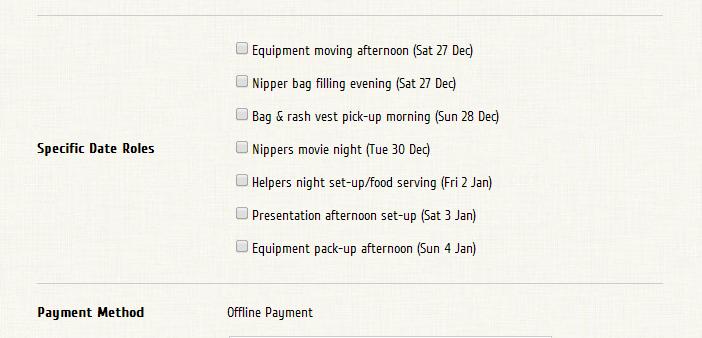
One more question - is it possible to also make the 'Title' for the Checkbox List align to the top of the table cell rather than in the middle? See image as to what currently happens.
One more question - is it possible to also make the 'Title' for the Checkbox List align to the top of the table cell rather than in the middle? See image as to what currently happens.
Please Log in or Create an account to join the conversation.
- Tuan Pham Ngoc
- Offline
- Administrator
-
12 years 2 weeks ago #49256
by Tuan Pham Ngoc
Replied by Tuan Pham Ngoc on topic Editing layout of checkbox list options
HI
=> I think it will need some modification to css. You can submit a support ticket sending me admin and FTP account of your site so that I can ask a dev to work on it for you,
Regards,
Tuan
One more question - is it possible to also make the 'Title' for the Checkbox List align to the top of the table cell rather than in the middle? See image as to what currently happens.
=> I think it will need some modification to css. You can submit a support ticket sending me admin and FTP account of your site so that I can ask a dev to work on it for you,
Regards,
Tuan
Please Log in or Create an account to join the conversation.
Moderators: Tuan Pham Ngoc
Support
Documentation
Information
Copyright © 2026 Joomla Extensions by Joomdonation. All Rights Reserved.
joomdonation.com is not affiliated with or endorsed by the Joomla! Project or Open Source Matters.
The Joomla! name and logo is used under a limited license granted by Open Source Matters the trademark holder in the United States and other countries.
The Joomla! name and logo is used under a limited license granted by Open Source Matters the trademark holder in the United States and other countries.