- Posts: 242
- Thank you received: 4

Need help with Joomla? We are available for hire to help with Joomla customization, upgrades, maintenance, and custom development.
Explore our services Trouble with map
- spitjack
-
 Topic Author
- Offline
- Elite Member
-

Less
More
12 years 1 month ago #47876
by spitjack
__
a 'spit' is a rod upon which savory food was roasted, turned in ancient times by a worker called a 'jack', a middle English word for an ordinary laborer (eg jack of all trades, steeplejack, lumberjack). Today, this is done by a 19th C machine.
Trouble with map was created by spitjack
Partial map showing - you have probably seen this and know by memory the code that will fix this.
Also, the map goes out of bounds of the main column div. I can probably fix this in custom.css, but am sharing in case this is something you want to think about for a later release.
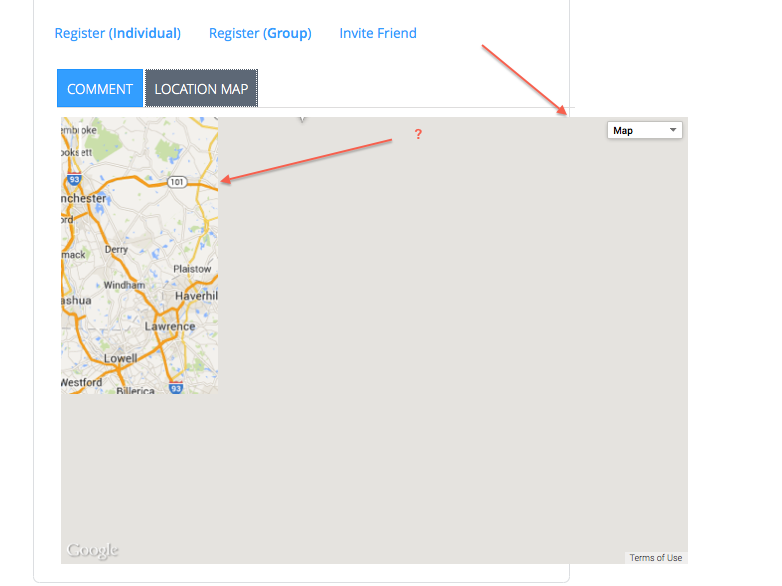
Also, the map goes out of bounds of the main column div. I can probably fix this in custom.css, but am sharing in case this is something you want to think about for a later release.
__
a 'spit' is a rod upon which savory food was roasted, turned in ancient times by a worker called a 'jack', a middle English word for an ordinary laborer (eg jack of all trades, steeplejack, lumberjack). Today, this is done by a 19th C machine.
Please Log in or Create an account to join the conversation.
- Tuan Pham Ngoc
- Offline
- Administrator
-

12 years 1 month ago #47885
by Tuan Pham Ngoc
Replied by Tuan Pham Ngoc on topic Trouble with map
Hi
Please go to Extensions -> Plugins Manager, change ordering of "Eventbooking - Map plugin" so that it comes after "Eventbooking - Jcomments plugin" and It should work well
Regards,
Tuan
Please go to Extensions -> Plugins Manager, change ordering of "Eventbooking - Map plugin" so that it comes after "Eventbooking - Jcomments plugin" and It should work well
Regards,
Tuan
Please Log in or Create an account to join the conversation.
- Tuan Pham Ngoc
- Offline
- Administrator
-
12 years 1 month ago #47886
by Tuan Pham Ngoc
Replied by Tuan Pham Ngoc on topic Trouble with map
If you don't know how to do that, you can submit a support ticket sending us super admin account of your site so that we can change it for you
Tuan
Tuan
Please Log in or Create an account to join the conversation.
- spitjack
-
Topic Author
- Offline
- Elite Member
-
Less
More
- Posts: 242
- Thank you received: 4
12 years 1 month ago - 12 years 1 month ago #47929
by spitjack
__
a 'spit' is a rod upon which savory food was roasted, turned in ancient times by a worker called a 'jack', a middle English word for an ordinary laborer (eg jack of all trades, steeplejack, lumberjack). Today, this is done by a 19th C machine.
Replied by spitjack on topic Trouble with map
That didn't work,* but disabling comments - which we don't need for this client - cleared it up.
I seem unable to control the zoom level of the map, regardless of what parameter I use in the configuration.
*(i didn't clear joomla cache, though, so this might be an error on my part.) :whistle:
I seem unable to control the zoom level of the map, regardless of what parameter I use in the configuration.
*(i didn't clear joomla cache, though, so this might be an error on my part.) :whistle:
__
a 'spit' is a rod upon which savory food was roasted, turned in ancient times by a worker called a 'jack', a middle English word for an ordinary laborer (eg jack of all trades, steeplejack, lumberjack). Today, this is done by a 19th C machine.
Last edit: 12 years 1 month ago by spitjack.
Please Log in or Create an account to join the conversation.
- Tuan Pham Ngoc
- Offline
- Administrator
-
12 years 1 month ago #47956
by Tuan Pham Ngoc
Replied by Tuan Pham Ngoc on topic Trouble with map
Hi
The zoom level is hardcoded in the code at the moment (it is set to 10). If you want to change it, please follow the instructions below to change it:
1. Open the file plugins/eventbooking/map/map.php
2. Find the code below:
3. Change it 10 from above code to the zoom level you want
After that, it will work as expected
Regards,
Tuan
The zoom level is hardcoded in the code at the moment (it is set to 10). If you want to change it, please follow the instructions below to change it:
1. Open the file plugins/eventbooking/map/map.php
2. Find the code below:
Code:
var myOptions = { zoom: 10, center: latlng, mapTypeId: google.maps.MapTypeId.ROADMAP };
3. Change it 10 from above code to the zoom level you want
After that, it will work as expected
Regards,
Tuan
The following user(s) said Thank You: spitjack
Please Log in or Create an account to join the conversation.
Moderators: Tuan Pham Ngoc
Support
Documentation
Information
Copyright © 2026 Joomla Extensions by Joomdonation. All Rights Reserved.
joomdonation.com is not affiliated with or endorsed by the Joomla! Project or Open Source Matters.
The Joomla! name and logo is used under a limited license granted by Open Source Matters the trademark holder in the United States and other countries.
The Joomla! name and logo is used under a limited license granted by Open Source Matters the trademark holder in the United States and other countries.