- Posts: 7
- Thank you received: 0

Need help with Joomla? We are available for hire to help with Joomla customization, upgrades, maintenance, and custom development.
Explore our services Event details are floating to the right
- Bridge
- Topic Author
- Offline
- New Member
-

Less
More
12 years 4 months ago #44438
by Bridge
Event details are floating to the right was created by Bridge
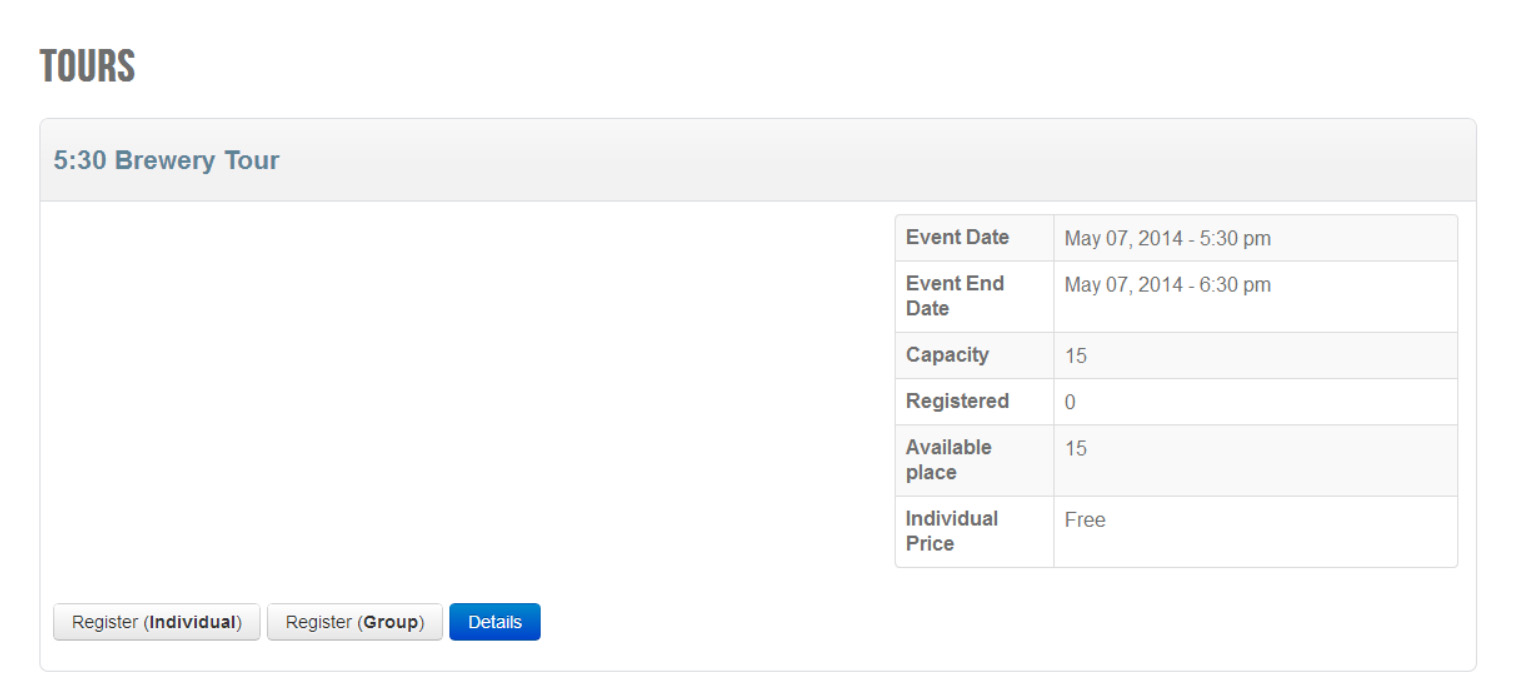
If my screen size is greater than about 980px, the event details float from the left (where I would like them to be) all the way to the right hand side of the div.
Can you help me figure out why this is happening? Also, while I'm on here, is there a way to put two events next to each other, like 2 columns of events?
Attaching a screen shot, and URL
Thanks!
Can you help me figure out why this is happening? Also, while I'm on here, is there a way to put two events next to each other, like 2 columns of events?
Attaching a screen shot, and URL
Thanks!
Please Log in or Create an account to join the conversation.
- Tuan Pham Ngoc
- Offline
- Administrator
-

12 years 4 months ago #44492
by Tuan Pham Ngoc
Replied by Tuan Pham Ngoc on topic Event details are floating to the right
Hi Bridget
The left side of the page is supposed to show the description of the event and that's the reason the event details floated to the right. You don't have description of the event ?
We don't have a columns layout, so we could not display one event next to each other. Maybe for your simple requirement, I think you should try to use Table layout to display events instead of using default layout ?
Sorry for lately response. We had holiday and just come back to office this morning !
Regards,
Tuan
The left side of the page is supposed to show the description of the event and that's the reason the event details floated to the right. You don't have description of the event ?
We don't have a columns layout, so we could not display one event next to each other. Maybe for your simple requirement, I think you should try to use Table layout to display events instead of using default layout ?
Sorry for lately response. We had holiday and just come back to office this morning !
Regards,
Tuan
Please Log in or Create an account to join the conversation.
- Bridge
- Topic Author
- Offline
- New Member
-
Less
More
- Posts: 7
- Thank you received: 0
12 years 4 months ago #44508
by Bridge
Replied by Bridge on topic Event details are floating to the right
Just thought I would post this in case anyone else is looking for this layout. I was able to get it working by adding this to my custom css file:
Thanks!
Code:
@media (min-width: 768px) {
#eb-events div.eb-event.row-fluid {
width: 45%!important;
float: left;margin-right: 5%;
}
#eb-events div.eb-description div.row-fluid .span5 {
width: 95%!important;
margin-right: 10px;
}
}
Thanks!
Please Log in or Create an account to join the conversation.
- Tuan Pham Ngoc
- Offline
- Administrator
-
12 years 4 months ago #44509
by Tuan Pham Ngoc
Replied by Tuan Pham Ngoc on topic Event details are floating to the right
Great ! Thanks Bridget for sharing the solution. It looks quite good !
Tuan
Tuan
The following user(s) said Thank You: Bridge
Please Log in or Create an account to join the conversation.
- OTWD
-

- Offline
- Platinum Member
-

Less
More
- Posts: 342
- Thank you received: 5
11 years 7 months ago - 11 years 7 hours ago #58702
by OTWD
Success consists of going from failure to failure without loss of enthusiasm.
Replied by OTWD on topic Event details are floating to the right
Thanks Bridget for your css solution
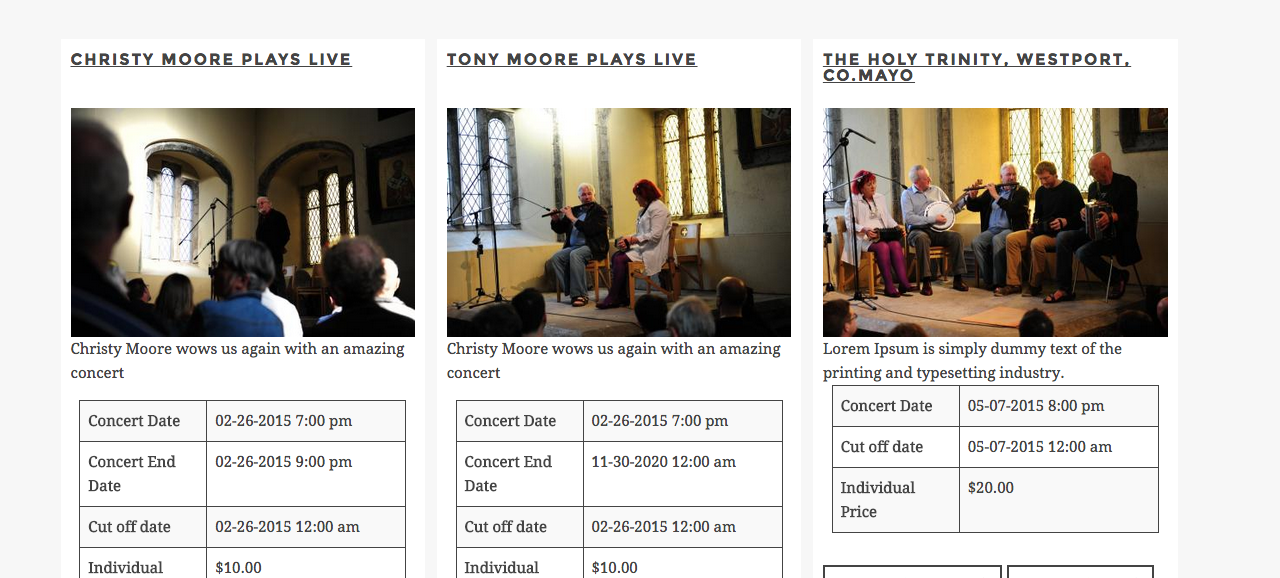
For anyone interested in a 3 column layout I added the following CSS
UPDATE - change this for layout in 2.0.4
For anyone interested in a 3 column layout I added the following CSS
Code:
@media (min-width: 768px) {
#eb-events div.eb-event.row-fluid {
width: 32%!important;
float: left;margin-right: 1%;
}
#eb-events div.eb-description div.row-fluid .span5 {
width: 95%!important;
margin-right: 10px;
}
.row-fluid .span7 {
width: 100%;
}
}
UPDATE - change this for layout in 2.0.4
Code:
@media (min-width: 768px) {
/*#eb-events div.eb-event.row-fluid*/
#eb-events .eb-event
{
width: 32%!important;
float: left;margin-right: 1.3%;
}
img.eb-thumb-left {
float: none !important;}
#eb-events div.eb-description div.row-fluid .span5 {
width: 95%!important;
margin-right: 10px;
display: none;
}
.row-fluid .span7 {
width: 100%;
}
}
Success consists of going from failure to failure without loss of enthusiasm.
Last edit: 11 years 7 hours ago by OTWD. Reason: update for 2.0.4
The following user(s) said Thank You: Bridge
Please Log in or Create an account to join the conversation.
- Bridge
- Topic Author
- Offline
- New Member
-
Less
More
- Posts: 7
- Thank you received: 0
11 years 7 months ago #58708
by Bridge
Replied by Bridge on topic Event details are floating to the right
That looks great, thanks for sharing!
Please Log in or Create an account to join the conversation.
Moderators: Tuan Pham Ngoc
Support
Documentation
Information
Copyright © 2026 Joomla Extensions by Joomdonation. All Rights Reserved.
joomdonation.com is not affiliated with or endorsed by the Joomla! Project or Open Source Matters.
The Joomla! name and logo is used under a limited license granted by Open Source Matters the trademark holder in the United States and other countries.
The Joomla! name and logo is used under a limited license granted by Open Source Matters the trademark holder in the United States and other countries.