- Posts: 12
- Thank you received: 0

Need help with Joomla? We are available for hire to help with Joomla customization, upgrades, maintenance, and custom development.
Explore our services Multiple categ. event, color in calendar conflict
- OSindelka
- Topic Author
- Offline
- New Member
-

Less
More
13 years 2 weeks ago #35705
by OSindelka
Multiple categ. event, color in calendar conflict was created by OSindelka
Hi,
I runned into this issue. When a event has more categories there is a conflict as to which category color the calender will use.
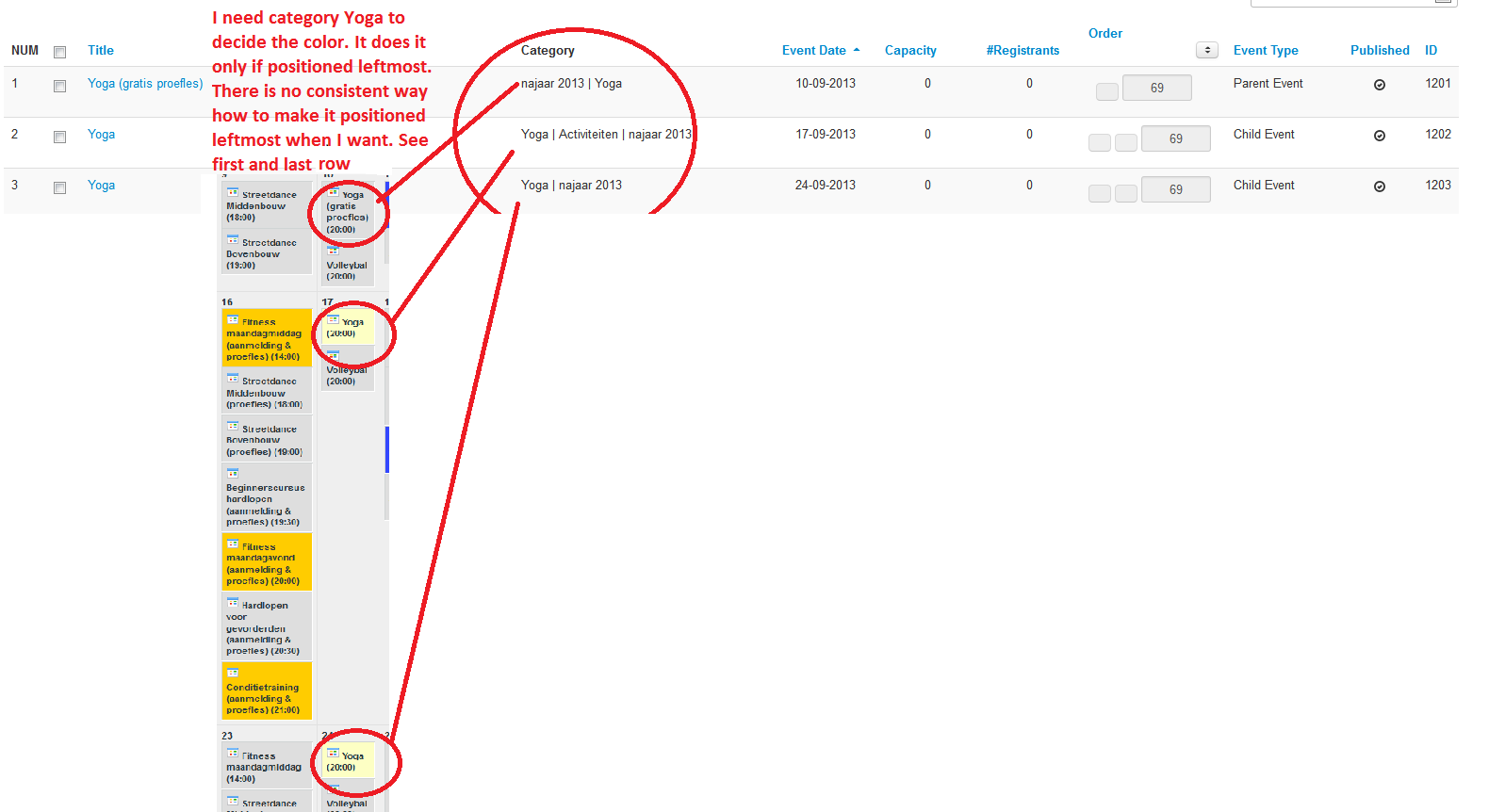
I noticed that the calender uses the color of the category that is the leftmost category in the Events menu under the Category column.
E.g. We have a event "Skiing" being in categories "Category A" and "Category B" each category having different color. If in the Category column in the Events menu is this: Category A | Category B, the Calendar will show Skiing with color A. If in the Category column in the Events menu is this: Category B | Category A, the Calender will show Skiing with color B. If there is no color specified for the leftmost category, there won't be any color in the calendar.
I noticed that the order of the categories doesn't correspond to the rooting structure (top category - leftmost, bottom category - rightmost).
I always make a category for each event name (or event series if recurring). Thus I in our example, I have also a category "Skiing" with its own color. I would need that this color would always be preferred. That means that Skiing would allays be on the leftmost position in the Category column in the Events menu as this:
Skiing | Category B | Category A
My question is how to achieve this. So far it seems to me rather random. Sometimes the category is placed on left and sometimes on right. I would need thus a answer how to make sure, that certain category color if multiple categories are used decides about the color in the calender.
See the snapshot from Events menu with illustration of the problem.
Thanks for the help.
I runned into this issue. When a event has more categories there is a conflict as to which category color the calender will use.
I noticed that the calender uses the color of the category that is the leftmost category in the Events menu under the Category column.
E.g. We have a event "Skiing" being in categories "Category A" and "Category B" each category having different color. If in the Category column in the Events menu is this: Category A | Category B, the Calendar will show Skiing with color A. If in the Category column in the Events menu is this: Category B | Category A, the Calender will show Skiing with color B. If there is no color specified for the leftmost category, there won't be any color in the calendar.
I noticed that the order of the categories doesn't correspond to the rooting structure (top category - leftmost, bottom category - rightmost).
I always make a category for each event name (or event series if recurring). Thus I in our example, I have also a category "Skiing" with its own color. I would need that this color would always be preferred. That means that Skiing would allays be on the leftmost position in the Category column in the Events menu as this:
Skiing | Category B | Category A
My question is how to achieve this. So far it seems to me rather random. Sometimes the category is placed on left and sometimes on right. I would need thus a answer how to make sure, that certain category color if multiple categories are used decides about the color in the calender.
See the snapshot from Events menu with illustration of the problem.
Thanks for the help.
Please Log in or Create an account to join the conversation.
- Tuan Pham Ngoc
- Offline
- Administrator
-

13 years 2 weeks ago #35783
by Tuan Pham Ngoc
Replied by Tuan Pham Ngoc on topic Re: Multiple categ. event, color in calendar conflict
Hi
I think we will need to make decision in this case. Maybe we simply get the color of the category which has lowest value of ordering ?
Please let me know your decision so that I can edit the code !
Tuan
I think we will need to make decision in this case. Maybe we simply get the color of the category which has lowest value of ordering ?
Please let me know your decision so that I can edit the code !
Tuan
Please Log in or Create an account to join the conversation.
- OSindelka
- Topic Author
- Offline
- New Member
-
Less
More
- Posts: 12
- Thank you received: 0
13 years 2 weeks ago #35821
by OSindelka
Replied by OSindelka on topic Re: Multiple categ. event, color in calendar conflict
Hallo,
Thanks for the response.
For my purposes that would be sufficient and good solution (the color of the lowest level category).
However, you could run into problems if you need to use two same level categories.
I noticed that the color is set by the leftmost category in the category column. What decides the order of the categories in the category column? Wouldn't it be possible to somehow open the possibility to set it? Its not set by the bottom down ordering of the categories, as sometimes the upper category appears on left and sometimes on right.
Kind regards,
O. Sin.
Thanks for the response.
For my purposes that would be sufficient and good solution (the color of the lowest level category).
However, you could run into problems if you need to use two same level categories.
I noticed that the color is set by the leftmost category in the category column. What decides the order of the categories in the category column? Wouldn't it be possible to somehow open the possibility to set it? Its not set by the bottom down ordering of the categories, as sometimes the upper category appears on left and sometimes on right.
Kind regards,
O. Sin.
Please Log in or Create an account to join the conversation.
- Tuan Pham Ngoc
- Offline
- Administrator
-
13 years 2 weeks ago #35831
by Tuan Pham Ngoc
Replied by Tuan Pham Ngoc on topic Re: Multiple categ. event, color in calendar conflict
I think we should get the value of the category which has lowest value in Ordering field ! (Go to Events Booking -> Events, you will see a column called Order and each event has a value for that column).
Does that work? Or will you need more explanation from me ?
Tuan
Does that work? Or will you need more explanation from me ?
Tuan
Please Log in or Create an account to join the conversation.
- OSindelka
- Topic Author
- Offline
- New Member
-
Less
More
- Posts: 12
- Thank you received: 0
13 years 2 weeks ago - 13 years 2 weeks ago #35839
by OSindelka
Replied by OSindelka on topic Re: Multiple categ. event, color in calendar conflict
I assume you mean go to Events Booking -> Categories -> Ordering.
I changed the ordering there, but the ordering of categories in the scroll down menu by Event specifications stays the same. The categories are listed there in the time order they were made. If I change the less old category and assign it order 1 it will still appear as second in that scroll down menu in the Event specifications.
order 1 oldest
....order 1 oldest
....order 2 less old
....order 3 newest
order 2 less old
I found out that the colors in the calender, as well as the left right order (Skiing | Category B | Category A) in the Categories column under Events Booking -> Events are defined by this order in the scroll down menu in the Event specifications.
The problem is thus not solved. Whatever value in the ordering I chose by a category, it keeps its position in that scroll down menu, and keeps defining the color, even if the other chosen category has higher value in the ordering field.
I changed the ordering there, but the ordering of categories in the scroll down menu by Event specifications stays the same. The categories are listed there in the time order they were made. If I change the less old category and assign it order 1 it will still appear as second in that scroll down menu in the Event specifications.
order 1 oldest
....order 1 oldest
....order 2 less old
....order 3 newest
order 2 less old
I found out that the colors in the calender, as well as the left right order (Skiing | Category B | Category A) in the Categories column under Events Booking -> Events are defined by this order in the scroll down menu in the Event specifications.
The problem is thus not solved. Whatever value in the ordering I chose by a category, it keeps its position in that scroll down menu, and keeps defining the color, even if the other chosen category has higher value in the ordering field.
Last edit: 13 years 2 weeks ago by OSindelka.
Please Log in or Create an account to join the conversation.
- OSindelka
- Topic Author
- Offline
- New Member
-
Less
More
- Posts: 12
- Thank you received: 0
13 years 2 weeks ago - 13 years 2 weeks ago #35840
by OSindelka
Replied by OSindelka on topic Re: Multiple categ. event, color in calendar conflict
Summarizing.
1) Currently the color should be defined by the bottom most chosen category in the scroll down menu in the new event specifications.
2) The scroll down menu ordering does not correspond with the values in the categories ordering in the ordering column in -> categories. The scroll down menu ordering does not react to the changes in the values of the categories ordering in the categories menu.
3) The system furthermore has a glitch. If you select multiple categories in the scroll down menu for the first time, they might appear in the category column in the -> events menu in different order, then if you deselect/save and again select&save them.
1) Currently the color should be defined by the bottom most chosen category in the scroll down menu in the new event specifications.
2) The scroll down menu ordering does not correspond with the values in the categories ordering in the ordering column in -> categories. The scroll down menu ordering does not react to the changes in the values of the categories ordering in the categories menu.
3) The system furthermore has a glitch. If you select multiple categories in the scroll down menu for the first time, they might appear in the category column in the -> events menu in different order, then if you deselect/save and again select&save them.
Last edit: 13 years 2 weeks ago by OSindelka.
Please Log in or Create an account to join the conversation.
- Tuan Pham Ngoc
- Offline
- Administrator
-
13 years 1 week ago #36005
by Tuan Pham Ngoc
Replied by Tuan Pham Ngoc on topic Re: Multiple categ. event, color in calendar conflict
Hi
The issue #1 should be fixed in the latest download on server now. Could you please get the latest version from My Downloads section, upgrade it to your site and help me to test it ?
For #2, I haven't checked it yet.
#3 should be sorted as well (the lowest ordering category will be displayed first in the list).
Please help me to check it and give me your feedback !
Regards,
Tuan
The issue #1 should be fixed in the latest download on server now. Could you please get the latest version from My Downloads section, upgrade it to your site and help me to test it ?
For #2, I haven't checked it yet.
#3 should be sorted as well (the lowest ordering category will be displayed first in the list).
Please help me to check it and give me your feedback !
Regards,
Tuan
Please Log in or Create an account to join the conversation.
- OSindelka
- Topic Author
- Offline
- New Member
-
Less
More
- Posts: 12
- Thank you received: 0
13 years 1 week ago #36006
by OSindelka
Replied by OSindelka on topic Re: Multiple categ. event, color in calendar conflict
I don't see anything in the My Downloads section. Respectively I see "No documents purchased".
Please Log in or Create an account to join the conversation.
- Tuan Pham Ngoc
- Offline
- Administrator
-
13 years 1 week ago #36082
by Tuan Pham Ngoc
Replied by Tuan Pham Ngoc on topic Re: Multiple categ. event, color in calendar conflict
Hi
Maybe your account uses a different email with the one you entered on order form to purchase the extension and that causes the error. Could you please submit a support ticket let me know the Paypal account you used to purchase the extension so that I can find, assign order to your account and you can login to download ?
Tuan
Maybe your account uses a different email with the one you entered on order form to purchase the extension and that causes the error. Could you please submit a support ticket let me know the Paypal account you used to purchase the extension so that I can find, assign order to your account and you can login to download ?
Tuan
Please Log in or Create an account to join the conversation.
- OSindelka
- Topic Author
- Offline
- New Member
-
Less
More
- Posts: 12
- Thank you received: 0
13 years 1 week ago - 13 years 1 week ago #36132
by OSindelka
Replied by OSindelka on topic Re: Multiple categ. event, color in calendar conflict
Hi,
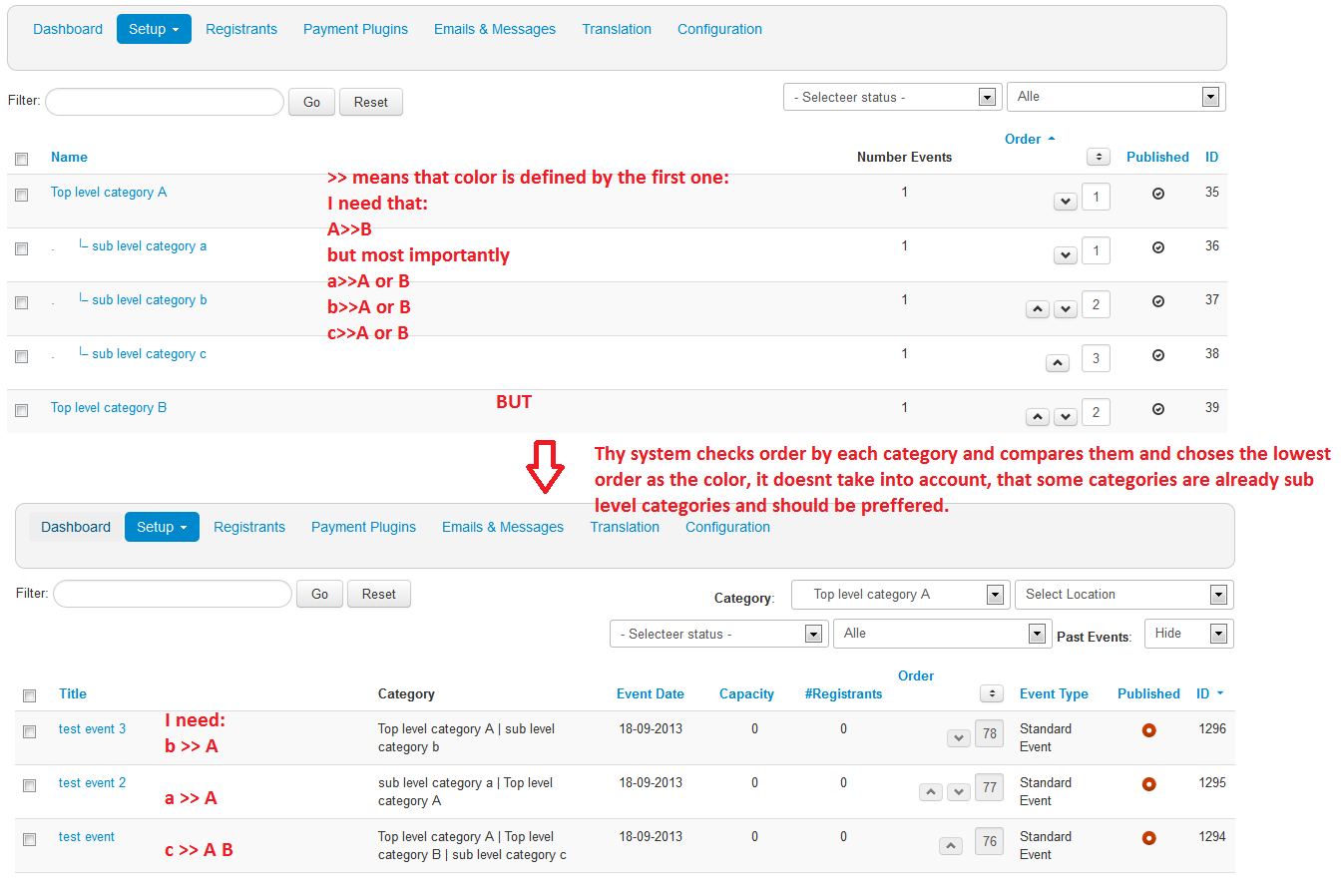
thanks for your response. I could download the update and installed it and tried it out. There is a improvement, but the issue is not completely solved. Please look at the print screen, it will make it clearer.
What is improved is that the system now really checks the order of the category and sets the color according to the color defined for the category with the lowest number. BUT! It doesn't distinguish between the top level and sub level categories. So when you have an event that uses both, top level and sub level category, it only compares the number by their order and chooses the one with lower order. It should rather always check whether there is a sub level category first and give it priority even if it has higher order number.
thanks for your response. I could download the update and installed it and tried it out. There is a improvement, but the issue is not completely solved. Please look at the print screen, it will make it clearer.
What is improved is that the system now really checks the order of the category and sets the color according to the color defined for the category with the lowest number. BUT! It doesn't distinguish between the top level and sub level categories. So when you have an event that uses both, top level and sub level category, it only compares the number by their order and chooses the one with lower order. It should rather always check whether there is a sub level category first and give it priority even if it has higher order number.
Last edit: 13 years 1 week ago by OSindelka.
Please Log in or Create an account to join the conversation.
Moderators: Tuan Pham Ngoc
Support
Documentation
Information
Copyright © 2026 Joomla Extensions by Joomdonation. All Rights Reserved.
joomdonation.com is not affiliated with or endorsed by the Joomla! Project or Open Source Matters.
The Joomla! name and logo is used under a limited license granted by Open Source Matters the trademark holder in the United States and other countries.
The Joomla! name and logo is used under a limited license granted by Open Source Matters the trademark holder in the United States and other countries.