
Need help with Joomla? We are available for hire to help with Joomla customization, upgrades, maintenance, and custom development.
Explore our services Category - Language Assignment Not Working
- Tomy Francois
-
 Topic Author
- Offline
- Junior Member
-

Less
More
13 years 1 month ago #34870
by Tomy Francois
Tomy François
Category - Language Assignment Not Working was created by Tomy Francois
Hi Tuan,
I come back again with the category issue, it seems that this occurs when we create a category and assign it to a specific language, on our website, if we create a category, then we assign it to 'All', then the category appears on frontend, if we create the category and assign it to either 'English' or 'French' language, then it does not show on frontend.
I guess there might be some issue with the language router of Event Booking, can you please look at this issue and let me know as soon as possible? If you lost it, I can provide you admin access through Skype, just let me know when you are having a look at it so we can see this issue together.
Thanks,
I come back again with the category issue, it seems that this occurs when we create a category and assign it to a specific language, on our website, if we create a category, then we assign it to 'All', then the category appears on frontend, if we create the category and assign it to either 'English' or 'French' language, then it does not show on frontend.
I guess there might be some issue with the language router of Event Booking, can you please look at this issue and let me know as soon as possible? If you lost it, I can provide you admin access through Skype, just let me know when you are having a look at it so we can see this issue together.
Thanks,
Tomy François
Please Log in or Create an account to join the conversation.
- Tomy Francois
-
Topic Author
- Offline
- Junior Member
-
13 years 1 month ago #34871
by Tomy Francois
Tomy François
Replied by Tomy Francois on topic Re: Category - Language Assignment Not Working
Hi Again Tuan,
Sorry for adding a reply to my own topic before you had time to answer to it, but I just find out something else with the category language issue, when adding an event on the English version of the website, the user should only see categories that have been assigned to the English version and not all categories! Otherwise creating a category for each language does not make any sense as per my opinion.
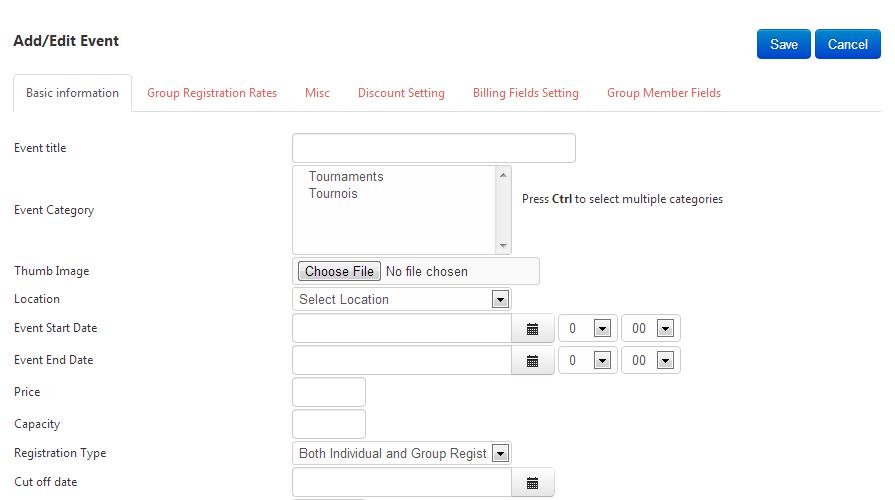
Just have a look at the screenshot attached to this topic, as you will see, I am currently creating a new event on the English version of the website, I currently have two categories setup, Tournaments is for the English version of the website and Tournois is for the French version, however, when adding an event to the English version, both categories are available and I can select both of them to add an event!
Can you please have a look at this and let me know your feedback.
Thanks,
Sorry for adding a reply to my own topic before you had time to answer to it, but I just find out something else with the category language issue, when adding an event on the English version of the website, the user should only see categories that have been assigned to the English version and not all categories! Otherwise creating a category for each language does not make any sense as per my opinion.
Just have a look at the screenshot attached to this topic, as you will see, I am currently creating a new event on the English version of the website, I currently have two categories setup, Tournaments is for the English version of the website and Tournois is for the French version, however, when adding an event to the English version, both categories are available and I can select both of them to add an event!
Can you please have a look at this and let me know your feedback.
Thanks,
Tomy François
Please Log in or Create an account to join the conversation.
- Tomy Francois
-
Topic Author
- Offline
- Junior Member
-
13 years 1 month ago #34872
by Tomy Francois
Tomy François
Replied by Tomy Francois on topic Re: Category - Language Assignment Not Working
Some more testing results, when we create a category, assign it to a specific language (for instance English) it is not saved in the English category but in 'All'. Even if we edit the category and re-assign it to the English version, it is always re-saved in 'All', it is not possible to assign the category to a specific language.
I guess the issue is there, since we cannot save it in a specific language and it is always saved to 'All', that is why it does not appear on frontend.
I guess the issue is there, since we cannot save it in a specific language and it is always saved to 'All', that is why it does not appear on frontend.
Tomy François
Please Log in or Create an account to join the conversation.
- Tom
- Offline
- Junior Member
-
Less
More
- Posts: 28
- Thank you received: 0
13 years 2 weeks ago #35685
by Tom
Replied by Tom on topic Re: Category - Language Assignment Not Working
If we save a categorie with setting "Language = German" the categorie will be not shown at backend but still exist in data base. If set in db back to all (*) the categorie will be displayed in backend again.
Same effect, if we save a event with "Language = German". The event will not be shown on the back end events list. if set back to all (* in db) this events are shown again.
How to use in this two cases the Language selection?
Thanks and best wishes
Tom
Same effect, if we save a event with "Language = German". The event will not be shown on the back end events list. if set back to all (* in db) this events are shown again.
How to use in this two cases the Language selection?
Thanks and best wishes
Tom
Please Log in or Create an account to join the conversation.
- Tuan Pham Ngoc
- Away
- Administrator
-

13 years 2 weeks ago #35686
by Tuan Pham Ngoc
Replied by Tuan Pham Ngoc on topic Re: Category - Language Assignment Not Working
Hi Tom
This bug was fixed few hours ago. Could you please login to your account, access to My Downloads menu item, upgrade it to your site and check it again ?
Regards,
Tuan
This bug was fixed few hours ago. Could you please login to your account, access to My Downloads menu item, upgrade it to your site and check it again ?
Regards,
Tuan
Please Log in or Create an account to join the conversation.
- Tom
- Offline
- Junior Member
-
Less
More
- Posts: 28
- Thank you received: 0
13 years 2 weeks ago #35694
by Tom
Replied by Tom on topic Re: Category - Language Assignment Not Working
Hi Tuan,
thank you very much for your fast replay, I will check and report to you.
Best wishes
Tom
thank you very much for your fast replay, I will check and report to you.
Best wishes
Tom
Please Log in or Create an account to join the conversation.
Moderators: Tuan Pham Ngoc
Support
Documentation
Information
Copyright © 2026 Joomla Extensions by Joomdonation. All Rights Reserved.
joomdonation.com is not affiliated with or endorsed by the Joomla! Project or Open Source Matters.
The Joomla! name and logo is used under a limited license granted by Open Source Matters the trademark holder in the United States and other countries.
The Joomla! name and logo is used under a limited license granted by Open Source Matters the trademark holder in the United States and other countries.