- Posts: 33
- Thank you received: 0

Need help with Joomla? We are available for hire to help with Joomla customization, upgrades, maintenance, and custom development.
Explore our services 12 hour clock for Event Start/End times?
- cork
- Topic Author
- Offline
- Junior Member
-

Less
More
13 years 4 months ago #29935
by cork
12 hour clock for Event Start/End times? was created by cork
Hi,
Currently, a user must select from a drop-down menu the time for each event. How can users enter their own time using a 12 hour clock?
Thank you.
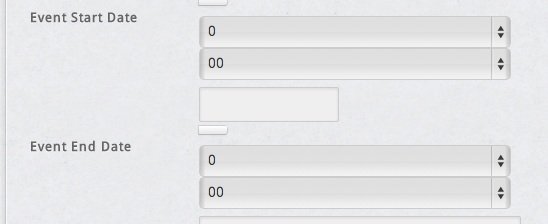
Currently, a user must select from a drop-down menu the time for each event. How can users enter their own time using a 12 hour clock?
Thank you.
Please Log in or Create an account to join the conversation.
- Tuan Pham Ngoc
- Away
- Administrator
-

13 years 4 months ago #29955
by Tuan Pham Ngoc
Replied by Tuan Pham Ngoc on topic Re: 12 hour clock for Event Start/End times?
Hi Cork
Unfortunately, it is not possible. At the moment, the extension uses 24 hours clock instead of 12 hours clock . If you want it to use 12 hours clock, you will need to find someone to help you to customize the code in the extension.
Tuan
Unfortunately, it is not possible. At the moment, the extension uses 24 hours clock instead of 12 hours clock . If you want it to use 12 hours clock, you will need to find someone to help you to customize the code in the extension.
Tuan
Please Log in or Create an account to join the conversation.
- cork
- Topic Author
- Offline
- Junior Member
-
Less
More
- Posts: 33
- Thank you received: 0
13 years 4 months ago - 13 years 4 months ago #30132
by cork
Replied by cork on topic Re: 12 hour clock for Event Start/End times?
Can I please hire you to do this task? I have an older version of Events Booking with a choice of 24 or 12 hour clock. You know this extension better than anyone. How much will you charge?
Last edit: 13 years 4 months ago by cork.
Please Log in or Create an account to join the conversation.
- Tuan Pham Ngoc
- Away
- Administrator
-
13 years 4 months ago #30145
by Tuan Pham Ngoc
Replied by Tuan Pham Ngoc on topic Re: 12 hour clock for Event Start/End times?
It will cost you 60$ for this modification. However, doing customization will prevent you from update to future releases of the extension. So please think about it carefully !
Regards,
Tuan
Regards,
Tuan
Please Log in or Create an account to join the conversation.
- cork
- Topic Author
- Offline
- Junior Member
-
Less
More
- Posts: 33
- Thank you received: 0
13 years 4 months ago - 13 years 4 months ago #30234
by cork
Replied by cork on topic Re: 12 hour clock for Event Start/End times?
I may have a solution for this. Could you please tell me which php file or xml file that contains the option values listed for each select menu (event_start_date_hour and event_start_date_minute)?
Thank you.
Thank you.
Last edit: 13 years 4 months ago by cork.
Please Log in or Create an account to join the conversation.
- Tuan Pham Ngoc
- Away
- Administrator
-
13 years 4 months ago #30238
by Tuan Pham Ngoc
Replied by Tuan Pham Ngoc on topic Re: 12 hour clock for Event Start/End times?
Hi
There are two files which you might have to modify if you make this change :
1. administrator/components/com_eventbooking/views/event/view.html.php
2. administrator/components/com_eventbooking/models/event.php
Hope this give you alitle help .
.
Tuan
There are two files which you might have to modify if you make this change :
1. administrator/components/com_eventbooking/views/event/view.html.php
2. administrator/components/com_eventbooking/models/event.php
Hope this give you alitle help
.Tuan
Please Log in or Create an account to join the conversation.
- cork
- Topic Author
- Offline
- Junior Member
-
Less
More
- Posts: 33
- Thank you received: 0
13 years 4 months ago #30257
by cork
I can't find the following code on any of those files:
<select name="event_date_hour" class="inputbox">
<option value="0" selected="selected">0</option>
<option value="1">1</option>
<option value="2">2</option>
<option value="3">3</option>
<option value="4">4</option>
<option value="5">5</option>
<option value="6">6</option>
<option value="7">7</option>
<option value="8">8</option>
<option value="9">9</option>
<option value="10">10</option>
<option value="11">11</option>
<option value="12">12</option>
<option value="13">13</option>
<option value="14">14</option>
<option value="15">15</option>
<option value="16">16</option>
<option value="17">17</option>
<option value="18">18</option>
<option value="19">19</option>
<option value="20">20</option>
<option value="21">21</option>
<option value="22">22</option>
<option value="23">23</option>
</select>
<select name="event_date_minute" class="inputbox">
<option value="0" selected="selected">00</option>
<option value="5">05</option>
<option value="10">10</option>
<option value="15">15</option>
<option value="20">20</option>
<option value="25">25</option>
<option value="30">30</option>
<option value="35">35</option>
<option value="40">40</option>
<option value="45">45</option>
<option value="50">50</option>
<option value="55">55</option>
<option value="60">60</option>
</select>
Where are these option values located?
Replied by cork on topic Re: 12 hour clock for Event Start/End times?
Tuan Pham Ngoc wrote: Hi
There are two files which you might have to modify if you make this change :
1. administrator/components/com_eventbooking/views/event/view.html.php
2. administrator/components/com_eventbooking/models/event.php
Hope this give you alitle help
Tuan
I can't find the following code on any of those files:
<select name="event_date_hour" class="inputbox">
<option value="0" selected="selected">0</option>
<option value="1">1</option>
<option value="2">2</option>
<option value="3">3</option>
<option value="4">4</option>
<option value="5">5</option>
<option value="6">6</option>
<option value="7">7</option>
<option value="8">8</option>
<option value="9">9</option>
<option value="10">10</option>
<option value="11">11</option>
<option value="12">12</option>
<option value="13">13</option>
<option value="14">14</option>
<option value="15">15</option>
<option value="16">16</option>
<option value="17">17</option>
<option value="18">18</option>
<option value="19">19</option>
<option value="20">20</option>
<option value="21">21</option>
<option value="22">22</option>
<option value="23">23</option>
</select>
<select name="event_date_minute" class="inputbox">
<option value="0" selected="selected">00</option>
<option value="5">05</option>
<option value="10">10</option>
<option value="15">15</option>
<option value="20">20</option>
<option value="25">25</option>
<option value="30">30</option>
<option value="35">35</option>
<option value="40">40</option>
<option value="45">45</option>
<option value="50">50</option>
<option value="55">55</option>
<option value="60">60</option>
</select>
Where are these option values located?
Please Log in or Create an account to join the conversation.
- Tuan Pham Ngoc
- Away
- Administrator
-
13 years 4 months ago #30258
by Tuan Pham Ngoc
Replied by Tuan Pham Ngoc on topic Re: 12 hour clock for Event Start/End times?
It is not simple like that. It doesn't use pure HTML code. It uses Joomla API to generate the values from dropdown. The code is :
Tuan
Code:
$lists['event_date_hour'] = JHTML::_('select.integerlist', 0, 23, 1, 'event_date_hour', ' class="inputbox input-mini" ', $selectedHour) ;
$lists['event_date_minute'] = JHTML::_('select.integerlist', 0, 60, 5, 'event_date_minute', ' class="inputbox input-mini" ', $selectedMinute, '%02d') ;
Tuan
Please Log in or Create an account to join the conversation.
Moderators: Tuan Pham Ngoc
Support
Documentation
Information
Copyright © 2026 Joomla Extensions by Joomdonation. All Rights Reserved.
joomdonation.com is not affiliated with or endorsed by the Joomla! Project or Open Source Matters.
The Joomla! name and logo is used under a limited license granted by Open Source Matters the trademark holder in the United States and other countries.
The Joomla! name and logo is used under a limited license granted by Open Source Matters the trademark holder in the United States and other countries.