- Posts: 18
- Thank you received: 0

Need help with Joomla? We are available for hire to help with Joomla customization, upgrades, maintenance, and custom development.
Explore our services
All questions about EDocman extension
EDocman CSS changing global bootstrap button size on mobile
- jd1980
- Topic Author
- Offline
- New Member
-

Less
More
2 months 2 weeks ago #179181
by jd1980
EDocman CSS changing global bootstrap button size on mobile was created by jd1980
Hello,
I noticed that on mobile, when I am using an EDocman module, all the button sizes throughout my website are changed. This is due to the following css file changing button size for mobile devices:
/media/com_edocman/assets/css/style.css
line 1714 : .btn{padding:.25rem .5rem;font-size:.875rem}
and
line 1727: .btn{padding:.2rem .4rem;font-size:.75rem}
Please could this be corrected so that these size adjustments only affect buttons in EDocman areas, and not for all buttons with class btn.
Thank you,
Jen
I noticed that on mobile, when I am using an EDocman module, all the button sizes throughout my website are changed. This is due to the following css file changing button size for mobile devices:
/media/com_edocman/assets/css/style.css
line 1714 : .btn{padding:.25rem .5rem;font-size:.875rem}
and
line 1727: .btn{padding:.2rem .4rem;font-size:.75rem}
Please could this be corrected so that these size adjustments only affect buttons in EDocman areas, and not for all buttons with class btn.
Thank you,
Jen
Please Log in or Create an account to join the conversation.
- Mr. Dam
- Offline
- Administrator
-

Less
More
- Posts: 13799
- Thank you received: 1816
2 months 2 weeks ago #179191
by Mr. Dam
Replied by Mr. Dam on topic EDocman CSS changing global bootstrap button size on mobile
Hi,
In fact, for the Documents Default and Documents Table layouts, we are improving the buttons so their colors can be configured more easily.
We are also making the button size more compact, instead of letting them inherit the button styles from template frameworks. In some cases, those framework styles can make the buttons display incorrectly on desktop or mobile.
Could you please send us the link where you see the button display issue?
Then we can check it directly and see what adjustment is needed.
Best regards,
Dam
In fact, for the Documents Default and Documents Table layouts, we are improving the buttons so their colors can be configured more easily.
We are also making the button size more compact, instead of letting them inherit the button styles from template frameworks. In some cases, those framework styles can make the buttons display incorrectly on desktop or mobile.
Could you please send us the link where you see the button display issue?
Then we can check it directly and see what adjustment is needed.
Best regards,
Dam
Please Log in or Create an account to join the conversation.
- jd1980
- Topic Author
- Offline
- New Member
-
Less
More
- Posts: 18
- Thank you received: 0
2 months 2 weeks ago #179194
by jd1980
Replied by jd1980 on topic EDocman CSS changing global bootstrap button size on mobile
Hi Dam,
The problem is that those lines of css mentioned above are not scoped to EDocman, so are affecting all buttons with the class 'btn' (so all bootstrap buttons!).
For example if I used a large bootstrap button on my home page, then the Edcoman css is making it tiny on a mobile phone.
Those lines need to be changed to include the edocman container class so they only affect btn within EDocman and don't affect other bootstrap buttons sitewide.
Thank you,
Jen
The problem is that those lines of css mentioned above are not scoped to EDocman, so are affecting all buttons with the class 'btn' (so all bootstrap buttons!).
For example if I used a large bootstrap button on my home page, then the Edcoman css is making it tiny on a mobile phone.
Those lines need to be changed to include the edocman container class so they only affect btn within EDocman and don't affect other bootstrap buttons sitewide.
Thank you,
Jen
Please Log in or Create an account to join the conversation.
- Mr. Dam
- Offline
- Administrator
-
Less
More
- Posts: 13799
- Thank you received: 1816
2 months 2 weeks ago #179197
by Mr. Dam
Replied by Mr. Dam on topic EDocman CSS changing global bootstrap button size on mobile
Hi Jen,
Thank you for your feedback.
I have just updated this on the EDocman demo site. The layouts and button styles are now handled independently and no longer depend on Bootstrap button styling.
You can check it here:
demo.joomdonation.com/edocman/index.php/...ument-details-layout
Please review the demo and see whether the button display now works as expected.
Best regards,
Dam
Thank you for your feedback.
I have just updated this on the EDocman demo site. The layouts and button styles are now handled independently and no longer depend on Bootstrap button styling.
You can check it here:
demo.joomdonation.com/edocman/index.php/...ument-details-layout
Please review the demo and see whether the button display now works as expected.
Best regards,
Dam
Please Log in or Create an account to join the conversation.
- jd1980
- Topic Author
- Offline
- New Member
-
Less
More
- Posts: 18
- Thank you received: 0
2 months 2 weeks ago - 2 months 2 weeks ago #179211
by jd1980
Replied by jd1980 on topic EDocman CSS changing global bootstrap button size on mobile
Hi,
I can still see the global .btn styles in the stylesheet on your demo site, as shown in the attached screenshot.
I may not have explained the issue clearly enough.The problem is not how the EDocman buttons are displayed—they look fine. The problem is that the .btn rules in the EDocman stylesheet also affect Bootstrap buttons elsewhere on the website, outside the EDocman content area. The EDocman stylesheet should only target buttons within EDocman containers, rather than applying styles globally to every element using the .btn class.For example, someone may be using a large Bootstrap button elsewhere on their website:
If an EDocman module is published on that page, the EDocman CSS overrides the Bootstrap styling and makes that button very small on mobile, even though the button is unrelated to EDocman.
Do you see what I mean?
I would normally correct this in my custom CSS file. However, because the EDocman rules override the existing Bootstrap rules, there is no straightforward way to do so without recreating or overriding all the affected properties. I have therefore had to edit EDocman’s style.css directly, but those changes will be overwritten the next time I upgrade EDocman.Could the .btn selectors in the EDocman stylesheet please be scoped to an EDocman-specific parent container?
Thanks for your time.
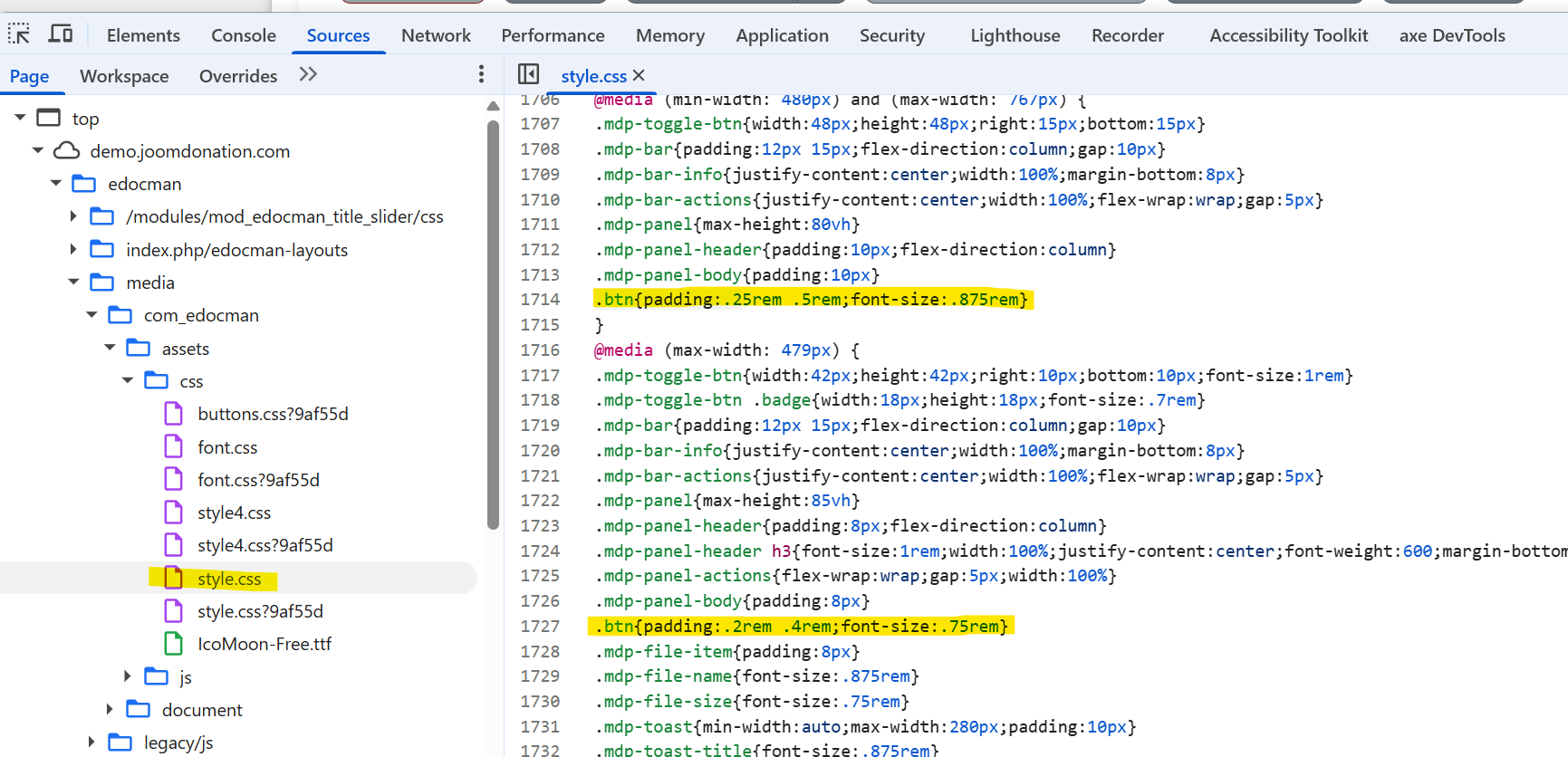
I can still see the global .btn styles in the stylesheet on your demo site, as shown in the attached screenshot.
I may not have explained the issue clearly enough.The problem is not how the EDocman buttons are displayed—they look fine. The problem is that the .btn rules in the EDocman stylesheet also affect Bootstrap buttons elsewhere on the website, outside the EDocman content area. The EDocman stylesheet should only target buttons within EDocman containers, rather than applying styles globally to every element using the .btn class.For example, someone may be using a large Bootstrap button elsewhere on their website:
Code:
class="btn btn-lg"
If an EDocman module is published on that page, the EDocman CSS overrides the Bootstrap styling and makes that button very small on mobile, even though the button is unrelated to EDocman.
Do you see what I mean?
I would normally correct this in my custom CSS file. However, because the EDocman rules override the existing Bootstrap rules, there is no straightforward way to do so without recreating or overriding all the affected properties. I have therefore had to edit EDocman’s style.css directly, but those changes will be overwritten the next time I upgrade EDocman.Could the .btn selectors in the EDocman stylesheet please be scoped to an EDocman-specific parent container?
Thanks for your time.
Last edit: 2 months 2 weeks ago by jd1980.
Please Log in or Create an account to join the conversation.
- Mr. Dam
- Offline
- Administrator
-
Less
More
- Posts: 13799
- Thank you received: 1816
2 months 1 week ago #179216
by Mr. Dam
Replied by Mr. Dam on topic EDocman CSS changing global bootstrap button size on mobile
Hi,
Thank you for the detailed explanation. I understand the issue now.
You are right that the global .btn rules in EDocman’s style.css can affect Bootstrap buttons outside the EDocman area when an EDocman module is loaded on the same page.
I will remove those .btn CSS rules from style.css in the next EDocman release, so they will no longer override Bootstrap buttons globally.
Thanks again for pointing this out.
Best regards,
Dam
Thank you for the detailed explanation. I understand the issue now.
You are right that the global .btn rules in EDocman’s style.css can affect Bootstrap buttons outside the EDocman area when an EDocman module is loaded on the same page.
I will remove those .btn CSS rules from style.css in the next EDocman release, so they will no longer override Bootstrap buttons globally.
Thanks again for pointing this out.
Best regards,
Dam
Please Log in or Create an account to join the conversation.
- jd1980
- Topic Author
- Offline
- New Member
-
Less
More
- Posts: 18
- Thank you received: 0
2 months 1 week ago #179217
by jd1980
Replied by jd1980 on topic EDocman CSS changing global bootstrap button size on mobile
Thank you very much, it's really appreciated 
Please Log in or Create an account to join the conversation.
- Mr. Dam
- Offline
- Administrator
-
Less
More
- Posts: 13799
- Thank you received: 1816
2 months 1 week ago #179227
by Mr. Dam
Replied by Mr. Dam on topic EDocman CSS changing global bootstrap button size on mobile
You're welcome.
Thanks
Dam
Thanks
Dam
Please Log in or Create an account to join the conversation.
Moderators: Mr. Dam
Support
Documentation
Information
Copyright © 2026 Joomla Extensions by Joomdonation. All Rights Reserved.
joomdonation.com is not affiliated with or endorsed by the Joomla! Project or Open Source Matters.
The Joomla! name and logo is used under a limited license granted by Open Source Matters the trademark holder in the United States and other countries.
The Joomla! name and logo is used under a limited license granted by Open Source Matters the trademark holder in the United States and other countries.