The Edocman developer team are proud to announce the release of Edocman 1.17.0. This is a first release for the 1.17.x series of Edocman with big improvements.
Whats new in Edocman 1.17.0
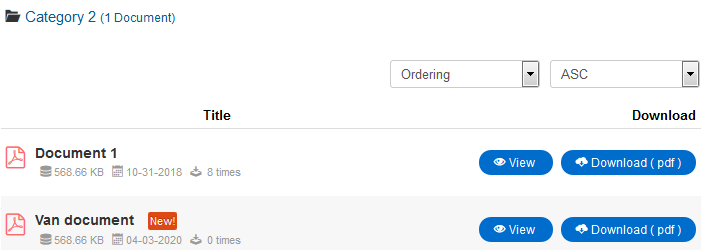
1. Add configure option to show/hide View button in Documents table layout
In this version, we add new configure option (
Edocman Configuration -> Themes -> Category Table Layout -> Show View Button), and in
Documents Table layout, we add new column
View instead of using
Eye icon as in previous versions.
2. Improve Ajax Upload function (Frontend side) to send notification emails after saving uploaded documents
In previous version, the
Document upload notification emails only be sent with
Single File Upload method, but from this version, when you use
Ajax Upload method at Frontend side, the Notification emails will be sent too.
3. Add configure option to show/hide text "No available documents" in Category view
We add new configure option (
Edocman Configuration -> Themes -> Category View -> Documents -> Show No available Documents text) to turn on/off text "No available documents" in Category View layout
4. Add option to sort documents by Publishing start date
Now, beside sorting options like: Created Date, Modified Date, File size, Title, Ordering you will able to sort documents by
Publish Start date.
5. Add configure option to allow you to select Layout that user will be redirected after uploading documents (Frontend side)
We add new configure option (
Edocman Configuration -> General -> Upload Configuration -> Redirect after uploading) to allow you to choose layout that user will be redirected after saving their documents at Frontend side. There are 3 options:
- User documents
- Main Category View (of saved document)
- Joomla Home page
6. Add feature to enlarge photos of documents in listing pages
We are modal box to enlarge photos of documents in listing view
7. Fix "Empty documents creating" issue when plugin Limit Downloads is enabled
In previous versions, when the plugin Limit Downloads is enabled, after saving new document, a new empty document will be created too. This issue is fixed in this version.
Please upgrade EDOCMAN 1.17.0 to get new features and resolved issue !!!
J O O M D O N A T I O N Dev Team