- Posts: 22
- Thank you received: 0

Need help with Joomla? We are available for hire to help with Joomla customization, upgrades, maintenance, and custom development.
Explore our services Is there a way to not assign an employee? A few other questions...
- Craig Scherbarth
- Topic Author
- Offline
- Junior Member
-

Less
More
10 months 1 week ago #175647
by Craig Scherbarth
Is there a way to not assign an employee? A few other questions... was created by Craig Scherbarth
Just purchased this and have a few questions.
We're renting out golf simulator/rooms and have 3 of them to rent and I'm trying to figure out the easiest way to set this up.
1st Question - we really don't need an employee there as it's just a room rental really - is there a way not to assign an employee?
We have 3 rooms and rentals are for an hour each - do we have to set up 3 services or is there a way to setup one service and 3 slots for each hour?
We are also considering offering 30 minute rentals as well as 1 hour rentals (which might cause a problem here). What would be the best way to set that up? Could we have time slots every half hour and then they can choose whether they want a full hour or half hour after they choose their start time? Would the system be able to handle availability correctly?
I'm not sure how much of this is possible?
Thanks for the input,
Craig
We're renting out golf simulator/rooms and have 3 of them to rent and I'm trying to figure out the easiest way to set this up.
1st Question - we really don't need an employee there as it's just a room rental really - is there a way not to assign an employee?
We have 3 rooms and rentals are for an hour each - do we have to set up 3 services or is there a way to setup one service and 3 slots for each hour?
We are also considering offering 30 minute rentals as well as 1 hour rentals (which might cause a problem here). What would be the best way to set that up? Could we have time slots every half hour and then they can choose whether they want a full hour or half hour after they choose their start time? Would the system be able to handle availability correctly?
I'm not sure how much of this is possible?
Thanks for the input,
Craig
Please Log in or Create an account to join the conversation.
- Craig Scherbarth
- Topic Author
- Offline
- Junior Member
-
Less
More
- Posts: 22
- Thank you received: 0
10 months 5 days ago #175748
by Craig Scherbarth
Replied by Craig Scherbarth on topic Is there a way to not assign an employee? A few other questions...
To add to my third question,
We would be charging 60 for a half hour and 110 for a full hour. Is this capable of handling this pricing and format?
We would be charging 60 for a half hour and 110 for a full hour. Is this capable of handling this pricing and format?
Please Log in or Create an account to join the conversation.
- Mr. Dam
- Offline
- Administrator
-

Less
More
- Posts: 13768
- Thank you received: 1807
10 months 5 days ago - 10 months 5 days ago #175749
by Mr. Dam
Replied by Mr. Dam on topic Is there a way to not assign an employee? A few other questions...
Hi Craig,
Thank you for reaching out with your questions!Here’s how you can set up your golf simulator room rentals:
1. Golf Rooms as "Employees":
In our system, the term "Employee" can be translated to "Golf Room" using the Translation tool in the Backend. So, you’ll create 3 "Golf Rooms" instead of employees.
2. Services Setup:
You will need to create 2 services:
Assign your 3 Golf Rooms to both services. This way, each room will be available for both 30-minute and 60-minute rentals.
4. Customer Booking Experience:
On the frontend, your customers will see the available timeslots for each Golf Room. They can select the preferred timeslot and duration (30 or 60 minutes), and then complete the booking and payment process if required.This setup ensures rooms are managed correctly, and the system will handle availability based on your configuration.If you need step-by-step guidance or have further questions, feel free to ask!Best regards,
Dam
Thank you for reaching out with your questions!Here’s how you can set up your golf simulator room rentals:
1. Golf Rooms as "Employees":
In our system, the term "Employee" can be translated to "Golf Room" using the Translation tool in the Backend. So, you’ll create 3 "Golf Rooms" instead of employees.
2. Services Setup:
You will need to create 2 services:
- 30 Minutes Rental
- 60 Minutes Rental
Both should be set up as "Custom Timeslot" services. This allows you to define available timeslots and assign the number of slots for each timeslot.
Assign your 3 Golf Rooms to both services. This way, each room will be available for both 30-minute and 60-minute rentals.
4. Customer Booking Experience:
On the frontend, your customers will see the available timeslots for each Golf Room. They can select the preferred timeslot and duration (30 or 60 minutes), and then complete the booking and payment process if required.This setup ensures rooms are managed correctly, and the system will handle availability based on your configuration.If you need step-by-step guidance or have further questions, feel free to ask!Best regards,
Dam
Last edit: 10 months 5 days ago by Mr. Dam.
Please Log in or Create an account to join the conversation.
- Craig Scherbarth
- Topic Author
- Offline
- Junior Member
-
Less
More
- Posts: 22
- Thank you received: 0
10 months 3 days ago #175765
by Craig Scherbarth
Replied by Craig Scherbarth on topic Is there a way to not assign an employee? A few other questions...
I think I'm headed in the right direction, but am stuck.
We're actually going 1 hour and 2 hour rentals.
So as of now, I have One room (employee) and two services (1 hour and 2 hour rentals.)
I have "custom timeslots" for both.
The problem I'm running into now is that if I select a 1 hour (9-10am) it doesn't remove that option from the 2 hour (9-11).
So I can technically overbook that room if someone books a 9am 1 hour rental and someone else books a 9am 2 hour rental in the same room......I'm not sure how to fix that?
We're actually going 1 hour and 2 hour rentals.
So as of now, I have One room (employee) and two services (1 hour and 2 hour rentals.)
I have "custom timeslots" for both.
The problem I'm running into now is that if I select a 1 hour (9-10am) it doesn't remove that option from the 2 hour (9-11).
So I can technically overbook that room if someone books a 9am 1 hour rental and someone else books a 9am 2 hour rental in the same room......I'm not sure how to fix that?
Please Log in or Create an account to join the conversation.
- Mr. Dam
- Offline
- Administrator
-
Less
More
- Posts: 13768
- Thank you received: 1807
10 months 2 days ago #175771
by Mr. Dam
Replied by Mr. Dam on topic Is there a way to not assign an employee? A few other questions...
Hi Craig,
To prevent overbooking between your 1-hour and 2-hour rental services for the same room, I recommend enabling the "Activate linked services" option in your configuration. Once this option is activated, you will be able to link the two services together using the "Linked services" field when you edit each service.
After making this change, you can test again to see if the issue you mentioned still occurs.
Please try this configuration and let us know if you need further assistance.
Thanks
Dam
To prevent overbooking between your 1-hour and 2-hour rental services for the same room, I recommend enabling the "Activate linked services" option in your configuration. Once this option is activated, you will be able to link the two services together using the "Linked services" field when you edit each service.
After making this change, you can test again to see if the issue you mentioned still occurs.
Please try this configuration and let us know if you need further assistance.
Thanks
Dam
Please Log in or Create an account to join the conversation.
- Craig Scherbarth
- Topic Author
- Offline
- Junior Member
-
Less
More
- Posts: 22
- Thank you received: 0
9 months 2 weeks ago #175983
by Craig Scherbarth
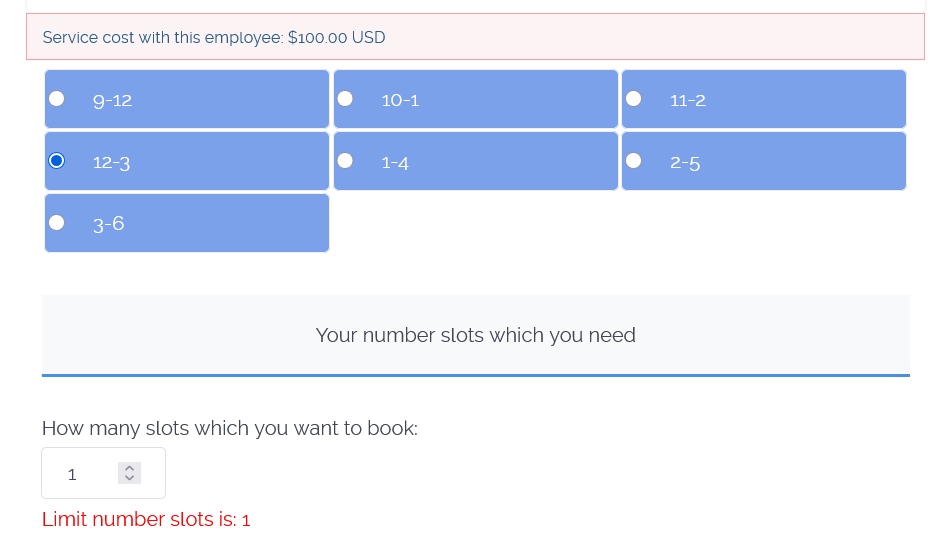
If there a way to remove the area where it says "HOW MANY SLOTS DO YOU WANT TO BOOK" ? I only have it where they can book one slot and I think that is just confusing.
The next issue I'm having is that I'm setting up 1 hour and 2 hour rentals. If I set up a 2 hour rental from 9-11 and have an option from 10-12, If i choose the 9-11, it should tie up the room, but it still allows me to pick the 10-12 slot also, even though the last event would still be going. Hope that made sense??....
Replied by Craig Scherbarth on topic Is there a way to not assign an employee? A few other questions...
If there a way to remove the area where it says "HOW MANY SLOTS DO YOU WANT TO BOOK" ? I only have it where they can book one slot and I think that is just confusing.
The next issue I'm having is that I'm setting up 1 hour and 2 hour rentals. If I set up a 2 hour rental from 9-11 and have an option from 10-12, If i choose the 9-11, it should tie up the room, but it still allows me to pick the 10-12 slot also, even though the last event would still be going. Hope that made sense??....
Please Log in or Create an account to join the conversation.
- Mr. Dam
- Offline
- Administrator
-
Less
More
- Posts: 13768
- Thank you received: 1807
9 months 2 weeks ago #176005
by Mr. Dam
Replied by Mr. Dam on topic Is there a way to not assign an employee? A few other questions...
Hi Craig,
If you want to hide the box that allows users to choose how many slots they want to book, please go to the Configuration page, then to the Layout Settings tab, and disable the option "Show number of slots input box".
You can also enable the option "Disable service timeslot when one of the employees is booked" to lock the service when an employee is already booked for that time slot.
If you have any further questions, please let me know.
Best regards,
Dam
If you want to hide the box that allows users to choose how many slots they want to book, please go to the Configuration page, then to the Layout Settings tab, and disable the option "Show number of slots input box".
You can also enable the option "Disable service timeslot when one of the employees is booked" to lock the service when an employee is already booked for that time slot.
If you have any further questions, please let me know.
Best regards,
Dam
Please Log in or Create an account to join the conversation.
- Craig Scherbarth
- Topic Author
- Offline
- Junior Member
-
Less
More
- Posts: 22
- Thank you received: 0
7 months 3 days ago #177088
by Craig Scherbarth
Replied by Craig Scherbarth on topic Is there a way to not assign an employee? A few other questions...
I've gotten everything setup and I believe it's working the way I want it to.
If we're looking for a Payment Option Plugin that's not on there, are we able to have custom work done to get it to work with our payment processor - www.eposnow.com/us/
I'm not sure if that's possible or not?
If we're looking for a Payment Option Plugin that's not on there, are we able to have custom work done to get it to work with our payment processor - www.eposnow.com/us/
I'm not sure if that's possible or not?
Please Log in or Create an account to join the conversation.
- Mr. Dam
- Offline
- Administrator
-
Less
More
- Posts: 13768
- Thank you received: 1807
7 months 3 days ago #177091
by Mr. Dam
Replied by Mr. Dam on topic Is there a way to not assign an employee? A few other questions...
Hi Craig,
We have looked into Eposnow, but there are still some technical aspects we do not fully understand about their payment gateway.
Could you please submit a support ticket under the "OS Services Booking" category?
This way, we can discuss further and clarify the requirements for integrating Eposnow as a payment option.
Thanks
Dam
We have looked into Eposnow, but there are still some technical aspects we do not fully understand about their payment gateway.
Could you please submit a support ticket under the "OS Services Booking" category?
This way, we can discuss further and clarify the requirements for integrating Eposnow as a payment option.
Thanks
Dam
Please Log in or Create an account to join the conversation.
Moderators: Mr. Dam
Support
Documentation
Information
Copyright © 2026 Joomla Extensions by Joomdonation. All Rights Reserved.
joomdonation.com is not affiliated with or endorsed by the Joomla! Project or Open Source Matters.
The Joomla! name and logo is used under a limited license granted by Open Source Matters the trademark holder in the United States and other countries.
The Joomla! name and logo is used under a limited license granted by Open Source Matters the trademark holder in the United States and other countries.