- Posts: 14
- Thank you received: 0

Need help with Joomla? We are available for hire to help with Joomla customization, upgrades, maintenance, and custom development.
Explore our services Manage Events - Add table columns
- Marielle Pasuquin
- Topic Author
- Offline
- New Member
-

Less
More
3 years 2 months ago #159782
by Marielle Pasuquin
Manage Events - Add table columns was created by Marielle Pasuquin
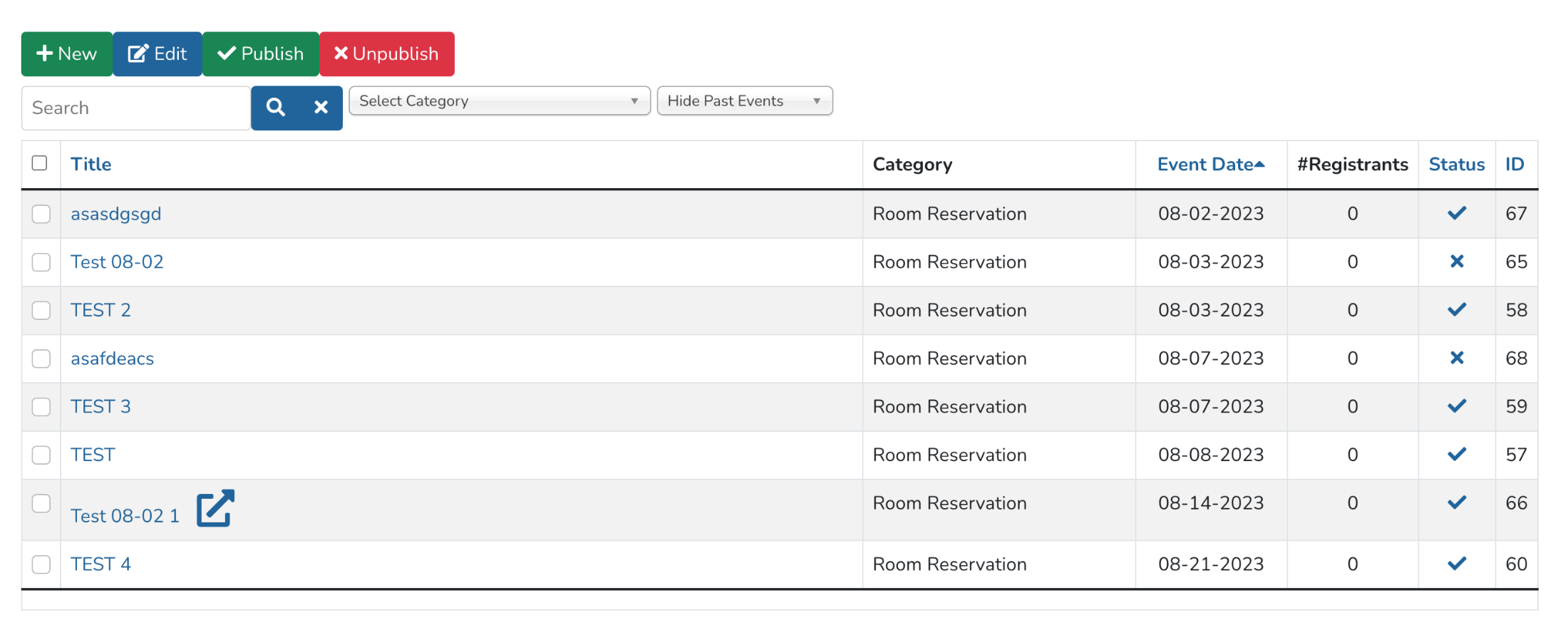
Hi! I am using the Events Booking component to create a room registration feature for my website (as a Submit Event module). However, since I added location and a couple of custom fields (e.g. Requester and division name), I wanted them visible on the MANAGE EVENTS table alongside the publish/unpublish options. I would also like to add the event end date, so the approving user can see everything at one glance.
I hope you can help. Thank you so much!
I hope you can help. Thank you so much!
Please Log in or Create an account to join the conversation.
- Tuan Pham Ngoc
- Offline
- Administrator
-

3 years 2 months ago #159785
by Tuan Pham Ngoc
Replied by Tuan Pham Ngoc on topic Manage Events - Add table columns
Hello
That would require modify the layout of that page to show the information you want (need some Joomla programming skill to do that). The file you will need to modify is components/com_eventbooking/themes/default/events/default.php
Regards,
Tuan
That would require modify the layout of that page to show the information you want (need some Joomla programming skill to do that). The file you will need to modify is components/com_eventbooking/themes/default/events/default.php
Regards,
Tuan
The following user(s) said Thank You: Marielle Pasuquin
Please Log in or Create an account to join the conversation.
- Marielle Pasuquin
- Topic Author
- Offline
- New Member
-
Less
More
- Posts: 14
- Thank you received: 0
3 years 2 months ago #159792
by Marielle Pasuquin
Replied by Marielle Pasuquin on topic Manage Events - Add table columns
Thanks for the prompt reply!
Yes, I saw the file you mentioned. However, I added 2 custom fields (requested by, division), but I do not know how to call them to be displayed in the table. Unlike for location which I was able to add to the table, there is an EB_LOCATION tag that I can use.
Yes, I saw the file you mentioned. However, I added 2 custom fields (requested by, division), but I do not know how to call them to be displayed in the table. Unlike for location which I was able to add to the table, there is an EB_LOCATION tag that I can use.
Please Log in or Create an account to join the conversation.
- Tuan Pham Ngoc
- Offline
- Administrator
-
3 years 2 months ago #159799
by Tuan Pham Ngoc
Replied by Tuan Pham Ngoc on topic Manage Events - Add table columns
Hello
You would need some programming skill to be able to do that. To display the value of a custom field, inside the for loop, use something like this:
Then at the position you want to display the value of certain custom field, just use this code:
Hope this helps
Tuan
You would need some programming skill to be able to do that. To display the value of a custom field, inside the for loop, use something like this:
Code:
$customFields = new \Joomla\Registry\Registry($row->custom_fields);
Then at the position you want to display the value of certain custom field, just use this code:
Code:
echo $customFields->get('name_of_field');
Hope this helps
Tuan
The following user(s) said Thank You: Marielle Pasuquin
Please Log in or Create an account to join the conversation.
- Marielle Pasuquin
- Topic Author
- Offline
- New Member
-
Less
More
- Posts: 14
- Thank you received: 0
3 years 2 months ago #159806
by Marielle Pasuquin
Replied by Marielle Pasuquin on topic Manage Events - Add table columns
That worked excellently. Thank you so much Tuan!
Please Log in or Create an account to join the conversation.
- Tuan Pham Ngoc
- Offline
- Administrator
-
3 years 2 months ago #159819
by Tuan Pham Ngoc
Replied by Tuan Pham Ngoc on topic Manage Events - Add table columns
Great. Happy to hear that. Please remember to move the modified file to template override PATH_TO_TEMPLATE/html/com_eventbooking/events folder so that the change won't be lost when you update to future releases of the extension
Regards,
Tuan
Regards,
Tuan
Please Log in or Create an account to join the conversation.
Moderators: Tuan Pham Ngoc
Support
Documentation
Information
Copyright © 2026 Joomla Extensions by Joomdonation. All Rights Reserved.
joomdonation.com is not affiliated with or endorsed by the Joomla! Project or Open Source Matters.
The Joomla! name and logo is used under a limited license granted by Open Source Matters the trademark holder in the United States and other countries.
The Joomla! name and logo is used under a limited license granted by Open Source Matters the trademark holder in the United States and other countries.