- Posts: 58
- Thank you received: 1

Tool Tip, how to change position on page
- vthomas
- Topic Author
- Offline
- Senior Member
-

Less
More
8 years 1 month ago #109582
by vthomas
Tool Tip, how to change position on page was created by vthomas
Hi, is there a css hook I can use to change where and the width of tool tips? Right now, they display 'above' the question and I'd live to move that done 50px or so and also make the enclosing box wider.
I am not able to find the css hook to make this adjustment for a hover tip. Can you provide that info?
Thanks!! Vicky
I am not able to find the css hook to make this adjustment for a hover tip. Can you provide that info?
Thanks!! Vicky
Please Log in or Create an account to join the conversation.
- James Riley
-

- Offline
- Platinum Member
-

8 years 1 month ago - 8 years 1 month ago #109585
by James Riley
James Riley .: EventBooking user since 2014 ::: JoomDonation user since 2016 :.
.: grfx & web design / IT / AV @ St. Therese Institute of Faith and Mission, Bruno, SK, Canada :.
Replied by James Riley on topic Tool Tip, how to change position on page
I'll see what I can find for you... but take a look at my video here (
www.joomdonation.com/forum/events-bookin...from-tuan.html#99004
) about searching for CSS elements, and you might be able to answer the question for yourself :) The css that I'm talking about in the video isn't the css you'll need, but it should introduce you to the tool you'll need (which you already have built in to your browser).
James Riley .: EventBooking user since 2014 ::: JoomDonation user since 2016 :.
.: grfx & web design / IT / AV @ St. Therese Institute of Faith and Mission, Bruno, SK, Canada :.
Last edit: 8 years 1 month ago by James Riley.
Please Log in or Create an account to join the conversation.
- James Riley
-
- Offline
- Platinum Member
-
8 years 1 month ago #109588
by James Riley
James Riley .: EventBooking user since 2014 ::: JoomDonation user since 2016 :.
.: grfx & web design / IT / AV @ St. Therese Institute of Faith and Mission, Bruno, SK, Canada :.
Replied by James Riley on topic Tool Tip, how to change position on page
Where is the tool tip you are trying to adjust? Could you post a link to a live example (or a screenshot if it's not a public page)? Thanks!
James Riley .: EventBooking user since 2014 ::: JoomDonation user since 2016 :.
.: grfx & web design / IT / AV @ St. Therese Institute of Faith and Mission, Bruno, SK, Canada :.
Please Log in or Create an account to join the conversation.
- vthomas
- Topic Author
- Offline
- Senior Member
-
Less
More
- Posts: 58
- Thank you received: 1
8 years 1 month ago #109596
by vthomas
Replied by vthomas on topic Tool Tip, how to change position on page
Hi James, thanks for your comments. I use inspector a lot, but I can only see tooltips when I am hovering over the actual question, and the tooltip disappears before I can get my cursor over it to right click. Still, I found the code for the tooltip, but can't really find the styling for it in inspector. Specifically, how to make it wider than it is (I would guess it is rendered at about 300 px wide).
The client's page isn't published yet, but here is the code:
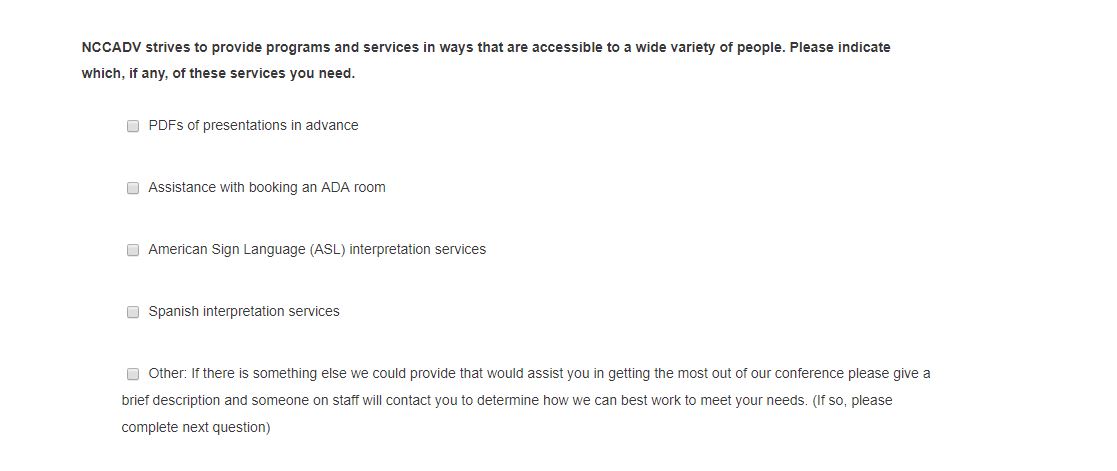
Attached is a screenshot of the question, but I can't get the tooltip to render for the screenshot. The tooltip repeats the question plus the text following the <br /> - basically is the code above. I just couldn't find the css hook to make it wider or lower on the page. I hope I am explaining this OK. Thanks, VIcky
The client's page isn't published yet, but here is the code:
Code:
<label id="accomodations_conference-lbl" for="accomodations_conference" class="hasTooltip hasTip" title="" data-original-title="<strong>NCCADV strives to provide programs and services in ways that are accessible to a wide variety of people. Please indicate which, if any, of these services you need. </strong><br />NCCADV strives to provide programs and services in ways that are accessible to a wide variety of people. To that end we are requiring all speakers to use microphones, providing PDFs of presentations before the conference upon request, assisting with booking ADA compliant hotel rooms in the conference hotel, and hoping to provide American Sign Language (ASL) and Spanish interpreters. Below please indicate which, if any, of these services you need. If there is something else we could provide that would assist you in getting the most out of our conference please give a brief description and someone on staff will contact you to determine how we can best work to meet your needs.">NCCADV strives to provide programs and services in ways that are accessible to a wide variety of people. Please indicate which, if any, of these services you need. </label>
Attached is a screenshot of the question, but I can't get the tooltip to render for the screenshot. The tooltip repeats the question plus the text following the <br /> - basically is the code above. I just couldn't find the css hook to make it wider or lower on the page. I hope I am explaining this OK. Thanks, VIcky
Please Log in or Create an account to join the conversation.
- vthomas
- Topic Author
- Offline
- Senior Member
-
Less
More
- Posts: 58
- Thank you received: 1
8 years 1 month ago #109597
by vthomas
Replied by vthomas on topic Tool Tip, how to change position on page
here is the screenshot
Please Log in or Create an account to join the conversation.
- Tuan Pham Ngoc
- Offline
- Administrator
-

8 years 1 month ago #109609
by Tuan Pham Ngoc
Replied by Tuan Pham Ngoc on topic Tool Tip, how to change position on page
Hi vthomas
Better sending us the link to the page so that we can check it and give you the answer for the question. It is not easy to find a solution from HTML code
BTW, we are having new year holiday here in our country Vietnam, so in case css is difficult, I am afraid of I could not give the answer until we come back to work on Wednesday next week (I usually rely on my support staffs for css issues but they are not available much during the holiday)
Regards,
Tuan
Better sending us the link to the page so that we can check it and give you the answer for the question. It is not easy to find a solution from HTML code
BTW, we are having new year holiday here in our country Vietnam, so in case css is difficult, I am afraid of I could not give the answer until we come back to work on Wednesday next week (I usually rely on my support staffs for css issues but they are not available much during the holiday)
Regards,
Tuan
Please Log in or Create an account to join the conversation.
- James Riley
-
- Offline
- Platinum Member
-
8 years 1 month ago #109633
by James Riley
James Riley .: EventBooking user since 2014 ::: JoomDonation user since 2016 :.
.: grfx & web design / IT / AV @ St. Therese Institute of Faith and Mission, Bruno, SK, Canada :.
Replied by James Riley on topic Tool Tip, how to change position on page
For some reason, my ToolTips aren't showing up on my site 
... However, I did find that when I mouse-over, a "hasToolTip" element, a div is dynamically added to code with a class of "tooltip". Maybe you can target this class with a negative margin value to move it around a bit?

... However, I did find that when I mouse-over, a "hasToolTip" element, a div is dynamically added to code with a class of "tooltip". Maybe you can target this class with a negative margin value to move it around a bit?
James Riley .: EventBooking user since 2014 ::: JoomDonation user since 2016 :.
.: grfx & web design / IT / AV @ St. Therese Institute of Faith and Mission, Bruno, SK, Canada :.
Please Log in or Create an account to join the conversation.
- Tuan Pham Ngoc
- Offline
- Administrator
-
8 years 1 month ago #109653
by Tuan Pham Ngoc
Replied by Tuan Pham Ngoc on topic Tool Tip, how to change position on page
I believe it is from Joomla core tooltip API, there should be option to allow changing tooltip position, will try to look at it when I am less busy. Staffs are off for one week new year holiday and right now, only me around for support, grrr...
Tuan
Tuan
Please Log in or Create an account to join the conversation.
- vthomas
- Topic Author
- Offline
- Senior Member
-
Less
More
- Posts: 58
- Thank you received: 1
8 years 1 month ago #109670
by vthomas
Replied by vthomas on topic Tool Tip, how to change position on page
Tuan, yes, enjoy the new year holiday! This is no emergency. Next week is OK.
James, I saw that class in the code, but couldn't find the css style for it (as you do see on the screenshot).
Thank you both.
Vicky
James, I saw that class in the code, but couldn't find the css style for it (as you do see on the screenshot).
Thank you both.
Vicky
Please Log in or Create an account to join the conversation.
- James Riley
-
- Offline
- Platinum Member
-
8 years 1 month ago #109675
by James Riley
James Riley .: EventBooking user since 2014 ::: JoomDonation user since 2016 :.
.: grfx & web design / IT / AV @ St. Therese Institute of Faith and Mission, Bruno, SK, Canada :.
Replied by James Riley on topic Tool Tip, how to change position on page
My site's .tooltip classes are defined in my templates' main css file (style.css in my case). Check your template's css file(s) for any occurance of .tooltip, and either mod them there or copy-and-paste-and-mod them in EB's Configuration -> Custom CSS window.
Example from my site:
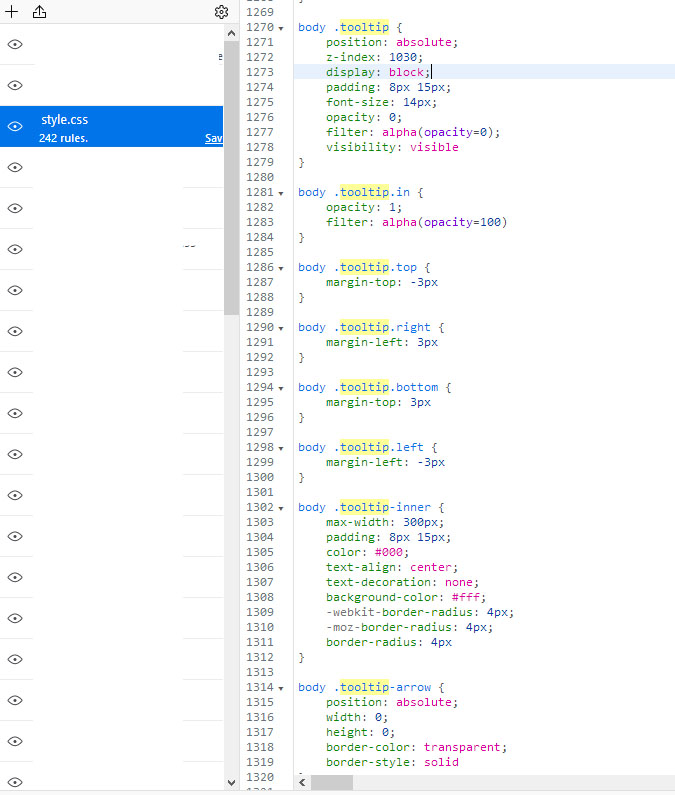
Example from my site:
James Riley .: EventBooking user since 2014 ::: JoomDonation user since 2016 :.
.: grfx & web design / IT / AV @ St. Therese Institute of Faith and Mission, Bruno, SK, Canada :.
Please Log in or Create an account to join the conversation.
Moderators: Tuan Pham Ngoc
Support
Documentation
Information
Copyright © 2026 Joomla Extensions by Joomdonation. All Rights Reserved.
joomdonation.com is not affiliated with or endorsed by the Joomla! Project or Open Source Matters.
The Joomla! name and logo is used under a limited license granted by Open Source Matters the trademark holder in the United States and other countries.
The Joomla! name and logo is used under a limited license granted by Open Source Matters the trademark holder in the United States and other countries.