- Posts: 14
- Thank you received: 0

Event-specific terms and conditions
- 3by400, Inc.
-
 Topic Author
- Offline
- New Member
-

Less
More
9 years 2 weeks ago - 9 years 2 weeks ago #96212
by 3by400, Inc.
Event-specific terms and conditions was created by 3by400, Inc.
I notice in the Events Booking config the "Terms and conditions" field is labeled as "default", which typically means that items 'default' to the selection only when a specific selection isn't made for an item.
If I don't want a particular event to show the "default" terms and conditions article, how do I select a different terms and conditions article for that one event?
PS - Have you stopped supporting Document Seller? We have an active license for it, however, I don't see a forum for it. How do we get support?
If I don't want a particular event to show the "default" terms and conditions article, how do I select a different terms and conditions article for that one event?
PS - Have you stopped supporting Document Seller? We have an active license for it, however, I don't see a forum for it. How do we get support?
Last edit: 9 years 2 weeks ago by 3by400, Inc..
Please Log in or Create an account to join the conversation.
- James Riley
-

- Offline
- Platinum Member
-

9 years 2 weeks ago #96213
by James Riley
James Riley .: EventBooking user since 2014 ::: JoomDonation user since 2016 :.
.: grfx & web design / IT / AV @ St. Therese Institute of Faith and Mission, Bruno, SK, Canada :.
Replied by James Riley on topic Event-specific terms and conditions
To setup different Terms & Conditions for an event,
1) Create a new Joomla Article with the new T&Cs
2) In your event, in [Event Detail tab] and under the [Misc] heading, look for the [Terms and Conditions] article selector. Click the [Select] button and pick your new T&C article.
I've also written code into my install of EB to disable T&C for specific events. I can push the code through to @Tuan for consideration in the main distro if you are interested
1) Create a new Joomla Article with the new T&Cs
2) In your event, in [Event Detail tab] and under the [Misc] heading, look for the [Terms and Conditions] article selector. Click the [Select] button and pick your new T&C article.
I've also written code into my install of EB to disable T&C for specific events. I can push the code through to @Tuan for consideration in the main distro if you are interested
James Riley .: EventBooking user since 2014 ::: JoomDonation user since 2016 :.
.: grfx & web design / IT / AV @ St. Therese Institute of Faith and Mission, Bruno, SK, Canada :.
The following user(s) said Thank You: 3by400, Inc.
Please Log in or Create an account to join the conversation.
- 3by400, Inc.
-
Topic Author
- Offline
- New Member
-
Less
More
- Posts: 14
- Thank you received: 0
9 years 2 weeks ago - 9 years 2 weeks ago #96214
by 3by400, Inc.
Replied by 3by400, Inc. on topic Event-specific terms and conditions
I don't have that field under Misc. in the event details.
Update: I found this setting in config, which was disabled - "Term and Condition By Event" - I've enabled it and I have the field in the event details now. Thanks.
Update: I found this setting in config, which was disabled - "Term and Condition By Event" - I've enabled it and I have the field in the event details now. Thanks.
Last edit: 9 years 2 weeks ago by 3by400, Inc..
Please Log in or Create an account to join the conversation.
- James Riley
-
- Offline
- Platinum Member
-
9 years 2 weeks ago #96215
by James Riley
James Riley .: EventBooking user since 2014 ::: JoomDonation user since 2016 :.
.: grfx & web design / IT / AV @ St. Therese Institute of Faith and Mission, Bruno, SK, Canada :.
Replied by James Riley on topic Event-specific terms and conditions
Make sure that under [Event Booking -> Configuration -> General tab -> Registration Settings] the option for [Term and Condition By Event] is set to YES.
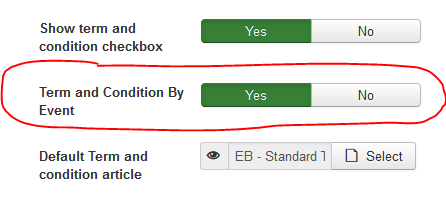
If you don't have that option, then maybe you're running too old a version of EB. What version are you running?
If you don't have that option, then maybe you're running too old a version of EB. What version are you running?
James Riley .: EventBooking user since 2014 ::: JoomDonation user since 2016 :.
.: grfx & web design / IT / AV @ St. Therese Institute of Faith and Mission, Bruno, SK, Canada :.
The following user(s) said Thank You: Tuan Pham Ngoc
Please Log in or Create an account to join the conversation.
- Tuan Pham Ngoc
- Offline
- Administrator
-

9 years 2 weeks ago #96219
by Tuan Pham Ngoc
Replied by Tuan Pham Ngoc on topic Event-specific terms and conditions
@3by400 : For Documents Seller, please submit a support ticket for support. I had to slow down the development for that extension to focus on more important products. I am planning to re-write that extension to have better architecture and feature in about one month or so
@James : Pull request to improve it is always welcomed
Tuan
@James : Pull request to improve it is always welcomed
Tuan
Please Log in or Create an account to join the conversation.
- lumis
- Offline
- Junior Member
-

Less
More
- Posts: 22
- Thank you received: 0
8 years 7 months ago #102791
by lumis
Replied by lumis on topic Event-specific terms and conditions
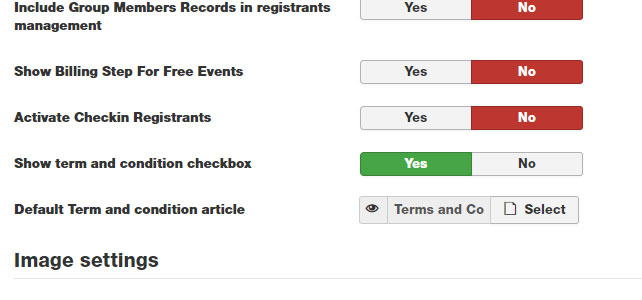
I have a problem where I remember being able to set custom terms and conditions for events, but not I cannot find the settings. I have updated to the latyest version, and I even have some events running with custom terms pages used...how did I do it?
My screenshot compared to James Riley's doesn't have the second "term and condition by event" parameter?
I have cleared site and browser cache, but I cannot find it. Any ideas?
My screenshot compared to James Riley's doesn't have the second "term and condition by event" parameter?
I have cleared site and browser cache, but I cannot find it. Any ideas?
Please Log in or Create an account to join the conversation.
- Tuan Pham Ngoc
- Offline
- Administrator
-
8 years 7 months ago #102800
by Tuan Pham Ngoc
Replied by Tuan Pham Ngoc on topic Event-specific terms and conditions
If you want to select terms and conditions for an event, look at Terms and Conditions setting, select the article you want for terms and conditions of that event
Try to check it again and let me know if you need screenshot
Tuan
Try to check it again and let me know if you need screenshot
Tuan
Please Log in or Create an account to join the conversation.
- lumis
- Offline
- Junior Member
-
Less
More
- Posts: 22
- Thank you received: 0
8 years 7 months ago #102892
by lumis
Replied by lumis on topic Event-specific terms and conditions
Hi Tuan,
There is no setting for Terms and Conditions in the event settings. It must have been there in an older version because I have several events with a custom terms article set, but I can no longer find where I can change this?
Thanks,
Aaron
There is no setting for Terms and Conditions in the event settings. It must have been there in an older version because I have several events with a custom terms article set, but I can no longer find where I can change this?
Thanks,
Aaron
Please Log in or Create an account to join the conversation.
- Tuan Pham Ngoc
- Offline
- Administrator
-
8 years 7 months ago #102903
by Tuan Pham Ngoc
Replied by Tuan Pham Ngoc on topic Event-specific terms and conditions
Hi Aaron
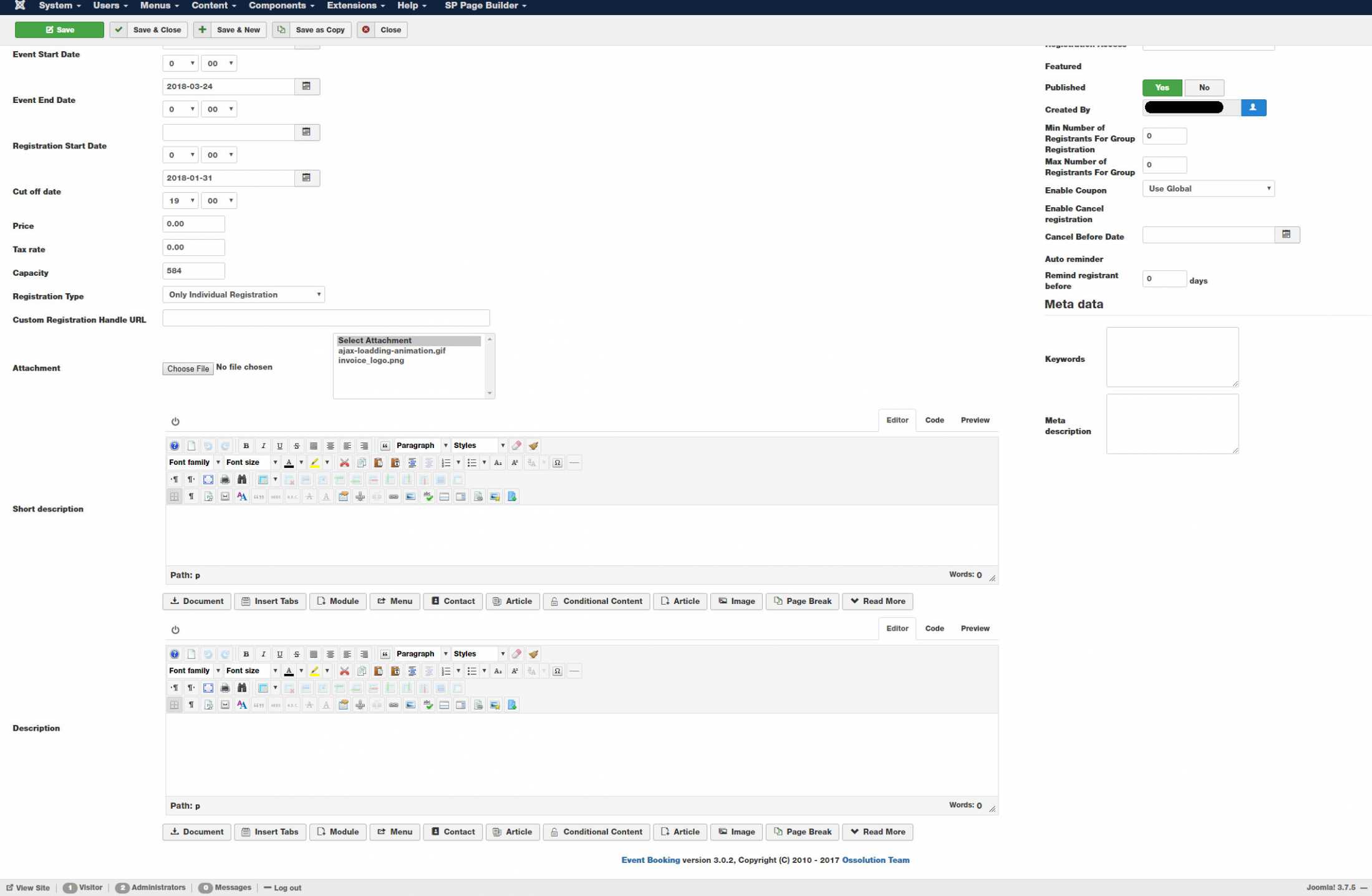
It's there, on add/edit event screen in the backend, see this screenshot from my local computer drive.google.com/file/d/0B2RoJ_24efMQaE1...lk/view?usp=drivesdk (latest version 3.0.3 for now)
Tuan
It's there, on add/edit event screen in the backend, see this screenshot from my local computer drive.google.com/file/d/0B2RoJ_24efMQaE1...lk/view?usp=drivesdk (latest version 3.0.3 for now)
Tuan
Please Log in or Create an account to join the conversation.
- lumis
- Offline
- Junior Member
-
Less
More
- Posts: 22
- Thank you received: 0
8 years 7 months ago #102951
by lumis
Replied by lumis on topic Event-specific terms and conditions
Hi Tuan,
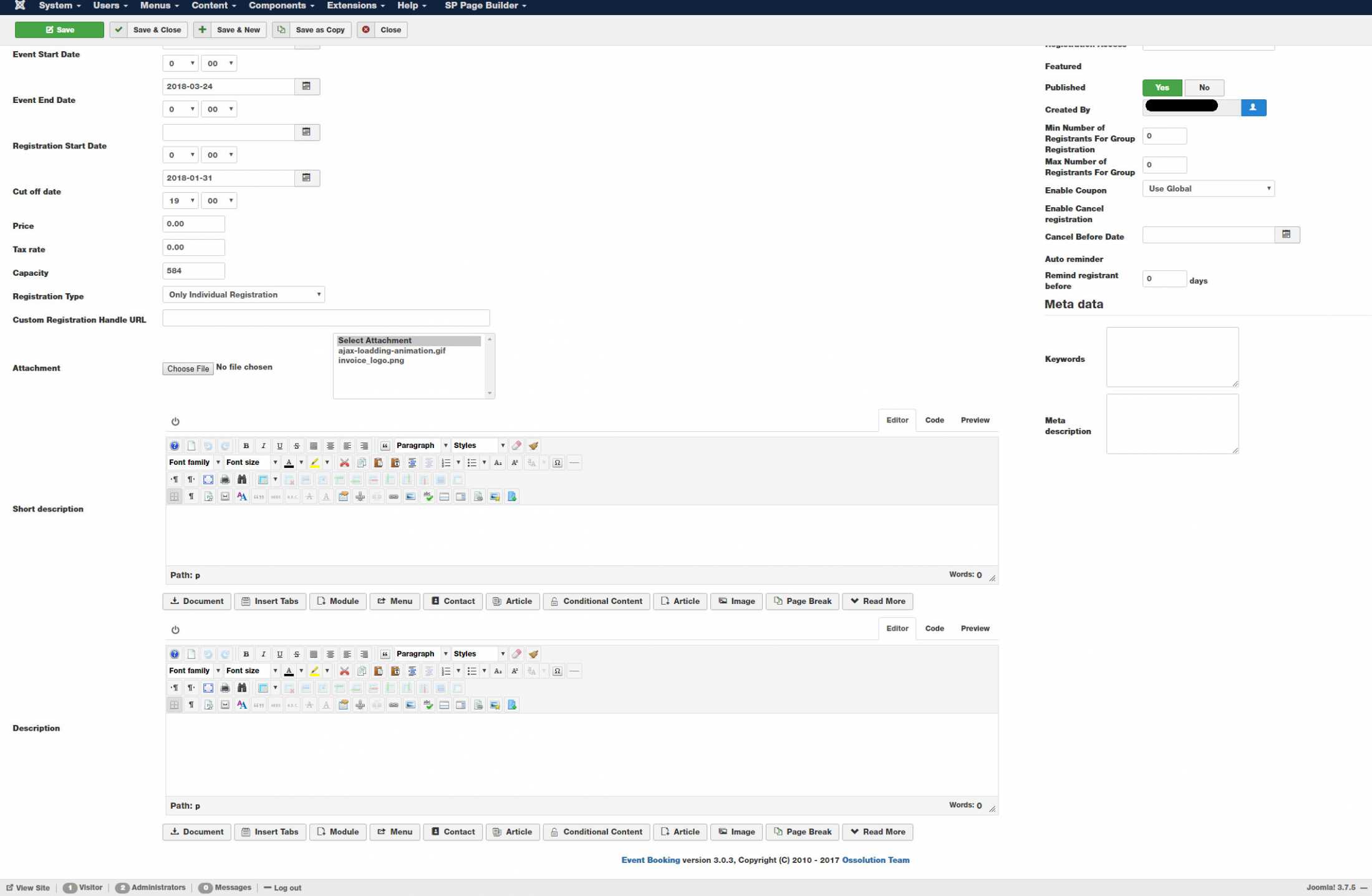
Sorry it is just not visible for me. Judging by your screenshot, several parameters in the event settings are missing too. I upgraded to 3.0.3 from 3.0.2 but it made no difference?
Thanks,
Aaron
Sorry it is just not visible for me. Judging by your screenshot, several parameters in the event settings are missing too. I upgraded to 3.0.3 from 3.0.2 but it made no difference?
Thanks,
Aaron
Please Log in or Create an account to join the conversation.
Moderators: Tuan Pham Ngoc
Support
Documentation
Information
Copyright © 2026 Joomla Extensions by Joomdonation. All Rights Reserved.
joomdonation.com is not affiliated with or endorsed by the Joomla! Project or Open Source Matters.
The Joomla! name and logo is used under a limited license granted by Open Source Matters the trademark holder in the United States and other countries.
The Joomla! name and logo is used under a limited license granted by Open Source Matters the trademark holder in the United States and other countries.