- Posts: 11
- Thank you received: 0

EB Paypal Pro Not Displaying Properly at Checkout
- Alan Oviatt
- Topic Author
- Offline
- New Member
-

Less
More
9 years 1 month ago #94433
by Alan Oviatt
EB Paypal Pro Not Displaying Properly at Checkout was created by Alan Oviatt
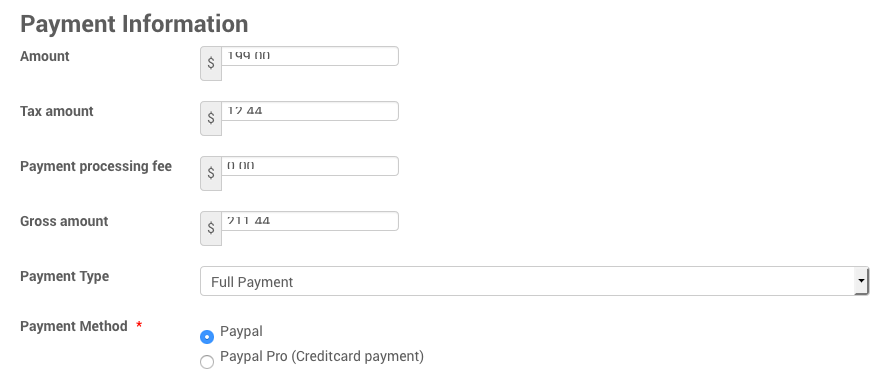
Please see the image attached - Not sure why I am only getting 1/2 box displaying the charges - impossible for a customer to read. Any thoughts?
Please Log in or Create an account to join the conversation.
- James Riley
-

- Offline
- Platinum Member
-

9 years 1 month ago - 9 years 1 month ago #94434
by James Riley
James Riley .: EventBooking user since 2014 ::: JoomDonation user since 2016 :.
.: grfx & web design / IT / AV @ St. Therese Institute of Faith and Mission, Bruno, SK, Canada :.
Replied by James Riley on topic EB Paypal Pro Not Displaying Properly at Checkout
CSS conflict with your template. If you could you post a URL to a registration page, I can help you with overriding the CSS so that it works properly 
James Riley .: EventBooking user since 2014 ::: JoomDonation user since 2016 :.
.: grfx & web design / IT / AV @ St. Therese Institute of Faith and Mission, Bruno, SK, Canada :.
Last edit: 9 years 1 month ago by James Riley. Reason: added "with your template"
Please Log in or Create an account to join the conversation.
- Alan Oviatt
- Topic Author
- Offline
- New Member
-
Less
More
- Posts: 11
- Thank you received: 0
9 years 1 month ago #94435
by Alan Oviatt
Replied by Alan Oviatt on topic EB Paypal Pro Not Displaying Properly at Checkout
Thank you for the help!!
smarttherapist.org/index.php/events
And I only get a registration icon for the first event. Subsequent events not showing registration option.
Do you need an admin login?
smarttherapist.org/index.php/events
And I only get a registration icon for the first event. Subsequent events not showing registration option.
Do you need an admin login?
Please Log in or Create an account to join the conversation.
- James Riley
-
- Offline
- Platinum Member
-
9 years 1 month ago - 9 years 1 month ago #94437
by James Riley
James Riley .: EventBooking user since 2014 ::: JoomDonation user since 2016 :.
.: grfx & web design / IT / AV @ St. Therese Institute of Faith and Mission, Bruno, SK, Canada :.
Replied by James Riley on topic EB Paypal Pro Not Displaying Properly at Checkout
One line of CSS should fix this for you
In [Event Booking -> Configuration -> Custom CSS tab], add the following:
.eb-container {box-sizing: content-box !important;}
As for the [Register] button not showing for other events, it's either a case of the event's 1) [Registration Start Date] still being in the future, 2) [Cut Off Date] having passed, or 3) {Registration Type] being set to "Disable Registration". #1 is the most likely reason.
In [Event Booking -> Configuration -> Custom CSS tab], add the following:
.eb-container {box-sizing: content-box !important;}
As for the [Register] button not showing for other events, it's either a case of the event's 1) [Registration Start Date] still being in the future, 2) [Cut Off Date] having passed, or 3) {Registration Type] being set to "Disable Registration". #1 is the most likely reason.
James Riley .: EventBooking user since 2014 ::: JoomDonation user since 2016 :.
.: grfx & web design / IT / AV @ St. Therese Institute of Faith and Mission, Bruno, SK, Canada :.
Last edit: 9 years 1 month ago by James Riley.
The following user(s) said Thank You: Alan Oviatt
Please Log in or Create an account to join the conversation.
- James Riley
-
- Offline
- Platinum Member
-
9 years 1 month ago #94438
by James Riley
James Riley .: EventBooking user since 2014 ::: JoomDonation user since 2016 :.
.: grfx & web design / IT / AV @ St. Therese Institute of Faith and Mission, Bruno, SK, Canada :.
Replied by James Riley on topic EB Paypal Pro Not Displaying Properly at Checkout
Oh -- forgot to mention that this CSS should also fix the problem of characters with descenders (the part of a letter that descends below the baseline, eg "g", "y", etc.) being cut off in the text entry part of your form too.
James Riley .: EventBooking user since 2014 ::: JoomDonation user since 2016 :.
.: grfx & web design / IT / AV @ St. Therese Institute of Faith and Mission, Bruno, SK, Canada :.
The following user(s) said Thank You: Alan Oviatt
Please Log in or Create an account to join the conversation.
- Alan Oviatt
- Topic Author
- Offline
- New Member
-
Less
More
- Posts: 11
- Thank you received: 0
9 years 1 month ago #94441
by Alan Oviatt
Replied by Alan Oviatt on topic EB Paypal Pro Not Displaying Properly at Checkout
That has fixed everything! Thanks for your great support!
Please Log in or Create an account to join the conversation.
- Alan Oviatt
- Topic Author
- Offline
- New Member
-
Less
More
- Posts: 11
- Thank you received: 0
9 years 1 month ago #94442
by Alan Oviatt
Replied by Alan Oviatt on topic EB Paypal Pro Not Displaying Properly at Checkout
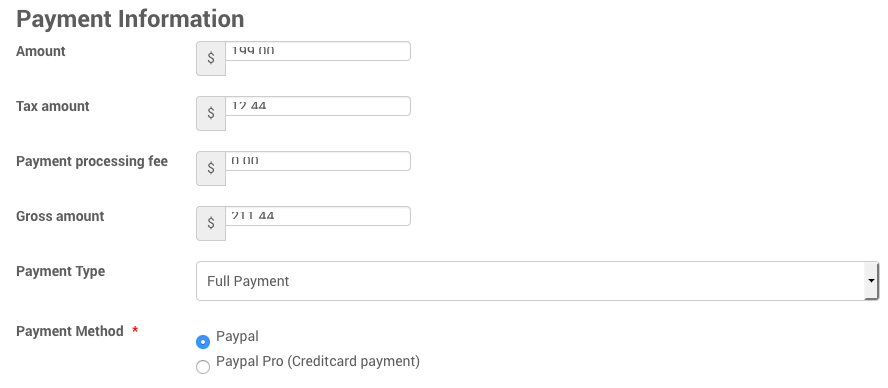
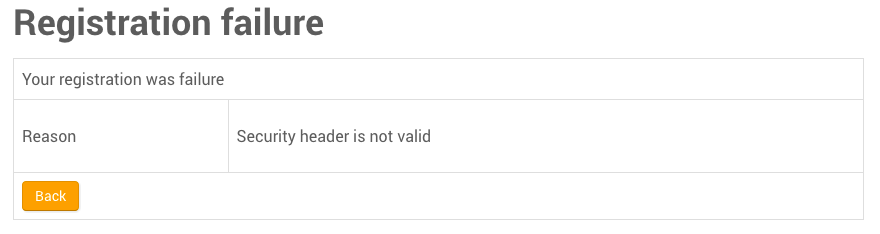
Spoke too soon - Register icon's now showing up but css did not fix the box issue. Registration for the event fails (i am still in sandbox mode - this may make a difference) Can you look at the two attachments and let me know what you think?
Please Log in or Create an account to join the conversation.
- James Riley
-
- Offline
- Platinum Member
-
9 years 1 month ago #94444
by James Riley
James Riley .: EventBooking user since 2014 ::: JoomDonation user since 2016 :.
.: grfx & web design / IT / AV @ St. Therese Institute of Faith and Mission, Bruno, SK, Canada :.
Replied by James Riley on topic EB Paypal Pro Not Displaying Properly at Checkout
Oops! I missed the input selector :whistle:
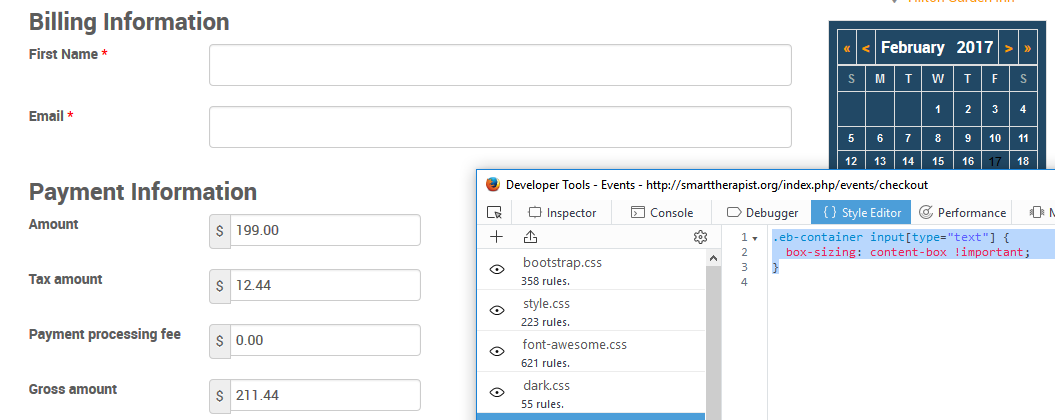
Replace the previous suggested CSS with this:
Here's what your form should then look like:
Replace the previous suggested CSS with this:
Code:
.eb-container input[type="text"] { box-sizing: content-box !important; }
Here's what your form should then look like:
James Riley .: EventBooking user since 2014 ::: JoomDonation user since 2016 :.
.: grfx & web design / IT / AV @ St. Therese Institute of Faith and Mission, Bruno, SK, Canada :.
Please Log in or Create an account to join the conversation.
- James Riley
-
- Offline
- Platinum Member
-
9 years 1 month ago #94445
by James Riley
James Riley .: EventBooking user since 2014 ::: JoomDonation user since 2016 :.
.: grfx & web design / IT / AV @ St. Therese Institute of Faith and Mission, Bruno, SK, Canada :.
Replied by James Riley on topic EB Paypal Pro Not Displaying Properly at Checkout
The registration failing is probably the result of the sandbox mode. When you do go to live payment mode, make sure that you edit the PayPal payment plugin options, inserting your account info: [Event Booking -> Payment Plugins -> select the plugin -> edit info]
James Riley .: EventBooking user since 2014 ::: JoomDonation user since 2016 :.
.: grfx & web design / IT / AV @ St. Therese Institute of Faith and Mission, Bruno, SK, Canada :.
Please Log in or Create an account to join the conversation.
- Alan Oviatt
- Topic Author
- Offline
- New Member
-
Less
More
- Posts: 11
- Thank you received: 0
9 years 1 month ago #94447
by Alan Oviatt
Replied by Alan Oviatt on topic EB Paypal Pro Not Displaying Properly at Checkout
Sorry about this, but still no bueno. It does not look like your image, still not properly sizing. Strange...
Please Log in or Create an account to join the conversation.
Moderators: Tuan Pham Ngoc
Support
Documentation
Information
Copyright © 2026 Joomla Extensions by Joomdonation. All Rights Reserved.
joomdonation.com is not affiliated with or endorsed by the Joomla! Project or Open Source Matters.
The Joomla! name and logo is used under a limited license granted by Open Source Matters the trademark holder in the United States and other countries.
The Joomla! name and logo is used under a limited license granted by Open Source Matters the trademark holder in the United States and other countries.