- Posts: 16
- Thank you received: 0

Need help with Joomla? We are available for hire to help with Joomla customization, upgrades, maintenance, and custom development.
Explore our services Locations Link error
- Anne
- Topic Author
- Offline
- New Member
-

Less
More
9 years 8 months ago #94292
by Anne
Locations Link error was created by Anne
Hello,
On my clients website I am getting the following error in the pop-up window when the event location is selected:
Sorry! Something went wrong.
This page didn't load Google Maps correctly. See the JavaScript console for technical details.
www.healthyriverstrust.org.uk/index.php/...ew_event&event_id=15
Thanks in advance,
Anne
On my clients website I am getting the following error in the pop-up window when the event location is selected:
Sorry! Something went wrong.
This page didn't load Google Maps correctly. See the JavaScript console for technical details.
www.healthyriverstrust.org.uk/index.php/...ew_event&event_id=15
Thanks in advance,
Anne
Please Log in or Create an account to join the conversation.
- Tuan Pham Ngoc
- Away
- Administrator
-

9 years 8 months ago #94294
by Tuan Pham Ngoc
Replied by Tuan Pham Ngoc on topic Locations Link error
Hello Anne
It causes by some changes in Google Map API few months ago. You will need to update to latest version of Events Booking to get it works (there are changes to code in many places in the extension to have it works)
I just checked and found that you are using Joomla 2.5, and your purchase was from 2013, so the support time was expired long time ago. You can purchase latest version of the extension (to get support), then submit a support ticket sending us super admin account (and FTP account of the site)
We will modify code to get it works for you. As I said, there are modifications to different places, so it would be better if you can update to Joomla 3, which will help saving much time of both of us
Regards,
Tuan
It causes by some changes in Google Map API few months ago. You will need to update to latest version of Events Booking to get it works (there are changes to code in many places in the extension to have it works)
I just checked and found that you are using Joomla 2.5, and your purchase was from 2013, so the support time was expired long time ago. You can purchase latest version of the extension (to get support), then submit a support ticket sending us super admin account (and FTP account of the site)
We will modify code to get it works for you. As I said, there are modifications to different places, so it would be better if you can update to Joomla 3, which will help saving much time of both of us
Regards,
Tuan
Please Log in or Create an account to join the conversation.
- Tuan Pham Ngoc
- Away
- Administrator
-
9 years 8 months ago #94296
by Tuan Pham Ngoc
Replied by Tuan Pham Ngoc on topic Locations Link error
Try to get this file, unzip it, upload to components/com_eventbooking/view/map/tmpl/ folder (to replace original file), then check it to see whether it works
If it works, then it saves you some money of the new purchase
Regards,
Tuan
If it works, then it saves you some money of the new purchase
Regards,
Tuan
Please Log in or Create an account to join the conversation.
- Anne
- Topic Author
- Offline
- New Member
-
Less
More
- Posts: 16
- Thank you received: 0
9 years 8 months ago #94548
by Anne
Replied by Anne on topic Locations Link error
Hi Tuan,
Perfect - that has worked! Many thanks indeed!
I am trying to convince my client to upgrade to Joomla 3!
Many thanks,
Anne
Perfect - that has worked! Many thanks indeed!
I am trying to convince my client to upgrade to Joomla 3!
Many thanks,
Anne
Please Log in or Create an account to join the conversation.
- Tuan Pham Ngoc
- Away
- Administrator
-
9 years 8 months ago #94551
by Tuan Pham Ngoc
Replied by Tuan Pham Ngoc on topic Locations Link error
That would be great. Thanks Anne
Tuan
Tuan
Please Log in or Create an account to join the conversation.
- Pat Evans
- Offline
- Junior Member
-

Less
More
- Posts: 27
- Thank you received: 0
7 years 3 months ago #126891
by Pat Evans
Replied by Pat Evans on topic Locations Link error
I have been having a similar issue and I'm about to lose my mind. Everything is setup correctly with the Google API Key, yet I still get:
Oops! Something went wrong.
This page didn't load Google Maps correctly. See the JavaScript console for technical details.
I have entered the API key in the Events Booking-> Configuration and in the Google Maps Plugin.
Any help would be great, I have tried every suggestion I can find to no avail.
Oops! Something went wrong.
This page didn't load Google Maps correctly. See the JavaScript console for technical details.
I have entered the API key in the Events Booking-> Configuration and in the Google Maps Plugin.
Any help would be great, I have tried every suggestion I can find to no avail.
Please Log in or Create an account to join the conversation.
- Tuan Pham Ngoc
- Away
- Administrator
-
7 years 3 months ago #126894
by Tuan Pham Ngoc
Replied by Tuan Pham Ngoc on topic Locations Link error
Hello
There must be something wrong in your API Key settings. Please send us the link to the page, we will tell you what's wrong (base on the error message throws by Google) so that you can check it
Tuan
There must be something wrong in your API Key settings. Please send us the link to the page, we will tell you what's wrong (base on the error message throws by Google) so that you can check it
Tuan
Please Log in or Create an account to join the conversation.
- Pat Evans
- Offline
- Junior Member
-
Less
More
- Posts: 27
- Thank you received: 0
7 years 3 months ago - 7 years 3 months ago #126903
by Pat Evans
Replied by Pat Evans on topic Locations Link error
Thank you I sorted it out... after hours of frustration.
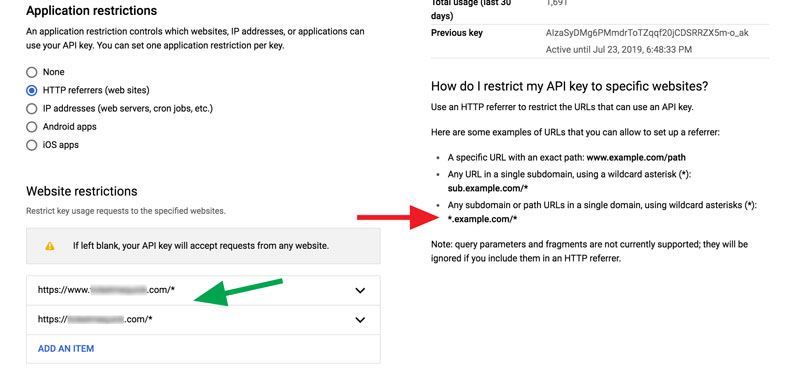
Basically Google was giving instructions that were confusing regarding creating the list of authorized websites for the API key. The example said enter it in this format:
*.example.com/*
but this was what I eventually discovered via a forum comment thread- the period on the front is only needed in case of a subdomain if you are adding your site without a "www". So I removed the period and- based on another suggestion- ended up dropping the front asterisk as it seemed to be affecting the result as well and it finally worked fine on all my pages.
So for anyone having trouble adding your authorized API websites on Google, use this format:
www.example.com/*
example.com/*
Also you will need to use the http:// or https:// prefix as well
Can't believe how much time I wasted over a period and an asterisk.
Basically Google was giving instructions that were confusing regarding creating the list of authorized websites for the API key. The example said enter it in this format:
*.example.com/*
but this was what I eventually discovered via a forum comment thread- the period on the front is only needed in case of a subdomain if you are adding your site without a "www". So I removed the period and- based on another suggestion- ended up dropping the front asterisk as it seemed to be affecting the result as well and it finally worked fine on all my pages.
So for anyone having trouble adding your authorized API websites on Google, use this format:
www.example.com/*
example.com/*
Also you will need to use the http:// or https:// prefix as well
Can't believe how much time I wasted over a period and an asterisk.
Last edit: 7 years 3 months ago by Pat Evans. Reason: text displaying as link
Please Log in or Create an account to join the conversation.
- Tuan Pham Ngoc
- Away
- Administrator
-
7 years 3 months ago #126904
by Tuan Pham Ngoc
Replied by Tuan Pham Ngoc on topic Locations Link error
Thanks Pat. Could you please attach a screenshot of that part if it's possible? It would be useful for other customers in case they have same error.
Many thanks again for sharing what you figured out
Tuan
Many thanks again for sharing what you figured out
Tuan
Please Log in or Create an account to join the conversation.
- Pat Evans
- Offline
- Junior Member
-
Less
More
- Posts: 27
- Thank you received: 0
7 years 3 months ago #126938
by Pat Evans
Replied by Pat Evans on topic Locations Link error
Here you go. The red arrow indicates Google's crap instructions and the green is the format I used successfully.
Please Log in or Create an account to join the conversation.
Moderators: Tuan Pham Ngoc
Support
Documentation
Information
Copyright © 2026 Joomla Extensions by Joomdonation. All Rights Reserved.
joomdonation.com is not affiliated with or endorsed by the Joomla! Project or Open Source Matters.
The Joomla! name and logo is used under a limited license granted by Open Source Matters the trademark holder in the United States and other countries.
The Joomla! name and logo is used under a limited license granted by Open Source Matters the trademark holder in the United States and other countries.