- Posts: 11
- Thank you received: 0

I need help in editing Events
- Chris Nawrot
- Topic Author
- Offline
- New Member
-

Less
More
9 years 4 months ago #91061
by Chris Nawrot
I need help in editing Events was created by Chris Nawrot
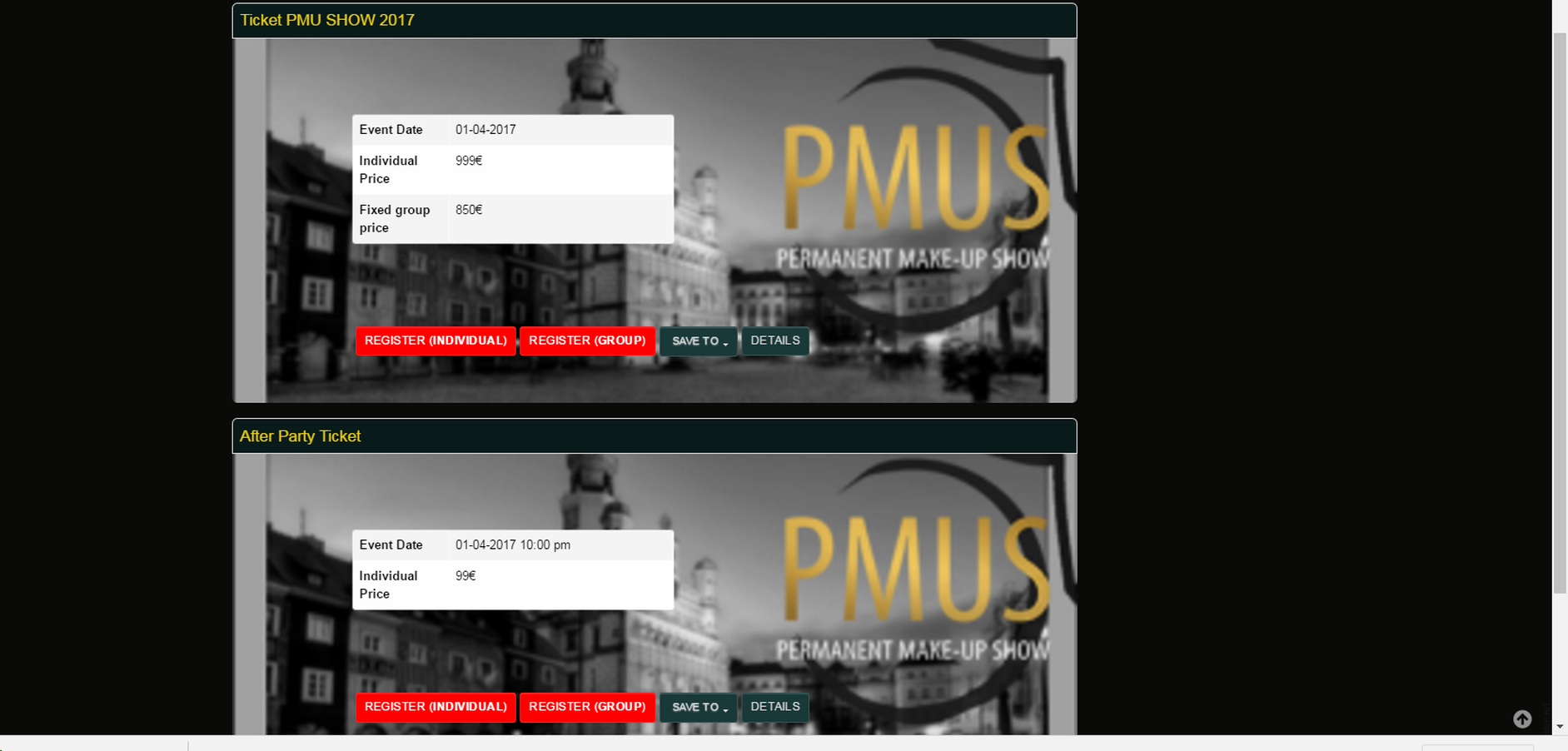
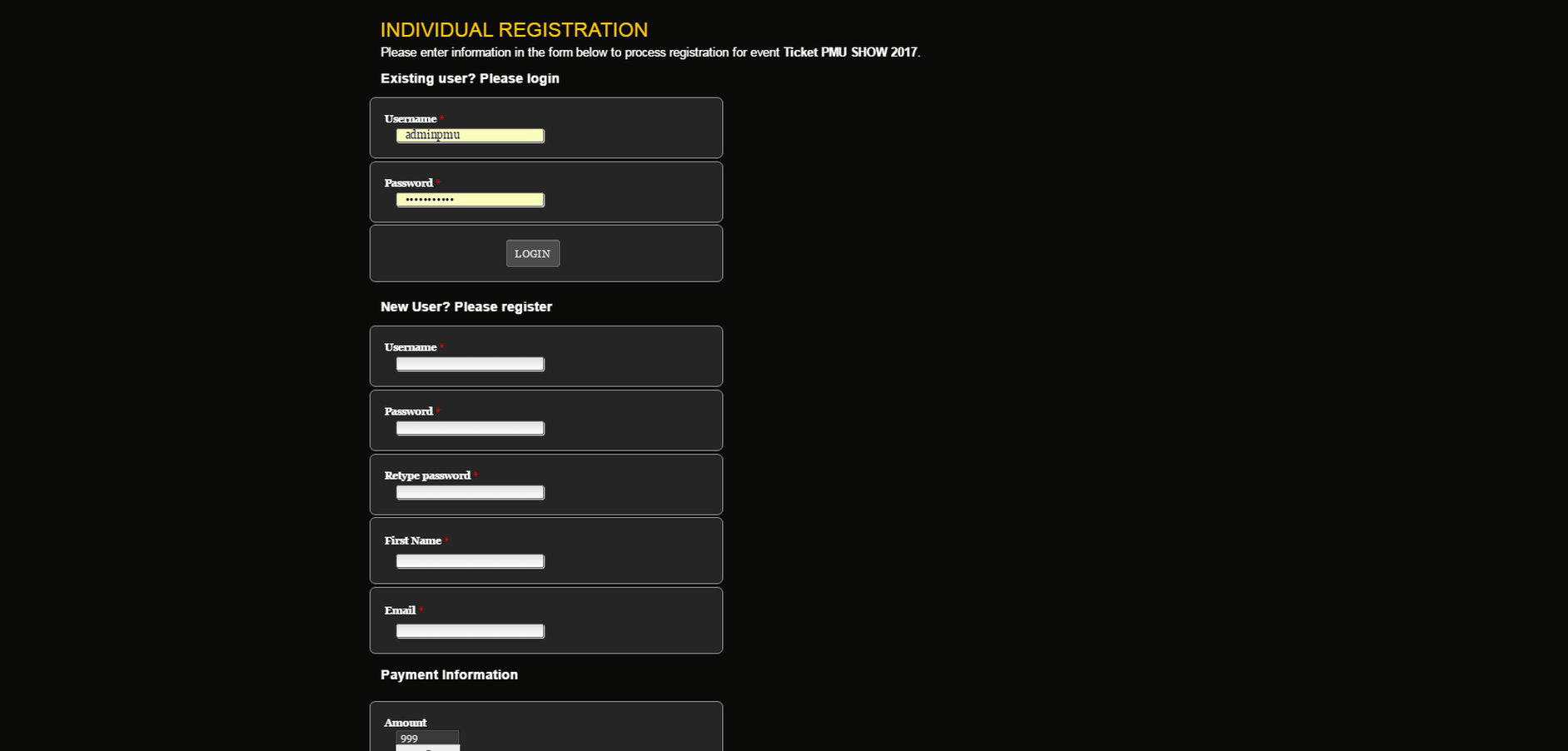
I need help in editing events settings.
1. I need todisplayed each event separate image background?.
2. Implementation clearer letter REGISTRATION (bigger price, symbol of money in right ...).
1. I need todisplayed each event separate image background?.
2. Implementation clearer letter REGISTRATION (bigger price, symbol of money in right ...).
Please Log in or Create an account to join the conversation.
- Tuan Pham Ngoc
- Away
- Administrator
-

9 years 4 months ago #91128
by Tuan Pham Ngoc
Replied by Tuan Pham Ngoc on topic I need help in editing Events
Hi Chris
Before giving the answers for those questions, could you please send us the links to the pages you are talking about ? We will look at it and give you the answers
The first look is that #1 is not possible (unless you can modify code or css), while #2 should be easier and doable
Tuan
Before giving the answers for those questions, could you please send us the links to the pages you are talking about ? We will look at it and give you the answers
The first look is that #1 is not possible (unless you can modify code or css), while #2 should be easier and doable
Tuan
Please Log in or Create an account to join the conversation.
- Chris Nawrot
- Topic Author
- Offline
- New Member
-
Less
More
- Posts: 11
- Thank you received: 0
9 years 4 months ago #91156
by Chris Nawrot
Replied by Chris Nawrot on topic I need help in editing Events
Please Log in or Create an account to join the conversation.
- Dang Dam
-
- Offline
- Premium Member
-

Less
More
- Posts: 119
- Thank you received: 21
9 years 4 months ago #91160
by Dang Dam
Replied by Dang Dam on topic I need help in editing Events
Hello.
Please open this css file: pmushow.com/pm1/media/com_eventbooking/assets/css/custom.css
And add the font-size, line-height:
.input-append input, .input-append select, .input-append .uneditable-input {
font-size: 16px;
line-height: normal;
height: auto;
}
.eb-container label.control-label {
font-size: 18px;
line-height: normal;
}
Thanks.
Please open this css file: pmushow.com/pm1/media/com_eventbooking/assets/css/custom.css
And add the font-size, line-height:
.input-append input, .input-append select, .input-append .uneditable-input {
font-size: 16px;
line-height: normal;
height: auto;
}
.eb-container label.control-label {
font-size: 18px;
line-height: normal;
}
Thanks.
The following user(s) said Thank You: Chris Nawrot
Please Log in or Create an account to join the conversation.
- Chris Nawrot
- Topic Author
- Offline
- New Member
-
Less
More
- Posts: 11
- Thank you received: 0
9 years 4 months ago #91165
by Chris Nawrot
Replied by Chris Nawrot on topic I need help in editing Events
1.How Can I have 2 difrent foto background in my Ticket PMU SHOW 2017 and After Party Ticket
2. How to delete button details
3.How to center table with price in link bellow
pmushow.com/pm1/index.php/en/ticket/even...ticket-pmu-show-2017
pmushow.com/pm1/index.php/en/ticket/even...2-after-party-ticket
2. How to delete button details
3.How to center table with price in link bellow
pmushow.com/pm1/index.php/en/ticket/even...ticket-pmu-show-2017
pmushow.com/pm1/index.php/en/ticket/even...2-after-party-ticket
Please Log in or Create an account to join the conversation.
- James Riley
-

- Offline
- Platinum Member
-

9 years 4 months ago #91182
by James Riley
James Riley .: EventBooking user since 2014 ::: JoomDonation user since 2016 :.
.: grfx & web design / IT / AV @ St. Therese Institute of Faith and Mission, Bruno, SK, Canada :.
Replied by James Riley on topic I need help in editing Events
Two ways to do this, but both require code modifications.
1) My template includes the current page ID in my body > class, tag, which allows me to target specific pages on my site. I have expanded this idea on my site to have EventBooking include the event ID (eg. eb-eventID-15) as a class for each event too so that I can also target each event with specific formatting when needed. You could then change the background image for your events via CSS based on the event-ID-class structure you've created.
2) You could add a new admin field into the Event manager for [Background Image], and then apply that image as the background on the appropriate DIV elements via inline CSS attached to those DIVs.
That doesn't really tell you how to do it, just what you could do How are you with writing and modifying PHP code?
1) My template includes the current page ID in my body > class, tag, which allows me to target specific pages on my site. I have expanded this idea on my site to have EventBooking include the event ID (eg. eb-eventID-15) as a class for each event too so that I can also target each event with specific formatting when needed. You could then change the background image for your events via CSS based on the event-ID-class structure you've created.
2) You could add a new admin field into the Event manager for [Background Image], and then apply that image as the background on the appropriate DIV elements via inline CSS attached to those DIVs.
That doesn't really tell you how to do it, just what you could do
How are you with writing and modifying PHP code? James Riley .: EventBooking user since 2014 ::: JoomDonation user since 2016 :.
.: grfx & web design / IT / AV @ St. Therese Institute of Faith and Mission, Bruno, SK, Canada :.
Please Log in or Create an account to join the conversation.
- Chris Nawrot
- Topic Author
- Offline
- New Member
-
Less
More
- Posts: 11
- Thank you received: 0
9 years 4 months ago #91185
by Chris Nawrot
Replied by Chris Nawrot on topic I need help in editing Events
Medium expiriernce in PHP
Please Log in or Create an account to join the conversation.
- James Riley
-
- Offline
- Platinum Member
-
9 years 4 months ago - 9 years 4 months ago #91202
by James Riley
James Riley .: EventBooking user since 2014 ::: JoomDonation user since 2016 :.
.: grfx & web design / IT / AV @ St. Therese Institute of Faith and Mission, Bruno, SK, Canada :.
Replied by James Riley on topic I need help in editing Events
Hide DETAIL button:
- go to Event Booking -> Configuration -> Theme tab -> turn on the Hide Detail Button option
As for the background images, are these the only two events you plan on selling tickets for? In that case, I overcomplicated things with my last message... This could all be done with CSS (using the first-child or first-of-type psudo-classes), or perhaps even directly in the event description using inline styles to adjust the margins on a div. element that you insert as the description. I would have to play with the whole thing a bit more, but this would certainly be easier than PHP code editing and easier to maintain. However, if you plan to add more events and want the flexibility to to select a bg image right in the Event Manager for any event, code editing will be required.
- go to Event Booking -> Configuration -> Theme tab -> turn on the Hide Detail Button option
As for the background images, are these the only two events you plan on selling tickets for? In that case, I overcomplicated things with my last message... This could all be done with CSS (using the first-child or first-of-type psudo-classes), or perhaps even directly in the event description using inline styles to adjust the margins on a div. element that you insert as the description. I would have to play with the whole thing a bit more, but this would certainly be easier than PHP code editing and easier to maintain. However, if you plan to add more events and want the flexibility to to select a bg image right in the Event Manager for any event, code editing will be required.
James Riley .: EventBooking user since 2014 ::: JoomDonation user since 2016 :.
.: grfx & web design / IT / AV @ St. Therese Institute of Faith and Mission, Bruno, SK, Canada :.
Last edit: 9 years 4 months ago by James Riley.
Please Log in or Create an account to join the conversation.
- Tuan Pham Ngoc
- Away
- Administrator
-
9 years 4 months ago #91215
by Tuan Pham Ngoc
Replied by Tuan Pham Ngoc on topic I need help in editing Events
I am not good enough at css to guide you to do it, but it should be doable using minor modification to php code and combine with css
1. Open the file components/com_eventbooking/view/common/tmpl/events_default.php, find this line of code:
2. Change it to:
With that modification, each event is now surrounded by a div with id="eb-event-ID_OF_EVENT", for example id="eb-event-1", id="eb-event-2"
2. The next part would be adding custom css to use background image for each event to media/com_eventbooking/assets/css/custom.css
#eb-event-1
{
// CSS code to handle background image for event with ID = 1 here
}
#eb-event-2
{
// CSS code to handle background image for event with ID = 2 here
}
and so on...
Hope it gives you some help
Regards,
Tuan
1. Open the file components/com_eventbooking/view/common/tmpl/events_default.php, find this line of code:
Code:
<div class="eb-category-<?php echo $event->category_id; ?> eb-event<?php if ($event->featured) echo ' eb-featured-event'; ?> clearfix" itemscope itemtype="http://schema.org/Event">
2. Change it to:
Code:
<div id="eb-event-<?php echo $event->id; ?>" class="eb-category-<?php echo $event->category_id; ?> eb-event<?php if ($event->featured) echo ' eb-featured-event'; ?> clearfix" itemscope itemtype="http://schema.org/Event">
With that modification, each event is now surrounded by a div with id="eb-event-ID_OF_EVENT", for example id="eb-event-1", id="eb-event-2"
2. The next part would be adding custom css to use background image for each event to media/com_eventbooking/assets/css/custom.css
#eb-event-1
{
// CSS code to handle background image for event with ID = 1 here
}
#eb-event-2
{
// CSS code to handle background image for event with ID = 2 here
}
and so on...
Hope it gives you some help
Regards,
Tuan
Please Log in or Create an account to join the conversation.
- James Riley
-
- Offline
- Platinum Member
-
9 years 3 months ago #91263
by James Riley
James Riley .: EventBooking user since 2014 ::: JoomDonation user since 2016 :.
.: grfx & web design / IT / AV @ St. Therese Institute of Faith and Mission, Bruno, SK, Canada :.
Replied by James Riley on topic I need help in editing Events
@Tuan: Any chance of having event IDs in all event display methods added to the core release? The more style control the better!
@Chris: Tuan solution is (of course, again) is the best and easiest for the bg images. You'll want to pull your existing bg img CSS off of the eb-description declaration, and move whatever you need from that block to the #eb-event-1 etc. declarations.
@Chris: Tuan solution is (of course, again) is the best and easiest for the bg images. You'll want to pull your existing bg img CSS off of the eb-description declaration, and move whatever you need from that block to the #eb-event-1 etc. declarations.
James Riley .: EventBooking user since 2014 ::: JoomDonation user since 2016 :.
.: grfx & web design / IT / AV @ St. Therese Institute of Faith and Mission, Bruno, SK, Canada :.
Please Log in or Create an account to join the conversation.
Moderators: Tuan Pham Ngoc
Support
Documentation
Information
Copyright © 2026 Joomla Extensions by Joomdonation. All Rights Reserved.
joomdonation.com is not affiliated with or endorsed by the Joomla! Project or Open Source Matters.
The Joomla! name and logo is used under a limited license granted by Open Source Matters the trademark holder in the United States and other countries.
The Joomla! name and logo is used under a limited license granted by Open Source Matters the trademark holder in the United States and other countries.