- Posts: 8
- Thank you received: 0

Can I Modify or Create New Themes?
- J Cooch Lucchese
- Topic Author
- Offline
- New Member
-

Less
More
9 years 4 months ago #90453
by J Cooch Lucchese
Can I Modify or Create New Themes? was created by J Cooch Lucchese
Hello
I would like to create or modify a theme. My client's website has all Pastel colors and none of the existing theses seem to match the look and feel of the site well.
Also, the drop down menus at the top of the calendar are not visible due to the text color clashing with the design.
Thank you
Cooch
I would like to create or modify a theme. My client's website has all Pastel colors and none of the existing theses seem to match the look and feel of the site well.
Also, the drop down menus at the top of the calendar are not visible due to the text color clashing with the design.
Thank you
Cooch
Please Log in or Create an account to join the conversation.
- Tuan Pham Ngoc
- Offline
- Administrator
-

9 years 4 months ago #90473
by Tuan Pham Ngoc
Replied by Tuan Pham Ngoc on topic Can I Modify or Create New Themes?
Hi Cooch
The best way would be select a theme which match the template best, then start adding custom css to change the look and feel of the pages to meet your need
Go to Events Booking -> Configuration, you will see the Custom CSS tab. Put any custom css you want there, save it. Doing that will help keeping the change when you update to future releases of the extension
Regards,
Tuan
The best way would be select a theme which match the template best, then start adding custom css to change the look and feel of the pages to meet your need
Go to Events Booking -> Configuration, you will see the Custom CSS tab. Put any custom css you want there, save it. Doing that will help keeping the change when you update to future releases of the extension
Regards,
Tuan
The following user(s) said Thank You: J Cooch Lucchese
Please Log in or Create an account to join the conversation.
- J Cooch Lucchese
- Topic Author
- Offline
- New Member
-
Less
More
- Posts: 8
- Thank you received: 0
9 years 4 months ago #90742
by J Cooch Lucchese
Replied by J Cooch Lucchese on topic Can I Modify or Create New Themes?
Hello Tuan
Is there no way of simply pulling in the styles of the YooTheme template I am using?
If not, is there at least a CSS file I can refer to to know the styles used for Events Booking?
Thank you
Cooch
Is there no way of simply pulling in the styles of the YooTheme template I am using?
If not, is there at least a CSS file I can refer to to know the styles used for Events Booking?
Thank you
Cooch
Please Log in or Create an account to join the conversation.
- Tuan Pham Ngoc
- Offline
- Administrator
-
9 years 4 months ago #90758
by Tuan Pham Ngoc
Replied by Tuan Pham Ngoc on topic Can I Modify or Create New Themes?
Hello Cooch
I don't know exactly what styles you want to get from your template, so I could not give you the answer for this question. Usually, the extension itself might have different css classes with your site template, so the color would not be the same
Events Booking has:
1. One main css file located at media/com_eventbooking/assets/css/style.css
2. One theme base css file (depends on the theme you select) media\assets\css\themes folder
I think the easiest way would be submitting a support ticket, sending us the link to the page and explain the changes you want + super admin account. I can then ask my template developer to give you a hand with the changes
Regards,
Tuan
I don't know exactly what styles you want to get from your template, so I could not give you the answer for this question. Usually, the extension itself might have different css classes with your site template, so the color would not be the same
Events Booking has:
1. One main css file located at media/com_eventbooking/assets/css/style.css
2. One theme base css file (depends on the theme you select) media\assets\css\themes folder
I think the easiest way would be submitting a support ticket, sending us the link to the page and explain the changes you want + super admin account. I can then ask my template developer to give you a hand with the changes
Regards,
Tuan
The following user(s) said Thank You: J Cooch Lucchese
Please Log in or Create an account to join the conversation.
- J Cooch Lucchese
- Topic Author
- Offline
- New Member
-
Less
More
- Posts: 8
- Thank you received: 0
9 years 2 months ago - 9 years 2 months ago #93419
by J Cooch Lucchese
Replied by J Cooch Lucchese on topic Can I Modify or Create New Themes?
Hello Tuan
Sorry, I never received a notice you replied.
Our site is very 'pastel' colored. I could not find a provided theme that matches the website at all. Also, you can barely read the drop down menus for Month & Year.
I'd like the theme to be based on the color #6fd2de, to match the blue line just below the header. Also, could the drop down buttons have more of a flat look, instead of bubble?
Thank you!
Cooch
Sorry, I never received a notice you replied.
Our site is very 'pastel' colored. I could not find a provided theme that matches the website at all. Also, you can barely read the drop down menus for Month & Year.
I'd like the theme to be based on the color #6fd2de, to match the blue line just below the header. Also, could the drop down buttons have more of a flat look, instead of bubble?
Thank you!
Cooch
Last edit: 9 years 2 months ago by J Cooch Lucchese.
Please Log in or Create an account to join the conversation.
- Tuan Pham Ngoc
- Offline
- Administrator
-
9 years 2 months ago #93533
by Tuan Pham Ngoc
Replied by Tuan Pham Ngoc on topic Can I Modify or Create New Themes?
Hello Cooch
I guess the easiest way would be you send us the link to the page, then explain exactly how you want to change it
Our template developer will then look at it and guide you to make the change
Regards,
Tuan
I guess the easiest way would be you send us the link to the page, then explain exactly how you want to change it
Our template developer will then look at it and guide you to make the change
Regards,
Tuan
The following user(s) said Thank You: J Cooch Lucchese
Please Log in or Create an account to join the conversation.
- J Cooch Lucchese
- Topic Author
- Offline
- New Member
-
Less
More
- Posts: 8
- Thank you received: 0
9 years 2 months ago #93567
by J Cooch Lucchese
Replied by J Cooch Lucchese on topic Can I Modify or Create New Themes?
Please Log in or Create an account to join the conversation.
- James Riley
-

- Offline
- Platinum Member
-

9 years 2 months ago - 9 years 2 months ago #93592
by James Riley
James Riley .: EventBooking user since 2014 ::: JoomDonation user since 2016 :.
.: grfx & web design / IT / AV @ St. Therese Institute of Faith and Mission, Bruno, SK, Canada :.
Replied by James Riley on topic Can I Modify or Create New Themes?
I think I would style it like this:
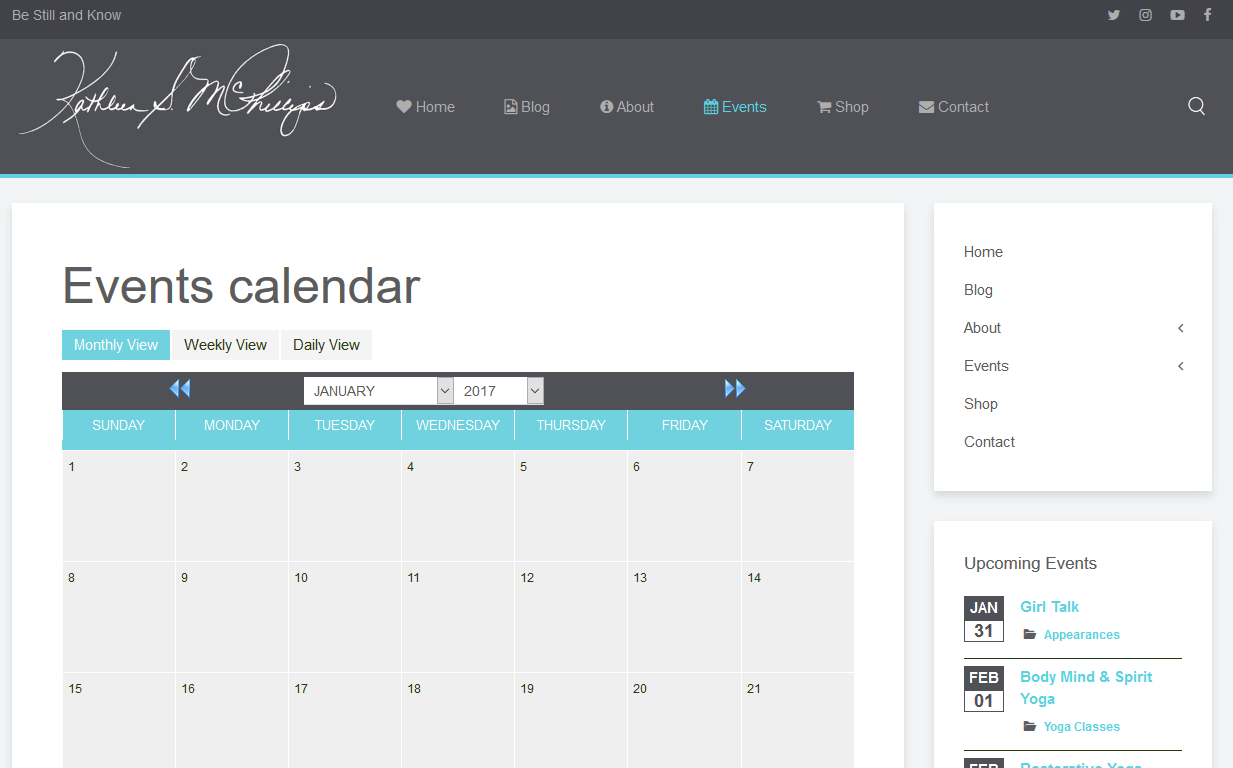
The forum won't let me insert the CSS inline for some reason (usually it does?!?!?). If you would like to implement this styling, open the attached file, and copy & paste the contents into the custom CSS box at [Event Booking -> Configuration -> Custom CSS tab].
PS: your current styling is coming partially from the EB "leaf" theme and partially from your site's template, and the 2 styles aren't playing together well, which is causing some the issues with the buttons and drop downs not showing up well.
The forum won't let me insert the CSS inline for some reason (usually it does?!?!?). If you would like to implement this styling, open the attached file, and copy & paste the contents into the custom CSS box at [Event Booking -> Configuration -> Custom CSS tab].
PS: your current styling is coming partially from the EB "leaf" theme and partially from your site's template, and the 2 styles aren't playing together well, which is causing some the issues with the buttons and drop downs not showing up well.
James Riley .: EventBooking user since 2014 ::: JoomDonation user since 2016 :.
.: grfx & web design / IT / AV @ St. Therese Institute of Faith and Mission, Bruno, SK, Canada :.
Last edit: 9 years 2 months ago by James Riley. Reason: added PS
The following user(s) said Thank You: J Cooch Lucchese
Please Log in or Create an account to join the conversation.
- J Cooch Lucchese
- Topic Author
- Offline
- New Member
-
Less
More
- Posts: 8
- Thank you received: 0
9 years 2 months ago #93595
by J Cooch Lucchese
Replied by J Cooch Lucchese on topic Can I Modify or Create New Themes?
Hello James
Thank you for doing this. I pasted the code, but two items still look out of place. The dropdown menus are still not legible and the back and forward buttons do not match. Do I have to edit the images for the back and forward buttons?
Appreciated!
Cooch
Thank you for doing this. I pasted the code, but two items still look out of place. The dropdown menus are still not legible and the back and forward buttons do not match. Do I have to edit the images for the back and forward buttons?
Appreciated!
Cooch
Please Log in or Create an account to join the conversation.
- James Riley
-
- Offline
- Platinum Member
-
9 years 2 months ago #93596
by James Riley
James Riley .: EventBooking user since 2014 ::: JoomDonation user since 2016 :.
.: grfx & web design / IT / AV @ St. Therese Institute of Faith and Mission, Bruno, SK, Canada :.
Replied by James Riley on topic Can I Modify or Create New Themes?
You'll need to add the word "!important" to one line to force it to take the style. Replace the line under the "dropdown" section with this:
As for the images, it looks like you will need to try changing and overwriting the following files. I don't know if this will be update-safe, or if they will be replaced with the original the next time you update EventBooking ... I guess we'll know when you update next
/media/com_eventbooking/assets/images/calendar_previous.png
/media/com_eventbooking/assets/images/calendar_next.png
Code:
select {background-color: #FFF !important;}
As for the images, it looks like you will need to try changing and overwriting the following files. I don't know if this will be update-safe, or if they will be replaced with the original the next time you update EventBooking ... I guess we'll know when you update next
/media/com_eventbooking/assets/images/calendar_previous.png
/media/com_eventbooking/assets/images/calendar_next.png
James Riley .: EventBooking user since 2014 ::: JoomDonation user since 2016 :.
.: grfx & web design / IT / AV @ St. Therese Institute of Faith and Mission, Bruno, SK, Canada :.
The following user(s) said Thank You: J Cooch Lucchese
Please Log in or Create an account to join the conversation.
Moderators: Tuan Pham Ngoc
Support
Documentation
Information
Copyright © 2026 Joomla Extensions by Joomdonation. All Rights Reserved.
joomdonation.com is not affiliated with or endorsed by the Joomla! Project or Open Source Matters.
The Joomla! name and logo is used under a limited license granted by Open Source Matters the trademark holder in the United States and other countries.
The Joomla! name and logo is used under a limited license granted by Open Source Matters the trademark holder in the United States and other countries.