- Posts: 6
- Thank you received: 0

Customise Course Detail Boxes
- Dave Carr
- Topic Author
- Offline
- New Member
-

Less
More
9 years 8 months ago #85003
by Dave Carr
Customise Course Detail Boxes was created by Dave Carr
Hi
Is it possible to customise the Course Detail boxes?
I'd like to add a Start/End Time Row and add a Manual Price entry row if possible.
Screen shot of existing box attached below.
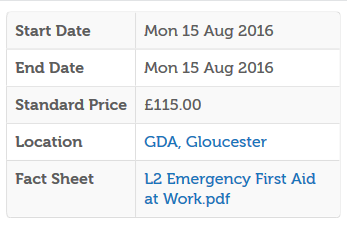
Any advice appreciated.
Thanks in advance.
Dave
Is it possible to customise the Course Detail boxes?
I'd like to add a Start/End Time Row and add a Manual Price entry row if possible.
Screen shot of existing box attached below.
Any advice appreciated.
Thanks in advance.
Dave
Please Log in or Create an account to join the conversation.
- Tuan Pham Ngoc
- Away
- Administrator
-

9 years 8 months ago #85010
by Tuan Pham Ngoc
Replied by Tuan Pham Ngoc on topic Customise Course Detail Boxes
Hi Dave
1. For displaying the time, maybe you should go to Events Booking -> Configuration, look at Themes tab, find the config option Event Date Format, add time parameters to that config option to show it's time? That would be easier. For list of supported parameters you can use, please see php.net/manual/en/function.date.php
2. If you want to add manual price entry, I think you can use this solution eventbookingdoc.joomservices.com/basic-s.../event-custom-fields
Tuan
1. For displaying the time, maybe you should go to Events Booking -> Configuration, look at Themes tab, find the config option Event Date Format, add time parameters to that config option to show it's time? That would be easier. For list of supported parameters you can use, please see php.net/manual/en/function.date.php
2. If you want to add manual price entry, I think you can use this solution eventbookingdoc.joomservices.com/basic-s.../event-custom-fields
Tuan
Please Log in or Create an account to join the conversation.
- Dave Carr
- Topic Author
- Offline
- New Member
-
Less
More
- Posts: 6
- Thank you received: 0
9 years 8 months ago #85012
by Dave Carr
Replied by Dave Carr on topic Customise Course Detail Boxes
Hi Tuan
Thank you for coming back so quickly. I've sorted the time, thank you.
How would I add the custom field to the box above please?
Thanks
Dave
Thank you for coming back so quickly. I've sorted the time, thank you.
How would I add the custom field to the box above please?
Thanks
Dave
Please Log in or Create an account to join the conversation.
- Stefan Schoch
- Offline
- Senior Member
-

Less
More
- Posts: 55
- Thank you received: 0
9 years 8 months ago #85014
by Stefan Schoch
Replied by Stefan Schoch on topic Customise Course Detail Boxes
Hi Dave,
simply follow the instructions about adding 'custom fields' via field.xml. That works easily and let's you show additional fields in both the details-table and each event-page:
integralzen.de/integral-zen-workshops.html
My question for Tuan would be: how can I have only some og the additional fields be shown in the details-view?
For example the 'Zeiten' and 'Veranstaltungsort' fields shall only be displaed in the full event page, not in the details view.
How can I achieve that?
Thx,
Stefan
simply follow the instructions about adding 'custom fields' via field.xml. That works easily and let's you show additional fields in both the details-table and each event-page:
integralzen.de/integral-zen-workshops.html
My question for Tuan would be: how can I have only some og the additional fields be shown in the details-view?
For example the 'Zeiten' and 'Veranstaltungsort' fields shall only be displaed in the full event page, not in the details view.
How can I achieve that?
Thx,
Stefan
Please Log in or Create an account to join the conversation.
- Dave Carr
- Topic Author
- Offline
- New Member
-
Less
More
- Posts: 6
- Thank you received: 0
9 years 8 months ago #85015
by Dave Carr
Replied by Dave Carr on topic Customise Course Detail Boxes
Hi Stafan
Many thanks for your help.
Kind Regards
Dave
Many thanks for your help.
Kind Regards
Dave
Please Log in or Create an account to join the conversation.
- James Riley
-

- Offline
- Platinum Member
-

9 years 8 months ago #85023
by James Riley
Two ways:
1: You would have to edit code to do it properly...
Look at /components/com_eventbooking/views/common/tmpl/events_default.php
You will find several sets of <tr class="eb-event-property"> ... </tr> . Look for the <tr ... /tr> block that contains the JText::_('...') that you want to remove (eg. Location would be JText::_('EB_LOCATION') ). You can either delete the entire <tr ... /tr> block, or comment it out. Save your file to \templates\YOUR-TEMPLATE\html\com_eventbooking\common\tmpl\event_default.php so that you don't have to make the change every time you upgrade EB. You might have to make the change again starting with the original file if Tuan adds new features to EB and you don't see them showing up on your site
2: Or you could use CSS to accomplish this without editing EB's source code...
You could try something like the following added to /media/com_eventbooking/assets/css/custom.css:
I haven't tested the CSS, but I *think* that it should work
James Riley .: EventBooking user since 2014 ::: JoomDonation user since 2016 :.
.: grfx & web design / IT / AV @ St. Therese Institute of Faith and Mission, Bruno, SK, Canada :.
Replied by James Riley on topic Customise Course Detail Boxes
Stefan wrote: how can I have only some og the additional fields be shown in the details-view?
For example the 'Zeiten' and 'Veranstaltungsort' fields shall only be displaed in the full event page, not in the details view.
How can I achieve that?
Two ways:
1: You would have to edit code to do it properly...
Look at /components/com_eventbooking/views/common/tmpl/events_default.php
You will find several sets of <tr class="eb-event-property"> ... </tr> . Look for the <tr ... /tr> block that contains the JText::_('...') that you want to remove (eg. Location would be JText::_('EB_LOCATION') ). You can either delete the entire <tr ... /tr> block, or comment it out. Save your file to \templates\YOUR-TEMPLATE\html\com_eventbooking\common\tmpl\event_default.php so that you don't have to make the change every time you upgrade EB. You might have to make the change again starting with the original file if Tuan adds new features to EB and you don't see them showing up on your site
2: Or you could use CSS to accomplish this without editing EB's source code...
You could try something like the following added to /media/com_eventbooking/assets/css/custom.css:
Code:
#eb-category-page-default .eb-description-details tr.eb-event-property:nth-of-type(3),
#eb-category-page-default .eb-description-details tr.eb-event-property:nth-of-type(6) {display:none;}
;
James Riley .: EventBooking user since 2014 ::: JoomDonation user since 2016 :.
.: grfx & web design / IT / AV @ St. Therese Institute of Faith and Mission, Bruno, SK, Canada :.
Please Log in or Create an account to join the conversation.
- Stefan Schoch
- Offline
- Senior Member
-
Less
More
- Posts: 55
- Thank you received: 0
9 years 8 months ago #85034
by Stefan Schoch
Replied by Stefan Schoch on topic Customise Course Detail Boxes
Hi James,
thx for the hints!
I'd shurely go for the 2nd one, changing the EB code is not a goof option I think.
But I don't really get what the lines you suggested mean. Does this decide, which line-number is displaed? Would the above example man that line 3 ist displayed and line 6 not?
What about the other lines?
Stefan
thx for the hints!
I'd shurely go for the 2nd one, changing the EB code is not a goof option I think.
But I don't really get what the lines you suggested mean. Does this decide, which line-number is displaed? Would the above example man that line 3 ist displayed and line 6 not?
What about the other lines?
Stefan
Please Log in or Create an account to join the conversation.
- James Riley
-
- Offline
- Platinum Member
-
9 years 8 months ago - 9 years 8 months ago #85047
by James Riley
James Riley .: EventBooking user since 2014 ::: JoomDonation user since 2016 :.
.: grfx & web design / IT / AV @ St. Therese Institute of Faith and Mission, Bruno, SK, Canada :.
Replied by James Riley on topic Customise Course Detail Boxes
The number (should hopefully if I got the code right) match the [strike]line[/strike] (EDIT: row ) number. There is a comma between the 2 elements, so that means that the {display:none} applies to both.
James Riley .: EventBooking user since 2014 ::: JoomDonation user since 2016 :.
.: grfx & web design / IT / AV @ St. Therese Institute of Faith and Mission, Bruno, SK, Canada :.
Last edit: 9 years 8 months ago by James Riley.
Please Log in or Create an account to join the conversation.
- Stefan Schoch
- Offline
- Senior Member
-
Less
More
- Posts: 55
- Thank you received: 0
9 years 8 months ago #85060
by Stefan Schoch
Replied by Stefan Schoch on topic Customise Course Detail Boxes
Thx!!
Just two minor problems:
1. it doesn't work at all
I inserted the lines into the file (which was already there for other purposes) but nothing happens.
Any idea?
2. if it would work:
I don't have the same numbers of rows in the table in different events (sometimes thre is no such field as 'Zeiten').
Is there another optoion to addresse the rows I want to hide?
Stefan
Just two minor problems:
1. it doesn't work at all
I inserted the lines into the file (which was already there for other purposes) but nothing happens.
Any idea?
2. if it would work:
I don't have the same numbers of rows in the table in different events (sometimes thre is no such field as 'Zeiten').
Is there another optoion to addresse the rows I want to hide?
Stefan
Please Log in or Create an account to join the conversation.
- James Riley
-
- Offline
- Platinum Member
-
9 years 8 months ago #85101
by James Riley
James Riley .: EventBooking user since 2014 ::: JoomDonation user since 2016 :.
.: grfx & web design / IT / AV @ St. Therese Institute of Faith and Mission, Bruno, SK, Canada :.
Replied by James Riley on topic Customise Course Detail Boxes
I would say to try and edit the code then as I outlined in option 1. The good think about saving the file as a template override in the location I specified is that if something doesn't work after the code change, just delete that saved file and the site will revert to the original code again.
I can make the modification to forward you the file... what fields are you trying to disable?
'Zeiten' = ????
'Veranstaltungsort' = Venue or location???
I can make the modification to forward you the file... what fields are you trying to disable?
'Zeiten' = ????
'Veranstaltungsort' = Venue or location???
James Riley .: EventBooking user since 2014 ::: JoomDonation user since 2016 :.
.: grfx & web design / IT / AV @ St. Therese Institute of Faith and Mission, Bruno, SK, Canada :.
Please Log in or Create an account to join the conversation.
Moderators: Tuan Pham Ngoc
Support
Documentation
Information
Copyright © 2026 Joomla Extensions by Joomdonation. All Rights Reserved.
joomdonation.com is not affiliated with or endorsed by the Joomla! Project or Open Source Matters.
The Joomla! name and logo is used under a limited license granted by Open Source Matters the trademark holder in the United States and other countries.
The Joomla! name and logo is used under a limited license granted by Open Source Matters the trademark holder in the United States and other countries.