- Posts: 11
- Thank you received: 0

Need help with Joomla? We are available for hire to help with Joomla customization, upgrades, maintenance, and custom development.
Explore our services Remove New User? Please register form
- Richard
- Topic Author
- Offline
- New Member
-

Less
More
12 years 3 months ago #46212
by Richard
Remove New User? Please register form was created by Richard
Hello,
We have just installed Event booking and we use this in a active directory environment which works perfectly!
We want the user to only login not to register themselves.
Is there a way to disable the "New User? Please register" form or remove it from the code in the file
\com_eventbooking\views\register\tmpl\default.php?
What I have noticed, if you remove the form the next part of the wizard doesn't work as the fields are used for more than one thing. Maybe a if statement to hide the form when no user is logged in?
Could someone assist with maybe a if statement or is there a feature Ive missed?
Many thanks fro your help.
We have just installed Event booking and we use this in a active directory environment which works perfectly!
We want the user to only login not to register themselves.
Is there a way to disable the "New User? Please register" form or remove it from the code in the file
\com_eventbooking\views\register\tmpl\default.php?
What I have noticed, if you remove the form the next part of the wizard doesn't work as the fields are used for more than one thing. Maybe a if statement to hide the form when no user is logged in?
Could someone assist with maybe a if statement or is there a feature Ive missed?
Many thanks fro your help.
Please Log in or Create an account to join the conversation.
- Tuan Pham Ngoc
- Offline
- Administrator
-

12 years 3 months ago #46235
by Tuan Pham Ngoc
Replied by Tuan Pham Ngoc on topic Remove New User? Please register form
Hi Richard
Hope you are using version 1.6.4 as this instruction is for version 1.6.4 of Events Booking.
1. Get this zip file, unzip it, you will see two files: default.php, register.php
2. Upload the file default.php to components/com_eventbooking/views/register/tmpl folder
3. Upload the file register.php to components/com_eventbooking/models folder
After that, check it again and it should work as expected. I haven't tested the code yet (too busy now). If it doesn't work, please let me know so that I can check it .
Tuan
Hope you are using version 1.6.4 as this instruction is for version 1.6.4 of Events Booking.
1. Get this zip file, unzip it, you will see two files: default.php, register.php
2. Upload the file default.php to components/com_eventbooking/views/register/tmpl folder
3. Upload the file register.php to components/com_eventbooking/models folder
After that, check it again and it should work as expected. I haven't tested the code yet (too busy now). If it doesn't work, please let me know so that I can check it .
Tuan
Please Log in or Create an account to join the conversation.
- Richard
- Topic Author
- Offline
- New Member
-
Less
More
- Posts: 11
- Thank you received: 0
12 years 3 months ago #46259
by Richard
Replied by Richard on topic Remove New User? Please register form
Thank you for the great support!! 
I'm using 1.6.4, so I tried the patch.
It has removed some fields but I'm still left with a portion of the new user form.
As you can see from the image the part highlighted, I would like to remove this completely.
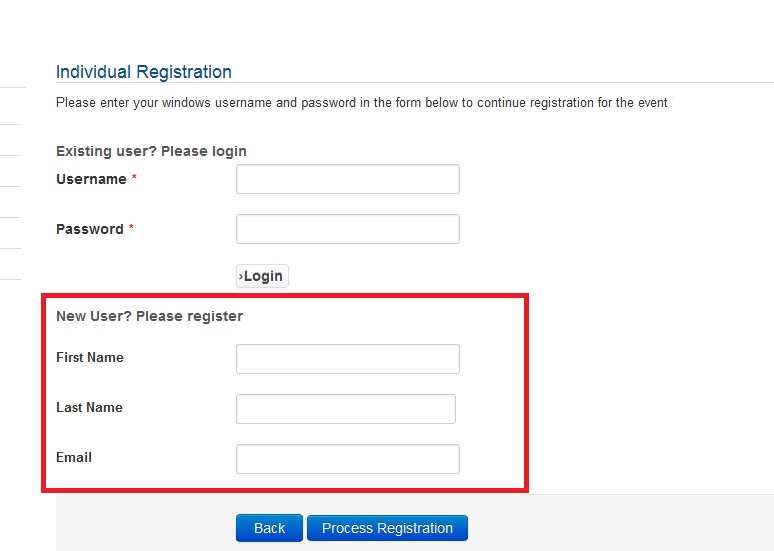
Registration is disabled across the site, we only use active directory authentication.
Thank you in advance!
I'm using 1.6.4, so I tried the patch.
It has removed some fields but I'm still left with a portion of the new user form.
As you can see from the image the part highlighted, I would like to remove this completely.
Registration is disabled across the site, we only use active directory authentication.
Thank you in advance!
Please Log in or Create an account to join the conversation.
- FrankM
- Offline
- Premium Member
-

Less
More
- Posts: 148
- Thank you received: 16
12 years 3 months ago #46261
by FrankM
Productiv: Joomla 3.5.1 / EB 2.4.3 / PHP 7.0.5
Testsys: Joomla 3.5.1 / EB 2.4.3 / PHP 7.0.5
Sorry, english isn't my native language.
Replied by FrankM on topic Remove New User? Please register form
I think you can skip this part with an option under configuration.

Productiv: Joomla 3.5.1 / EB 2.4.3 / PHP 7.0.5
Testsys: Joomla 3.5.1 / EB 2.4.3 / PHP 7.0.5
Sorry, english isn't my native language.
Please Log in or Create an account to join the conversation.
- Richard
- Topic Author
- Offline
- New Member
-
Less
More
- Posts: 11
- Thank you received: 0
12 years 3 months ago #46265
by Richard
Replied by Richard on topic Remove New User? Please register form
Thanks for the reply.
I have tried the following setting in the config....

This removes the login box and just places the registration form which I don't require
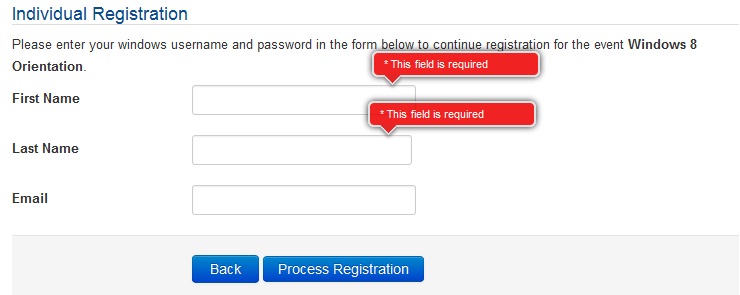
I only need the username and password form for the user to login with their account.
I have tried the following setting in the config....
This removes the login box and just places the registration form which I don't require
I only need the username and password form for the user to login with their account.
Please Log in or Create an account to join the conversation.
- FrankM
- Offline
- Premium Member
-
Less
More
- Posts: 148
- Thank you received: 16
12 years 3 months ago #46266
by FrankM
Productiv: Joomla 3.5.1 / EB 2.4.3 / PHP 7.0.5
Testsys: Joomla 3.5.1 / EB 2.4.3 / PHP 7.0.5
Sorry, english isn't my native language.
Replied by FrankM on topic Remove New User? Please register form
Sorry, i don't understand fully what you want.
I think set the events to "Registration Access" = Registered. So only registered user can access the form.
I think set the events to "Registration Access" = Registered. So only registered user can access the form.
Productiv: Joomla 3.5.1 / EB 2.4.3 / PHP 7.0.5
Testsys: Joomla 3.5.1 / EB 2.4.3 / PHP 7.0.5
Sorry, english isn't my native language.
Please Log in or Create an account to join the conversation.
- Richard
- Topic Author
- Offline
- New Member
-
Less
More
- Posts: 11
- Thank you received: 0
12 years 3 months ago - 12 years 3 months ago #46267
by Richard
Sorry if I'm not being clear....
I want to keep section 1 and remove section 2.
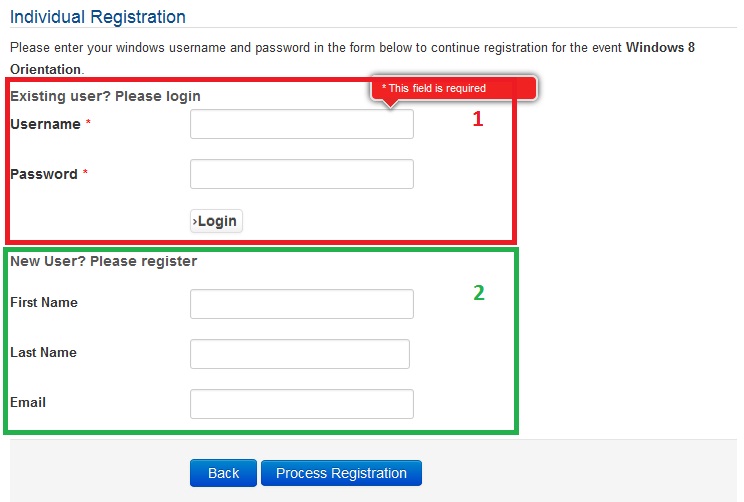
If I only have section 1 the users can log in with their joomla account which is in the group Registered already.
I hope that's a bit more clear
Replied by Richard on topic Remove New User? Please register form
FrankM wrote: Sorry, i don't understand fully what you want.
I think set the events to "Registration Access" = Registered. So only registered user can access the form.
Sorry if I'm not being clear....
I want to keep section 1 and remove section 2.
If I only have section 1 the users can log in with their joomla account which is in the group Registered already.
I hope that's a bit more clear
Last edit: 12 years 3 months ago by Richard.
Please Log in or Create an account to join the conversation.
- Tuan Pham Ngoc
- Offline
- Administrator
-
12 years 3 months ago #46268
by Tuan Pham Ngoc
Replied by Tuan Pham Ngoc on topic Remove New User? Please register form
@Frank: Need to edit some code to complete this requirement.
@Richard: Submit a support ticket sending me admin and FTP account of your site. I will modify it directly for you
Tuan
@Richard: Submit a support ticket sending me admin and FTP account of your site. I will modify it directly for you
Tuan
Please Log in or Create an account to join the conversation.
- Richard
- Topic Author
- Offline
- New Member
-
Less
More
- Posts: 11
- Thank you received: 0
12 years 3 months ago #46269
by Richard
Replied by Richard on topic Remove New User? Please register form
Tuan,
Thanks for the reply.
Unfortunately the server is Intranet based, which I'm not able to give external access due to restrictions.
Is there a chance you could send a patch like before?
Thanks for the reply.
Unfortunately the server is Intranet based, which I'm not able to give external access due to restrictions.
Is there a chance you could send a patch like before?
Please Log in or Create an account to join the conversation.
- Tuan Pham Ngoc
- Offline
- Administrator
-
12 years 3 months ago #46270
by Tuan Pham Ngoc
Replied by Tuan Pham Ngoc on topic Remove New User? Please register form
OK Richard. I could not test the code I sent you right now because I am too busy at the moment (have some urgent tasks need to finish first). I will modify code, test it myself, send the modified code (after tested) to you on tomorrow.
Tuan
Tuan
Please Log in or Create an account to join the conversation.
Moderators: Tuan Pham Ngoc
Support
Documentation
Information
Copyright © 2026 Joomla Extensions by Joomdonation. All Rights Reserved.
joomdonation.com is not affiliated with or endorsed by the Joomla! Project or Open Source Matters.
The Joomla! name and logo is used under a limited license granted by Open Source Matters the trademark holder in the United States and other countries.
The Joomla! name and logo is used under a limited license granted by Open Source Matters the trademark holder in the United States and other countries.