
A few questions
- Jono
- Topic Author
- Offline
- Premium Member
-

I have a few questions regarding Event Booking:
- we want users to be able to register for events, but events are to be free and not charged. Is there a way then to hide the 'cart' people have to go through when registering?
- we will have many users submitting events. As such, we want to make sure they submit certain info in custom fields about the events, and therefore create some custom fields for event submission. How would we go about this?
- we would also like to hide some questions from the event submission form. Any tips on this?
Please Log in or Create an account to join the conversation.
- Tuan Pham Ngoc
- Away
- Administrator
-

we want users to be able to register for events, but events are to be free and not charged. Is there a way then to hide the 'cart' people have to go through when registering?
=> Maybe you can try the solution below :
- Go to Events Booking->Configuration, find the config option Activate Shopping Cart feature, set it to No
- Set reduce registration process to Yes.
- we will have many users submitting events. As such, we want to make sure they submit certain info in custom fields about the events, and therefore create some custom fields for event submission. How would we go about this?
=> You will need to define event custom fields via an XML file. Please see joomdonation.com/using-extensions/using-..._event_custom_fields for instructions.
we would also like to hide some questions from the event submission form. Any tips on this?
=> You will need to edit the code to remove the fields you don't want. Look at the file components/com_eventbooking/views/event/tmpl/form.php and you should be able to do it.
Tuan
Please Log in or Create an account to join the conversation.
- Jono
- Topic Author
- Offline
- Premium Member
-
One more issue we are having is that we have created a 'submit event' link in the frontend for registered users, however when one clicks on this link one gets the error: "Error 310 (net::ERR_TOO_MANY_REDIRECTS): There were too many redirects."
Any tips for this error?
Please Log in or Create an account to join the conversation.
- Tuan Pham Ngoc
- Away
- Administrator
-
That mean the user doesn't have create event permission. You will need to go to Events Booking->Configuration, click on Options button in the toolbar. Then choose the group you want to be able to create events, set "Create" permission to Allowed and it will work as expected.
Tuan
Please Log in or Create an account to join the conversation.
- Jono
- Topic Author
- Offline
- Premium Member
-
THanks again for your help.
There is no 'options' button in the toolbar when one goes to components - event booking - configuration?
My client would like to have a default text appear in the 'short description' field when a user creates a new event (reminding them of what information to supply). Is there a way of doing this? Or should one simply place this text in the file components/com_eventbooking/views/event/tmpl/form.php directly where needed?
Please Log in or Create an account to join the conversation.
- Tuan Pham Ngoc
- Away
- Administrator
-
There is no 'options' button in the toolbar when one goes to components - event booking - configuration?
=> Oh, what Joomla version you are using ? Maybe you are still using Joomla 1.5 ?
Or should one simply place this text in the file components/com_eventbooking/views/event/tmpl/form.php directly where needed?
=> That's correct.
Tuan
Please Log in or Create an account to join the conversation.
- Jono
- Topic Author
- Offline
- Premium Member
-
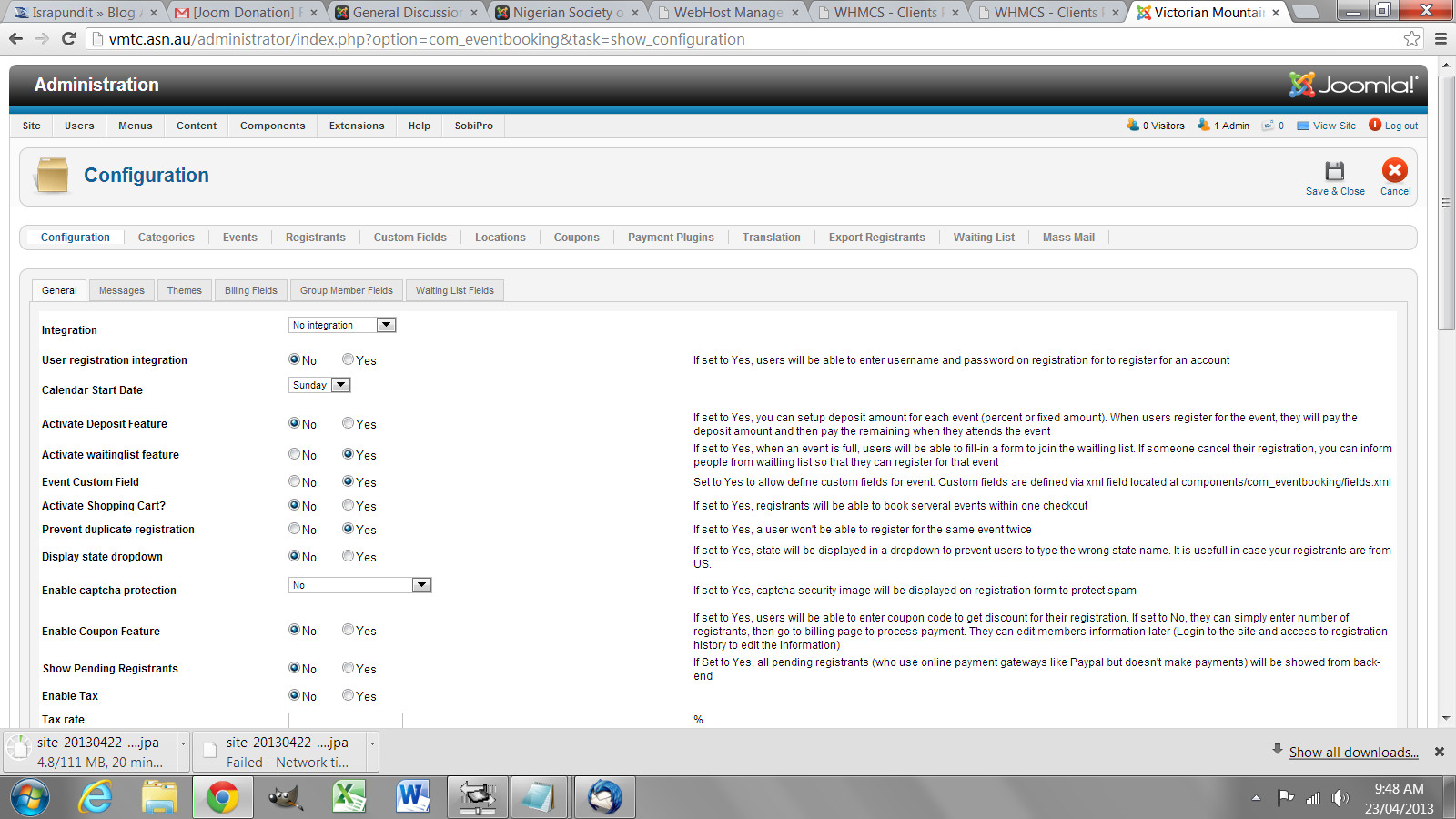
We are using version 2.5 - but have no 'options' button in the configuration page - see attached.
Event booking version 1.4.5
Please Log in or Create an account to join the conversation.
- Tuan Pham Ngoc
- Away
- Administrator
-
enoch wrote: Hi,
We are using version 2.5 - but have no 'options' button in the configuration page - see attached.
Event booking version 1.4.5
Version 1.4.5 doesn't have the permissions setting in Configuration. That Options button was added from version 1.5.0 if I remember correctly.
Tuan
Please Log in or Create an account to join the conversation.
- Jono
- Topic Author
- Offline
- Premium Member
-
Thanks again for your help.
One more question - now on our web site users of a certain user group are able to submit events - however when they do, they are not shown a list of 'locations' to choose from for the event.
However, when our super-admin users submit events from the frontend, they get a full list of locations in a dropdown from which they can select.
Can you assist with this as well?
Please Log in or Create an account to join the conversation.
- Tuan Pham Ngoc
- Away
- Administrator
-
You can follow the instruction below :
1. Open the file components/com_eventbooking/views/event/view.html.php
2. Find the code below :
Change it to :
After that, it will work as expected .
Regards,
Tuan
Please Log in or Create an account to join the conversation.
Support
Documentation
Information
The Joomla! name and logo is used under a limited license granted by Open Source Matters the trademark holder in the United States and other countries.