- Posts: 12
- Thank you received: 0

Need help with Joomla? We are available for hire to help with Joomla customization, upgrades, maintenance, and custom development.
Explore our services Custom Fields and Language Files
- Meilech DuBrow
- Topic Author
- Offline
- New Member
-

Less
More
14 years 4 weeks ago #18580
by Meilech DuBrow
Custom Fields and Language Files was created by Meilech DuBrow
Several questions, primarily related to custom and fee fields, and language files:
1. Most of our nonprofit events have different levels of fees or sponsorship, with no base fee. I don't want to set the base price at $0 because then it shows the event as Free in the info box. So I set the price at $54 and in the fee field, added $18 for the next level up--$72. But when I go to Registration Confirmation, it shows the Total Amount as: $72.00(including $18.00 extra fee). Definitely not cool! The amount is right. But I want to get rid of the (including...) language--it's just plain confusing.
2. Event attendees typically buy multiple tickets--one for the husband/father, one for the mother/wife, maybe a couple for the kids. Is the best way to handle that with a "group" purchase, or by creating a custom field called Quantity? And if I use a custom field, how do I get EB to calculate the total amount for multiple tickets at the same price?
3. When I click on an event, after the Event Properties info, it show a button Registration (Individual). How doI get rid of the words (Individual)? What does it even mean?
4. Where is the language file for EB? I changed all of the messages and notifications that could in the backend, but there is still some language I would like to adjust to American English, including capitalization. Not a criticism of you, just my preferences for my audience.
P.S. I thought that I submitted these questions yesterday, but they seem to have disappeared. Sorry if this is a duplicate.
1. Most of our nonprofit events have different levels of fees or sponsorship, with no base fee. I don't want to set the base price at $0 because then it shows the event as Free in the info box. So I set the price at $54 and in the fee field, added $18 for the next level up--$72. But when I go to Registration Confirmation, it shows the Total Amount as: $72.00(including $18.00 extra fee). Definitely not cool! The amount is right. But I want to get rid of the (including...) language--it's just plain confusing.
2. Event attendees typically buy multiple tickets--one for the husband/father, one for the mother/wife, maybe a couple for the kids. Is the best way to handle that with a "group" purchase, or by creating a custom field called Quantity? And if I use a custom field, how do I get EB to calculate the total amount for multiple tickets at the same price?
3. When I click on an event, after the Event Properties info, it show a button Registration (Individual). How doI get rid of the words (Individual)? What does it even mean?
4. Where is the language file for EB? I changed all of the messages and notifications that could in the backend, but there is still some language I would like to adjust to American English, including capitalization. Not a criticism of you, just my preferences for my audience.
P.S. I thought that I submitted these questions yesterday, but they seem to have disappeared. Sorry if this is a duplicate.
Please Log in or Create an account to join the conversation.
- Tuan Pham Ngoc
- Offline
- Administrator
-

14 years 4 weeks ago #18606
by Tuan Pham Ngoc
=> It is simple. You can go to Events Booking -> Translation, find the text and remove the including text....
=> Maybe you can try to activate group registration option. Try to edit one event, set Registration Type to Both Individual and Group Registration. After that, when you access to one event, you will see Register (Group) option which allows you to register for multiple tickets.
=> See my answer for question #2 above about Group Registration option. If you want to remove the Individual text, you can go to Events Booking -> Translation , find the text and remove it.
=> Go to Events Booking -> Translation, you will be able to change any language strings you want.
Tuan
Replied by Tuan Pham Ngoc on topic Re: Custom Fields and Language Files
1. Most of our nonprofit events have different levels of fees or sponsorship, with no base fee. I don't want to set the base price at $0 because then it shows the event as Free in the info box. So I set the price at $54 and in the fee field, added $18 for the next level up--$72. But when I go to Registration Confirmation, it shows the Total Amount as: $72.00(including $18.00 extra fee). Definitely not cool! The amount is right. But I want to get rid of the (including...) language--it's just plain confusing.
=> It is simple. You can go to Events Booking -> Translation, find the text and remove the including text....
2. Event attendees typically buy multiple tickets--one for the husband/father, one for the mother/wife, maybe a couple for the kids. Is the best way to handle that with a "group" purchase, or by creating a custom field called Quantity? And if I use a custom field, how do I get EB to calculate the total amount for multiple tickets at the same price?
=> Maybe you can try to activate group registration option. Try to edit one event, set Registration Type to Both Individual and Group Registration. After that, when you access to one event, you will see Register (Group) option which allows you to register for multiple tickets.
3. When I click on an event, after the Event Properties info, it show a button Registration (Individual). How doI get rid of the words (Individual)? What does it even mean?
=> See my answer for question #2 above about Group Registration option. If you want to remove the Individual text, you can go to Events Booking -> Translation , find the text and remove it.
4. Where is the language file for EB? I changed all of the messages and notifications that could in the backend, but there is still some language I would like to adjust to American English, including capitalization. Not a criticism of you, just my preferences for my audience.
=> Go to Events Booking -> Translation, you will be able to change any language strings you want.
Tuan
Please Log in or Create an account to join the conversation.
- Meilech DuBrow
- Topic Author
- Offline
- New Member
-
Less
More
- Posts: 12
- Thank you received: 0
14 years 3 weeks ago #18633
by Meilech DuBrow
Replied by Meilech DuBrow on topic Re: Custom Fields and Language Files
You wrote--with regard to getting EB to calculate the Total Amount based upon the number of participants and their sponsorship level:
=> Maybe you can try to activate group registration option. Try to edit one event, set Registration Type to Both Individual and Group Registration. After that, when you access to one event, you will see Register (Group) option which allows you to register for multiple tickets
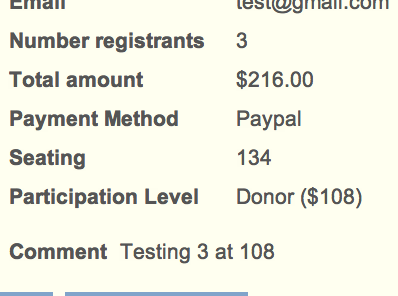
So I did that. It does give me Registration (Group). And it does let me input the number of participants. But when it calculates the Total Amount, it doesn't calculate it properly. In other words, if I say 3 members, at the $108 level, it gave me $216 instead of $324.
Here's a screenshot of the bottom of the Registration Confirmation with the calculation error.
Thank you for your help.
=> Maybe you can try to activate group registration option. Try to edit one event, set Registration Type to Both Individual and Group Registration. After that, when you access to one event, you will see Register (Group) option which allows you to register for multiple tickets
So I did that. It does give me Registration (Group). And it does let me input the number of participants. But when it calculates the Total Amount, it doesn't calculate it properly. In other words, if I say 3 members, at the $108 level, it gave me $216 instead of $324.
Here's a screenshot of the bottom of the Registration Confirmation with the calculation error.
Thank you for your help.
Please Log in or Create an account to join the conversation.
- Tuan Pham Ngoc
- Offline
- Administrator
-
14 years 3 weeks ago #18698
by Tuan Pham Ngoc
Replied by Tuan Pham Ngoc on topic Re: Custom Fields and Language Files
Hi Meilech DuBrow
I am sure that it is something wrong with your setting. Please submit a support ticket sending me administrator account of your site so that I can check the settings for you .
Regards,
Tuan
I am sure that it is something wrong with your setting. Please submit a support ticket sending me administrator account of your site so that I can check the settings for you .
Regards,
Tuan
Please Log in or Create an account to join the conversation.
Moderators: Tuan Pham Ngoc
Support
Documentation
Information
Copyright © 2026 Joomla Extensions by Joomdonation. All Rights Reserved.
joomdonation.com is not affiliated with or endorsed by the Joomla! Project or Open Source Matters.
The Joomla! name and logo is used under a limited license granted by Open Source Matters the trademark holder in the United States and other countries.
The Joomla! name and logo is used under a limited license granted by Open Source Matters the trademark holder in the United States and other countries.