- Posts: 16
- Thank you received: 2

Need help with Joomla? We are available for hire to help with Joomla customization, upgrades, maintenance, and custom development.
Explore our services
OS Property support center
Remove price from property photo
- DimitrisTEI
- Topic Author
- Offline
- New Member
-

Less
More
11 years 6 months ago - 11 years 6 months ago #60281
by DimitrisTEI
Remove price from property photo was created by DimitrisTEI
Hello,
I want some help please.
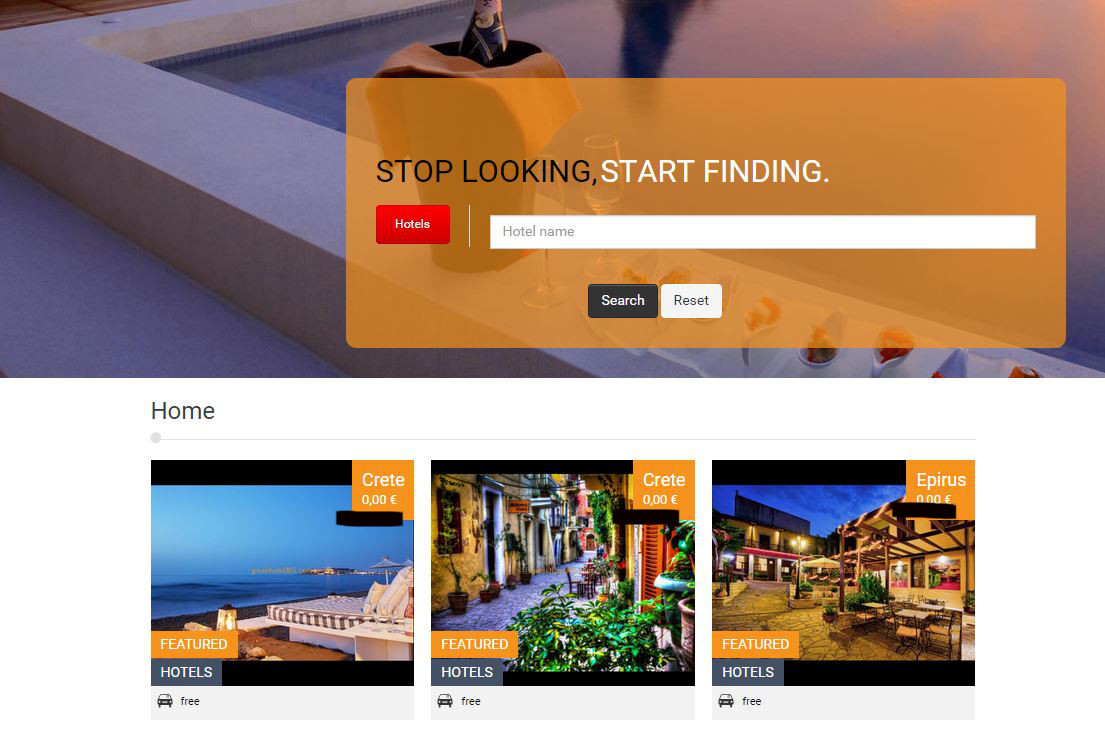
How could i remove price from property photo?
Please check the attachment
I want some help please.
How could i remove price from property photo?
Please check the attachment
Last edit: 11 years 6 months ago by DimitrisTEI.
Please Log in or Create an account to join the conversation.
- Mr. Dam
- Offline
- Administrator
-

Less
More
- Posts: 13804
- Thank you received: 1816
11 years 6 months ago #60283
by Mr. Dam
Replied by Mr. Dam on topic Remove price from property photo
Hi,
You forgot to send the attachment.
Thanks
Dam
You forgot to send the attachment.
Thanks
Dam
Please Log in or Create an account to join the conversation.
- DimitrisTEI
- Topic Author
- Offline
- New Member
-
Less
More
- Posts: 16
- Thank you received: 2
11 years 6 months ago #60284
by DimitrisTEI
Replied by DimitrisTEI on topic Remove price from property photo
Can you see this now?
Please Log in or Create an account to join the conversation.
- Mr. Dam
- Offline
- Administrator
-
Less
More
- Posts: 13804
- Thank you received: 1816
11 years 6 months ago #60285
by Mr. Dam
Replied by Mr. Dam on topic Remove price from property photo
Hi,
To Remove the price in Property listing layout, please follow these steps
1. Open file: components > com_osproperty > templates > theme3 > listing.html.tpl.php and result.html.tpl.php
2. Find
<span class="price">
<?php
if($row->price_call == 0){
echo OSPHelper::generatePrice($row->curr,$row->price);
if($row->rent_time != ""){
echo " /".JText::_($row->rent_time);
}
}else{
echo JText::_('OS_CALL_FOR_PRICE');
}
?>
</span>
and remove it
Good luck
Dam
To Remove the price in Property listing layout, please follow these steps
1. Open file: components > com_osproperty > templates > theme3 > listing.html.tpl.php and result.html.tpl.php
2. Find
<span class="price">
<?php
if($row->price_call == 0){
echo OSPHelper::generatePrice($row->curr,$row->price);
if($row->rent_time != ""){
echo " /".JText::_($row->rent_time);
}
}else{
echo JText::_('OS_CALL_FOR_PRICE');
}
?>
</span>
and remove it
Good luck
Dam
The following user(s) said Thank You: DimitrisTEI
Please Log in or Create an account to join the conversation.
Moderators: Mr. Dam, Nguyen Phu Quan
Support
Documentation
Information
Copyright © 2026 Joomla Extensions by Joomdonation. All Rights Reserved.
joomdonation.com is not affiliated with or endorsed by the Joomla! Project or Open Source Matters.
The Joomla! name and logo is used under a limited license granted by Open Source Matters the trademark holder in the United States and other countries.
The Joomla! name and logo is used under a limited license granted by Open Source Matters the trademark holder in the United States and other countries.