- Posts: 17
- Thank you received: 0

Need help with Joomla? We are available for hire to help with Joomla customization, upgrades, maintenance, and custom development.
Explore our services
OS Property support center
Change watermark name -> web name
- Qtal
- Topic Author
- Offline
- New Member
-

Less
More
13 years 10 months ago #23038
by Qtal
Change watermark name -> web name was created by Qtal
Is possible Change watermark name to web name?
Please Log in or Create an account to join the conversation.
- Qtal
- Topic Author
- Offline
- New Member
-
Less
More
- Posts: 17
- Thank you received: 0
13 years 9 months ago #23104
by Qtal
Replied by Qtal on topic Re: Change watermark name -> web name
is possible to put a watermark domain name or a word fixed (google translation)
Es posible que la marca de agua sea el nombre del dominio o una palabara fija?
Es posible que la marca de agua sea el nombre del dominio o una palabara fija?
Please Log in or Create an account to join the conversation.
- Mr. Dam
- Offline
- Administrator
-

Less
More
- Posts: 13801
- Thank you received: 1816
13 years 9 months ago #23126
by Mr. Dam
Replied by Mr. Dam on topic Re: Change watermark name -> web name
Hi,
You can change the water mark text by make the change following bellow steps
1 Open file
components > com_osproperty > helper > common.php
find function
function watermarkImage ($SourceFile, $WaterMarkText, $DestinationFile) {
list($width, $height) = getimagesize($SourceFile);
$image_p = imagecreatetruecolor($width, $height);
$image = imagecreatefromjpeg($SourceFile);
imagecopyresampled($image_p, $image, 0, 0, 0, 0, $width, $height, $width, $height);
$black = imagecolorallocate($image_p,238, 29, 29);
$font = JPATH_ROOT.DS.'components'.DS.'com_osproperty'.DS.'helpers'.DS.'pdf'.DS.'font'.DS.'arial.ttf';
$font_size = 30;
imagettftext($image_p, $font_size, 45, $width/2, $height/2 + 50, $black, $font, $WaterMarkText);
if ($DestinationFile != "") {
imagejpeg ($image_p, $DestinationFile, 100);
} else {
header('Content-Type: image/jpeg');
imagejpeg($image_p, null, 100);
};
imagedestroy($image);
imagedestroy($image_p);
}
You can change $WaterMarkText by the text in "" , for example
function watermarkImage ($SourceFile,"i am happy", $DestinationFile) {
2. Open file
administrator > components > com_osproperty > helper > common.php
and do the same work with above
Good luck
Dam
You can change the water mark text by make the change following bellow steps
1 Open file
components > com_osproperty > helper > common.php
find function
function watermarkImage ($SourceFile, $WaterMarkText, $DestinationFile) {
list($width, $height) = getimagesize($SourceFile);
$image_p = imagecreatetruecolor($width, $height);
$image = imagecreatefromjpeg($SourceFile);
imagecopyresampled($image_p, $image, 0, 0, 0, 0, $width, $height, $width, $height);
$black = imagecolorallocate($image_p,238, 29, 29);
$font = JPATH_ROOT.DS.'components'.DS.'com_osproperty'.DS.'helpers'.DS.'pdf'.DS.'font'.DS.'arial.ttf';
$font_size = 30;
imagettftext($image_p, $font_size, 45, $width/2, $height/2 + 50, $black, $font, $WaterMarkText);
if ($DestinationFile != "") {
imagejpeg ($image_p, $DestinationFile, 100);
} else {
header('Content-Type: image/jpeg');
imagejpeg($image_p, null, 100);
};
imagedestroy($image);
imagedestroy($image_p);
}
You can change $WaterMarkText by the text in "" , for example
function watermarkImage ($SourceFile,"i am happy", $DestinationFile) {
2. Open file
administrator > components > com_osproperty > helper > common.php
and do the same work with above
Good luck
Dam
Please Log in or Create an account to join the conversation.
- Qtal
- Topic Author
- Offline
- New Member
-
Less
More
- Posts: 17
- Thank you received: 0
13 years 9 months ago #23171
by Qtal
Replied by Qtal on topic Re: Change watermark name -> web name
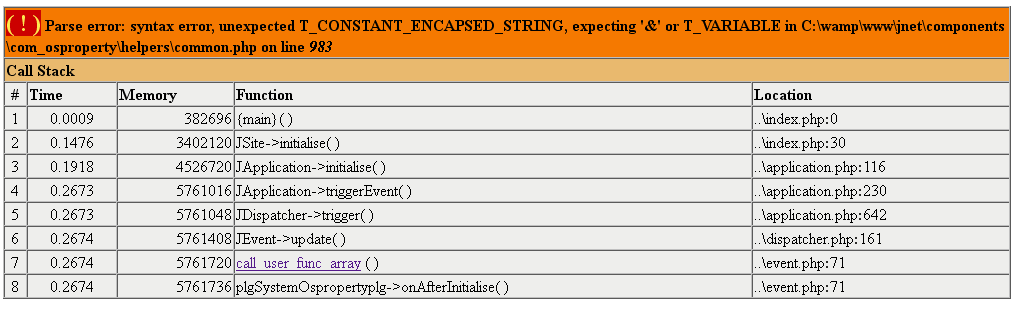
Error T_CONSTANT_ENCAPSED_STRING

Please Log in or Create an account to join the conversation.
- ilai
- Offline
- New Member
-
Less
More
- Posts: 3
- Thank you received: 0
13 years 9 months ago #23379
by ilai
Replied by ilai on topic Re: Change watermark name -> web name
i have same problem too..
Qtal wrote: Error T_CONSTANT_ENCAPSED_STRING
Please Log in or Create an account to join the conversation.
- Mr. Dam
- Offline
- Administrator
-
Less
More
- Posts: 13801
- Thank you received: 1816
13 years 9 months ago #23401
by Mr. Dam
Replied by Mr. Dam on topic Re: Change watermark name -> web name
Hi,
Please do not put the text in the name of the function
please change to
function watermarkImage($SourceFile,$text,$DestinationFile) {
to
function watermarkImage($SourceFile,$text,$DestinationFile) {
$text = "new mon"
Good luck
Dam
Please do not put the text in the name of the function
please change to
function watermarkImage($SourceFile,$text,$DestinationFile) {
to
function watermarkImage($SourceFile,$text,$DestinationFile) {
$text = "new mon"
Good luck
Dam
Please Log in or Create an account to join the conversation.
- ilai
- Offline
- New Member
-
Less
More
- Posts: 3
- Thank you received: 0
13 years 9 months ago #23409
by ilai
Replied by ilai on topic Re: Change watermark name -> web name
i change to
function watermarkImage($SourceFile,$"text",$DestinationFile)
and the result
Parse error: syntax error, unexpected '$', expecting '&' or T_VARIABLE in /home/bulevarh/public_html/www.----.com/components/com_osproperty/helpers/common.php on line 983
i change to
function watermarkImage($SourceFile,"text",$DestinationFile)
and the result
Parse error: syntax error, unexpected T_CONSTANT_ENCAPSED_STRING, expecting '&' or T_VARIABLE in /home/bulevarh/public_html/www.---.com/components/com_osproperty/helpers/common.php on line 983
i change to
function watermarkImage($SourceFile,$text,$DestinationFile)
and the result
Parse error: syntax error, unexpected T_STRING, expecting ')' in /home/bulevarh/public_html/www.---.com/components/com_osproperty/helpers/common.php on line 983
function watermarkImage($SourceFile,$"text",$DestinationFile)
and the result
Parse error: syntax error, unexpected '$', expecting '&' or T_VARIABLE in /home/bulevarh/public_html/www.----.com/components/com_osproperty/helpers/common.php on line 983
i change to
function watermarkImage($SourceFile,"text",$DestinationFile)
and the result
Parse error: syntax error, unexpected T_CONSTANT_ENCAPSED_STRING, expecting '&' or T_VARIABLE in /home/bulevarh/public_html/www.---.com/components/com_osproperty/helpers/common.php on line 983
i change to
function watermarkImage($SourceFile,$text,$DestinationFile)
and the result
Parse error: syntax error, unexpected T_STRING, expecting ')' in /home/bulevarh/public_html/www.---.com/components/com_osproperty/helpers/common.php on line 983
Please Log in or Create an account to join the conversation.
- Mr. Dam
- Offline
- Administrator
-
Less
More
- Posts: 13801
- Thank you received: 1816
13 years 9 months ago #23411
by Mr. Dam
Replied by Mr. Dam on topic Re: Change watermark name -> web name
Please change it like bellow
function watermarkImage ($SourceFile, $WaterMarkText, $DestinationFile) {
$WaterMarkText = "Your text here";
list($width, $height) = getimagesize($SourceFile);
$image_p = imagecreatetruecolor($width, $height);
$image = imagecreatefromjpeg($SourceFile);
imagecopyresampled($image_p, $image, 0, 0, 0, 0, $width, $height, $width, $height);
$black = imagecolorallocate($image_p,238, 29, 29);
$font = JPATH_ROOT.DS.'components'.DS.'com_osproperty'.DS.'helpers'.DS.'pdf'.DS.'font'.DS.'arial.ttf';
$font_size = 30;
imagettftext($image_p, $font_size, 45, $width/2, $height/2 + 50, $black, $font, $WaterMarkText);
if ($DestinationFile != "") {
imagejpeg ($image_p, $DestinationFile, 100);
} else {
header('Content-Type: image/jpeg');
imagejpeg($image_p, null, 100);
};
imagedestroy($image);
imagedestroy($image_p);
}
Good luck
Dam
function watermarkImage ($SourceFile, $WaterMarkText, $DestinationFile) {
$WaterMarkText = "Your text here";
list($width, $height) = getimagesize($SourceFile);
$image_p = imagecreatetruecolor($width, $height);
$image = imagecreatefromjpeg($SourceFile);
imagecopyresampled($image_p, $image, 0, 0, 0, 0, $width, $height, $width, $height);
$black = imagecolorallocate($image_p,238, 29, 29);
$font = JPATH_ROOT.DS.'components'.DS.'com_osproperty'.DS.'helpers'.DS.'pdf'.DS.'font'.DS.'arial.ttf';
$font_size = 30;
imagettftext($image_p, $font_size, 45, $width/2, $height/2 + 50, $black, $font, $WaterMarkText);
if ($DestinationFile != "") {
imagejpeg ($image_p, $DestinationFile, 100);
} else {
header('Content-Type: image/jpeg');
imagejpeg($image_p, null, 100);
};
imagedestroy($image);
imagedestroy($image_p);
}
Good luck
Dam
Please Log in or Create an account to join the conversation.
- Mr. Dam
- Offline
- Administrator
-
Less
More
- Posts: 13801
- Thank you received: 1816
13 years 9 months ago #23412
by Mr. Dam
Replied by Mr. Dam on topic Re: Change watermark name -> web name
In above post, you can chang Your text here by your content
Dam
Dam
Please Log in or Create an account to join the conversation.
Moderators: Mr. Dam, Nguyen Phu Quan
Support
Documentation
Information
Copyright © 2026 Joomla Extensions by Joomdonation. All Rights Reserved.
joomdonation.com is not affiliated with or endorsed by the Joomla! Project or Open Source Matters.
The Joomla! name and logo is used under a limited license granted by Open Source Matters the trademark holder in the United States and other countries.
The Joomla! name and logo is used under a limited license granted by Open Source Matters the trademark holder in the United States and other countries.